

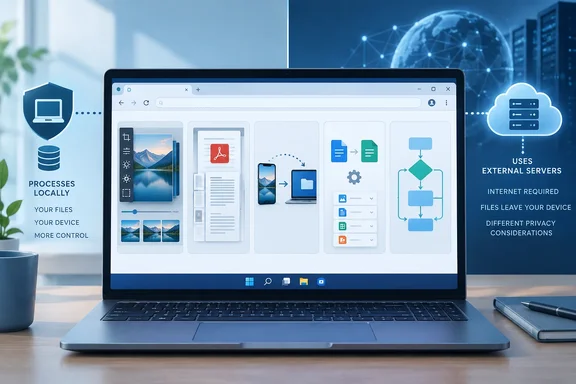
MakeUseOf writer Oluwademilade Afolabi describes that approach with five tools: Photopea, iLovePDF, PairDrop, CloudConvert, and diagrams.net. His account is about retiring infrequently used utilities—not proving that browser services outperform professional desktop applications.
For Windows users, the useful distinction is where the work happens. A browser tab can contain a local editor, connect two devices, or send your document to someone else’s servers. Those workflows may look equally convenient, but their privacy and offline implications are very different.
Photopea: image editing without another installation
Afolabi uses Photopea for the occasional job that previously justified keeping GIMP installed: cleaning up a scan, adding layered text, touching up a photograph, or opening a PSD.
Photopea’s learning documentation describes a raster and vector editor with layers, masks, smart objects, adjustment tools, and other familiar image-editing features. That supports its usefulness for small but substantive edits; it does not establish complete feature parity with Photoshop or GIMP.
Its most important characteristic is architectural. According to Photopea’s privacy policy, files opened in the editor are processed on the user’s hardware rather than uploaded for ordinary editing. Optional cloud-storage connections are a separate choice: the policy explains that the editor can retrieve a file from services such as OneDrive and save changes back there.
Local processing also does not mean no local traces. Photopea’s backup documentation says it periodically stores temporary PSD copies in the browser’s IndexedDB storage. These are normally removed when documents or the site close properly, but they can survive a crash or power failure.
That adds a practical precaution for shared PCs: save your finished work and close documents properly. If old documents unexpectedly reopen, Photopea identifies retained browser backups as a possible explanation.
Best fit: occasional layered image edits where installing another editor feels unnecessary. Keep a desktop tool when it already forms part of a dependable production workflow.
iLovePDF: useful PDF chores, with an upload boundary
Merging two PDFs or rotating a badly scanned page is a different job from extensively editing a document. Afolabi’s experience places iLovePDF in the former category: splitting, merging, compression, conversion, rotation, and OCR.
The important caveat is that its online processing involves uploading the file. iLovePDF’s legal information states that uploads use HTTPS and that processed files are deleted from its servers within two hours.
Those are the provider’s stated practices—not a reason to treat every document as upload-friendly. Encryption in transit protects the connection; it does not change the fact that the service receives the document.
For a public brochure or an ordinary handout, that tradeoff may be acceptable. For confidential contracts, unredacted financial paperwork, medical records, or employer-controlled information, the sensible question comes before the upload: am I permitted to send this file to an external service?
Afolabi explicitly keeps sensitive paperwork in local tools. That is the boundary worth preserving, rather than turning a convenient PDF website into a universal Acrobat replacement.
Best fit: routine PDF housekeeping on documents you are comfortable uploading. Sensitive material deserves a local workflow or an explicitly approved service.
PairDrop: phone-to-PC transfers without cloud-storage gymnastics
PairDrop addresses a familiar irritation: moving one file between devices without finding a cable or uploading it to storage just to download it again.
The project’s repository describes a browser-based, cross-platform sharing tool derived from Snapdrop. Its basic workflow is straightforward:
- Open PairDrop on both devices.
- Select the receiving device and choose the file.
- Accept the transfer on the receiving device.
- Save or download the completed transfer.
The project also supports persistent device pairing and temporary public rooms. Those options can help devices find each other across networks or in more complicated network environments.
The networking detail matters. PairDrop’s technical documentation explains that its server exchanges connection-signaling information, while WebRTC carries the transfer. When a direct connection cannot be established, a TURN server can relay the encrypted traffic.
Consequently, “not uploaded to cloud storage” should not be confused with “never uses an internet server.”
There is another distinction for administrators considering self-hosting. PairDrop’s deployment documentation describes an optional WebSocket fallback whose traffic passes through—and is readable by—the server. The documentation says this fallback is not enabled on the official hosted website. It is not equivalent to the encrypted WebRTC/TURN path.
Best fit: occasional cross-platform transfers. For self-hosted deployments, understand the signaling, relay, and fallback configuration before making privacy claims.
CloudConvert: broad format support, bounded convenience
CloudConvert is the catch-all option for the awkward file that another application refuses to open. Its own catalog lists more than 200 formats spanning documents, images, audio, video, ebooks, archives, CAD, and other categories. It also exposes format-specific conversion settings rather than offering only a single generic conversion button.
The pricing page returned for CloudConvert lists a free allowance of 10 conversion credits daily, a 1 GB maximum file size, a five-minute processing limit, and five concurrent tasks. Crucially, credits are not necessarily synonymous with files: its explanation says conversion type and processing duration can affect consumption. Ten credits therefore should not be presented as a guarantee of ten arbitrary conversions.
CloudConvert’s website describes server-side processing and removal of files according to its retention policy. That makes the upload decision part of the workflow, not an afterthought.
Afolabi retains VidCoder for deliberate video transcoding and mentions ConvertX as a self-hosted alternative. The practical distinction is sound: an occasional format rescue and a carefully controlled video-conversion pipeline are different requirements. Self-hosting is an option to investigate, not an automatic security endorsement.
Best fit: isolated conversions within the service’s limits, using files suitable for external processing.
diagrams.net: occasional diagrams, with qualified offline support
Afolabi uses diagrams.net for flowcharts, rough network layouts, process maps, and architecture sketches. His workflow preserves editable .drawio files and exports finished diagrams as PNG, SVG, or PDF.
For occasional diagramming, that is a useful alternative to maintaining a dedicated paid application. It is not evidence that every Visio workflow, integration, or document will transfer unchanged.
The most useful additional detail comes from draw.io’s own offline documentation. Once the browser editor and diagram have loaded, users can continue editing after disconnecting. However, the documentation lists unavailable offline functions, including cloud-storage operations, PDF and image conversion, online templates, hosted fonts, and online help. Depending on the selected storage destination, users may need to reconnect before closing the tab.
That qualification changes the advice: continued editing after a dropped connection is not the same as a fully offline workflow. For dependable offline use, draw.io also identifies its standalone desktop application as an option.
Best fit: occasional diagrams, provided you preserve the editable file and understand which saving and export functions need connectivity.
Replace the occasional task—not the dependable workflow
The strongest lesson here is selective substitution. Try the browser option on a non-sensitive copy, complete the task, and inspect the result before removing the installed utility.
A successful replacement should produce the output you need without introducing an unacceptable upload, connectivity, compatibility, or recovery dependency.
There is no prize for the emptiest Start menu. The worthwhile outcome is fewer unnecessary installations while keeping the tools that earn their place.
References
- I ditched five desktop apps for these browser tools instead MakeUseOf · 2026-09-29T23:00:15+00:00
- Photopea | Privacy policy photopea.com
- Run draw.io offline | draw.io drawio.com