

The product was first reported by The Register on September 22, 2026, and ABBYY's own FineParser site and recent engineering posts supply the pricing, API shape and deployment details. For Windows and enterprise IT readers, the case rests less on OCR accuracy than on logistics. The engine needs no GPU, runs in your own infrastructure, uses a consistent HTTP API, and has a licensing model that affects whether "self-hosted" also means "disconnected."
ABBYY FineParser Turns FineReader Engine Into a CPU-Only Docker Service for AI Ingestion
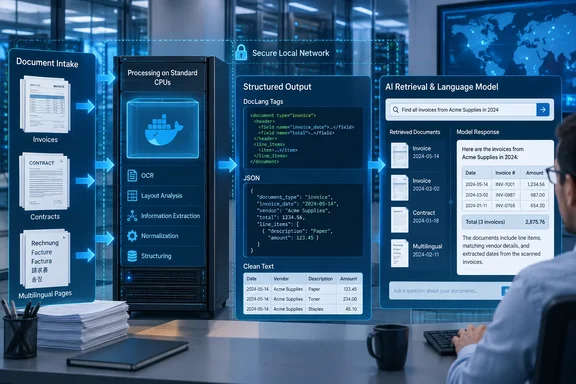
FineParser is a repackaging of ABBYY FineReader Engine, the company's long-running OCR software development kit. ABBYY describes it on the product site as "a self-hosted, Docker-native document-parsing engine for AI applications, powered by ABBYY FineReader Engine". The Register describes it as a tool that takes images of documents in multiple languages and returns structured, formatted text that tools such as generative AI LLMs can process.
The workflow ABBYY advertises has three steps. You pull and run a container, POST a document to an HTTP endpoint, and receive DocLang or JSON. The public example runs an image called abbyyteam/fineparser, maps port 8080, and passes a license through an environment variable named FINEPARSER_LICENSE_DATA. The license file uses a .fineparserlicense extension. According to the FAQ, you get it when you sign up, pass its contents to the container, and can start parsing without a separate activation key or a mounted volume.
The absence of a GPU requirement is a deliberate design choice. Much of the recent attention in document AI has gone to vision-language models that read page images directly, and those usually need accelerators. ABBYY's own competitive framing says Mistral OCR 4's self-hosting option requires GPU infrastructure and a sales conversation before access. FineParser lists "CPU Docker" as a feature on every tier, including the free one. Organizations with secure environments that contain conventional servers and no accelerator fleet can therefore trial it on hardware they already have.
FineParser also belongs to a broader product line. In June 2026, ABBYY released FineReader Engine 12.8, which it presented as a better-supported starting point for containerized deployment. The company said the engine could "act as a document preprocessing layer: take complex documents in, apply ABBYY OCR and layout understanding, and return structured output the rest of the pipeline can use". The same release added DocLang export. FineParser takes that preprocessing role and sells it as a self-service subscription with a fixed API, so customers no longer need to integrate the SDK themselves.
The SDK is still available for teams that want it. The Register notes that ABBYY continues to publish an OCR SDK for companies that embed FineReader Engine in their own products. ABBYY's SDK page says developers can build on Windows, Linux, or Mac and deploy in the cloud or on VM platforms. ABBYY also maintains NeoML, an open-source machine-learning framework on GitHub. FineParser is not open source. ABBYY runs a GitHub repository for examples, DocLang tooling and community support, but the parsing engine inside the container is proprietary.
The timeline shows this is a planned launch rather than a surprise drop:
| Date (2026) | Milestone |
|---|---|
| June | FineReader Engine 12.8 ships with containerized-deployment improvements and DocLang export |
| August 21 | An ABBYY engineering post on parser evaluation invites readers to "get early access" to FineParser |
| September 15 | ABBYY publishes a post arguing that cloud-only parsing blocks regulated and air-gapped deployments |
| September 22 | The Register reports FineParser as a self-hosted product with public tiers |
Why ABBYY Calls FineParser's OCR "Deterministic" and Why RAG Pipelines Care About Layout
ABBYY uses the word deterministic to describe FineParser. Per The Register, the company means that the tool extracts text and document structure "rather than generating a plausible rendition of them." The output can then go to a generative model, whose responses are less predictable. The architecture divides the work. A recognition engine reports what is on the page, and a separate model summarizes, answers questions or transforms the content.
The word should be read as a statement about intent. ABBYY says its OCR and ICR (intelligent character recognition, the handwriting counterpart to OCR) already use the same families of techniques as modern LLMs: convolutional neural networks, transformers, and a language model tuned to its customers' business documents. FineParser is therefore a trained neural system with a recognition task, not a hand-coded rules engine. The practical difference is in the failure mode. OCR can misread a character, misclassify a region, or mishandle messy handwriting. It is much less likely than a text-generating model to produce a fluent sentence the document never contained. Deterministic here means the output reflects what the engine detected, not that the output is free of errors.
Layout is where the argument gets concrete. The Register says FineParser recognizes columns in reading order, headings, and tables, including tables without borders, "rather than returning a jumble of extracted text." It also says the tool handles handwriting and more than 200 languages. The product FAQ repeats the 200-plus figure and names Latin, Cyrillic, CJK and Arabic scripts. ABBYY's broader recognition materials say the engine's capabilities cover multi-language documents and output that reflects the original's structure. Coverage for handwriting and specific languages varies by recognition module, so a claim of 200 languages for printed text is not a guarantee of 200 languages for handwriting.
Retrieval-augmented generation (RAG) is the setting where layout errors cost the most. RAG pipelines split documents into chunks, embed them, retrieve the most relevant chunks for a query, and feed those to a model. ABBYY lays out the chain in its August evaluation guide: "Bad parsing produces bad chunks. Bad chunks produce weak retrieval. Weak retrieval produces hallucinations that no amount of prompt engineering or model tuning can fix, because the model is reasoning over corrupted evidence".
A simple example shows the mechanism. Take a two-column contract page. A naïve text extractor reading straight across the page interleaves the left and right columns line by line. Every character may be correct while the sentences are wrong. A chunker then splits that interleaved text, and a retriever returns a chunk that mixes a termination clause with an unrelated payment schedule. The model downstream has no way to recover the original order. The same problem occurs with tables. When a borderless table collapses into a flat run of numbers, the model can no longer tell which value belongs to which row header, and it may guess.
ABBYY supports the size of this problem with other organizations' research, each cited in its own posts. It says LlamaIndex's ParseBench benchmark found that even the best document-parsing services reach only about 90 percent content faithfulness on enterprise pages, which in ABBYY's words means "one in ten pages contains a meaningful omission or structural error before a single embedding is generated." It points to OmniDocBench, published at CVPR 2025, as evidence that parser accuracy drops when moving from clean benchmark pages to realistic, varied documents. It also cites a Gartner prediction that organizations will abandon 60 percent of AI projects through 2026 because their data is not AI-ready. These figures come from ABBYY's summaries of others' work and were not measured on FineParser. They explain why ABBYY sees a market, but they say nothing about how FineParser performs against those benchmarks. ABBYY has not published FineParser scores on ParseBench or OmniDocBench in the materials here.
DocLang Makes Document Structure Explicit, but the 40 Percent Token Saving Needs a Careful Reading
FineParser exports three formats. According to the product FAQ, these are DocLang, JSON and TXT. DocLang is the structure-preserving default designed for LLMs, and JSON "carries the same structure with pixel-accurate bounding boxes". The Register describes DocLang as a compact format meant for LLM input.
The two structured formats suit different jobs. JSON with bounding boxes is useful when an application needs to link an extracted value back to its location on the page. A review interface can highlight the source of a figure, and an audit trail can show where a number came from. DocLang is intended to go into a model's context window, or into a chunker that respects structural boundaries, so that headings, table cells and paragraphs stay explicit and the model does not have to infer them from whitespace.
ABBYY's example gives a sense of the format. A tax-form page renders as a <doclang> block containing a <heading level="1"> element and a <table> element. Inside the table, compact self-closing tags mark cells and row breaks, such as <ched/> before column headers, <fcel/> before filled cells, and <nl/> at the end of a row. Other tags appear to mark a row label and cells that continue a span. The design choice is visible: a controlled, terse vocabulary rather than verbose HTML or deeply nested JSON.
DocLang is described as a format, not a proprietary product. When ABBYY announced FineReader Engine 12.8's DocLang export in June, it said the format had been developed with IBM, Nvidia, Red Hat and the Linux Foundation's AI & Data Foundation. ABBYY calls DocLang an open, AI-oriented representation for models, agents, analytics and compliance systems. The distinction affects lock-in. An open interchange format means DocLang output stored in a data lake or vector store is not tied to FineParser as the only producer or consumer, even though the engine that creates it is commercial.
The most prominent number on the FineParser site is "-40%* fewer LLM tokens with DocLang." It needs a close reading because the comparison differs from what a quick scan suggests. According to ABBYY's methodology note, the company benchmarked 8,030 DocLang documents and compared each tokenizer's base vocabulary with the same tokenizer extended with DocLang's special tokens through the open-source doclang package (doclang.tokenization.get_special_tokens()). The results were a 41 percent mean and 40 percent median reduction on IBM's granite-4.0 tokenizer, and a 45 percent mean and median reduction on gpt-oss-20b. ABBYY adds that "actual savings depend on your documents and choice of base tokenizer".
The benchmark therefore measures DocLang tokenized two ways. It does not compare DocLang with Markdown, HTML, plain text, or the output of a competing parser. The saving comes from teaching a tokenizer to treat each DocLang tag as a single token instead of splitting <fcel/> into several fragments. The integration code ABBYY publishes loads a Hugging Face tokenizer with AutoTokenizer.from_pretrained, then calls add_special_tokens with the DocLang vocabulary.
Two practical limits follow from that setup. The following is our inference from how the method works, not a documented ABBYY statement. First, tokenizer extension applies to models whose tokenizer you control, which in practice means open-weight models you host. A hosted commercial LLM API tokenizes input with its own vocabulary, and customers cannot add special tokens to it, so the headline saving does not apply to those models. Second, adding tokens to a vocabulary does not by itself mean an existing model understands them. How a model handles newly added tokens depends on whether it has been trained or fine-tuned with them, and ABBYY's published figure measures token counts, not answer quality. DocLang may still be economical when sent unmodified to any model because the vocabulary is terse, but ABBYY has not published that comparison in these materials.
FineParser's Tiers Put Self-Hosted Parsing in the Same Per-Page Range as Cloud APIs
FineParser's pricing is public. All tiers except Enterprise are self-service monthly subscriptions, and the FineParser site lists them as follows:
| Tier | Monthly price | Pages per month | Effective list price per page | Support |
|---|---|---|---|---|
| Free | $0 | 1,000 | n/a | Community (GitHub) |
| Starter | $119 | 25,000 | about $0.0048 | Community (GitHub) |
| Growth | $750 | 250,000 | $0.003 | Community (GitHub) |
| Business | $2,000 | 1,000,000 | $0.002 | Community (GitHub) |
| Enterprise | Custom | Unlimited | Negotiated | ABBYY Business Support with SLAs |
The per-page column is our arithmetic from ABBYY's list prices. It assumes a customer uses the full allowance, so a customer who parses half its allotment pays twice the effective rate. The site states that processing stops when the monthly page limit is reached and that there are "no overages." Customers either upgrade or wait for the next billing period. That model protects against runaway invoices but creates a different operational risk. A pipeline that exceeds its cap will stop parsing mid-month, so capacity planning and alerting should account for the hard limit.
The table is worth comparing with ABBYY's own case against cloud APIs. In its September 15 post, ABBYY argues that per-page cloud pricing becomes costly at scale. It gives the example of a pipeline processing 10 million pages a month at $0.002 to $0.004 per page, which costs $20,000 to $40,000 a month. It contrasts that with self-hosting, "where the cost is compute rather than per-page fees". FineParser's self-service tiers do charge per page, though, and at list rates they sit in the same $0.002 to $0.004 band. The customer also supplies the compute.
The Enterprise tier is the only one that matches the "compute rather than per-page fees" argument, because it offers unlimited pages at custom pricing. The self-service tiers compete on factors other than price per page: data stays on your infrastructure, there is no GPU requirement, and there is a published price with no sales call. Buyers attracted by the cost argument should expect a sales conversation.
The free tier has a documented inconsistency. The Register reports 1,000 pages a month for one year, and the FineParser FAQ says the product "starts free — 1,000 pages/month for a year". Another recent ABBYY post, however, describes the free tier as having no time limit. The product page's FAQ is the more specific and more current commercial statement, and The Register agrees with it. Evaluators should plan on the one-year limit and confirm the term at signup. A proof of concept that becomes a small production workload on the free tier would need to move to a paid plan within a year.
Support levels differ in a way that matters to operations teams. Every self-service tier, including the $2,000 Business plan, is supported through GitHub issues and discussions. ABBYY technical support with defined service-level agreements is limited to Enterprise. An organization processing a million pages a month on Business still reports parsing faults in a public issue tracker, where ABBYY asks users to attach a sample document. That is a real constraint for regulated data, because the documents most likely to break a parser are often the ones that cannot be posted publicly.
FineParser's Self-Service Tiers Still Need ABBYY's License Server, and Only Enterprise Runs Air-Gapped
"Self-hosted" and "offline" are separate properties in this product. The Register reports that ABBYY's subscription tiers connect to a license server for validation and that a fully offline deployment requires an Enterprise plan. ABBYY's own FAQ confirms this: "FineParser only requires a connection to a single ABBYY server for subscription validation. The Enterprise tier supports full air-gapped deployment with zero connectivity." The Enterprise column lists "Air-gapped deployment, zero connectivity" as a feature.
ABBYY's broader marketing is less careful about this boundary. Its September 15 post argues that air-gapped environments "require self-contained systems that cannot depend on external cloud services to function," and it presents FineParser's container model as the answer for on-premises, private-cloud and regulated deployments. The product page shows how that works in practice. On Free through Business, document content is parsed locally, but the container still needs outbound access to one ABBYY licensing endpoint. For many security teams, the difference between "no document data leaves" and "no traffic leaves" decides whether a trial can go ahead.
The older FineReader Engine documentation describes how licensing affects container topology. ABBYY's Docker guide for the Linux edition of FineReader Engine says online-license deployments need an active internet connection and access to ABBYY's licensing service. It also warns that licensing arrangements constrain how container replicas share a license service. That guidance covers the SDK, not FineParser's newer license-file model, so it should not be applied directly. It does show that ABBYY licensing has traditionally shaped scaling design, and anyone planning several FineParser replicas behind a load balancer should ask whether one license file can be shared across replicas and how page counts are totalled.
The license mechanism also has a secrets-management aspect. ABBYY's examples pass the full license contents into FINEPARSER_LICENSE_DATA using shell substitution, as in -e FINEPARSER_LICENSE_DATA="$(cat acme.fineparserlicense)". The following is standard container practice rather than ABBYY guidance. Environment variables are visible to anyone who can inspect a container's configuration, and they can end up in orchestration manifests, CI logs and shell history. The license file is effectively a billing credential tied to your page quota. Organizations should store it in whatever secret store their container platform provides rather than in plaintext in scripts.
The data-residency case is where FineParser offers the most. ABBYY's September post lists the situations that rule out cloud parsing. These include healthcare revenue-cycle documents with clinical notes and prior-authorization forms, KYC onboarding files with beneficial-ownership records, EU personal data subject to GDPR, and internal policies that prohibit sending unencrypted documents to outside services. In each case, parsing inside your own network means the documents are not processed by a third party. The license check sends subscription validation traffic, not document content, according to ABBYY's description. That claim is worth confirming with egress monitoring during a trial, because it is the property that determines whether the tool meets policy.
ABBYY also names competitors. It says LlamaParse, Reducto and Mistral OCR are cloud-only by default. It says LlamaParse's top tiers offer VPC deployment for enterprise customers but no Docker image or CPU path, that Reducto is cloud-only at every tier, and that Mistral OCR 4 self-hosting requires GPUs and a sales conversation, with no public pricing. These are a competitor's descriptions of rival products. Vendor offerings change quickly, and buyers should check current terms with each vendor before relying on ABBYY's account. The distinction ABBYY draws still gives evaluators a useful framework: where the parser runs, what hardware it needs, and whether a price is published.
How to Trial FineParser's /parse Endpoint Against Your Hardest Documents
The FineParser site says the product takes "< 5min from zero to production document parsing". That claim is about installation time, not about readiness for your documents. The published procedure is short. The evaluation around it is the part that takes effort.
Prerequisites
You need a host that can run Docker containers and reach Docker Hub to pull abbyyteam/fineparser. On self-service tiers, the host also needs outbound access to ABBYY's subscription-validation server. You need a .fineparserlicense file, which you get by signing up, and the free tier's 1,000 monthly pages is enough for a structured evaluation if you choose documents carefully. ABBYY's materials do not state the container's minimum CPU count or memory, so capacity has to be established by measurement. On Windows machines, the examples use a POSIX shell. The $(cat …) license substitution and the $PWD volume mount are written for Bash, so running them from PowerShell requires adapting the syntax, for example by reading the file with PowerShell's own cmdlets. ABBYY does not document a Windows-specific procedure in these materials.
Starting the service and parsing a document
- Pull the image with
docker pull abbyyteam/fineparser. - Start the service with your license supplied as an environment variable and the API port published:
docker run -p 8080:8080 -e FINEPARSER_LICENSE_DATA="$(cat yourfile.fineparserlicense)" abbyyteam/fineparser. - Submit a document as a multipart form POST to
/parse, settingoutputTypetodoclangorjson:curl -X POST [url]http://localhost:8080/parse[/url] -F "[email protected]" -F "outputType=doclang" -o invoice.doclang. - For batch jobs, use the one-shot command-line mode instead. It mounts a directory, parses one file, and exits, choosing the output format from the output file's extension:
docker run --rm -e FINEPARSER_LICENSE_DATA="$(cat yourfile.fineparserlicense)" -v "$PWD:/data" abbyyteam/fineparser /data/invoice.pdf /data/invoice.doclang.
A successful run returns a DocLang document beginning with a <doclang> element, or a JSON object when you request json. ABBYY's Python example reads it with response.json(), and its Node.js example uses built-in fetch with a FormData body. Because the interface is plain HTTP, no SDK needs installing, and any language that can send multipart requests can call it. ABBYY also offers a documentation server using the Model Context Protocol (MCP), and the product site suggests pointing AI coding assistants such as Claude Code or Codex at it so generated integration code uses the real API.
ABBYY's materials do not document error responses, the behavior when a monthly quota runs out beyond "processing stops," supported input file types beyond the PDF examples, or file-size limits. These should be tested during evaluation rather than assumed. Submit a document after deliberately exhausting a test quota, submit an oversized file, and submit an unsupported format, and record what the API returns in each case.
Building a test set that reflects production
ABBYY's August evaluation guide gives advice that applies to any parser, including its own. It warns that demos using native PDFs, single-column layouts and well-structured tables "deliver conditions where every parser performs well." It lists the highest-risk document types for production RAG as multi-column layouts, tables with merged or borderless cells, scanned documents with noise or skew, long documents whose structure spans multiple pages, and documents in non-Latin scripts. Scanned contracts with uneven brightness, skewed faxed invoices and multilingual regulatory filings are the examples it names.
A test set of a few hundred pages drawn from those categories fits within the free tier and gives far more information than a vendor demo. Include handwriting if your workflow involves it, because recognition quality for handwriting varies more than for print. Include documents with repeated headers, footers and footnotes, since page furniture that leaks into body text is a common source of chunking noise.
What to measure
Score the output on these properties, using your current parser as the baseline:
- Check character accuracy on a sample you have transcribed by hand, with particular attention to numbers, dates and identifiers.
- Confirm that multi-column pages come out in the correct reading order rather than interleaved.
- Verify that table rows and columns survive intact, especially in borderless tables and those with merged cells.
- Confirm that heading levels and section hierarchy match the source document.
- Measure processing time per page on the CPU-only hosts you would actually use, including under concurrent requests.
- Compare the token count of the output in the models you plan to use, which is a separate question from ABBYY's tokenizer-extension benchmark.
- Monitor network egress during parsing to confirm that only license-validation traffic leaves the host.
ABBYY recommends inspecting parsed output before adjusting chunk sizes or switching models. If a person cannot follow the extracted structure, a downstream model will not reconstruct it either. That rule is also a cheap diagnostic for existing pipelines. If a RAG system is hallucinating, read the chunks it retrieved before blaming the model.
What this means for you
FineParser is worth a trial if you are building RAG, search or archive ingestion over scanned or complex-layout documents and either cannot send those documents to a cloud parser or do not have GPUs where the data lives. Teams already satisfied with a cloud parser and without data-residency constraints have little reason to switch based on these materials, because FineParser's list prices per page are close to the cloud rates ABBYY itself cites. Air-gapped environments are a separate case. For them, only the custom-priced Enterprise tier works, and the self-service trial will not show how an offline deployment behaves.
Before a trial, confirm three things. Security must approve outbound traffic to ABBYY's license server. Someone must own the license credential as a managed secret. You must have a test set of your most difficult documents that you are allowed to process. After a trial, the decision depends on measured reading-order and table fidelity on your own corpus and on CPU throughput at your volumes, not on the vendor's token-reduction figure.
- ABBYY FineParser is a proprietary, CPU-only Docker container built on FineReader Engine that returns DocLang, JSON or plain text from a
/parseHTTP endpoint. - The Free tier allows 1,000 pages a month, which ABBYY's product FAQ says lasts one year, and paid self-service tiers run from $119 for 25,000 pages to $2,000 for 1,000,000 pages, with processing stopping at the cap.
- Every tier below Enterprise validates its subscription against an ABBYY server, so fully air-gapped operation requires a custom Enterprise contract.
- The advertised 40 percent token saving compares DocLang tokenized with and without DocLang-specific special tokens, so it applies mainly to self-hosted open-weight models whose tokenizer you can extend.
- Self-service customers, including those on the $2,000 Business plan, get support only through public GitHub issues and discussions, which matters when failing documents are confidential.
- A trial should score reading order, table fidelity, heading hierarchy, CPU throughput and network egress on your own hardest documents.
FineParser applies an old approach to a new bottleneck. It gives the job of reading a page to a recognition engine that reports what it sees, and leaves text generation to the model that follows. The engineering argument is sound, and ABBYY's decades of layout analysis are a credible basis for it. The commercial details are what enterprise buyers will focus on: per-page fees on self-hosted infrastructure, a license check on every self-service tier, and community-only support below Enterprise. For most organizations, the decision will come down to how the parser performs on a free-tier trial with their own documents, and ABBYY has made that trial easy to run.
References
- ABBYY gives old-school OCR a job in the AI pipeline The Register · 2026-09-22T17:15:00+00:00
- When Cloud-Only Document Parsing Stops Being an Option abbyy.com
- help.abbyy.com help.abbyy.com