

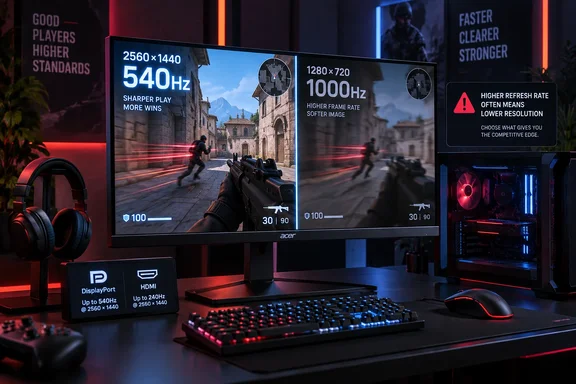
The practical takeaway is straightforward. The XV273U F5 is not a 1,000Hz QHD monitor and it is not even a 1,000Hz 1080p monitor. It is a 27-inch QHD Fast IPS display whose native high-end mode is 540Hz, with a Dynamic Frequency and Resolution, or DFR, option that trades away three quarters of its native pixel count to chase the four-digit refresh rate.
That does not make the 1,000Hz mode fake. It makes it a situational tool. For players whose games can sustain enormous frame rates—think lightweight competitive shooters running at deliberately reduced settings—the Acer offers a real choice between sharp 1440p presentation and maximum temporal resolution. For everyone else, 540Hz at QHD is the specification worth paying attention to.
The 1,000Hz claim comes with an unusually steep resolution trade
Acer announced the Nitro XV273U F5 at Computex 2026 as a 27-inch Fast IPS monitor capable of 540Hz at 2560×1440 and 1,000Hz in an HD DFR mode. Acer’s U.S. Nitro XV3 product page makes the broader pitch plainly: buyers can switch between high-resolution modes and HD at 1,000Hz when competitive play takes priority.
Tom’s Hardware supplies the missing operational detail: the 1,000Hz setting is 1280×720. Digital Trends and VideoCardz independently reported the same limitation before retail availability, describing the display as a dual-mode 540Hz QHD monitor rather than a full-resolution 1,000Hz panel.
The difference is larger than the word “HD” implies. A 1280×720 image on a 27-inch panel works out to roughly 54 pixels per inch, compared with about 109 pixels per inch at the monitor’s native 2560×1440. Text, HUD elements, distant targets, and game-world detail will all look materially softer. This is not a display mode suited to desktop work, cinematic single-player games, or the person who buys a 1440p monitor chiefly for 1440p clarity.
But a 720p mode also cuts rendering demand dramatically. It drives 2.25 times as many frames per second as 540Hz and renders only one quarter as many pixels per frame as native QHD. Measured purely by pixel throughput, 1,000Hz at 720p asks a GPU to render roughly 922 million pixels a second; 540Hz QHD requires about 1.99 billion. The reduced resolution is therefore doing most of the engineering work behind the four-figure refresh rate.
That is the real value proposition: not a miracle panel that makes 1,000fps easy, but a mode designed to make it more attainable in games that are already tuned around low latency and high frame rates.
Acer’s own regional specification table muddies the picture
Acer’s Japanese launch material correctly says in its product description that the XV273U F5 reaches 540Hz at QHD and 1,000Hz in HD through DFR. Yet a specification table farther down that same announcement lists the DFR resolution as “2560×1080” while calling it HD.
That cannot be right. 2560×1080 is an ultrawide resolution with more pixels than 1920×1080 Full HD, not an HD mode—and it does not match the 1280×720 configuration reported by Tom’s Hardware, Digital Trends, and VideoCardz. Acer’s U.S. series page avoids publishing a numeric resolution for the 1,000Hz mode, referring only to “HD 1000Hz.”
The evidence points strongly to a documentation error rather than a third operating mode. Still, it is an error worth flagging because high-refresh displays often depend on particular cables, graphics cards, ports, and timing modes. A buyer setting up the monitor should confirm the actual available resolutions in the Nvidia App, Nvidia Control Panel, AMD Software: Adrenalin Edition, or Windows’ Advanced Display settings rather than relying on regional marketing tables.
Acer also notes that actual refresh rates vary with hardware configuration, settings, and system performance. That disclaimer is conventional, but it is especially important here: the monitor can accept a 1,000Hz signal, yet the game itself must produce frames at something approaching that pace before the mode can show its full benefit.
Tom’s Hardware finds the 540Hz mode is the one to use most often
The useful result from Tom’s Hardware’s testing is not merely that the monitor reached 1,000Hz. The review found the XV273U F5 delivered very low measured input lag—14.4ms at 540Hz and 11.1ms at 1,000Hz—and praised its overdrive and backlight-strobing implementation for reducing blur without conspicuous ghosting or phasing artifacts.
Those results matter because raw refresh rate is not a complete measure of motion quality. A display can refresh rapidly and still produce smearing if pixel transitions cannot keep up, or introduce distracting inverse ghosting if overdrive is too aggressive. Tom’s Hardware reports that Acer’s tuning stays effective down to roughly 300fps, where the monitor’s motion-handling features become more useful for games that cannot realistically hit 540fps or 1,000fps.
The review also offers a corrective to the simplistic “OLED always wins” conclusion. OLED still holds the advantage for per-pixel contrast and black levels, while the XV273U F5 has no local dimming system to deepen HDR blacks. Tom’s Hardware specifically found that HDR content did not gain more contrast than SDR despite the monitor’s DisplayHDR 600 certification. The certification promises a brightness level and test compliance; it does not guarantee OLED-style black levels or a dramatic HDR presentation.
Yet the panel’s measured native contrast reportedly exceeded 2,000:1, about double Acer’s 1,000:1 specification and unusually high for IPS. If repeat testing supports that figure, it gives this monitor a better all-around image than the washed-out IPS experience buyers may expect from an extreme-refresh esports display.
Windows setup will determine whether the monitor earns its premium
The XV273U F5 is being positioned around a $699.99 U.S. price, and VideoCardz reported in July that an Amazon listing was live but temporarily out of stock, with Acer previously targeting North American availability in the fourth quarter of 2026. As of September 19, Acer’s U.S. site presents the XV3 range but does not provide a direct XV273U F5 purchase page or a confirmed U.S. ship date. That makes a review sample easier to find than a retail unit for the moment.
When the monitor does reach buyers, Windows users should treat it as two displays sharing one panel. Configure 2560×1440 at 540Hz first, verify that the chosen DisplayPort 1.4 or HDMI 2.1 connection exposes the expected refresh rate, and confirm the setting in Windows’ Advanced Display panel. Then set up the lower-resolution 1,000Hz mode separately in the GPU driver before using Acer’s on-screen refresh-rate switch.
A 1,000Hz display also raises the stakes for the rest of the system. CPU limits, background tasks, anti-cheat overhead, frame-time spikes, driver behavior, and input-device polling can all become visible constraints long before a modern graphics card runs out of shader power in an esports title. Tom’s Hardware used a GeForce RTX 4090 and reported that even it was working hard to keep 1,000 frames per second locked.
That means prospective buyers should not view the XV273U F5 as an easy route to 1,000fps. It is a display for players who already tune for high frame rates, play titles capable of reaching them, and are prepared to accept 720p image quality when fractions of a frame matter more than detail.
The missing USB hub is a strange cut at $700
Acer includes two DisplayPort 1.4 inputs, two HDMI 2.1 inputs, a 3.5mm headphone output, and small integrated speakers. The stand provides height, tilt, swivel, and pivot adjustment, and the rear-facing input layout should be easier to access than downward-facing ports tucked beneath a panel.
What it does not include is USB connectivity. For a premium 27-inch monitor aimed at PC players, that is a conspicuous omission. There is no USB hub for a mouse receiver or keyboard, no USB-C display input, no laptop charging, and no KVM-style switching between systems. Those features do not improve reaction time in Counter-Strike 2 or Valorant, but they do matter to the enthusiast who uses one desk for gaming, work, and multiple devices.
The Nitro XV273U F5 succeeds as a focused performance monitor because its QHD 540Hz mode appears to offer the speed readers can use daily, while its 1,000Hz option serves as an extreme competitive setting rather than its default identity. Acer’s documentation needs to become more precise before retail rollout, but the hardware’s core proposition is clearer now: buy it for unusually fast 1440p IPS gaming, and regard 720p at 1,000Hz as the specialized extra.
References
- Acer Nitro XV273U F5 gaming monitor review: One of the fastest LCDs on the planet Tom's Hardware · 2026-09-19T13:00:00+00:00