

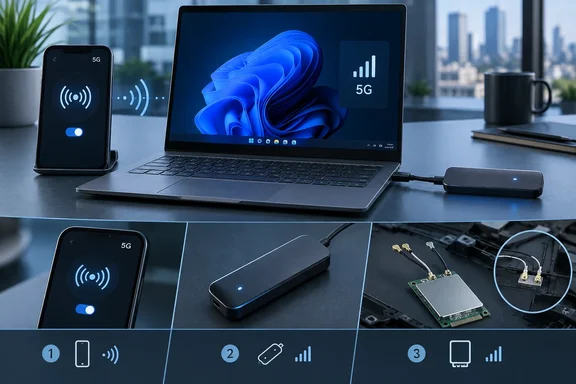
This guide covers the three realistic ways to get 5G on a Windows laptop, what each needs, and how to check your hardware before you spend anything.
Why built-in 5G is still rare
Laptops with cellular do exist. They're mostly business models you configure to order. MakeUseOf points to Lenovo's ThinkPad T14/T14s, HP's EliteBook line and certain Dell Latitude models. Mainstream consumer laptops mostly skip it, and MakeUseOf gives several reasons:
- Wi-Fi is usually enough. Most people use their laptop where Wi-Fi already exists.
- Phones are already hotspots. When Wi-Fi isn't available, tethering is the easy fallback. Few buyers want a second data plan for a laptop that rarely needs one.
- Certification is expensive. Every cellular device needs regulatory approval (the FCC in the US) plus carrier certification. Laptop makers sell many SKUs and configurations, so the paperwork adds up quickly.
- Most laptop chips have no modem inside. Tablets are designed around cellular from the start. Most laptop platforms aren't.
Section summary: Built-in 5G is a business-class, configure-to-order feature, and cost, certification and chip design keep it that way.
Option 1: Tether to your phone (the free one)
MakeUseOf calls tethering the best route for most people, and it's hard to argue. It costs nothing beyond the plan you already pay for, and it takes seconds to set up.
- Android: MakeUseOf gives the path as Settings > Network & internet > Hotspot & tethering. Menu names vary by manufacturer and Android version, so yours may be labeled a little differently.
- iPhone: MakeUseOf says an iPhone's Personal Hotspot shows up as a Wi-Fi network when you browse available networks. It describes this mainly for Macs, but on a Windows laptop the phone simply appears as a normal Wi-Fi network once the hotspot is on.
Things to watch:
- Battery drain. Running a hotspot drains the phone. MakeUseOf suggests plugging the phone into the laptop or a power bank.
- Fine print on "unlimited." Many plans cap hotspot data separately or slow it down after a limit, and MakeUseOf itself says to read the fine print. Check your plan's hotspot terms before a big download on a train.
Section summary: Tethering needs no new hardware, costs nothing extra and works with any laptop. For occasional use, the other options have a hard time competing.
Option 2: An internal M.2 WWAN card (the "cheap card")
This is the $95 option from the headline. MakeUseOf lists a DW5930 / T99W175 5G/LTE M.2 modem on Amazon at $94.97. Whether it works depends almost entirely on your laptop.
The slot problem
M.2 is a physical form factor, not a guarantee that any card will work. SSDs use an M-keyed slot. Cellular modems use a B-keyed slot, which carries modem-specific signals such as SIM data and radio power control. If your only M.2 slot holds your SSD, it isn't a WWAN slot.
The antenna problem
The modem also needs antennas. They attach through tiny coaxial connectors on the card. If the laptop wasn't built with cellular antenna cables routed through the chassis, a card that fits and powers up can still have poor or no reception. Framework's community forum shows how awkward this gets on a laptop never designed for WWAN: users there discuss antenna routing and metal-chassis worries. That's user experience, not engineering guidance.
What "WWAN ready" means
MakeUseOf suggests looking for "WWAN Ready" in the manufacturer's specs. It names the Lenovo ThinkPad P16s and the Dell Latitude 5350 and 7350 as examples. Even then, support usually depends on the exact configuration, not just the model name. Dell's spec page for the Precision 7680 shows this clearly:
- Dell says the WWAN module is available only on certain configurations and in certain regions.
- The supported module is the DW5930e, based on Qualcomm's Snapdragon SDX55 5G.
- Dell rates it at up to 3 Gbps down and 250 Mbps up under 3GPP Release 15 NR/LTE CAT20. Those are theoretical peaks, not real-world speeds.
- It supports sub-6 GHz 5G NR, LTE and WCDMA/HSPA+. Dell lists support for GPS and GLONASS navigation.
- Dell lists encryption as "not supported" on that module.
Notice that Dell's part is the DW5930e. MakeUseOf's example card is sold as the DW5930 / T99W175. Similar names don't prove the two are interchangeable in any given laptop, so match part numbers against your manufacturer's documentation.
Pre-purchase checklist
Before buying a card, confirm each of these for your exact configuration:
- The laptop has a WWAN slot with the right keying and interface. The SSD slot doesn't count.
- Cellular antenna cables are installed and reach the slot.
- The card is on the manufacturer's supported list, or is known to work with that system's firmware.
- The modem supports your carrier's bands in your region.
- You have a SIM route: a physical SIM tray, eSIM support, or both.
MakeUseOf also mentions putting an M.2 modem in a USB enclosure for laptops without a slot. It warns that once external antennas are attached, the setup ends up roughly the size of a small drone.
Section summary: "One cheap card away" is only true for laptops built or configured for WWAN. The decisive test is antennas and configuration support, not whether an M.2 opening exists.
Option 3: A USB 5G modem
With no WWAN slot, an external USB modem is the next hardware option. It skips the screwdriver but costs more up front. MakeUseOf's example is a Vosio USB-C 5G modem listed at $295.59. The listing describes it as using Qualcomm's Snapdragon X62, working with Windows and Mac, having a SIM slot, and running on T-Mobile and AT&T. Those specs come from the product listing and haven't been independently confirmed. Check carrier compatibility with your operator before buying.
Windows supports this kind of device directly. Microsoft's documentation on configuring cellular settings lists "built-in cellular modem or plug-in USB modem dongle" as the hardware it applies to.
Setting it up in Windows
A modem isn't a data plan. With an internal card or a USB dongle, you still need service from a carrier. MakeUseOf notes this can be a physical SIM or an eSIM. On Windows 11:
- eSIM activation: Microsoft says that starting with Windows 11 version 24H2, Windows recognizes carrier activation links and QR codes that begin with
lpa:. You can scan the QR code with the Camera app or click a link in an email or web page. Either way, Windows opens the eSIM flow under Settings > Network & Internet > Cellular > eSIM Profiles. This only works if the PC already has working cellular hardware with eSIM support. - Check the connection: Microsoft's documentation gives these commands for an administrator command prompt:
netsh mbn show profileslists mobile broadband profiles.netsh mbn show profiles name="name"shows one profile's details, including the APN.netsh mbn show interfacereturns the cellular interface name.netsh mbn show connection interface="name"shows connection details, including the APN.
- For IT departments: Microsoft documents deploying carrier APN settings through a Windows Configuration Designer provisioning package (Runtime settings > Connections > EnterpriseAPN). Devices then connect automatically without users setting anything up.
If it won't connect, use the list above to narrow it down. No cellular interface in netsh usually points to a driver or hardware detection problem. An interface with no working connection points to SIM activation, the APN or carrier band support.
The Snapdragon X2 question
MakeUseOf ends by saying newer Arm platforms like Qualcomm's Snapdragon X2 have 5G "built into the chip," but manufacturers still have to add antennas and switch it on. The second half is right. The first half needs a small correction.
Qualcomm's own launch material says the Snapdragon X2 Elite supports up to the Snapdragon X75 5G Modem. Qualcomm claims up to 10 Gbps peak download speeds. The key word is supports. Jon Peddie Research described the platform as offering optional X75 5G, updated Wi-Fi/Bluetooth, and Snapdragon Guardian. In other words, the X75 is a companion modem system the laptop maker has to design in, not a free feature waiting on a software switch. That explains why Wi-Fi-only X2 laptops exist. MakeUseOf names the Asus Zenbook A16 as one. We haven't independently confirmed that model's configuration, so check before you buy.
X2 also adds a management angle. Petri reported that Qualcomm's Snapdragon Guardian lets users and administrators to remotely locate, lock, or wipe devices using Wi-Fi or 5G technology. Enterprise buyers who value that may be the ones who push laptop makers to ship more cellular X2 models. It's a reason for business fleets, not casual users.
Section summary: X2 laptops can be designed with 5G. They don't automatically have it. Check each model's spec sheet for a listed X75 modem and SIM or eSIM support.
Bottom line
MakeUseOf's conclusion stands: for most people, the 5G modem you already carry is the right answer. The $95 card makes sense for one group: owners of business laptops whose exact configuration is WWAN-ready, with antennas already in the chassis. For everyone else, it's tethering, a USB modem, or choosing cellular as a factory option on your next laptop. Before ordering the card, check the spec sheet for your exact configuration, not just the model name.
References
- Your laptop may be one cheap card away from built-in 5G cellular MakeUseOf · 2026-09-28T19:30:14+00:00
- Precision 7680 Setup and Specifications | Dell US dell.com
- SNAPDRAGON X2 ELITE EXTREME & SNAPDRAGON X2 ELITE: FEATURES AT A GLANCE FEATURE qualcomm.com