

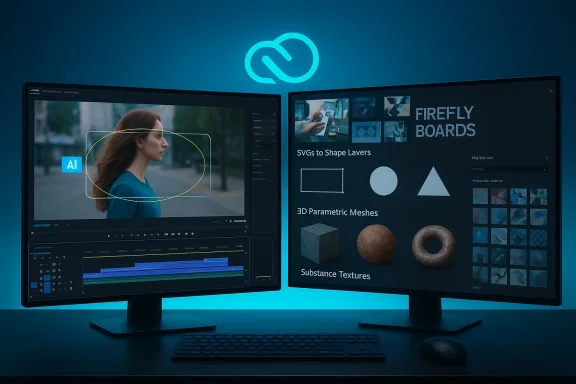
Adobe’s latest Creative Cloud updates put a heavy focus on AI-driven productivity: new on-device masking in Premiere Pro, redesigned and vastly faster shape masks, tighter Firefly Boards and Adobe Stock integration, and a major After Effects upgrade that adds native SVG import, parametric 3D meshes and Substance material support — all intended to shave repetitive work from timelines and timelines from motion-design pipelines so editors and designers can concentrate on craft.
Background
Adobe’s January 2026 releases continue a multi-year push toward embedding AI into core Creative Cloud workflows while keeping many assistive models local to the user’s machine. The company frames these changes as both time-savers and productivity enablers: tasks that once required nested composites, rotoscoping passes, or switching between apps can now often be started — and sometimes finished — directly inside Premiere Pro or After Effects. Adobe’s blog and product documentation describe the updates as part of the Premiere Pro 26.0 and After Effects 26.0 waves. At the same time, the market around video and motion workflows has accelerated: Microsoft’s Clipchamp/Copilot integrations analyzed AI tools (from automated upscalers to single-button clip composers) are pushing feature layers into every editing tier. Creators face both opportunity — faster iteration — and complexity: more AI features mean new failure modes, new quality-control steps, and fresh licensing questions for stock assets and generative outputs. The broader industry context helps explain Adobe’s emphasis on on-device AI and integrated asset licensing.
What’s new in Premiere Pro
Object Mask: hover, click, and go
The marquee addition in Premiere Pro is the AI-powered Object Mask tool. With a single hover-and-click workflow, editors can generate pixel-accurate masks around people or objects and immediately track them across a clip. Adobe presents the tool as an assistive layer in the Program Monitor: pass the cursor over an object, visual overlays indicate selectable elements, and a click creates a mask you can refine with lasso/rectangle edits, feathering, and expansion controls. Adobe’s documentation notes the feature is rolling out through the standard release and beta channels. Adobe explicitly says the Object Mask model runs on-device and that the models are not trained on customer data — a key privacy claim that positions Premiere against cloud-dependent offerings. The first time an editor enables Object Masking the app will download required local models; after that the processing is claimed to run locally. Users should still audit their Creative Cloud and Firefly settings to confirm whether any downstream Firefly features or asset lookups involve cloud interaction. Practical impact
- Rapid rotoscoping for interviews, product shots, and privacy blurs.
- Faster selective color grades or relighting of moving subjects.
- Fewer roundtrips to After Effects for routine object isolation.
Caveat: on-device models reduce some privacy concerns, but the claim that Adobe “never uses customer data to train” its models is a corporate policy statement; independent verification of training datasets and telemetry remains limited. Editors with highly sensitive footage should confirm enterprise agreements and IT policies before adopting automated masking at scale.
Redesigned Shapepe Masks: precision and speed
Premiere’s classic shape masks — Ellipse, Rectangle, and Pen — have been reworked with improved toolbar access, bezier curve editing, and more precise numeric input. Adobe’s release highlights one headline figure: tracking that can be up to 20× faster than older mask-tracking implementations. That speed claim is framed as practical: significantly reduced tracking waits and quicker iterations when anchoring masks to faces, screens, or moving objects. What editors will notice:
- Bi-directional tracking (track forward and backward from a chosen frame).
- 3D perspective tracking (attach masks convincingly to screens and planes).
- Live FPS readouts for mask tracking performance.
Why it matters: mask tracking is a common production bottleneck. When a project contains dozens of tracked masks (blurred logos, tracked titling, multi-object adjustments), each mask’s tracking latency adds up. Performance gains here translate directly to hours saved on medium-to-large timelines.
Firefly Boards and Adobe Stock: closing the ideation-to-edit loop
Premiere’s integration with Firefly Boards and an embedded Adobe Stock panel are designed to minimize context switching. Firefly Boards allow teams to build moodboards, collect references and early assets in a Firefly workspace, then send selected assets straight into Premiere. The embedded Stock panel gives editors the ability to search, preview, license, and import millions of assets without leaving the timeline — a workflow convenience that also nudges teams toward licensed stock rather than ad-hoc sourcing. Adobe lists Stock counts and licensing tiers as part of its product messaging. Business implication: for frequent stock users, the in-app licensing path reduces legal friction and accelerates finishing — but it also centralizes spend inside Creative Cloud. Production managers should plan budgets accordingly and verify asset types and license ceilings for intended uses.
What’s new in After Effects
Native SVG import and improved vector fidelity
After Effects 26.0 adds direct SVG import, converting vector files into native shape layers while preserving gradients, strokes, and transparencies. This eliminates several clumsy conversion steps (exporting to AI, expanding strokes, re-linking gradients) and makes collaboration with illustrators and UI designers far smoother. Motion designers gain faster iteration when animating logos, icons, and UI elements sourced from web or cross-platform vector formats. Why this is a practical win:
- Drag-and-drop SVGs become editable shape layers.
- Gradients and stroke data survive the import, reducing rework.
- Better fidelity reduces file churn between Illustrator and After Effects.
Parametric 3D meshes and Substance materials
The After Effects update represents a notable step toward in-app 3D. Creators can now spawn parametric 3D meshes (cubes, spheres, cylinders, cones, tori, planes) natively and assign Substance 3D (.sbsar) materials directly within After Effects. The Advanced 3D renderer supports spot and parallel lights casting shadows, and Substance materials expose parameters that are animatable inside the composition. These changes shorten the pipeline for motion designers who previously had to model or texture externally in a DCC (digital content creation) app. Practical strengths:
- Rapid prototyping for product shots and stylized 3D motion.
- Ability to iterate textures and material parameters without leaving AE.
- Native shadows and improved lighting bring more photoreal options to standard timelines.
Production caveat: While native 3D primitives and Substance integration reduce some outboard tool needs, complex modeling and high-end renders still favor full 3D packages. This AE functionality is best understood as a way to remove friction for many motion-graphics tasks, not as a replacement for dedicated 3D pipelines.
Performance and playback improvements
After Effects 26.0 adds a lossless compressed playback cache and improved caching strategies intended to preview longer comps without thrashing storage or RAM. The release also ships several audio effects and expression improvements that benefit motion-graphics workflows. Users on Windows on ARM and mobile-heavy pipelines will find official system-requirement updates and improved stability notes in the release docs.
Critical analysis: strengths, practical benefits, and adoption trade-offs
Strengths worth praising
- Real-world time savings. The Object Mask plus faster Shape Mask tracking address two of the most time-consuming steps in editorial and conform tasks — rotoscoping and repeat mask-tracking. Faster masking means more time for color, pacing, and story edits.
- Tighter creative loop. Firefly Boards and built-in Stock reduce friction between ideation and edit, which benefits teams that iterate quickly or rely on licensed footage.
- Stronger motion-design toolkit. Native SVG import and parametric meshes make After Effects more of a one-stop environment for many motion work types, reducing handoff overhead and file-format friction.
- On-device AI for privacy-conscious workflows. Running models locally lowers some organizational barriers around uploading proprietary frames to cloud models — a selling point for enterprises with strict data policies.
Risks and practical limits
- Model accuracy and edge cases. AI masks are excellent on well-lit, high-contrast subjects but can struggle with occlusion, motion blur, or stylized sources. Expect manual touch-ups; the tool reduces work, it does not eliminate the need for editorial oversight.
- Policy vs. verification on training usage. Adobe’s statement that on-device models “do not use customer data for training” is a policy declaration. Independent verification of telemetry, opt-in telemetry controls, and enterprise-level data-use contracts should be requested by security teams before full adoption. Claim is vendor-stated and should be audited by privacy teams in regulated contexts.
- Pipeline compatibility. Projects that mix versions or rely on third-party plugins may face compatibility challenges; community threads show staged rollouts and caution about using bleeding-edge releases in critical timelines. Always test major releases on copies((])
- Over-centralization of spend. In-app Adobe Stock licensing simplifies procurement buiption spend and create a dependence on a single vendor for assets and tooling. Production and legal teams should negotiate enterprise licensiblog.adobe.
Practical workflows and recommendations for editors and motion designers
Quick-start checklist for editorial teams (apply before you upgrade)
- Back up active projects and test the new build on non-critical timelines.
- Verify plugin compatibility: check third-party vendors for official support of Premiere 26.0 / After Effects 26.0.
- For sensitive footage, confirm Enterprise Creative Cloud contracts and review telemetry/privacy settings for Firefly and model downloads.
- Run a small pilot (1–3 typical projects) to profile mask-tracking speed gains and to measure export parity.
How to incorporate Object Masking into a typical edit
- Identify candidate clips where a moving subject requires selective color, blur, or relight.
- In the Program Monitor, hover to preview selectable objects and click to generate an Object Mask.
- Use lasso/rectangle refinements and feather/expansion controls to fit the mask precisely.
- Track bi-directionally only when necessary — choose the frame with the clearest subject pose as the start.
- If automated tracking drifts, export a short reference or nest the clip for more precise frame-by-frame manual correction.
After Effects: moving SVGs and simple 3D into motion design
- Import SVGs directly as shape layers and preserve gradients — this speeds up logo animations and UI motion.
- Use parametric meshes for simple product turntables, infographics, or motion backgrounds; apply Substance materials for quick realism without full PBR pipelines.
- For complex 3D scenes or photoreal renders, continue to rely on dedicated 3D tools and import the finished assets.
Competitive landscape and broader market context
Adobe’s moves arrive as a broader industry trend toward embedded AI in creative tools. Microsoft’s Copilot + Clipchamp initiatives automate draft video assembly and tight Windows integrations; specialized vendors like Topaz focus on dedicated image/video enhancement models (denoise, upscalers, realism models). These competitors push Adobe to keep feature parity, while Adobe’s advantage remains the breadth of Creative Cloud and deep interoperability between apps (Premiere ↔ After Effects ↔ Photoshop ↔ Firefly). Industry chatter and community threads show creators are evaluating multi-tool stacks rather than single-vendor lock-in.
A few market notes:
- Microsoft’s Visual Creator and Copilot-video flows emphasize one-click draft production for business users and social creators, reducing the threshold to create short-form content.
- Point solutions (AI upscalers, dedicated object-matting APIs) remain valuable for finishing houses that need specialized quality at scale.
- Open ecosystem partnerships — notable Adobe–Google cloud model integrations announced earlier — complicate the vendor lock-in conversation because they increase options for enterprise model choice while raising governance questions.
Governance, ethics, and quality control
AI tools amplify both productivity and ethical complexity. Masking and generative tools make it easier to alter a subject’s appearance, remove elements, or synthesize content. Production houses and publishers should adopt clear provenance and version-control practices:
- Maintain a log of automated steps applied (mask generated by Object Mask, shape mask tracked with X frames, Firefly assets imported).
- For client work, explicitly flag automated edits and obtain approvals for any synthesized content or licensed assets.
- Keep a clear trail of licensed Stock assets and check license terms before reuse in derivative works or redistributed products.
These steps protect creative teams and downstream consumers and are increasingly expected by editors and broadcasters.
Final assessment: who benefits most, and what to watch for
Premiere Pro editors and After Effects motion designers are the clear winners in this cycle: routine rotoscoping and mask-tracking tasks are materially faster, SVG and Substance support reduce pipeline friction, and Firefly/Stock integrations compress ideation-to-execution loops. Freelancers and small teams that rely on fast turnaround will get immediate productivity boosts; mid-size studios will benefit if they plan phased rollouts and instrument QA around automated masks.
What to watch:
- Real-world tolerance of AI masks in complex, noisy footage.
- Enterprise adoption of on-device AI models versus cloud generative features that still require server-side compute or Firefly credits.
- The pace at which third-party plugin vendors update for Premiere 26.0 and After Effects 26.0 compatibility.
For editors and motion designers who value iteration speed and tighter cross-app workflows, these releases are a significant upgrade. For studios that prioritize verified reproducibility and control, the releases are an invitation to pilot and to formalize verification, provenance, and privacy practices before committing on large projects.
Adobe’s January 2026 updates shift the immediate balance of power in creative workflows: more work moves from manual, repetitive prep into tool-assisted passes that generate starting points rather than finished products. The practical effect is straightforward — less time spent fighting masks and format conversions, more time refining pacing, color, and design. The near-term task for production leaders is to translate those time savings into secure, auditable pipelines that preserve quality and legal clarity while letting creatives reclaim hours formerly lost to masking, tracking, and tedious format gymnastics.