

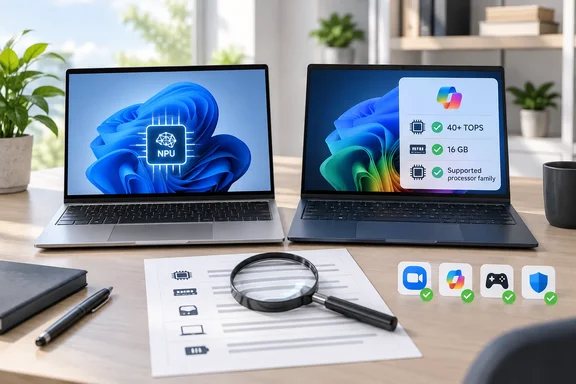
The guide's main point is reasonable. A laptop with a neural processing unit (NPU) can run some newer AI features locally. It also admits that an ordinary laptop still handles browsing, documents, streaming and entertainment without trouble. What it leaves blurry is the gap between a laptop marketed as an "AI PC" and one that meets Microsoft's Copilot+ PC standard. That gap decides which Windows features you actually get.
"AI laptop" is a sales label. "Copilot+ PC" has a spec sheet
Any laptop maker can call a machine an AI laptop. Microsoft's Copilot+ label has fixed hardware requirements. On its Windows learning center, Microsoft says a Copilot+ PC needs an NPU capable of at least 40 TOPS, enabling AI tasks like real-time translation, image generation, and intelligent search to run locally, plus 16GB RAM, 256GB SSD, and Windows 11 version 24H2 or newer.
TOPS means trillions of operations per second. It's a peak figure for how much AI math a chip can do. Microsoft's own developer comparison page calls Copilot+ a hardware-defined category: an NPU above 40 TOPS, at least 16GB of RAM and specific systems-on-chip. The same page says most Windows AI APIs need a Copilot+ PC, although a growing number now also run on other Windows 11 hardware.
The 40 TOPS number has to come from the NPU alone. A thread on the Eleven Forum raised a common trick: some systems advertise 90+ TOPS but include the CPU and GPU in this calculation while the NPU is like 13 TOPS. Those combined numbers don't count toward Copilot+ eligibility.
Earlier WindowsForum coverage listed the qualifying processor families as AMD Ryzen AI 300 and 400, Intel Core Ultra 200 and 300, and Qualcomm Snapdragon X, and warned that individual configurations still need checking. The same coverage said the badge cannot tell you whether the computer is fast for your workload, compatible with your software, or equipped with every feature Microsoft advertises.
Summary: Before you pay extra for "AI," find out whether the exact configuration is a Copilot+ PC or just a laptop with an NPU.
Running the seven picks against Microsoft's spec
The guide doesn't separate these categories clearly, so here is each model checked against Microsoft's published requirements. All specs below are as HT lists them.
| Model (as listed by HT) | Processor | RAM | NPU claim in guide | Against the Copilot+ spec |
|---|---|---|---|---|
| Lenovo IdeaPad Slim 3X | Snapdragon X X1-26-100 | 16GB LPDDR5x | 45 TOPS | Listed as Copilot+; meets the published thresholds |
| HP OmniBook 5 OLED | Snapdragon X | 16GB LPDDR5x | 45 TOPS | Meets the published thresholds |
| ASUS Vivobook 14 Smartchoice | Ryzen AI 5 330 | 16GB | Up to 50 TOPS | Ryzen AI 300 family is a listed Copilot+ family |
| Acer Aspire 5 AI PC | Core Ultra 5 226V | 16GB LPDDR5x | Not stated | Core Ultra 200V family is a listed Copilot+ family |
| Dell 15 AI | Core Ultra 5 225H | 8GB DDR5 | Not stated | Fails the 16GB memory requirement as configured |
| HP OmniBook 3 | Snapdragon X | 16GB LPDDR5x | 45 TOPS | Meets the published thresholds |
| Acer Aspire Go 14 | Core Ultra 5 125H | 16GB | Not stated | Core Ultra Series 1 is not among the listed Copilot+ families |
Some caveats apply to that table:
- The Dell 15 AI is HT's "value for money" pick, and the guide does flag its 8GB of RAM as a multitasking limit. It doesn't mention that 8GB also rules the machine out of the Copilot+ category, whatever its NPU can do. If Copilot+ features matter to you, this configuration can't give them to you.
- The Acer Aspire Go 14's Core Ultra 5 125H belongs to Intel's first Core Ultra generation. That generation isn't in the processor families Microsoft lists for Copilot+. Calling it an "AI" machine is fair in the loose sense, but it's not a Copilot+ PC.
- The ASUS 50 TOPS figure matches AMD's family-level claim for Ryzen AI 300. AMD's CES 2025 announcement adds its own fine print: TOPS is the maximum number of operations per second that can be executed in an optimal scenario <!-- --> and can vary by system, model and software. Treat it as a ceiling, not a measure of how fast the whole laptop is.
- Three of the seven run Qualcomm Snapdragon chips, which means Windows on Arm. The guide flags app compatibility as a concern itself. WindowsForum's earlier reporting notes that Snapdragon machines use Prism for many non-native x86 and x64 applications; specialized software and hardware should still be tested. Before switching, check VPN clients, anti-cheat games, older printer drivers and niche line-of-business apps.
Summary: Four or five of the seven fit Microsoft's Copilot+ spec on paper. The Dell (8GB) and the Aspire Go 14 (older Intel generation) are AI-branded laptops that don't.
Features you can test on the laptop you already own
The guide lists video-call enhancements, background effects, transcription, summarisation and smarter search as reasons to buy. The clearest built-in example is Windows Studio Effects. Microsoft's support documentation says it needs an NPU and current Windows updates, and that the full feature set needs a Copilot+ PC with an NPU above 40 TOPS.
The tiers matter:
- NPUs under 40 TOPS get only background effects, standard eye contact, automatic framing and voice focus.
- Snapdragon Copilot+ PCs only get portrait light, the more natural Teleprompter eye-contact mode, and creative filters (Illustrated, Animated, Watercolor).
- Battery life: Microsoft warns that on some devices, turning on background effects, eye contact or automatic framing can noticeably hurt performance and battery life.
So "the NPU saves battery" is sometimes true, not a promise.
How to check what your current PC supports:
- Open Settings > Bluetooth & devices > Cameras and select your front-facing camera.
- Look for Windows Studio Effects toggles. Microsoft says that if they're missing, the device might not have an NPU.
- You can also check Quick Settings for a Studio Effects tile. You may need to add it manually first.
- To confirm you have an NPU at all, open Task Manager (Ctrl+Shift+Esc), go to the Performance tab, and look for an NPU entry in the left-hand list.
If your current laptop already shows an NPU and Studio Effects, some of HT's "reasons to upgrade" are already in your hands.
Summary: Video-call effects are the most concrete everyday use for an NPU, but which effects you get depends on NPU tier and chip vendor.
Local AI is real, but more complicated than the marketing
HT describes AI laptops as "future ready" because Windows and apps keep adding AI features. That's partly supported by how Microsoft ships the software.
Microsoft's servicing documentation for Windows 11 versions 24H2, 25H2 and 26H1 describes built-in Copilot+ AI components, including image processing, image transform, image creation and the Phi Silica small language model. These are updated separately through Windows Update. Microsoft says Phi Silica handles tasks such as summarisation and rewriting on the device, and that developers can reach it through the Windows AI APIs.
Two cautions:
- An NPU isn't the only way in anymore. Microsoft's developer documentation says Phi Silica is also available on some non-Copilot+ PCs with a supported NVIDIA or AMD GPU. Foundry Local and Windows ML run on a wide range of Windows hardware. Local AI is spreading beyond the Copilot+ badge.
- "AI laptop" doesn't mean everything is private or offline. Plenty of popular AI features, including many Copilot and third-party assistant functions, still run in the cloud. The guide's own FAQ says available features depend on the laptop, the operating system and compatible apps.
A 40-plus TOPS NPU also isn't built for heavy AI work. An explainer from South African retailer Evetech put it this way: even at 40+ TOPS the NPU cannot run large local LLMs, so the badge matters most for lightweight AI.
Summary: An NPU speeds up specific, lightweight on-device features. It doesn't turn a mid-range laptop into an AI workstation, and it isn't the only route to local AI.
Who should actually pay for the NPU?
Based on Microsoft's documentation and the guide's own caveats:
A Copilot+ laptop makes sense if you:
- Spend hours on video calls and would use framing, background blur and voice focus.
- Want the on-device Windows AI features and models Microsoft limits to Copilot+ hardware.
- Want a new laptop with 16GB of RAM anyway, since that's now the Copilot+ minimum and a sensible baseline for multitasking.
A regular or non-Copilot+ laptop is still fine if you:
- Mostly browse, write documents and stream, which the guide itself says ordinary laptops handle well.
- Rely on cloud AI tools, which don't depend on your local NPU.
- Need x86 compatibility for specialist software and don't want to test it on Arm.
Checklist before you buy any of these:
- Confirm the exact model number and configuration, not just the product family name.
- Check the RAM amount and whether it can be upgraded. HT notes the Acer Aspire 5's RAM is soldered.
- Make sure the NPU TOPS figure is for the NPU alone, not a combined "platform TOPS" number.
- If it's a Snapdragon machine, confirm your critical apps, drivers and peripherals work on Windows on Arm.
- Look for independent battery and display reviews of that exact configuration. HT flags limited brightness on the IdeaPad Slim 3X, and the guide's buyer-feedback summaries aren't lab tests.
The bottom line
HT's argument holds up in its cautious version: an NPU is becoming standard equipment and does handle some useful jobs. It falls apart as a blanket recommendation. Two of the seven laptops don't meet Microsoft's Copilot+ spec, and feature support varies by chip vendor. What you pay should follow what the configuration can actually do, whatever the lid sticker says.
Why pay extra for AI features your laptop can't run? Check the NPU, the RAM and your app compatibility before you spend the money.
References
- Why an AI laptop could make more sense than a regular laptop for work, study and everyday use | Technology News(HT Tech) - Hindustan Times Hindustan Times · 2026-09-28T09:22:36+00:00
- Copilot+ PCs developer guide | Microsoft Learn learn.microsoft.com
- Copilot+ PCs & Windows PCs: Differences? | Microsoft Windows microsoft.com