

Here's what the review found, what Aoostar's own listings confirm or contradict, and who should buy one.
The hardware at a glance
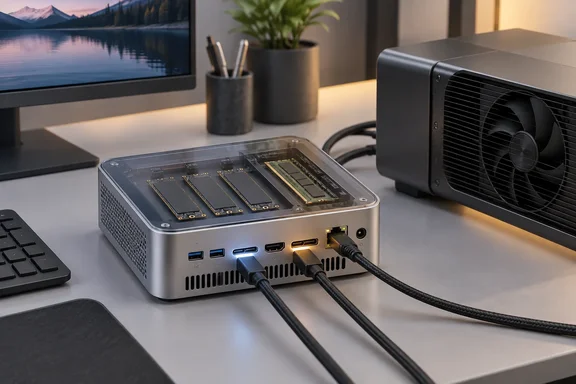
Aoostar's product page lists the core platform. The CPU is an AMD Ryzen 7 PRO 6850H (8 cores, 16 threads, Zen 3+, 3.2GHz base and 4.7GHz boost), paired with 24GB of LPDDR5 at 6400MHz. There are three M.2 2280 PCIe 4.0 x4 slots with a stated maximum of 24TB, and video comes out over HDMI, DisplayPort and two USB4 ports, for four displays in total.
| Component | Specification (vendor and review) |
|---|---|
| CPU | Ryzen 7 PRO 6850H, 8C/16T, Zen 3+, 45W TDP per TechRadar |
| GPU | Radeon 680M, RDNA 2, 12 CUs, up to 2.2GHz |
| Memory | 24GB LPDDR5-6400, soldered |
| Storage | 3 × M.2 2280 PCIe 4.0 x4, 1TB SSD in the review unit |
| Networking | Wi-Fi 6, Bluetooth 5.2, 2 × 2.5GbE (Intel I226V) |
| Expansion | 2 × USB4, 1 × OCuLink (no hot-swap) |
| Display | HDMI 2.1, DisplayPort 1.4, plus the two USB4 ports |
| Power | 19V 6.32A, 120W external adapter |
| Size | 150 × 132 × 57 mm, no VESA mount |
Memory is the biggest limit, and Aoostar says so plainly: the 24GB of LPDDR5 is soldered to the board and cannot be removed or replaced. If 24GB is too little today, it will still be too little in three years.
The PRO in the chip name matters to business buyers. TechRadar notes that the PRO variant adds Microsoft Pluton security and remote-management features on top of the same silicon as the consumer Ryzen 7 6800H. The review doesn't test any of that in a managed environment, so treat it as a spec-sheet feature, not a proven fleet capability.
Section summary: A Zen 3+ platform with generous storage and I/O, and memory that's fixed at 24GB for the life of the machine.
Design: solid build, a couple of odd omissions
According to Aoostar's listing, the whole body is aluminium alloy apart from the plastic bottom cover. TechRadar found the inside easy to reach: four screws on the base. The power button has a fingerprint reader. Aoostar says it supports Windows Hello for quick, secure sign-in. That's more common on business laptops than on budget mini PCs.
For cooling, Aoostar says air is routed through a vapour chamber and out the back, and it claims the chamber is 60% more efficient than copper heat pipes. That's a marketing claim. TechRadar didn't measure thermals or noise.
Things the review didn't like:
- No VESA mount. You can't hide it behind a monitor without a third-party bracket.
- Unlabelled ports. The front ports have no markings, and the two rear USB ports just say "USB."
- No SD card slot. TechRadar suggests a USB4 dock if you need one.
Section summary: Well built and easy to open, with a few small annoyances that add up on a desk.
Where the sources disagree
Three spec details don't line up between Aoostar's page and TechRadar's review. Check them before you order.
- How many M.2 slots? The review's design section says there are four M.2 slots, with the SSD and the Wi-Fi module using two. Its own spec table says three storage slots, and so does Aoostar. The vendor page states 3×M.2 2280 PCIe4.0×4, Max 24TB. Most likely there are three storage slots plus a separate Wi-Fi slot, which would leave two storage slots free out of the box.
- Rear USB speeds. Aoostar's I/O list includes one USB 2.0 port and one USB 3.0 port, but Pickavance says both rear ports ran at USB 2.0 speeds in his testing. If you plan to plug a fast external drive in at the back, use the front ports or USB4 until you've checked.
- Memory channels. TechRadar's summary says the memory is split into four 6GB banks for maximum bandwidth. Its spec table says "single channel," and Aoostar's page reads 1×LPDDR5 24GB 6400Mhz RAM channel. What's clear is 24GB of soldered LPDDR5-6400. How it's laid out internally isn't settled.
The marketing has a slip of its own. One Amazon listing describes the chip as Zen 4 architecture, while Aoostar's own page correctly says Zen 3+. Go by the vendor spec sheet.
Performance: good, but not a clean sweep
TechRadar compared the Maco with the GMKtec NucBox M7 Pro, which runs a Ryzen 9 PRO 6950H from the same generation. Both machines use the Radeon 680M.
| Test | Maco 6850H | NucBox M7 Pro (6950H) |
|---|---|---|
| 3DMark Wild Life | 17,098 | 15,703 |
| 3DMark Fire Strike | 6,792 | 7,036 |
| 3DMark Time Spy | 2,872 | 2,811 |
| 3DMark Steel Nomad ("S.Nomad" in the review's table) | 2,502 | 2,497 |
| Cinebench 2024 single / multi | 84 / 708 | 94 / 772 |
| Geekbench 6 single / multi | 1,996 / 9,601 | 2,167 / 10,454 |
| Geekbench 6 OpenCL / Vulkan | 29,110 / 33,652 | 29,730 / 30,797 |
| CrystalDisk read / write (MB/s) | 7,070 / 6,680 | 3,544 / 2,145 |
| PCMark 10 Office | 7,100 | 7,064 |
What the numbers show:
- CPU work goes to the 6950H. It wins Cinebench and Geekbench single- and multi-core by roughly 8–12%, which is what you'd expect from the higher-binned chip.
- Graphics is a split. The Maco leads in Wild Life, Time Spy and Vulkan, and loses Fire Strike and OpenCL. Pickavance credits the fast LPDDR5, which makes sense because integrated graphics has no video memory of its own and relies on system RAM bandwidth.
- Storage explains a lot. The Maco's Apacer Gen4 SSD roughly doubles the rival's read speed and triples its write speed. That probably helps its PCMark result.
This isn't a controlled test, though. The review's table lists the Maco with "16GB DDR4 (2x8GB)," which contradicts its own spec sheet. That's almost certainly a copy-paste error, but it's still an error. The prose also says the drive writes at "3500MB/s," while the table shows 6,680MB/s. The opening claim that the Maco beats Ryzen 9 8945HS systems isn't backed by any data in the review. Pickavance also says the Core i7-13700H in the Minisforum NBP7 "struggled to beat" the Maco, but shows no numbers for it.
Amazon's listing adds that the chip's TDP can go up to 70W, with three BIOS-adjustable power ranges (45–54W, 55–65W and 65–70W). TechRadar lists 45W and doesn't say which mode it tested in. If you try to reproduce these scores, check the BIOS power setting first, since it can move multi-core results a lot.
Section summary: Performance is solid for a four-year-old chip, helped by fast memory and a quick SSD. It trades wins with its same-generation rival rather than beating newer silicon across the board.
OCuLink and "AI potential": what's actually shown
The review's verdict mentions "AI potential" because of the OCuLink port. Aoostar's pitch is that you can connect an eGPU over OCuLink with less loss than USB4. That's reasonable in principle, since OCuLink carries PCIe directly. TechRadar hasn't run an eGPU or AI workload test yet, though. Pickavance says he plans to do so in a later feature.
So for now, OCuLink is an upgrade path, not proven AI performance. The Zen 3+ chip has no built-in NPU either. TechRadar notes that newer Zen 4 and Zen 5 parts add NPUs, so Copilot+ PC features that need one are off the table. Remember too that the OCuLink port doesn't support hot-swap. Shut down before connecting or disconnecting a GPU dock.
Price, Windows licensing and where to buy
TechRadar reported these prices for the 24GB/1TB model when the review was published:
- Aoostar direct, US: $459, shipped from a US warehouse
- Aoostar direct, Germany: $459, shipped from a German warehouse
- Aoostar direct, UK: $519, shipped from China
- Amazon.com: $479
- Amazon.co.uk: £395
Aoostar's US product page currently shows a sale price of $459.00 against a regular price of $469.00. Prices move around a lot. Slickdeals recorded an AliExpress deal in July 2026 that brought the 1TB model to $386.68 with a promo code, and in March a barebones unit dropped to $249.82 after a code. Both deals have expired, but if you can wait, $459 isn't necessarily the lowest you'll see.
Windows licensing depends on the model. Aoostar's store page says the barebone does not include a Windows key. The Amazon listing for the no-SSD version, however, says Aoostar provides a complimentary Windows 11 Pro activation key upon request after purchase. TechRadar also mentions a free key for the storage-free model. Get the terms in writing from the seller before you count on a free Pro licence.
If you buy the barebones model, you'll need to add an NVMe drive and install Windows yourself. The practical steps:
- Remove the four base screws and fit an M.2 2280 PCIe 4.0 drive. Aoostar includes an SSD cooling pad and a mounting screw in the box.
- Create Windows 11 installation media on another PC with Microsoft's Media Creation Tool.
- Boot from USB, install, then get chipset and graphics drivers from AMD or Aoostar rather than relying only on Windows Update.
- Activate with your own key or the one Aoostar provides, then set up the fingerprint reader under Windows Hello in Sign-in options.
Who should buy it?
Good fit if you want:
- A compact Windows 11 Pro desktop for office work, development or light creative tasks
- A small storage or media server with lots of NVMe room and two 2.5GbE ports for redundancy or link aggregation
- An upgrade path to an external GPU over OCuLink
- One-cable USB4 docking with multiple displays
Look elsewhere if you:
- Run VMs, large datasets or local LLMs that need more than 24GB of RAM
- Want an NPU or the newest instruction-set support
- Need VESA mounting or clearly labelled ports
TechRadar suggests two alternatives. The GMKtec NucBox K16 (Ryzen 7 7735HS, 32GB) costs more. The NucBox K8 Plus (Ryzen 7 8845HS) costs less, has expandable RAM, USB4 and OCuLink, but only two M.2 slots.
The bottom line
The Maco 6850H is a sensible machine at a time when new hardware keeps getting pricier. You get a lot of storage, networking and expansion for about $459, a well-built case and fast memory for the 680M. TechRadar's benchmarks support "capable for the money," not "faster than newer chips." Before you buy, confirm the slot count, the rear USB speeds and the Windows key terms. Buy it for its ports and storage, and be sure 24GB of RAM will be enough for you, because you can't add more later.
References
- Aoostar Maco 6850H mini PC review TechRadar · 2026-09-27T12:10:17+00:00
- AOOSTAR MACO 6850H Mini PC: Ryzen 7 Pro 6850H, Radeon 680M, 24GB RAM. 1TB SSD - 2026-07-03 slickdeals.net
- Amazon.com: AOOSTAR MACO AMD R7 6850H Mini PC (Beat 7735HS/7730U/6800H,Up to 4.70Ghz) Mini Computers W11 PRO with LPDDR5 6400Mhz 24GB RAM Without SSD,3 *M.2 Slots; Dual 2.5G LAN; Dual USB4; Support Openclaw : Electronics amazon.com