

The short version
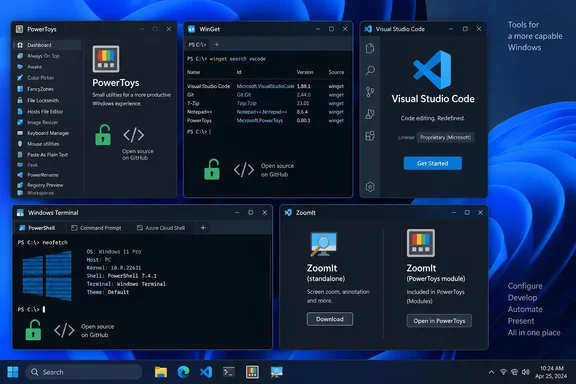
| Tool | Open-source status | Notes |
|---|---|---|
| PowerToys | Open source (MIT) | Microsoft project on GitHub |
| WinGet | Open source (MIT) | The client repository carries an MIT license |
| Windows Terminal | Open source | Developed publicly on GitHub |
| VS Code | Built on open source | The official download is not itself open source |
| ZoomIt | Both | Standalone Sysinternals build, plus an open-source copy in PowerToys |
"Microsoft wrote half of them" also undersells the picture. Microsoft started all five, so the count is closer to five of five. The better question is which ones you can inspect, modify and redistribute.
PowerToys: the one that sticks
The author describes installing PowerToys for a few features and then keeping it. The tools he names are FancyZones, PowerToys Run, PowerRename and Text Extractor. Microsoft's repository describes it as a collection of utilities that help you customize Windows and streamline everyday tasks, and the project is MIT-licensed.
Per the repository's documentation, it supports Windows 11 and Windows 10 version 2004 (build 19041) or newer, on x64 or ARM64. Setup installs the Edge WebView2 Runtime if it is missing. You can install it from GitHub, the Microsoft Store or WinGet.
WinGet: handy, but not universal
The author likes searching and installing from the terminal. He also likes checking for updates across installed apps. Microsoft's documentation supports both uses, with some caveats.
- Sources decide what you can get. WinGet ships with three default sources, but Microsoft's source documentation lists them as
msstore(the Microsoft Store catalog),winget(the community repository for applications) andwinget-font(fonts). The same page says to use only secure, trusted sources. - The font source is explicit by default. Commands must target it directly with
--source winget-font. - Review before you update. Running
winget upgradewith no arguments lists apps with available upgrades.winget upgrade --alltries to upgrade everything it can. Look at the list first. Packages with unknown current versions may need--include-unknown, and pinned packages can be skipped.
WinGet's coverage depends on package manifests. Software that isn't in a configured source won't show up.
VS Code: built on open source, not open source
This is the roundup's most accurate section, and Microsoft's own FAQ backs it up.
- The
microsoft/vscoderepository is Code - OSS, where Microsoft develops the product. The source is available under a standard MIT license. - The official Visual Studio Code download is a distribution of Code - OSS with Microsoft-specific customizations. It ships under a traditional Microsoft product license.
- Microsoft's FAQ says those additions include proprietary assets such as icons, Visual Studio Marketplace integration and some Remote Development pieces. It calls them a very small share of the code. It says "built on open source" is more accurate than "is open source."
The practical effect shows up in extensions. Microsoft says its extensions from the Marketplace are licensed only for the Visual Studio family of products, including VS Code, GitHub Codespaces and Azure DevOps. They are not licensed for forks of Code - OSS. Microsoft also says alternative products built on a fork are not permitted to access the Marketplace. Some extensions, such as the Remote Development extensions, are proprietary.
Windows Terminal: open, and now the default
Microsoft's terminal repository holds the source for Windows Terminal, Windows Terminal Preview, the console host (conhost.exe) and shared components. Its README lists Windows 10 version 2004 (build 19041) or later as a requirement. The repository recommends installing from the Microsoft Store because that gives automatic updates. Builds installed from GitHub do not update themselves.
Microsoft's accessibility documentation says the terminal was released as an open-source first-party app in 2019. It became Windows' default terminal in October 2022. Your own machine may be set differently, so check Settings if you want to confirm.
ZoomIt: both closed and open
The roundup calls ZoomIt a free Sysinternals utility. That is true, and the Microsoft Learn page currently lists version 12.22, published September 10, 2026. It is a zoom, annotation and recording tool for presentations. The documented defaults are:
- Ctrl+1: zoom mode
- Ctrl+2: draw without zooming
- Ctrl+3: countdown timer
- Ctrl+5: full-screen recording, on Windows 10 May 2019 Update and later
The Learn page also offers a Mac download, so this is no longer a Windows-only tool.
The open-source question is where the roundup falls short. Microsoft's Sysinternals blog says ZoomIt is now part of Microsoft PowerToys and open source, and it will remain available from Sysinternals as a stand-alone tool. The PowerToys release notes, as quoted by Thurrott, say the source code was released and included in PowerToys. PowerToys' developer docs add that the PowerToys repository is the source of truth for both the PowerToys version and the standalone Sysinternals version, with build flags separating them.
So ZoomIt's source is public through PowerToys. The article's "free utility" description is true but incomplete.
One gotcha if you use both
Both versions grab the same hotkeys. Windows Latest reports that PowerToys warns that the PowerToys version and the standalone ZoomIt cannot run at the same time. It is off by default in PowerToys. If hotkeys misbehave, exit the standalone ZoomIt, check your startup folder, and then enable the PowerToys module.
Why the licensing distinctions matter
"Free to download," "open source" and "built on open source" are three different claims.
- Free means you don't pay.
- Open source means you can read, modify and redistribute the code under a license.
- Built on open source means a company's own distribution adds separately licensed parts.
For home users the difference is mostly academic. It matters more in a few cases:
- Admins and developers deciding what to standardize on, who should know whether they are deploying a Microsoft-licensed build or the community project.
- Anyone using a VS Code fork, who should expect Marketplace and Microsoft-extension restrictions.
- Anyone who wants to audit or contribute, who should know which repository holds the real source.
What to take from the roundup
The author's accounts of daily use are personal testimony. They are a reasonable pointer to useful tools, but they say nothing about popularity or performance. Mixing "open source" with "free" and "Microsoft-made" also loosens the details. Microsoft's own documentation draws the lines more cleanly.
The roundup still makes a fair point. Several tools that many Windows users run daily are developed in public, and four of the five have clear paths to the source.
If you want to try the lot on a fresh install, WinGet can handle most of it. Check the package IDs with winget search first rather than assuming them.
References
- 5 open-source apps have quietly taken over my Windows PC, and Microsoft wrote half of them XDA · 2026-10-02T23:00:19+00:00
- winget-cli/LICENSE at master · microsoft/winget-cli · GitHub github.com
- PowerToys 0.88 Adds (Not So) New Zoomit Utility - Thurrott.com thurrott.com