

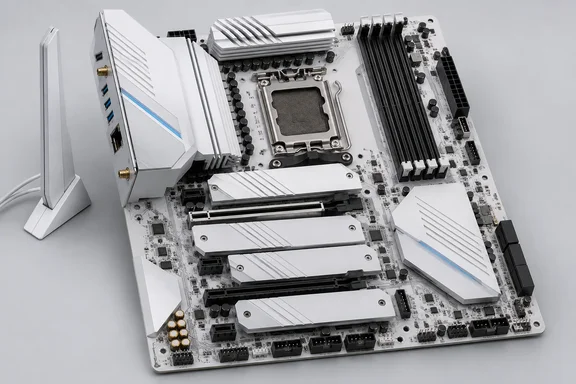
The review also finds some trade-offs, and the performance results need context. If you're planning a Ryzen 9000 build and want a board that won't hold it back, here's what you should know.
What you get for $230
This is a full AMD X870E board, not an X870 board sold under a similar name. That matters. According to Wccftech's coverage of the chipset family, the X870E series uses two Promontory 21 dies on the motherboards with support for USB4 and both Gen5 GPU/SSD support, while X870 (non-E) features just one of the dies but retains the same I/O support — just with fewer lanes. The second chipset die is where the extra connectivity comes from.
ASRock's own product page describes the board as an AMD AM5 socket board for Ryzen 9000, 8000, and 7000 series with 20+2+1 phase power and 110A SPS. Tom's Hardware's specification table gives these details:
| Area | Specification |
|---|---|
| Socket / chipset / form factor | AM5 (LGA 1718), X870E, ATX |
| Power delivery | 23 phases total, 20 × 110A SPS for Vcore |
| Memory | 4 × DDR5, up to DDR5-8200+ (OC), 256 GB |
| Expansion | 1 × PCIe 5.0 x16 (CPU), 1 × PCIe 3.0 x2 (full-length), 1 × PCIe 3.0 x1 |
| M.2 | 1 × PCIe 5.0 x4, 3 × PCIe 4.0 x4 (all up to 80 mm) |
| SATA | 2 × 6 Gbps |
| Rear USB | 2 × USB4 40 Gbps Type-C, 5 × 10 Gbps, 3 × 5 Gbps, 2 × USB 2.0 |
| Video out | 2 × USB4, 1 × HDMI 2.1 |
| Networking | Realtek RTL8126 5GbE; Realtek 8922AE Wi-Fi 7 (160 MHz, 6 GHz), BT 5.4 |
| Audio | Realtek ALC4082, two analog jacks plus S/PDIF |
| USB4 controller | ASMedia ASM4242 |
| Fan/pump headers | 7 × 4-pin (PWM and DC) |
| Lighting | 3 × 3-pin ARGB Gen2, 1 × 4-pin RGB; no onboard RGB |
| Diagnostics | 4-LED POST status checker |
| Warranty | 3 years |
Bottom line: at this price, many competing boards drop USB4, use 2.5GbE, or come with weaker audio. Tom's Hardware found this one does none of those things.
Power delivery that's more than the price calls for
The VRM is the headline feature. Power goes from two high-density 8-pin EPS connectors (only one is required) to a Renesas RAA229628 20-phase PWM controller, and then to Renesas R2209004 110A SPS MOSFETs. Tom's Hardware was surprised to see those parts on a board in this class. The math works out to 2,200A for Vcore. The review says that's enough for flagship chips such as the Ryzen 9 9950X, even when overclocked with extreme cooling.
Is that overkill for a Ryzen 5 or Ryzen 7 gaming PC? Yes. But a strong VRM also means cooler, quieter running under long loads, and room to drop in a 16-core chip later without buying a new board. ASRock also says the board uses a server grade low loss PCB with 8 layers and 2oz copper. The company claims this improves signal integrity for PCIe 5.0 and helps memory overclocking.
Storage and expansion: generous M.2, weak secondary slot
The four M.2 sockets are one of the board's best practical features. They split into one CPU-connected PCIe 5.0 x4 "Blazing" socket and three PCIe 4.0 x4 sockets. Tom's Hardware reports that the M.2 sockets don't share lanes, so filling all four won't slow down or disable anything else. TweakTown agrees, saying they can all run at the same time without lane-sharing compromises because ASRock uses the dual X870E chipset. Overclockers adds that the M.2 sockets don't share the bandwidth with the first PCIe x16 slot or USB4, like on most other motherboards.
That's a real selling point. On many boards, using a certain M.2 slot cuts the graphics slot to x8 or turns off SATA ports. RAID 0/1/10 is supported on M.2, and RAID 0/1 on SATA.
Overclockers also gives a useful tip on cooling: the PCIe 5.0 x4 socket is the only one with a double-sided heatsink, and it does not recommend installing higher-wattage PCIe 5.0 x4 SSDs under any other heatsink, as this may cause overheating and thermal throttling during extended use. Put your hottest drive in M.2_1.
Expansion slots are the weak spot. The top slot is ASRock's steel-reinforced PCIe 5.0 x16 slot, wired to the CPU (Tom's Hardware notes it has no bifurcation). Below it:
- A full-length slot that runs at only PCIe 3.0 x2, fed by the chipset.
- An open-ended PCIe 3.0 x1 slot, also fed by the chipset.
These are fine for a sound card, capture card or basic NIC. A 10GbE card or a fast NVMe adapter will be limited by the bandwidth. Tom's Hardware said it would have liked a PCIe 4.0 slot here.
Bottom line: the storage layout beats most boards at this price. The secondary expansion slots are budget-grade.
A lot of USB
Tom's Hardware singles out USB as the board's standout feature, and the port count supports that. The rear panel has 12 USB ports:
- Two USB4 Type-C (40 Gbps), which also work as video outputs.
- Five USB 3.2 Gen 2 (10 Gbps). Two of these are yellow "Lightning" gaming ports that use separate controllers to reduce latency.
- Three USB 3.2 Gen 1 (5 Gbps) in purple, which support USB PD 3.0 charging up to 5V/3A (15W).
- Two USB 2.0 ports in black.
The FPS Review describes the same layout, ten USB-A (three 5Gb/s, five 10Gb/s, and two 2.0) and two USB-C (40Gb/s) ports. Inside, there's a 20 Gbps USB 3.2 Gen 2x2 front-panel Type-C header, a 19-pin USB 3.2 Gen 1 header and two USB 2.0 headers.
On the Lightning ports, Tom's Hardware says they could help esports players who care about every millisecond, but add little for most users. That seems fair.
The rear panel also has Clear CMOS and BIOS Flashback buttons, the Wi-Fi antenna connectors, HDMI 2.1, the 5GbE jack, and an audio stack with two 3.5mm jacks and S/PDIF. BIOS Flashback is a good thing to have on AM5, because it lets you update firmware for a newer CPU without a working chip installed. Newegg's listing also mentions an integrated I/O shield, tool-free M.2 installation, RGB lighting support, and reinforced PCIe 5.0 graphics slot.
Audio, cooling headers and diagnostics
The ALC4082 codec sits in the open with dedicated audio capacitors, but no separate DAC or headphone amp. Tom's Hardware calls it the best codec for the platform and a nice surprise at this price.
All seven 4-pin fan headers accept PWM or DC devices and can be tuned in the BIOS or ASRock's Windows software. CPU_FAN1 is rated for 1A/12W. The rest handle up to 3A/36W each, which is enough for pumps and fan hubs.
For troubleshooting, you get a four-LED POST checker covering CPU, Boot, VGA and RAM. If something fails during POST, the matching LED stays lit. It's less precise than a two-character debug display, but typical for this price and far better than a board that just shows a black screen.
Design: very white, and fairly plain
Almost everything is white: the PCB, the heatsinks, the onboard chips, even the M.2 heatsink screws. The only exceptions are two light-gray fan headers. ASRock markets it as the visual centerpiece for pristine white gaming builds.
It's also basic. There's no onboard RGB. Only the primary M.2 heatsink is tool-free. The others are plate-style covers held on with screws, and there are no EZ-latch features like those on ASRock's pricier boards. Impulse Gamer called it probably the simplest looking white motherboard produced by Asrock. The box is sparse too: Wi-Fi antennas, two white SATA cables (one with a 90-degree connector), an installation guide and stickers.
The performance results, and the memory problem
The review's performance results need a closer look.
Tom's Hardware rated the board's performance average to below average across most of its tests. It gives a specific reason. Its standard Kingston DDR5-6000 kit isn't officially supported on this board and wouldn't work after XMP/DOCP was turned on, so the reviewer switched to a secondary DDR5-6000 kit. According to the reviewer, this is the third ASRock board that hasn't worked with its base test kit. Tom's Hardware believes the board would score a bit higher with a QVL-listed kit that has tighter secondary and tertiary timings.
Overclockers found that the X870E Challenger performs similarly to other ASRock motherboards in memory benchmarks. That supports the view that the lower scores come from the memory setup, not from a flaw in the board.
What this means for buyers:
- Check the memory QVL before you buy RAM. ASRock's advertised DDR5-8200+ is an overclocking ceiling. It isn't a promise that every kit and CPU combination will be stable at that speed.
- If an EXPO/XMP kit won't boot, turn the profile off, update to the latest BIOS (Flashback works without a CPU), and try again before deciding the kit or board is faulty.
- Keep motherboard benchmark gaps in perspective. At stock settings, differences between boards mostly come from memory timings and boost behavior. The chipset rarely makes much difference.
Firmware, software and drawbacks
Tom's Hardware says ASRock's firmware starts in an informative Easy Mode that still gives you XMP, profiles, boot order and Fan-Tastic Tuning. The advanced view exposes almost every option, and overclocking is simple to set up. The complaint is appearance: the BIOS could use a facelift to keep up with recent Asus, Gigabyte and MSI designs.
The full list of cons in the review:
- The BIOS needs a visual refresh.
- No AI features. Few buyers will miss them.
- Wi-Fi 7 is limited to 160 MHz channels. You won't get the 320 MHz channel width that premium Wi-Fi 7 cards support. In practice, 5GbE is the faster connection anyway.
Windows 11 users should download the Realtek Wi-Fi, LAN and audio drivers from ASRock's support page for this model. Check that page for current firmware and operating-system support before you build, especially if you still use Windows 10.
Verdict
Other reviewers largely agree with Tom's Hardware. TweakTown called it strong motherboard features, including Wi-Fi 7, USB4, and four M.2 slots, for $229, and The FPS Review said it is a surprisingly great value entry point for an X870E board, especially without the typical "white tax."
My take: the power delivery, lane layout and audio on this board would suit a board costing $100 more. The savings come from convenience features, looks and the secondary expansion slots. If you need a fast second PCIe slot or 320 MHz Wi-Fi, look elsewhere. For most Ryzen 9000 builders, and anyone planning a white build, it's one of the easiest AM5 boards to recommend. Just check the memory QVL before you buy RAM.
References
- ASRock X870E Challenger Wifi Motherboard Review: A value X870E board packed with features Tom's Hardware · 2026-09-28T13:20:00+00:00
- ASRock X870E Challenger WIFI White Motherboard Review: More Features, More VRMs, Great Support For $229 wccftech.com
- ASRock > X870E Challenger WiFi White asrock.com