

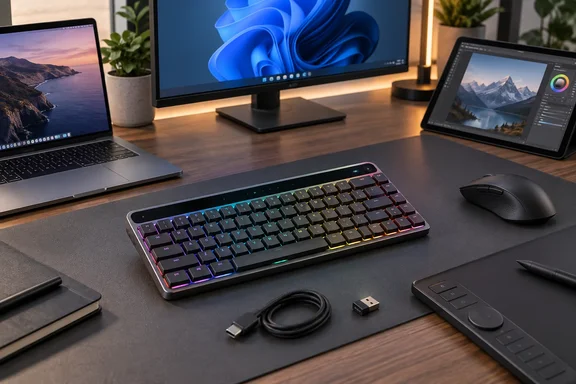
That makes the KD300 a credible option for a Windows desk shared with a Mac, tablet, or second PC, but less frictionless than its “multi-device” pitch implies. Asus says the keyboard can connect through USB-C, its 2.4 GHz receiver, and Bluetooth, yet anyone planning to remap keys, record macros, or adjust profiles needs a cable or the RF dongle available at least for setup.
PCWorld’s assessment, published September 18 after hands-on testing by Mattias Inghe, is broadly supported by separate testing from MacSources: the KD300’s chassis, optical switches, touch control, and wireless reliability are the strengths. The disagreement is over the central compromise. PCWorld calls the keyboard cramped, while MacSources found the key spacing comfortable and adapted quickly. That is a reminder that the 65% layout is the purchase decision, not a minor specification.
A compact layout with real workflow costs
The KD300 uses a 65% layout with 68 keys. It retains arrow and navigation keys, but drops the number pad and the separate F1–F12 row. On Windows, those missing controls are available through Fn layers, including media commands, screen brightness, screenshots, window-management actions, and function keys.
That arrangement saves space, which Asus presents as a benefit for creators who need room for a pen display, graphics tablet, camera accessories, or an oversized mousepad. The claim is fair in a constrained workspace. A compact keyboard can also let right-handed mouse users place the mouse closer to the body, reducing the reach across a desk during long editing or design sessions.
But desk space is only valuable if the keys being removed are not part of the daily workload. Excel users entering figures, IT staff working through consoles, developers who rely on F5, F10, F12, and modifier-heavy shortcuts, and Windows users accustomed to direct media controls should treat the KD300 as a deliberate retraining exercise. The function layer is printed on the fronts of the keys, but PCWorld notes that the RGB backlight does not illuminate those front-facing legends. In a dim room—the setting where backlighting ought to be most useful—the secondary shortcuts are therefore harder to find.
The review’s “cramped” verdict should not be read as a mechanical defect. Asus uses full-sized key spacing within a smaller chassis, and MacSources reported that it did not experience frequent mistypes during its own testing. The issue is operational memory: users accustomed to reaching toward a dedicated function row or numpad will repeatedly find empty space. No macro feature changes that physical fact.
For a workstation that spends most of its day in Adobe apps, a browser, chat, and document editing, the trade can work. For a general-purpose Windows machine that moves between spreadsheets, remote administration, command-line tools, and creative work, a compact layout asks more from the user than Asus’ creator-focused branding suggests.
The touch strip is the KD300’s useful differentiator
The control strip along the rear edge is the feature that gives the KD300 a stronger case than a conventional compact keyboard. A nearby button changes its mode, allowing swipes and taps to control volume, media playback, display brightness, lighting, or a customizable action. The quick-start documentation identifies the default customizable mode as scrolling, with a tap acting as a click.
That is more practical than relying entirely on Fn combinations, especially for volume adjustment during calls or media playback. MacSources similarly found the strip more convenient than remembering the secondary media keys. It is a modest control rather than a replacement for a full dial or a dedicated macro pad, but it restores some immediacy lost when Asus removed the standard top row.
Asus also promotes “AI hot keys” for Adobe workflows. The company describes these as ten preset shortcut cards for supported Adobe functions, with availability depending on the officially supported regions and applications. Prospective buyers should not assume the keyboard contains a specialized physical Adobe controller. The KD300’s differentiator is programmable input: mappings, macros, profiles, and the touch strip—not dedicated editing hardware equivalent to a dial console.
The optical RX Red low-profile switches are another straightforward strength. Asus specifies a 1.0 mm actuation point and 40–55 gram-force feedback. PCWorld found the linear switches quick to trigger, with some clicking on press and release but without excessive racket. The keyboard also uses two layers of silicone dampening foam intended to reduce echo and pinging. This is a mechanical keyboard aimed at people who want a responsive, smooth keypress without the noise and styling normally associated with gaming boards.
Gear Link makes configuration easier—and imposes boundaries
Asus moved KD300 customization into its web-based Gear Link utility, where owners can change key assignments, create macros, set lighting, and define profiles. For a Windows user who dislikes installing a large always-running peripheral suite, the browser-based approach has appeal. There is no need to keep Armoury Crate installed merely to alter a keyboard shortcut.
The details matter, though. Asus’ Gear Link support FAQ lists Windows 10, Windows 11, and macOS as supported operating systems, but names only Google Chrome, Microsoft Edge, and Opera as compatible browser engines. Firefox is absent. MacSources separately reported that Safari did not work with Gear Link during its review, which follows directly from Asus’ published browser support list.
The larger catch is connectivity. Asus states that Gear Link does not support device configuration via Bluetooth; the KD300 must be connected through USB or the 2.4 GHz receiver to configure it. After setup, the user can switch back to Bluetooth. This does not affect ordinary typing over Bluetooth, but it changes what “wireless multi-device” means in practice.
A Windows laptop user who travels with only the keyboard and expects to make a quick macro change over Bluetooth will be blocked. An administrator locking down USB peripherals should consider whether the RF dongle is permitted before adopting the keyboard. And a user who primarily connects through Bluetooth should keep the USB-C cable or the receiver accessible rather than putting it permanently in a drawer.
Asus says Gear Link can work offline only after the device has already connected successfully and permission has been granted, while the browser remains open on the device page. That is a narrower form of offline support than a conventional installed utility. It is manageable for a personal desktop, but it is worth knowing before standardizing the keyboard in a controlled Windows environment.
Multi-device support is real, but only one connection is active
Asus specifies three connection methods—wired USB, Bluetooth, and 2.4 GHz RF—and remembers up to five devices. Only one device is connected at a time. The keyboard has a dedicated PC/Mac hardware toggle intended to change the modifier layout between operating systems, plus magnetic storage for the receiver.
This is the KD300’s most defensible professional feature. A user moving between a Windows workstation, MacBook, meeting-room PC, and tablet can reduce the clutter of maintaining several keyboards. The physical OS switch is more dependable than relying on software to reinterpret labels, particularly where Ctrl, Alt, Command, and Option muscle memory matters.
The battery claim is also specific enough to put in context. Asus rates the KD300 for up to 16 months in 2.4 GHz mode with RGB lighting disabled, or up to 100 days at full-brightness white lighting; Bluetooth estimates are lower. Those are vendor lab figures rather than independently verified endurance results, and they depend heavily on connection mode and illumination. Still, a 4,000 mAh battery and USB-C fallback should prevent power from being a routine concern for most desktop users.
At $164.99 in U.S. retail listings checked by MacSources and B&H Photo, the KD300 costs materially more than mainstream compact office keyboards. The price is being spent on the aluminum-topped build, low-profile optical switches, tri-mode connectivity, touch controls, per-key RGB, and configuration options. It is not a bargain compact keyboard—and it does not include the keys that many Windows power users consider non-negotiable.
The buying decision is about key count, not RGB
PCWorld is right to question what makes the KD300 specifically a “ProArt” keyboard. Nothing in the hardware makes it indispensable for creative software, and a creator with a roomy desk may be better served by a full-size or 75% board with direct function and media controls. The KD300’s productivity value comes from a compact, solid keyboard with flexible device switching and input customization.
For Windows users with limited desk space, a mixed Windows-and-Mac setup, and a willingness to configure the keyboard through Edge or Chrome using USB or 2.4 GHz RF, it is a polished compact option. For anyone whose work depends on a number pad, visible F-key legends, or Bluetooth-only configuration, the KD300’s small footprint comes with recurring compromises rather than one-time inconvenience.
References
- Asus ProArt KD300 review: A tiny keyboard with big features PCWorld · 2026-09-18T15:00:00+00:00