

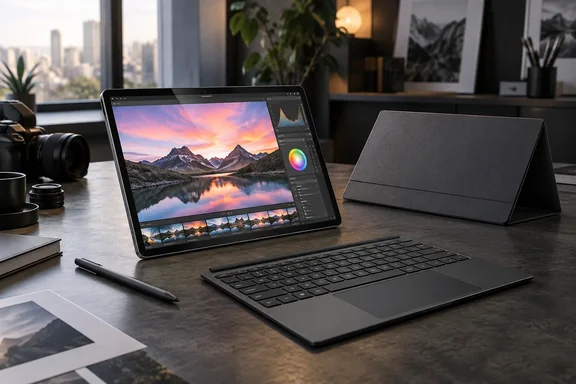
The important distinction is tablet-first versus laptop-first. Asus has built a machine whose detachable design serves a purpose, rather than simply adding another hinge trick to a conventional notebook. Its official specifications confirm an 18-core Snapdragon X2 Elite processor, integrated Adreno graphics, and a 75Wh battery in a tablet weighing approximately 790 grams. Those are substantial ingredients for this form factor.
For Windows users, however, the most useful conclusions lie beyond the specification sheet: how much the complete kit weighs, whether a particular creative workflow survives the move to Arm, and which configuration is actually being purchased.
Portability changes when the keyboard joins the party
Digital Trends describes the aluminum tablet as sturdy and comfortable to hold, with a magnetic stand that remains stable during touchscreen use. Its roughly 9mm thickness and 790g tablet-only weight agree with Asus’ published specifications.
But the reviewer estimates that the stand cover adds approximately 270g and the keyboard another 470g. Together, the working setup approaches 1.5kg—before considering the charger.
That does not invalidate the design. It changes the buying question.
Someone who frequently removes the keyboard for drawing, reviewing photographs, or reading gets a meaningful benefit from the detachable construction. Someone who leaves every accessory attached all day should judge the complete package, not the unusually light screen section.
The review also finds that the keyboard can shift when nudged, the trackpad requires a firmer press than expected, and lap-based typing is uncomfortable. Occasional unintended palm touches further temper the tablet experience.
The practical takeaway: detachable flexibility is valuable when you actually detach. For an eight-hour typing routine, keyboard stability deserves at least as much attention as processor performance.
The OLED display is the headline attraction
Asus specifies a 14-inch, 2880 × 1800 OLED touchscreen. Its product documentation identifies a 144Hz refresh rate, variable refresh rate support, and pen input with up to 4,096 pressure levels using Microsoft Pen Protocol 2.6. The manufacturer also claims factory-calibrated Delta E below 1.
Digital Trends’ subjective assessment is enthusiastic: rich blacks, striking contrast, responsive pen use, and an especially enjoyable indoor viewing experience. The reviewer also praises the speakers, making the PZ14 appealing for media consumption as well as creative work.
The catch is glare. Strong ceiling lights and direct sunlight remained distracting despite the anti-reflection treatment.
Asus lists 500-nit brightness and up to 1,000-nit HDR peak brightness. That distinction matters: the larger HDR figure should not be treated as a promise of 1,000-nit brightness throughout ordinary desktop work.
The sensible interpretation is therefore narrower than “excellent everywhere.” The review supports an excellent indoor display with useful outdoor legibility, not immunity to reflections.
Fast everyday work is not workstation performance
Digital Trends tested a 32GB-memory configuration using Chrome multitasking, Photoshop, and Lightroom Classic over several days. The reviewer reports smooth everyday operation, including around 30–35 browser tabs without active chatbots, although heavy prompting occasionally produced brief pauses.
The review’s reported measurements include:
- Geekbench 6 single-core: 3,784.
- Geekbench 6 multi-core: 17,521.
- Sequential SSD reads: approximately 5,800–6,100MB/s.
These are Digital Trends’ results, not WindowsForum measurements. They provide useful evidence of responsiveness, but the review does not establish controlled performance comparisons across competing machines.
Graphics are the more important boundary. The reviewer considers demanding rendering and gaming outside the PZ14’s strongest use cases. Asus confirms that the system uses integrated Qualcomm Adreno graphics rather than a discrete GPU.
The resulting editorial assessment is straightforward: this looks better suited to mobile photo work and general productivity than to replacing a graphics-heavy workstation. A long list of CPU cores does not automatically make every creative workload equally comfortable.
Windows on Arm: check the workflow, not just the app
The review’s successful use of Photoshop and Lightroom Classic is encouraging. It is not a compatibility guarantee for every plug-in, peripheral, or specialist application attached to those programs.
Microsoft’s documentation explains that Windows 11 supports x86 and x64 application emulation on Arm, with Prism introduced in Windows 11 version 24H2. Native Arm applications remain the preferred route to native performance.
Drivers are a separate issue. Microsoft states that peripherals require compatible drivers built into Windows or Arm64 drivers supplied by their manufacturers. Application emulation does not remove that requirement.
Before treating the PZ14 as a primary work computer, use this checklist:
- Confirm support for essential applications and extensions. Include the plug-ins that make the workflow useful, not merely the main application.
- Check peripheral drivers. Pay particular attention to equipment requiring manufacturer-specific software.
- Ask IT about required security software. Microsoft identifies driver-dependent applications and some third-party antivirus products as potential compatibility limitations.
- Test a representative project. Opening an application successfully is only the first checkpoint.
There is also a deployment boundary worth noting: Asus says this PC’s drivers are compatible with Windows 11 version 24H2 or later and warns against manually installing an older operating-system version. That is directly relevant to administrators considering an existing deployment image.
Battery endurance looks useful—with conditions attached
Digital Trends reports approximately 10–11 hours of mixed use with Wi-Fi enabled, brightness around 30–40%, and the Standard power profile. That is a practical workday result, although it comes from several days of reviewer use rather than a standardized cross-device battery test.
Asus separately advertises up to 16 hours of browsing, 16 hours of video streaming, and 22 hours of FHD video playback. Those workload-specific manufacturer claims should not be substituted for the review’s mixed-use result.
The reviewer’s suggested five-to-six-hour endurance under heavier creative workloads is an expectation, not a measured result. Likewise, the enthusiastic charging discussion does not provide a detailed charging curve. The strongest supported conclusion is simply that ordinary mixed-use endurance impressed the reviewer.
U.S. buyers should inspect the exact configuration
The review lists a $2,499.99 MSRP and discusses a 32GB/1TB machine. Its suggestion that the PZ14 comes in only one configuration needs qualification.
Asus’ June 8, 2026 U.S. announcement identifies two configurations:
| U.S. configuration | Memory | Storage |
|---|---|---|
| HT7407NA-PA/PZ14_E0 | 16GB | 512GB |
| HT7407NA-PB99T | 32GB | 1TB |
The announcement described the first as available through Best Buy and scheduled the second for the Asus Store in early Q3 2026. That historical announcement does not establish today’s stock or checkout price. It also lists different accessory bundles, making configuration-specific verification important.
Consequently, the review’s price and included-accessory experience should be understood as applying to its reported package—not every U.S. PZ14 offer.
The verdict: compelling, provided the tablet matters
Digital Trends’ review supports the PZ14 as a capable mobile creative PC whose display, responsiveness, and battery endurance outweigh several ergonomic compromises.
Our assessment is conditional: the strongest reason to choose it is the combination of Windows desktop software and genuinely useful tablet operation. If pen input and keyboard-free use feature prominently in your day, its compromises may be worthwhile. If your routine mostly involves sustained typing, lap use, or demanding graphics work, the review gives ample reason to remain cautious.
The PZ14 does not make the laptop obsolete. It makes choosing a Windows tablet feel considerably less like accepting a consolation prize.
References
- Asus ProArt PZ14 review: A rare Windows tablet that almost replaced my laptop - Digital Trends Digital Trends · 2026-09-30T21:31:35+00:00
- ASUS ProArt PZ14 (HN7407) | AI PC for Creators| ASUS USA - Tech Specs asus.com
- ProArt PZ14 (HT7407)|Laptops For Creators|ASUS Global asus.com