

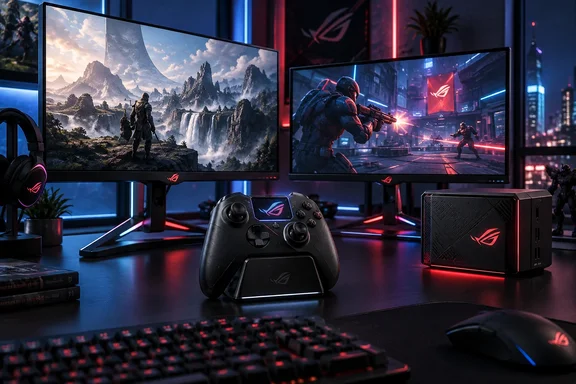
For Windows gamers, the most consequential detail is not the shared ROG branding. ASUS is bringing together a controller that claims 8,000Hz input over 2.4GHz wireless, two OLED displays aimed at both high-detail and high-frame-rate PC play, and a roughly three-liter Windows-class gaming PC using laptop-grade CPU and GPU parts. The release schedule is real; the decision to buy will depend on requirements ASUS has yet to publish for the Japanese market.
ROG Raikiri II Pro PC puts 8,000Hz on a wireless controller
The ROG Raikiri II Pro PC supports an 8,000Hz polling rate over USB and its proprietary 2.4GHz RF connection. In simple terms, a controller running at 8,000Hz can report its state every 0.125 milliseconds, compared with once per millisecond at 1,000Hz. That is an unusually aggressive specification for a wireless gamepad and removes the usual assumption that the highest input rate requires a cable.
The hardware is explicitly a PC controller, with ASUS listing Windows 10 and Windows 11 support plus USB, 2.4GHz RF, and Bluetooth 5 connectivity. Its own product comparison also distinguishes it from the ROG Raikiri II Xbox Wireless model. Buyers who need native Xbox console support should not treat the “Pro” name as an Xbox compatibility guarantee; ASUS’s Japanese material identifies this version as a PC-focused device.
The rest of the design reads like an attempt to consolidate the features usually spread across enthusiast controllers. There are hot-swappable TMR thumbstick modules, two additional bumper controls, four removable rear buttons, adjustable dual-mode triggers, a full-color onboard display, a charging stand, carrying case, and replacement parts in the box. TMR, or tunneling magnetoresistance, is intended to provide contactless stick sensing and reduce the wear behavior associated with conventional potentiometer sticks. The inclusion of replaceable modules is more important than the sensor acronym: a drifting or damaged stick should not automatically make a $200-class controller disposable.
There is a material qualification behind the battery-life claim. ASUS advertises up to 79 hours in 2.4GHz mode, but its own battery chart ties that maximum to a 1,000Hz setting with the display, vibration, and RGB lighting disabled. At 8,000Hz under the same lights-off conditions, the company lists 63 hours; with display, vibration, and RGB enabled, its table lists 22 hours at 8,000Hz and 24 hours at 1,000Hz.
That makes the controller’s high-polling mode a setting to use deliberately rather than a free upgrade. A 480Hz display redraws every 2.08 milliseconds, so an 8,000Hz controller can theoretically provide many fresh input reports between frames. But the gains will be difficult to distinguish in games with frame-time spikes, network latency, poor controller implementations, or processor-heavy workloads. The higher setting may be most defensible for competitive Windows games where users have already eliminated larger sources of input delay.
ASUS also says the supplied charging stand can function as a wireless extender, letting users place the 2.4GHz receiver closer to the controller. That is a practical inclusion for a device whose headline feature depends on a stable high-rate wireless link, especially in desk setups already crowded with Wi-Fi, Bluetooth, and USB 3.x interference.
The OLED monitors target Windows desktop work as well as games
The PG32UCWM and PG27UCWM share the same basic proposition: a native 4K True Tandem RGB OLED panel that switches between 4K at 240Hz and 1920×1080 at 480Hz. The larger model measures 31.5 inches while the smaller one measures 26.5 inches, giving buyers a genuine desk-space and pixel-density choice rather than two identical panels in different chassis.
The “RGB” part is significant for PC use. ASUS says these panels use an RGB stripe subpixel arrangement rather than the RGBW layout seen on conventional WOLED screens. On its product page, ASUS specifically identifies better compatibility with Windows ClearType text rendering as a benefit of the standard stripe layout. For people who use one monitor for Office apps, code editors, remote administration consoles, browsers, and games, text clarity can be more consequential than a marginal peak-brightness claim.
That does not mean these become maintenance-free productivity displays. OLED remains susceptible to image retention from persistent high-contrast elements, the very kind Windows users create with taskbars, IDE panels, dashboards, spreadsheets, and monitoring tools. ASUS includes OLED Care Pro safeguards, including pixel-cleaning routines, screen movement, a screen saver, and a Neo Proximity Sensor that can black out the panel when the user leaves. The PG32UCWM is also listed with a three-year warranty in Japan. Those measures mitigate risk; they do not erase the need to configure the display sensibly and let its maintenance cycles run.
The dual-mode switch is useful, but its trade-off should be clear. At 4K/240Hz, these are high-resolution OLED desktop monitors that demand a powerful GPU to maintain top-frame-rate performance in current games. At Full HD/480Hz, they prioritize motion and lower rendering load, but the image is no longer using the panel’s native 4K resolution. That may be a sensible competitive setting for esports titles, yet it is not a magic way to make a 4K game look sharper while running twice as fast.
The 32-inch PG32UCWM adds another useful option: display modes that can present a smaller 24.5-inch or 27-inch image area for players accustomed to tournament-style screens. That feature directly addresses the awkwardness of playing fast shooters full-screen on a 31.5-inch panel at close range. ASUS has not provided the equivalent Japanese feature breakdown for the PG27UCWM in its release notice, so prospective buyers should check the final product page rather than assume exact parity beyond the core panel and dual-mode specifications.
DisplayPort bandwidth is part of the purchase decision
The PG32UCWM carries DisplayPort 2.1a UHBR20, which ASUS says provides the full 80Gbps link rate necessary for uncompressed 4K at 240Hz. It also includes two HDMI 2.1 ports, a USB hub, and USB-C with up to 90W Power Delivery. Those are welcome specifications, but they expose a compatibility issue that the Japanese release announcement does not discuss: the monitor’s port capability is only half of the connection.
A Windows PC needs a graphics card and cable that support the relevant DisplayPort mode to take advantage of the uncompressed claim. Older GPUs may still drive the display through DisplayPort or HDMI, often using Display Stream Compression where supported, but users should verify the refresh rate, HDR, color depth, and VRR mode actually offered in Windows’ Advanced Display settings. “DisplayPort 2.1” alone is not a sufficient compatibility label, because different UHBR link rates offer different bandwidth.
The good news is that ASUS has included several paths rather than making the monitor dependent on one connection standard. The more important warning is that a buyer should not budget for a premium 4K/240Hz OLED and discover later that an existing graphics card cannot expose the intended mode. The monitor’s 480Hz option lowers GPU rendering requirements dramatically, but it does not change the display’s connection requirements for every feature combination.
ROG NUC 16 is compact, but the graphics are still laptop-class
The ROG NUC 16 arrives in Japan around November, later than the controller and monitors. ASUS globally announced the system in May with an Intel Core Ultra 9 290HX Plus processor, configurations scaling up to an Nvidia GeForce RTX 5080 Laptop GPU, up to 128GB of DDR5-6400 memory, Thunderbolt 4, and a three-liter chassis. The distinction in the GPU name matters: this is an RTX 5080 Laptop GPU, not the desktop RTX 5080 used in full-size tower systems.
That does not make the NUC 16 a weak gaming PC. It makes it a compact system whose performance, thermals, memory configuration, storage capacity, and upgrade limits must be assessed as a whole. ASUS says its QuietFlow cooling design uses three fans and dual vapor chambers, while the global announcement claims under-38dBA operation under full workloads and a dedicated SSD heatsink. Those are vendor measurements, not independent acoustic testing, and they should be treated accordingly until retail units are reviewed.
The unit’s small volume is compelling for users who want a portable living-room PC, a compact LAN system, or a powerful desk machine without a conventional tower. Thunderbolt 4 is especially useful for fast external storage, docks, and capture workflows, while ASUS says the machine can support up to five 4K displays. But a compact chassis also means buyers need the final Japanese configuration sheet before comparing it with a self-built Windows desktop: RAM capacity, SSD slots, installed storage, power supply behavior, port layout, and warranty terms can change the value substantially.
ASUS has announced no Japanese price for the ROG NUC 16, nor has it said whether all global CPU, GPU, color, memory, and storage combinations will ship locally. That omission is more consequential than the broad November estimate. A three-liter PC with an RTX 5080 Laptop GPU could be an unusually tidy high-end Windows machine, but only if its final configuration does not price it beyond an equivalent small-form-factor desktop.
The immediate date to watch is mid-October, when the two OLED monitors are due in Japan and retail pages should finally reveal pricing and full connection specifications. The Raikiri II Pro PC follows in late October with a compelling 8,000Hz wireless claim tempered by its real battery trade-off, while the NUC 16 remains the least-defined of the four products until ASUS publishes the Japanese SKU details in November.