

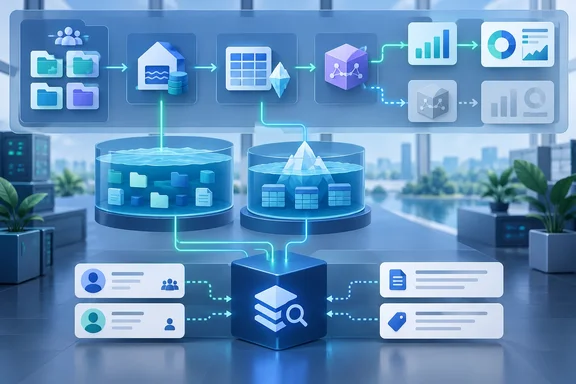
The announcement contains two different things, and it helps to keep them apart. One is a connector that is available now. It catalogs Fabric assets and maps lineage. The other is a OneLake integration that lets governance metadata sit in open tables next to the data it describes. Atlan also mentions a future integration for unstructured content and a goal of "one-click" setup. Neither of those exists yet, so Fabric admins should not plan around them today.
The connector: generally available, now at version 2.0
According to the press release, Atlan's connector for Microsoft Fabric is generally available to all Atlan customers, with version 2.0 shipped in August 2026. The connector catalogs Fabric workspaces, lakehouses, warehouses, semantic models, reports, dashboards, dataflows, and data pipelines — down to the table and column level.
Atlan says lineage runs from upstream external SQL sources, through lakehouse and warehouse tables and semantic models, and on to reports and visuals, at both table and column level. The company also says a browser extension shows ownership, definitions, certification status and upstream lineage directly inside Fabric and Power BI. That means analysts can check the context without switching tools.
Atlan's own pitch is big. It says a Fabric analyst can answer "where did this number come from, can I trust it, and what breaks if I change it" in seconds rather than days. That is Atlan's claim, not a measured result. Still, anyone who has traced a broken Power BI measure through three dataflows and a mystery SQL view will see why it appeals.
Section summary:
- The Fabric connector is GA for Atlan customers, with v2.0 released in August 2026.
- It covers the main Fabric item types down to column level.
- The "seconds rather than days" outcome is Atlan's marketing, not a benchmark.
The fine print: one toggle decides how much lineage you get
This section matters most for anyone deploying the connector. Atlan's documentation says lineage extraction works in two modes, controlled by the Scanner API Access setting in the crawler workflow. The press release describes lineage flowing "out to the reports and visuals." Whether you actually get that depends on the mode you pick.
Scanner API enabled. Atlan uses the Power BI Admin Scanner APIs. The setup guide warns that in this mode Report Pages, Report Visuals, and Pipeline Copy Activities aren't cataloged. End-to-end lineage stops at Semantic Models and doesn't extend to Report Pages or Visuals. The trade-off is simpler permissions: Atlan uses only the Power BI Admin Scanner APIs and doesn't require workspace-level permissions.
Scanner API disabled. Atlan uses both admin and non-admin APIs for full catalog coverage. You get lineage from semantic model tables and columns all the way to report pages and visuals, plus table-level lineage for pipeline Copy Activities. The cost is more permissions work. Atlan's FAQ says this mode requires the crawl identity (service principal or APIM managed identity) to have Viewer access on each workspace on top of the admin API settings.
| Lineage path | Scanner API on | Scanner API off |
|---|---|---|
| Lakehouse/Warehouse → Semantic model (table and column) | Yes | Yes |
| External SQL sources → Lakehouse/Warehouse | Yes | Yes |
| Semantic model → Report | Yes | Yes |
| Dataflow columns → Semantic model columns | Yes | Yes |
| Measures/columns → Report pages and visuals | No | Yes |
| Pipeline Copy Activity (table → table) | No | Yes |
| Notebook Spark jobs (requires extra setup) | Yes | Yes |
In practice, large tenants with hundreds of workspaces may choose Scanner mode to avoid granting Viewer access workspace by workspace. If they do, they give up the report-level lineage the press release highlights. Neither choice is wrong, but it is a real trade-off.
There is one more permissions catch. For Dataflow Gen2 (CI/CD) items, Atlan builds lineage from the dataflow definition. That requires the Contributor role or higher on each workspace, in both modes. With a lower role, Atlan catalogs the dataflow but extracts no entity columns or lineage for it. Atlan's docs also say dataflow lineage doesn't yet follow references between queries in the same dataflow, or queries combined with Table.Combine.
Section summary:
- Scanner mode means easier permissions but no report page or visual lineage and no Copy Activity lineage.
- Non-scanner mode gives the full graph but needs Viewer access on every workspace.
- Dataflow Gen2 (CI/CD) lineage needs Contributor access in either mode.
Notebook lineage: useful, but labeled Private Preview
Notebook code is often where the real transformation logic lives, and metadata scanning alone can't see it. Atlan handles this with Spark runtime lineage, built from the OpenLineage events that Fabric Spark emits while notebooks run. The press release doesn't mention that Atlan's documentation labels this feature Private Preview, even though the connector as a whole is GA.
It also needs deliberate setup, and it has behavior admins should understand:
- Two switches. You must enable "Extract Spark runtime lineage" in the crawler and set up Spark runtime lineage in Fabric.
- Matching is strict. Lakehouse tables must be cataloged by the same Fabric connection, and column names must match exactly, including case. Datasets that don't match, such as files in a lakehouse's
Filesfolder, are skipped. No placeholder assets are created for them. - Only the latest run is kept. A rerun replaces the earlier lineage. A job that is left out of a later notebook run keeps the lineage from its last execution.
- Freshness runs in hourly UTC folders. Atlan reads an hour only after it ends. A crawl at 14:35 UTC reads events up to 14:00 UTC.
- Late files are lost. The first crawl looks back 30 days. After that, event files that arrive late for an hour Atlan has already read are not picked up. To reread the previous 30 days, you have to create a new connection.
Atlan's docs also note that columns used only to filter, join, group, sort or window rows are not linked to output columns. If a column-level graph looks sparse, check that before blaming the tool.
Security and network posture
Atlan documents two ways to connect:
- Direct connectivity. Atlan SaaS calls Microsoft identity and Fabric APIs over HTTPS on port 443, using a service principal (tenant ID, client ID, client secret).
- Self-deployed runtime. This is for organizations that require all access to Fabric to originate inside their network perimeter. Credentials stay in an enterprise secret store such as Azure Key Vault, and Atlan says they never reach Atlan Cloud.
If Spark runtime lineage is enabled, either setup also needs HTTPS access to the OneLake endpoint. Atlan says the connector is read-only. It extracts structural and governance metadata, not business data, and it cannot change workspaces or Fabric configuration. From runtime lineage events, Atlan says it keeps only identifiers, event times, statuses and dataset and column identities, not SQL text, Spark configuration or error details.
Those are the vendor's claims. Security teams should still review the service principal's tenant settings and workspace roles themselves. This matters most if the non-scanner mode or Dataflow Gen2 lineage leads someone to grant Contributor access widely. Atlan's setup docs also say the tenant setting that lets service principals call Fabric public APIs is required for all crawl modes.
OneLake and the Context Lakehouse: open tables, but not turnkey yet
The second part of the announcement is more ambitious. Atlan says its Context Lakehouse stores technical, business and operational metadata, plus observations written back by AI agents, as Apache Iceberg tables in OneLake storage the customer owns. According to Atlan, that context can be queried directly from Fabric. A data engineer could join governance metadata to operational data in a notebook or SQL endpoint, and a Fabric data agent could base its answers on the same definitions the human teams use.
Microsoft's platform documentation makes this idea plausible. It says OneLake supports both Delta Lake and Apache Iceberg through metadata virtualization, so Iceberg tables can be read as Delta tables across Fabric workloads without manual conversion. Microsoft also says OneLake security roles are enforced across SQL, Spark and Power BI.
What Atlan hasn't published is the operational detail: setup steps, which Fabric engines are supported, how permissions on the context tables map to your OneLake security roles, and any current limitations. Atlan's own note that it is still working toward "one-click" integration suggests setup takes work today. "No copies" is a real architectural benefit. It does not mean there is no configuration to do.
The Microsoft angle
Microsoft's own Fabric catalog and Atlan's platform overlap, and both sides are presenting that as cooperation. Microsoft's Dipti Borkar, VP for Microsoft IQ and OneLake, said in the announcement that Atlan helps customers "extend trusted context beyond Fabric." That fits Atlan's likely audience: organizations whose estates extend past Microsoft into other clouds, on-premises warehouses and SaaS. For a shop that runs entirely on Fabric, the value of a second catalog is a harder question, and the built-in OneLake catalog may be enough. Atlan cofounder Prukalpa Sankar said the company delivers context to Copilot, Teams and Copilot Studio agents. The announcement doesn't explain how.
Atlan says it is listed in the Microsoft Marketplace and is Azure co-sell eligible. It will be at FabCon Europe through October 1.
Before you deploy: a checklist for Fabric admins
- Pick a Scanner API mode on purpose. If you need lineage down to report visuals or Copy Activity lineage, plan for workspace-level Viewer access.
- Audit Contributor grants if you need Dataflow Gen2 (CI/CD) lineage.
- Treat notebook lineage as preview. Plan for hourly lag and the risk of missing late-arriving events.
- Crawl upstream sources first. Tables from other connections must be cataloged before the Fabric crawler runs, or they won't link.
- Ask Atlan for the OneLake context-table details (setup steps, supported engines, permissions mapping) before promising anyone agent-ready governance metadata.
Taken together, the connector looks mature enough to evaluate seriously today. The OneLake Context Lakehouse is a promising design that still needs published documentation. Check how each mode's coverage lines up with the lineage your auditors actually expect to see.
References
- Atlan Brings Governed Context to Microsoft Fabric and OneLake - 01net 01net · 2026-09-29T10:00:00+00:00
- What lineage does Atlan extract from Microsoft Fabric | Atlan Documentation docs.atlan.com
- How Atlan connects to Microsoft Fabric | Atlan Documentation docs.atlan.com