

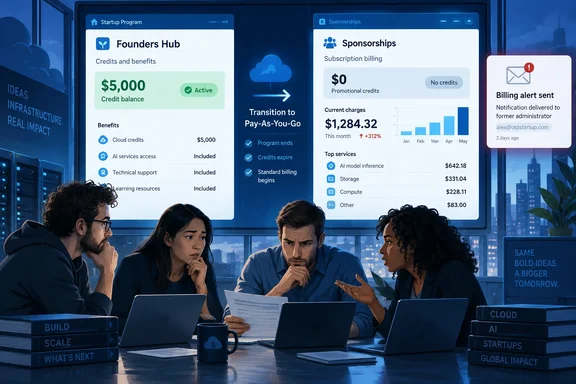
Microsoft’s documentation confirms the underlying financial mechanism: an exhausted startup sponsorship can convert automatically to paid service so that workloads keep running. But its documentation also describes different enrollment experiences, including a newer starter-credit flow with spending protection. The practical lesson needs those boundaries intact: the reported incident concerns a particular sponsorship account, not a newly established rule that every Azure credit offer automatically becomes chargeable.
Founders Hub showed credit while Azure Sponsorships showed zero
The customer described by The Register had been directing workloads to Azure on the understanding that Microsoft for Startups credits would cover them. The company supplied the publication with a screenshot of the Microsoft for Startups portal, also known as Founders Hub, showing a healthy remaining balance.
In the Azure Sponsorships portal, however, the balance was zero. The credits had been exhausted in August, and approximately $16,000 in charges had accumulated beginning August 17. Most of the spending was attributed to AI workloads, although the report did not identify particular models, services, or regions.
That chronology makes this more consequential than a cosmetic dashboard discrepancy. A remaining-credit figure informs a purchasing decision: whether to run another experiment, continue a deployment, or send additional work to a particular cloud. In this case, the customer said it continued directing work to Azure because the program dashboard showed credits remaining. The spending decision and the system collecting payment were operating from different figures.
In an email shared with The Register, a Microsoft for Startups representative identified the problem as an “ongoing synchronization issue between backend systems.” The representative said engineering was working on a resolution but provided no estimated completion time. The Azure Sponsorships balance was described as accurate, and the representative warned that further usage could be billable because the sponsorship credits were exhausted.
The report also describes a separate administrative failure: the credit-exhaustion notification went to a former administrator, despite the customer having transferred account ownership. The available evidence does not establish a technical connection between that recipient problem and the balance mismatch. They nevertheless compounded one another operationally: the company saw reassuring information in a portal while the warning reached someone who had left.
As of the report’s publication, there was no established refund or waiver decision. The customer said it had been told that only the Startups team could grant an exception. The Register also said Microsoft had requested until September 21 to investigate its inquiry, but that deadline passed without further comment. The reported $16,000 therefore remains a customer billing dispute with an acknowledged display problem, not a confirmed reimbursement or a publicly quantified service-wide incident.
Azure sponsorship exhaustion can change the payer without stopping the work
Microsoft’s startup billing guidance explains why a stale balance can become expensive. For the sponsorship arrangement it describes, consuming all available credits automatically converts the subscription to pay-as-you-go. Services continue, but subsequent usage becomes the customer’s financial responsibility. Microsoft’s general startup FAQ describes continuity of service as the reason for that transition.
The same usage guidance says sponsorship credits are consumed at pay-as-you-go rates. In that documented arrangement, the critical change is who funds the consumption. Before exhaustion, eligible consumption reduces the credit allocation; after conversion, it contributes to a paid bill. A workload can therefore continue functioning while its financial status changes underneath it.
Microsoft also says the payment card used to activate the Azure account is automatically charged each billing period for the preceding month’s usage after the credits are used. That creates two distinct checkpoints for administrators: when consumption becomes billable and when payment is collected. Waiting for an invoice or card transaction means waiting until some of the financial exposure has already occurred.
There is an important scope boundary. Microsoft’s activation guidance separates customers who joined before May 29, 2026, from those joining on or after that date. In its newer account-creation flow, Microsoft describes an initial $1,000 credit allocation with spending protection enabled by default, and says the card will not be charged unless the customer exceeds those credits and chooses to move to pay-as-you-go. Its sponsorship usage guidance and broader FAQ describe automatic conversion when sponsorship credits are exhausted.
Those statements apply to different documented flows and should not be flattened into a universal Azure billing rule. The reported customer’s enrollment date and exact offer configuration are not supplied. For another startup, the relevant check is the actual subscription’s offer and billing status, together with the protections applicable to that account—not a general assumption based on the words “startup credits.”
This is also why changing the payment method would not resolve the underlying information problem. Microsoft provides payment-management options, but the reported failure occurred earlier: billable consumption accumulated while a program dashboard still appeared to show sponsorship funding. Reconciling credit availability and subscription status is the decision point that matters.
Microsoft’s portal split makes reconciliation an operational task
Microsoft’s “Understanding Azure Usage and Billing” guidance explicitly assigns different roles to its interfaces. For startups that joined before May 29, 2026, the Microsoft for Startups portal provides a quick snapshot of remaining credits. The Azure portal provides more detailed usage information, including resource name, resource type, region, and cost. Newer participants are directed toward the Azure portal experience.
A snapshot is useful for a quick decision only when it agrees with the underlying financial records. In the reported incident, the sponsorship interface exposed the exhausted balance while the program interface continued displaying available credits. That supports a specific precaution: when the figures conflict, stop treating the favorable number as sufficient authorization for further spending and reconcile the account.
The available interfaces answer related but different questions:
| Interface or view | What Microsoft’s documentation or the reported incident establishes | What to use it to check |
|---|---|---|
| Microsoft for Startups / Founders Hub | Provides a remaining-credit snapshot for the older program experience; showed the disputed balance in this incident. | Whether the program view agrees with the account’s other billing information. |
| Azure Sponsorships portal | Showed zero remaining credits in the reported case and was identified as accurate by the Microsoft representative. | The sponsorship balance for the relevant account. |
| Azure usage and charges | Provides resource-level usage detail, including resource type, region, and cost. | Which resources are consuming funds and how much usage is accumulating. |
| Azure billing profiles | Provides access to invoices and payment methods. | Which billing profile is receiving charges and what payment information is attached. |
For an account reconciliation, Microsoft’s usage guidance gives the Azure portal path Cost Management > Billing > Usage + Charges. Its startup FAQ directs customers to Cost Management + Billing > Billing profiles for invoices and payment methods. These are documented destinations, but the available billing views depend on the account’s configuration and access; they should not be treated as interchangeable screens displaying the same number.
A useful reconciliation needs more than two screenshots with different balances. The administrator should establish that the records concern the account and subscription receiving the startup benefit, then compare remaining sponsorship, recorded usage, current billing status, and any invoice. Microsoft’s FAQ specifically identifies usage in a different billing profile or account as one reason charges can appear while credits remain elsewhere.
The personnel change deserves a separate check. The customer’s account-ownership transfer reportedly failed to ensure that the exhaustion notification reached a current employee. The exact recipient-setting mechanism is not documented in the report, so there is no supported universal toggle to prescribe. Administrators can still make the handover requirement explicit: confirm the current recipient of billing and credit-exhaustion communications, rather than assuming an ownership change updated every contact record.
Microsoft Foundry eligibility is a second check, even with a positive balance
A correct credit balance still leaves another question: whether the intended service is eligible to consume it. Microsoft’s startup FAQ lists three reasons a customer might be charged despite having credits: the service is excluded, the credits have been exhausted, or usage is occurring in a different billing profile or account.
For AI deployments, Microsoft’s “Sponsorship Coverage for Foundry Models” guidance draws the boundary around the seller and billing arrangement. Startup sponsorship covers models sold and billed directly by Azure. Models sold through partner arrangements or billed through Azure Marketplace are excluded under that guidance. Being discoverable or deployable through Microsoft Foundry is therefore insufficient to establish sponsorship eligibility.
Microsoft provides a concrete starting point in the Foundry portal: the “Direct from Azure” collection, which identifies models hosted and billed directly by Azure and eligible for sponsorship credits. Its guidance also warns that model availability and billing characteristics can change. The relevant decision is whether the particular model offering is eligible under the account’s sponsorship, not whether the model appears somewhere in Microsoft’s catalog.
A separate incident illustrates that boundary. In March 2026, The Register reported that startup founder Riyaj Shaikh incurred several thousand dollars in charges after assuming his startup credits covered Anthropic products accessed through Azure. That was a coverage dispute, distinct from September’s conflicting credit balances; it provides no evidence that the September customer used Anthropic or encountered the same problem.
For a team evaluating AI workloads, the two checks belong alongside each other: whether sponsorship funds remain and whether the intended consumption qualifies. Neither answer substitutes for the other. A positive balance cannot fund an excluded service, while an eligible service can become a paid expense once its sponsorship is exhausted.
The September report attributes most of the customer’s charges to AI work but does not identify the products involved. Its supported explanation remains the exhausted sponsorship and the portal synchronization problem. Model eligibility is an additional planning check for readers, not an alternative diagnosis of this customer’s bill.
What this means for Microsoft for Startups customers
Customers currently relying on sponsorship credits should reconcile their account before increasing consumption, especially if they use the older Founders Hub experience or have recently changed administrators. The aim is to establish a consistent picture of funding, usage, billing, and notification ownership—not merely to find another screen displaying a reassuring balance.
Start with the account and subscription that received the benefit. Compare the Microsoft for Startups snapshot, where applicable, with the sponsorship balance and Azure usage detail. Then examine the subscription’s current billing status and the relevant billing profile. A successful check should leave the team able to explain both the remaining credit figure and any recorded charges; a continuing mismatch calls for support escalation.
For billing problems, Microsoft’s usage guidance directs customers to Help + Support in the Azure portal. Its general startup FAQ says program requests should be submitted through the Azure portal using Get Program Support under the Your Microsoft Team tile. Program Support’s documented remit includes billing-profile issues, entitlement corrections, and portal-access problems. Older program guidance also describes a Founders Hub support route through the question-mark menu and Submit a Support Ticket.
Those routes establish how to raise the problem, not a guaranteed outcome. In the reported case, engineering’s acknowledgment of a synchronization issue did not establish that the charges would be waived. The customer’s report that only the Startups team could approve an exception should likewise be understood as the handling of that case, not a published entitlement to a refund.
A practical escalation should keep the discrepancy concrete: which portal displayed which balance, when it was observed, which subscription incurred the usage, and when paid billing began. Preserving the conflicting screenshots and relevant correspondence is a sensible way to document the dispute; the September customer’s screenshot and Microsoft email were central to the reporting. This is evidence preservation, not a documented promise that a particular submission will secure a credit.
The most useful checks are:
- Compare the Founders Hub balance with the Azure Sponsorships view and Azure usage records before relying on it to fund additional workloads.
- Confirm whether the relevant subscription remains sponsored or has entered pay-as-you-go billing, and distinguish legacy sponsorship behavior from the newer starter-credit flow.
- Review usage and invoices under the correct account and billing profile, because credits in one account do not automatically explain charges in another.
- After an ownership or staffing change, confirm who actually receives billing and credit-exhaustion notifications.
- For Microsoft Foundry deployments, verify sponsorship eligibility for the specific model offering as well as the remaining credit balance.
- Escalate conflicting balances through Azure billing support and Microsoft for Startups Program Support, retaining the evidence without assuming charges will be reversed.
Microsoft’s automatic sponsorship transition is designed to preserve service continuity, but that convenience makes accurate balances and correctly routed warnings part of a customer’s financial controls. The reported company kept its Azure workloads running while the funding behind them changed, and the favorable portal display concealed the decision it needed to make. Until the discrepancy is resolved for an affected account, further spending decisions need to rest on reconciled sponsorship and billing records—not the most optimistic dashboard.
References
- Register reader hit with surprise bill after Microsoft portals disagreed The Register · 2026-09-22T13:00:00+00:00
- Understanding Azure Usage and Billing | Microsoft Learn learn.microsoft.com
- Microsoft startup credits are the gift that keeps on billing theregister.com