

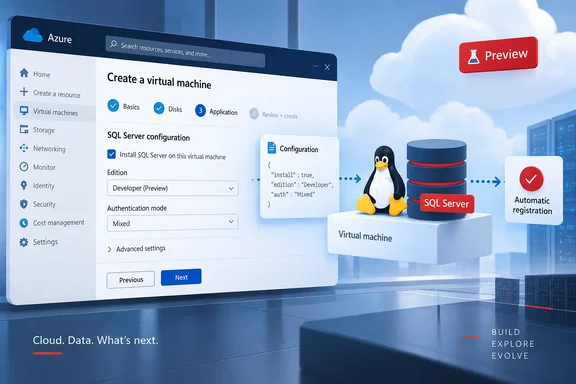
Microsoft's SQL team also mentioned the release in its SQLCon/FabCon Europe 2026 recap. The Azure SQL Dev Corner blog said a script-based provisioning experience (preview) enables flexible and customizable SQL Server deployment experience for Linux Azure VMs, alongside the news that the bulkadmin role now works on SQL Server on Linux.
How we got here: the images went away first
The removal came before the replacement. On September 29, 2025, Microsoft's SQL Server Blog announced that Microsoft-published Linux SQL Server images would be removed from Azure Marketplace. After that, these SQL Server on Linux images will no longer be visible in the Azure SQL hub during VM provisioning, nor accessible via CLI, Azure Portal, or PowerShell scripts.
Microsoft's stated reason: "We're transitioning away from image-based provisioning to a script-based model that offers greater flexibility, automation, and control." In the meantime, Microsoft said that VMs deployed using the SQL on Linux Azure marketplace images in the past they'd continue to work. For new deployments, it said manual installation was the recommended path.
Neowin covered the change at the time and noted that existing images were the standard for easy and quick deployment of SQL Server on Linux in Azure. For about a year, teams deploying new Linux SQL VMs had to create the VM themselves, install SQL Server themselves, and register the extension themselves.
Section summary: The image-based path was retired in late 2025. The script-based portal deployment now in preview is the replacement Microsoft promised back then.
What the preview actually does
Microsoft Learn's overview page for SQL Server on Linux Azure VMs was updated on the same day as the announcement. It says you create a SQL Server on Linux VM through the Azure portal's normal VM deployment flow. You start from a supported Linux base image, and Azure installs and configures SQL Server while it provisions the VM. The page labels this script-based portal deployment as preview. It also confirms that the precreated SQL Server on Linux Marketplace images are deprecated and can no longer be used for new deployments through the portal, the Azure SQL hub, Azure CLI or Azure PowerShell.
Microsoft Learn describes four stages:
- Pick the base. Choose a supported Linux base image and a VM size.
- Configure SQL Server. Enable SQL Server and set the version, edition, features and licensing model.
- Azure installs it. Azure installs and configures SQL Server on the VM during provisioning.
- Azure registers it. The VM is registered with the SQL Server IaaS Agent extension using either pay-as-you-go or Azure Hybrid Benefit licensing.
You can start from the regular Create a virtual machine page or from the Azure SQL hub. Microsoft Learn says both lead to the same guided SQL Server configuration.
The advertised benefits
According to Microsoft Learn, the new flow offers:
- Flexibility and control. You choose the distribution, SQL Server version, edition and features, and you can upload your own
mssql.conffile to customize SQL Server's configuration. - Faster access to new versions. New Linux versions and Azure capabilities can arrive without waiting for Microsoft to publish a new Marketplace image.
- Automatic registration. Every VM is registered with the SQL Server IaaS Agent extension by default.
- Guided configuration. The portal only shows valid combinations of OS, SQL Server version and licensing.
The mssql.conf upload is probably the most useful of these for experienced DBAs. With the old images you took Microsoft's defaults and then tuned the box afterward. Being able to supply your own configuration file at deploy time lets you standardize settings across a fleet without a separate post-deployment step.
Supported distributions, and the one that's missing
Microsoft Learn lists the distributions supported by the portal deployment:
| Distribution | Supported versions |
|---|---|
| Red Hat Enterprise Linux (RHEL) | RHEL 9, RHEL 10 |
| Ubuntu | 22.04, 24.04, 26.04 |
Microsoft says it will add later versions automatically as they become supported.
SUSE Linux Enterprise Server is not supported. Microsoft Learn says the portal deployment doesn't support SLES, and anyone who wants SQL Server on SLES has to create a SLES VM and install SQL Server manually. The 2025 announcement had said the new model would let customers choose their preferred supported Linux distribution (RHEL, SLES or Ubuntu (Pro)), so SLES shops get less at this preview stage than they were led to expect. The documentation doesn't say whether SLES support is planned.
Section summary: RHEL 9/10 and Ubuntu 22.04/24.04/26.04 are covered. SLES still requires a manual install.
Why automatic IaaS Agent registration matters
The automatic registration with the SQL Server IaaS Agent extension is easy to overlook, and it's one of the more practical parts of the release. When people installed SQL Server manually, they often forgot to register the extension afterward.
Registration has a real effect. Microsoft's Linux extension documentation says registering creates the SQL virtual machine resource within your subscription. This resource is separate from the virtual machine resource. The extension simplifies SQL Server license management, and allows you to quickly identify SQL Server VMs with the Azure Hybrid Benefit enabled, and there's no extra cost for using the extension.
If a VM isn't registered, licensing and Hybrid Benefit reporting can be hard to see. For anyone who has to answer licensing-compliance questions, having Azure handle the registration step is a real improvement.
The manual path hasn't gone anywhere
The preview doesn't replace hand-built deployments. Microsoft Learn still documents the manual route:
- Provision a Linux VM on Azure.
- Install SQL Server on Linux.
- Register the VM with the SQL IaaS Agent extension to enable management features.
This is still the only option for SLES. It's also the obvious choice for teams whose infrastructure-as-code pipelines already handle installation their own way.
A few caveats before you roll this out
It's a preview. Azure Updates defines "In preview" as available to all Azure customers for non-production use and testing. That's a general label, not a feature-specific support agreement, but the message is clear: test it before you build production on it.
"Script-based" currently means the portal. The Learn documentation describes the preview as an Azure portal deployment experience. The 2025 announcement also talked about customizing deployment parameters through scripts and ability to add VM extensions. The current documentation doesn't list a standalone script, Azure CLI parameters, Bicep or ARM templates, or PowerShell cmdlets for this preview. If your deployments run through a pipeline rather than the portal, don't assume you can automate this flow until Microsoft documents a way to.
Some details are still undocumented. The materials reviewed here don't cover regional availability, whether the flow configures storage layout or networking (NSG rules, guest firewall ports), or whether it can update existing VMs rather than only deploy new ones. Test these yourself instead of assuming them.
Watch subscription billing if you use RHEL. This isn't specific to the preview. A long-standing Azure FAQ warns that RHEL and SLES virtual machines require a subscription with no spending limit and a verified payment method. Anyone testing RHEL-based SQL VMs on a trial or credit-limited subscription should check that before clicking Create.
A practical test plan
If you run SQL Server on Linux in Azure, here's a reasonable way to evaluate the preview:
- Use a non-production subscription or resource group, as the preview terms require.
- Start from the Azure SQL hub or Create a virtual machine, pick RHEL 9/10 or Ubuntu 22.04/24.04/26.04, and select a VM size.
- Enable SQL Server and set version, edition, features and licensing. If you have a standard configuration, upload your own
mssql.conf. - After deployment, confirm registration: a separate SQL virtual machine resource should appear next to the VM resource, with the license type you chose.
- Compare against your manual build: check networking, firewall rules, storage placement and any post-install hardening your team usually applies, and note what the flow didn't do.
- Keep the manual runbook for SLES and for any pipeline-driven deployments.
The bigger picture
Microsoft's approach with prebuilt Marketplace images was always a compromise. Each combination of distribution, SQL version and edition had to be built, patched and republished, and customers waited for that cycle. Moving to "plain base image plus automated install" puts Linux SQL VMs on the same footing as the distributions themselves: when a new Ubuntu or RHEL release reaches Azure, SQL Server support can follow without waiting for a new image.
The drawback was the year in between, when Microsoft had removed the images and the replacement hadn't arrived. That gap has now closed, at least in preview, for RHEL and Ubuntu. SLES users are still waiting, and teams that deploy from code rather than the portal will want to see documented CLI or template support before this becomes their default.
References
- (In preview) Public preview: Script-based deployment for SQL Server on Linux Azure VM Azure Updates · 2026-09-29T17:52:59Z
- SQL Server on Linux virtual machines FAQ | Azure Docs docs.azure.cn
- Microsoft to remove crucial SQL Server on Linux VM images, forcing temporary manual installs - Neowin neowin.net