

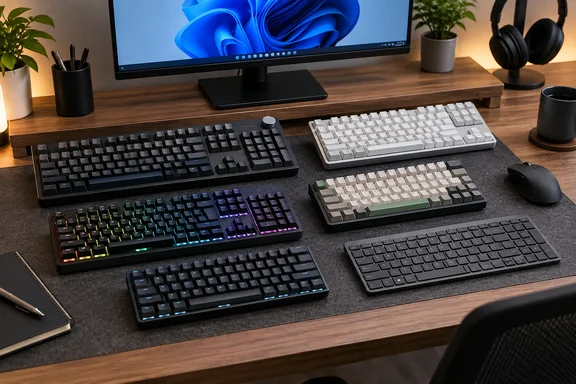
Buying guides like this carry retailer links and deal widgets, so the useful part is the reasoning, not the "buy now" buttons. Below are the picks, what each one is good at, where each one falls short, and the claims worth checking before you buy.
The Six Picks at a Glance
| Category | Keyboard | Layout | Headline strengths | Stated drawbacks |
|---|---|---|---|---|
| Best overall | Keychron V6 Max | Full-size | Pre-lubed switches, hot-swap, OSA PBT keycaps, volume knob | Heavy, not silent, pricey vs rivals |
| Best budget | Keychron K8 Ultra 8K | Tenkeyless | Bluetooth, 2.4GHz and USB-C; hot-swap; metal frame | Thick, heavy, tall off the desk |
| Best gaming | Razer Huntsman V3 Pro | Full-size | 8,000Hz polling, analog optical switches, Rapid Trigger, Snap Tap | Expensive |
| Best for work | Epomaker P65 | 65% | CNC aluminum case, gasket mount, dampening, tri-mode | Two switch options, limited software |
| Best mini | SteelSeries Apex Pro Mini Gen 3 | 60% | Hall effect magnetic switches, adjustable actuation | No F-row, numpad or nav keys |
| Best for Mac | Logitech Signature Slim K950 | Low-profile | Connects to three devices, Mac legends, Logi Options+ | Runs on AA batteries |
Summary: Four of the six are mechanical or magnetic boards for enthusiasts. The Logitech is the only conventional office-style keyboard. TechRadar says each pick was used as a tester's main keyboard for at least a week.
Best Overall: Keychron V6 Max
The V6 Max is a full-size mechanical board with a numpad and a volume knob. It gets the top spot for three reasons: pre-lubricated switches, a hot-swappable PCB, and good sound. The PCB takes 3-pin or 5-pin MX-style switches, so you can pull switches out with the bundled tool and put in new ones without soldering.
TechRadar's spec box lists Keychron K Pro Red, Blue and Brown switches, double-shot PBT keycaps in the OSA profile, south-facing RGB lighting, and 1000Hz polling. The board also has screw-in stabilizers, which are easier to service than clip-in ones, plus a silicone pad and sound-dampening foam inside its ABS plastic case.
Two things to check before you buy:
- Price. The guide says the V6 Max costs "under $100." Keyboard prices change often and Keychron runs frequent sales, so check the current listing rather than relying on a figure from a buying guide.
- Switches. The review configurations used K Pro switches. Keychron's current range has changed and now includes newer V6 8K and V6 Ultra 8K models, so make sure the product in your cart is the one TechRadar tested.
The listed downsides are weight, noise and price. None of them is a surprise for a full-size mechanical board.
Best Budget: Keychron K8 Ultra 8K
This is a tenkeyless board, meaning a full layout without the numpad, with three ways to connect: Bluetooth, 2.4GHz wireless and wired USB-C. TechRadar's reviewers say they switched between a work laptop, a tablet and a desktop without re-pairing problems. For someone with a work laptop and a home PC on one desk, that is the main selling point.
It also has hot-swappable switches and a full metal frame that the reviewers say doesn't flex. The guide lists the downsides too:
- The metal chassis is heavy and thick, so the keys sit high off the desk.
- That height can be uncomfortable during long sessions without a wrist rest.
- It isn't quiet, particularly with some switch types.
In TechRadar's view, going cheaper means "serious compromises." That's a fair point, but "budget" here still means a hot-swappable wireless metal board. People used to $20 membrane keyboards may not see it as budget at all.
Best Gaming: Razer Huntsman V3 Pro
The guide describes the Huntsman V3 Pro as having 8000Hz polling, Razer Analog Optical Gen-2 switches, Snap Tap and Rapid Trigger mode. Those specs match the model Razer sells as the Huntsman V3 Pro 8KHz. Keep the naming in mind when shopping, because Razer sells several V3 Pro sizes and versions.
According to Razer, the 8KHz model features true 8000 Hz polling rate via HyperPolling technology. Additionally, it now includes lubricated switches and thick dampening foam for an optimized keystroke feel and enhanced acoustics. Windows Central's review lists 0.1-4.0mm actuation, 40g actuation force, 100 million keystroke lifespan, textured double-shot PBT keys, N-key rollover w/ anti-ghosting, pre-lubed stabilizers, 8,000Hz polling rate. It connects only over a detachable USB-C cable.
Setup is done in Razer Synapse on Windows. Polling rate can be adjusted in Razer Synapse. Ensure the selected polling rate is 8000 Hz. For Snap Tap, the keyboard can save up to 4 pairs of assigned keys for Snap Tap. Choose your preferred keys via Razer Synapse. In practice:
- Install Razer Synapse on your Windows PC and connect the keyboard.
- Check the polling rate. Razer's own guidance tells you to confirm it is set to 8000Hz, so don't assume the board ships that way.
- Assign Snap Tap key pairs, for example opposing movement keys, in Synapse.
- Change Rapid Trigger and actuation depth with the dedicated dial or in the software.
Is the latency advantage real? Razer says the board has 0.58ms latency and is 11% faster than its nearest rival. TweakTown pointed out that the company doesn't say which keyboard it's comparing performance to. Output Lag put it more bluntly: those advantages exist almost entirely on paper for the overwhelming majority of players who will buy it. The reviewer still liked the keyboard a lot.
Two other caveats matter. TurboVS notes that the board has no hot-swap support or open-source firmware, and that Mac users will find limited out-of-the-box support. Price is the other one. Windows Central listed it at $249.99 at Best Buy, and TweakTown reported the range starting at $219.99. TechRadar lists price as the main drawback, which is fair.
Best for Work: Epomaker P65
The P65 is a 65% board, which keeps the arrow keys and drops the numpad and function row. It has a CNC-machined aluminum case, a five-layer gasket mount with dampening, and pre-lubed switches: Zebra (listed as tactile in the guide) or Wisteria (linear). It connects over USB-C, Bluetooth and 2.4GHz, and TechRadar's long-term testing found no stutters or dropped connections when switching between devices.
The guide says a tester typed at 129 WPM with 97% accuracy on the P65. That's one person's typing test, not a benchmark, and buying this board won't make you faster by itself.
The guide lists the drawbacks honestly:
- Only two switch options.
- QMK/VIA support exists, but the software is less capable than some rivals', so heavy remapping and macro work may feel limited.
What to weigh: the guide recommends the P65 for shared workspaces because of its "muted" sound. How loud a keyboard sounds is subjective, and a dampened mechanical board is still a mechanical board. If your coworkers already complain about your typing, lower your expectations.
Best Mini: SteelSeries Apex Pro Mini Gen 3
This is a 60% board with no function row, numpad or dedicated navigation keys. You get those through Fn combinations. What you gain is desk space for your mouse, which matters for low-sensitivity FPS players, and a keyboard that fits easily in a backpack.
TechRadar chose it because it doesn't give up performance for size. It uses magnetic Hall effect switches with adjustable actuation. The downside comes from the format: if you use Excel all day, relying on Fn layers for F-keys and navigation will get old quickly. Try the layout before you buy it.
Best for Mac: Logitech Signature Slim K950
The K950 is the only pick for people who don't care about mechanical switches. It's low-profile, pairs with three devices at once (for example a Windows PC, a Mac and an iPhone), and switches between them with dedicated keys. The guide says it has Mac-specific legends and supports macros and hotkeys through Logi Options+.
For Windows users with a mixed setup, the three-device pairing is the main reason to consider it. It runs on AA batteries, which some people will see as a downside and others won't notice. TechRadar puts it under $100.
How to Choose: Reading Past the Rankings
The guide's own FAQ says there's no objectively right answer on mechanical versus membrane keyboards. Mechanical switches can help accuracy through tactile feedback and more key travel, while membrane keys need less force to press. My own checklist, based on general industry practice rather than TechRadar's testing:
- Layout first. Full-size if you use the numpad, TKL or 75% for a balance, 60% only if you're comfortable with Fn layers.
- Connections. Tri-mode boards (Bluetooth, 2.4GHz and wired) suit multi-PC desks. Competitive gamers usually go wired.
- Polling rate isn't comfort. 8000Hz is a spec, not a measure of ergonomics or build quality.
- Height and wrists. Two of the picks, the K8 Ultra 8K and P65, are described as tall or thick. Budget for a wrist rest.
- Hot-swap compatibility. Check whether the board takes 3-pin or 5-pin switches before buying a set.
- Software on Windows. Synapse, Logi Options+ and VIA/QMK each work differently. Web-based VIA setup can be fiddly.
- Return policy. Typing feel is personal. A week of your own use tells you more than any review.
The Bottom Line
TechRadar's guide is a sensible, experience-based shortlist that admits each pick's weak points. That's more than many "best of" pages manage. Its choices still need some checking. The headline year is out of date, the prices change constantly, and the gaming pick's speed claims are manufacturer figures that independent reviewers have questioned. The keyboard that matters most is the one that suits your hands, your desk and your coworkers' patience.
Which of these would replace the keyboard on your desk right now, and which one wouldn't survive a week at your office?
References
- The best keyboard in 2025: our top picks for typing and gaming - TechRadar TechRadar · 2022-06-29T19:42:57+00:00