

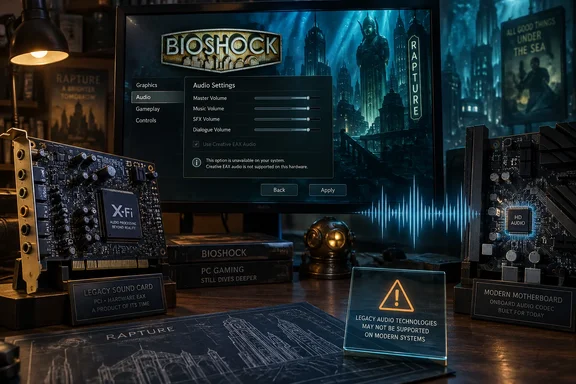
For Windows users revisiting the game, that changes the upgrade question. A better audio output and an implementation that satisfies BioShock’s EAX requirements solve different problems. Buying a new motherboard for better analog audio does not, by itself, restore that legacy interface.
What BioShock is looking for
EAX, short for Environmental Audio Extensions, lets a game describe environmental processing such as reverberation and muffling. These effects help distinguish sounds in different spaces or behind obstacles. According to XDA, Creative’s X-Fi processed those effects on its dedicated audio processor, while BioShock used an OpenAL-based path for EAX 5.0.
There are two separate jobs here. Environmental processing determines how a sound should change within the game world. The analog output stage converts the resulting digital audio into a signal for headphones or speakers. Improving the second job does not automatically supply the software interfaces needed for the first.
BioShock also has to recognize the implementation it is using. Discussion in the OpenAL Soft project’s BioShock issue identifies library routing and EAX capability detection as relevant: merely placing one compatibility DLL in a directory does not necessarily make the game discover or use it. Participants also discuss circumstances in which changing detection behavior makes the EAX option selectable. Those reports establish a compatibility complication, not a universally verified repair procedure.
Consequently, a disabled EAX switch is not a measurement of motherboard sound quality. Equally, making that switch selectable is not, on its own, proof that every intended EAX 5.0 effect is reproduced correctly.
Why Windows Vista explains only part of the problem
The history of missing EAX support often leads back to Windows Vista, but the audio interface used by each game matters.
Microsoft’s DirectX Frequently Asked Questions documents that Vista updated DirectSound for its new audio driver stack, which supports multichannel software buffers. XDA describes the practical legacy-game consequence: the old hardware-accelerated DirectSound3D route was lost, taking hardware-dependent environmental effects with it in affected games.
That does not mean Vista eliminated every route to accelerated audio. According to XDA, OpenAL applications could still use compatible hardware, and BioShock’s EAX path already used OpenAL. Treating BioShock as just another DirectSound3D restoration task therefore starts at the wrong interface.
The compatibility tools serve distinct purposes:
| Component | Role described in XDA’s reporting | Consequence for BioShock |
|---|---|---|
| Creative ALchemy | Translates legacy DirectSound3D calls into OpenAL. | It does not directly solve recognition problems in a game already using OpenAL for EAX. |
| DSOAL | Provides a replacement DirectSound interface, with OpenAL Soft doing the audio processing. | Its relevance to DirectSound3D games does not make it a drop-in fix for BioShock’s native OpenAL path. |
| OpenAL Soft | Implements OpenAL processing in software. | BioShock compatibility still depends on the implementation and the game’s detection behavior. |
This separation is more useful than assuming that one “EAX fix” applies to every older Windows game. The OpenAL Soft discussion corroborates the narrower point that BioShock has implementation and detection details of its own.
It also means a claimed EAX-version ceiling for a DirectSound wrapper should not become a blanket verdict on every software OpenAL configuration. Interface compatibility and successful operation in a particular game both need to be established.
The noise figures do not establish a listening winner
XDA contrasts Creative’s advertised 109 dB signal-to-noise ratio for the X-Fi XtremeMusic with ASUS’s advertised 120 dB figure for the audio codec on the ROG Strix X870E-E Gaming WiFi. The publication says it consulted specifications rather than installing and listening to an old card.
Those numbers therefore remain an attributed specification comparison, not an independently measured head-to-head result. Signal-to-noise ratio describes the relationship between a reference signal and background noise. It does not describe EAX compatibility, and a codec-level specification does not by itself establish the performance of an entire motherboard’s headphone output.
The supported conclusion is narrower than “every new motherboard sounds better.” Modern audio specifications can look strong while a legacy game still cannot access a particular processing feature. Conversely, an old card’s ability to expose that feature does not establish that it will improve ordinary music or other games.
Should you buy an X-Fi for this?
For someone preserving an older PC gaming configuration, a compatible Creative card may have a specific purpose. As a general audio upgrade motivated by one unavailable setting, it is harder to justify.
XDA identifies two purchase constraints for its particular comparison: the original X-Fi XtremeMusic uses legacy PCI, while the ASUS board it discusses provides PCI Express slots; it also reports that Creative’s last software package for those cards targets Windows 10. Neither observation should be expanded into a claim that every X-Fi model has the same connector or that Windows 10 driver targeting proves Windows 11 compatibility.
Before spending money, separate three requirements:
- The exact card must fit the system’s expansion interface.
- The driver package must be suitable for the intended Windows installation.
- The game must recognize the required EAX-capable audio implementation.
The evidence here does not establish a repeatable, current Windows 11 software procedure that fully restores BioShock’s EAX 5.0 behavior. The project discussion is useful evidence of the compatibility work involved, but it is not enough to turn individual DLL or detection experiments into a universal installation guide.
For an otherwise satisfactory modern PC, the grayed-out option alone is insufficient reason to replace onboard audio. BioShock illustrates a genuine preservation problem: older games can depend on interfaces that better analog hardware does not restore. Address that compatibility requirement directly rather than buying audio equipment on noise specifications or age alone.
References
- Your motherboard still can't do one thing a 20-year-old sound card could, and BioShock proves it XDA · 2026-09-21T11:00:16+00:00
- DirectX Frequently Asked Questions - Win32 apps | Microsoft Learn learn.microsoft.com