

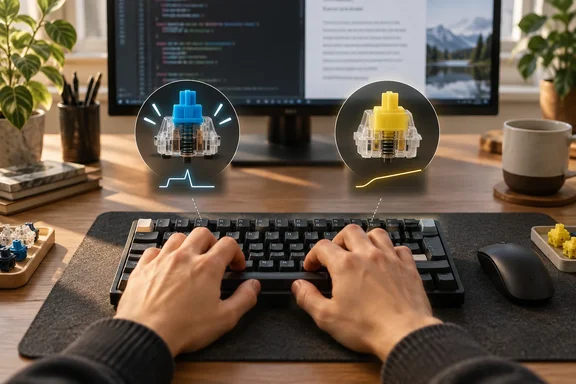
What the writer actually reports
Abidi's account is simple. Blue switches make typing feel like an event. You get a bump and an audible click around the actuation point, so every keystroke comes with physical and acoustic confirmation. He says that feedback made work more enjoyable and made him more deliberate.
Over long sessions, though, he says each press felt segmented. He describes a distinct beginning, middle and end to every keystroke. That was most noticeable in code, where punctuation bursts, repeated keys and constant Backspace use are the norm. He says he sometimes felt he was waiting for one keystroke to finish before starting the next.
He found that yellow linears initially felt like a downgrade. With no bump and no click, he made more mistakes early on, either pressing too lightly or bottoming out too hard. After he adapted, he says the smoothness became the feedback, and he could carry momentum between letters and shortcuts.
Some caveats matter here:
- He reports reaching up to 115 WPM on blues, but gives no test conditions and no matching figure for yellows.
- He says the difference was not dramatic in a short typing test and only became obvious after several thousand words and a few hours of work.
- He has not abandoned blues. He still calls them his favorite, especially for casual writing.
Checking the specs: not as different as you'd think
A common assumption is that linears are lighter and shorter-travel than clickies. The manufacturer figures don't really support that for these two switches.
CHERRY's product page for the MX Blue describes it as tactile and audible, with a click. It lists 60 cN operating force, 2.2 mm pre-travel, 4.0 mm total travel, and a rating above 50 million keystrokes. The same page's properties list a 50 cN actuation force and a 25 cN initial force.
Those two numbers describe different things. 50 cN is the actuation force. 60 cN is the force at the tactile pressure point. Many retailers and guides just call 60 cN the operating force, which is why you see both figures quoted for the same switch. Wikipedia's switch list shows the same split, with 0.50 N actuation force and 0.60 N tactile force for the Cherry MX Blue.
Gateron's own switch guide lists its Yellow as a linear switch. Its figures are not directly comparable in units, because Gateron uses gram-force with a tolerance: 50 ± 15 gf, 2.0 ± 0.6 mm pre-travel and up to 4.0 mm total travel, with no bump.
| Spec | Cherry MX Blue | Gateron Yellow |
|---|---|---|
| Feel | Tactile bump plus click | Linear, no bump |
| Actuation force | 50 cN (60 cN at the pressure point) | 50 ± 15 gf |
| Pre-travel | 2.2 mm | 2.0 ± 0.6 mm |
| Total travel | 4.0 mm | Up to 4.0 mm |
On paper, then, the numbers are close. The practical difference is the mechanism, not a big gap in force or distance. Abidi makes the same point himself: the notable thing is how the force is delivered. A tolerance of ±15 gf also means individual Gateron Yellow switches can feel noticeably different from one another. Colors aren't a universal standard across brands either, so "yellow" can mean different things depending on the maker and the product line. Check the exact switch model before comparing numbers.
What the research says
The studies don't settle this one way or the other, and Abidi acknowledges as much.
A tactile versus linear comparison. A study in the Journal of the Ergonomics Society of Korea compared a tactile brown switch with a linear silent red. Twenty participants did typing tasks. The tactile switch scored statistically better on overall satisfaction, finger fatigue and pleasure, but there was no significant difference in performance. The tested switches were brown and silent red, not blue and yellow, and the abstract doesn't describe anything close to an eight-hour workday. It is still a direct caution against treating one person's result as universal. This study also points to a wrist-rest effect on subjective physical demands.
A five-profile gaming switch study. A Human Factors and Ergonomics Society proceedings paper by Miller and colleagues used 64 subjects in a crossover design. It found that the linear force-displacement curve had higher net strokes and lower net typing speed than two tactile switches. The authors concluded that switches with shorter tactile and operating travel and lower bottom force had the best outcomes overall. That cuts against a simple "linear is faster" story. It also shows that travel and force characteristics matter as much as the switch category.
So the evidence is mixed. One study found no performance gap and a satisfaction edge for tactile switches. Another found a linear profile did worse on typing speed. Neither tested a Cherry MX Blue against a Gateron Yellow directly.
How to test this yourself
Abidi's real lesson is about method. Enjoying a five-minute test is not the same as being comfortable for a full shift. If you're curious, here is a low-risk way to compare. These are practical suggestions, not findings from the cited studies.
- Get a switch tester or a hot-swappable board, so the layout and keycaps stay the same across switches.
- Give each switch real adaptation time. Abidi says he made more mistakes in his first few linear sessions before things settled.
- Test on your actual work: prose, terminal commands, code with lots of brackets and quotes, and shortcut-heavy editing.
- Record speed, error and Backspace counts, and how your hands feel afterward, over realistic session lengths.
- Pay attention to your technique. Heavy typists who bottom out may do better with certain switches than light typists who rely on tactile feedback.
The bottom line
Abidi's "eight hours" framing is his own experience, not a verified ergonomic threshold. The evidence doesn't show that blue switches cause fatigue, that linears prevent it, or that a click causes mental fatigue. What it does support is that switch choice is a fit question. The specs for a blue and a yellow are closer than most people expect, and the differences come down to mechanism and feel. If a keyboard makes you happy and you're comfortable at the end of the day, that counts for a lot. If your hands or focus are fading by mid-afternoon, a quieter and less theatrical switch is cheap to try.
References
- Blue switches feel amazing until you use them for 8 hours straight MakeUseOf · 2026-10-07T11:00:15+00:00
- CHERRY MX BLUE | Clicky and noticeable - Cherry cherry.de
- Granvela Cherry MX RGB Blue Key Switches Plate Mounted Tactile 60g Force Clicky Tactile SwitchesMX1A-L1NA for Mechanical Keyboard, with Switch Puller-10 Pack : Video Games amazon.com