

The word that matters is "all." Layout statuses aren't new. They arrived in the spring, but only for some layouts. This release takes the same control to the rest, and that explains why two official Microsoft pages give different dates for what looks like the same feature.
The date mismatch, explained
Microsoft's 2026 release wave 1 release plan, last updated August 27, 2026, describes a feature called "Control the lifecycle of report layouts." It lists general availability as May 1, 2026, enabled for users automatically. The new roadmap entry says October 2026. Read side by side, the two pages look like a contradiction.
The community coverage from version 28 clears it up. That first version applied only to user-defined layouts. Writing after BC28 reached general availability, Belgian Business Central blogger thinkaboutit.be said user-defined layouts on the Report Layouts page can now be assigned a lifecycle status, and added one important limitation: this applies only to user-defined layouts, not to layouts deployed by apps or extensions. Microsoft MVP Yun Zhu, testing BC28.1, saw the same limit: similar to Edit info, we cannot change the layout status for the layout provided by an extension.
The October item appears in Microsoft's "What's New or Changed" page for Business Central 2026 release wave 2, update 29.0 (still a public preview), under Reporting and data analysis. Its one-line description says you can set status on all layout types to control what end users see. That page says the preview runs from the first week of September until version 29.0 reaches general availability in the first week of October 2026.
So the most likely timeline:
| Milestone | Version | Status applies to |
|---|---|---|
| May 2026 (release wave 1) | BC28 / 28.1 | User-defined layouts only |
| October 2026 (release wave 2) | BC 29.0 | All layouts: Microsoft base app, PTEs, AppSource apps |
There's also some paperwork churn behind the confusion. Microsoft says it stopped publishing Release Plans in September 2026. New Dynamics 365, Power Platform and Dataverse capabilities now go on the AI at Work roadmap, and the 29.0 "What's New" page notes that features are no longer linked to release plans. If you were watching the old Release Planner for wave 2 Business Central news, you were watching the wrong page.
Section summary: May brought statuses for layouts you build yourself. October's 29.0 release brings them to layouts from Microsoft, your partner's PTE and AppSource vendors.
The four statuses
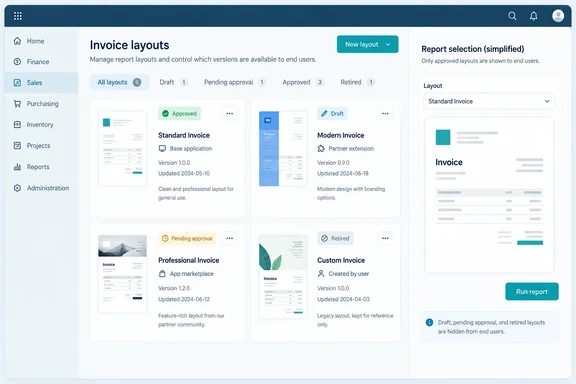
Microsoft's feature documentation lists four statuses: Draft: Layout is under development and not available to users. Pending approval: Layout is awaiting approval. Approved: Layout is approved and available to users. Retired: Layout is phased out and no longer available.
From the version 28 behaviour, community testers have filled in where these statuses show up in practice:
- What users see. In Yun Zhu's testing, the Layout Status field note reads: Only Approved layouts are available for selection on report request pages. ISV Apportunix's changelog adds that a layout set to anything other than Approved will not show up in the report layouts lookup page.
- Who still sees the rest. thinkaboutit.be reports that all other states are hidden from consumers and only accessible to layout administrators.
- How to change a status (in 28.x). This field is not editable. We need to select Actions->Layout Status, and then click on the status that needs to be updated. Those steps come from Zhu's BC28.1 testing on user-defined layouts. Microsoft hasn't published separate steps for setting status on extension layouts in 29.0, so confirm the menu path in your own 29.0 sandbox.
- Default for new layouts. Apportunix says the default status for new user-defined layouts is Draft, aligned with the default behaviour in BC 28.1.
That last point can catch people out. If new layouts start as Draft, someone who builds a layout and wonders why colleagues can't pick it probably has a status problem, not a permissions problem.
Why extension layouts matter
Most of the documents a Business Central tenant actually sends, such as invoices, order confirmations and statements, use layouts that come from an extension. Microsoft's layout documentation says the term "report" includes externally facing documents like sales invoices and order confirmations sent to customers as PDFs. A layout controls which dataset fields appear, fonts, the logo and its position, margins and background images. One report can have several layouts that you switch between.
Microsoft groups layouts by source:
- Extension layouts come from the base application or other providers' extensions. The Extension column on the Report Layouts page shows the extension name and publisher.
- User-defined layouts are added by people with the right permissions. Their Extension column is blank.
- Custom layouts are the obsolete Word and RDLC layouts made on the old Custom Report Layouts page. They're being phased out in favour of user-defined layouts.
Layout type is a separate idea: Word, RDLC, Excel or External. External layouts are usually supplied by partners, and their file format depends on the provider.
Under version 28, an admin who built a polished user-defined replacement for, say, the standard sales invoice could approve it. But the Microsoft-shipped original and any similar layouts from an AppSource app stayed selectable, because statuses couldn't touch them. It's like locking the front door while the back door is propped open with a fire extinguisher. Version 29.0 is meant to close that gap so the approved layout can be the only one users can pick.
Setting a status isn't the same as editing. Microsoft's documentation still says extension layouts can't be modified from the Business Central client: you can't rename them, change their type or upload a replacement. The supported route is to create a user-defined or custom layout based on the extension layout. Microsoft's description says the October feature controls availability. Nothing in it says you can now edit vendor or Microsoft layouts.
Section summary: In 29.0, statuses control visibility for layouts from every source. They don't give you editing rights over layouts you don't own.
What Microsoft hasn't documented yet
Microsoft's release plan pitches the feature as fewer errors, better compliance with internal standards and faster approvals. Those are Microsoft's stated goals, not measured results, and several practical questions remain open:
- Is "Pending approval" a real approval process? The status exists, but nothing published so far links it to Business Central's approval workflows, approver assignment or notifications. Treat it as a label unless your 29.0 testing shows more.
- What happens when you retire a layout that's set as a default? No published source covers default selections, document layouts assigned per customer or vendor, or scheduled jobs that point at a now-Retired extension layout.
- Permissions. The documentation refers to "report layout administrators" but doesn't name the permission sets involved.
- Upgrade behaviour. There's no published guidance on what status existing extension layouts get after the 29.0 upgrade. Approved by default would be the sensible choice, but it isn't documented.
There is an audit angle that already exists. Microsoft's layout documentation says Business Central can send report layout lifecycle telemetry to Azure Application Insights, covering actions such as adding, modifying and deleting layouts, which you can query and alert on with Azure Monitor. The documentation doesn't say whether status changes are logged in that telemetry. If your auditors care, test it.
Practical prep for the 29.0 upgrade
These steps are a cautious rollout plan based on how the statuses are documented to behave. They aren't a Microsoft checklist:
- Test in the preview sandbox first. Microsoft says the 29.0 public preview applies only to online sandbox environments. You can create a new sandbox on 29.0 preview or update an existing one with your extensions installed. Preview sandboxes are deleted automatically about 30 days after 29.0 reaches general availability.
- List the layouts that matter. For each report and customer-facing document, write down which layout is in use, where it comes from (base app, PTE, AppSource or user-defined) and who owns it in the business.
- Approve before you retire. Make sure the replacement is set to Approved before you retire the old one. Otherwise users can end up with nothing to pick for a business-critical report.
- Check request pages as an ordinary user. Admins can see every layout, so admin testing can hide a problem. Run the key reports as a non-admin user.
- Tell your layout builders about Draft. If new layouts start as Draft, as Apportunix reports for 28.1, the people creating them need to know that users won't see their work until it's approved.
- Ask your ISVs. If you depend on AppSource reporting apps or External layouts, check whether the vendor has tested 29.0 status handling. Apportunix, for example, already added the Layout Status field to its own user-defined layouts page and layout packages for 28.1.
The bigger picture
Version 29.0 brings a lot of reporting changes alongside this one: report themes and reusable headers and footers ("composable layouts" that admins can set globally, per company, per report or per layout), new Word add-in design controls including conditional visibility, and financial report changes that are now always recorded in the change log. Taken together, Microsoft is treating document output as something to govern centrally, not something each department maintains on its own.
Lifecycle statuses fit that approach. Business Central partners have long put up with tenants carrying a dozen near-identical invoice layouts called "Invoice_NEW_final_v3." Version 28 let admins sort out the layouts they built themselves. Version 29.0 should let them do the same for everything else on the request page. Just approve the replacement before you retire the old one, or the accounts team will be calling.
References
- Dynamics 365 Business Central: Reporting and data analysis - Control the lifecycle of all report layouts Microsoft 365 Roadmap · 2026-09-30T23:31:03.389585Z
- Control the lifecycle of report layouts learn.microsoft.com
- Report and document layouts overview - Business Central | Microsoft Learn learn.microsoft.com