

October availability needs a qualification
Microsoft’s AI at Work roadmap record, item 573324, labels the feature Launched and lists October 2026 general availability for the web platform in worldwide standard multi-tenant cloud environments.
However, as of October 1, 2026, the inspected Update 29.0 documentation remains explicitly a public-preview page. It describes availability only in Business Central online sandboxes, excludes production and on-premises environments from that preview, and anticipates general availability during the first week of October. The roadmap label should therefore not be treated as confirmation that every production tenant already has the capability.
That distinction matters for administrators planning a reporting change: evaluate against the environment’s actual version and available functionality, rather than scheduling production work around a month-level roadmap date.
What account tracing is intended to clarify
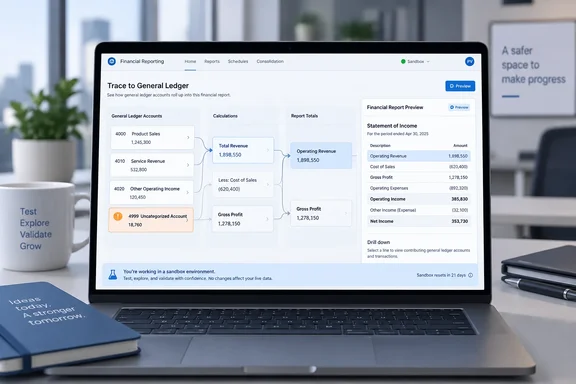
Microsoft identifies three authoring capabilities:
- Find uncategorized accounts.
- Trace account usage and calculations.
- Preview definitions before publishing.
The documentation does not yet supply the new controls’ names, detailed procedures, or the extent of calculation tracing. It also does not establish automatic categorization, correction of mappings, or rollback functionality. Those would be useful additions, but they are not promises supported by this feature description.
The practical significance becomes clearer when looking at how Business Central builds financial reports. Microsoft Learn explains that row definitions specify calculations, while column definitions specify the data used by those calculations. Reports can analyze G/L figures and compare ledger entries with budgets. A suspicious result can consequently require investigation of both the report’s calculation logic and its data settings.
Row definitions can use posting-account numbers or ranges, existing total accounts, account categories, and formulas referencing other rows. Microsoft’s documented examples also allow multiple lines to share a row identifier, with a formula summing that group. Understanding account inclusion alone is therefore not always enough: authors may need to follow how an intermediate value feeds a subsequent total.
Our analysis: the feature’s likely value is making those relationships easier to inspect before a definition reaches report users. That is a reporting-quality improvement, not evidence that the system can certify the accounting logic.
Existing safeguards still matter
There are useful checks authors can perform today without assuming anything about the new tracing interface.
Check dependencies before editing
Microsoft documents an existing Where-Used action, introduced in Business Central 2025 release wave 1:
- On the (Financial Report) Row Definitions page, select the relevant definition.
- Choose Edit Row Definition.
- Choose Where-Used to display the reports that depend on it.
This checks report dependencies; it should not be confused with the new account-and-calculation tracing capability. The existing G/L Accounts FactBox separately shows which accounts a posting-account or total-account filter includes.
Preserve a recoverable definition
Microsoft Learn warns that financial report definitions are not versioned: saving a change replaces the previous definition. Its advice is to copy or export a definition before modifying it. A preview is not a substitute for that backup.
Validate the report’s data settings
Microsoft also cautions authors to use the Options and Dimensions FastTabs for report-data filters—not the general Filter pane, which can cause errors or fail to filter the report data. Sample reports require adjustment to the organization’s accounts, dimensions, categories, and budgets rather than being accepted unchanged.
The takeaway
Account tracing promises a clearer route from ledger accounts to calculated report values. For now, the sensible adoption approach is to distinguish preview from production availability, preserve definitions before editing, and keep dependency and data-filter checks in the review process. Better visibility should make investigation easier; it should not become an excuse to skip validation.
References
- Dynamics 365 Business Central: Reporting and data analysis - Trace G/L account usage in finance reports Microsoft 365 Roadmap · 2026-09-30T23:31:03.389585Z
- Build financial reports using financial data and account categories - Business Central | Microsoft Learn learn.microsoft.com
- What's New or Changed in Business Central 2026 release wave 2 - Update 29.0 preview - Business Central | Microsoft Learn learn.microsoft.com