

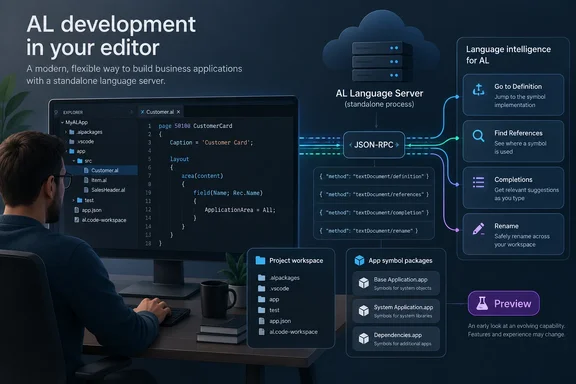
What changes for AL development
Microsoft’s agent-tools overview distinguishes three integration surfaces: tools inside Visual Studio Code, a standalone Model Context Protocol (MCP) server, and the AL LSP server. LSP provides continuous language intelligence, including go-to-definition, references, completions, rename, and type hierarchy. MCP handles discrete operations such as building, publishing, downloading symbols, and retrieving compilation diagnostics. They complement each other rather than being interchangeable.
That distinction matters when choosing an AI coding workflow. An agent’s ability to call MCP tools does not, by itself, establish that it can connect to this LSP server; its host needs an appropriate LSP integration.
Launching the server—and the important catch
Microsoft Learn documents the launch form:
al launchlspserver [<projects>...] [options]
Configure the editor or agent’s LSP host to spawn that command as a child process. Quote each project-folder path. The Business Central Development Tools package supplies the al alias; otherwise, use the full path to altool.exe.
The critical configuration checks are:
- Load all relevant projects. With multiple project paths, ALTool reads their
app.jsonmanifests and resolves dependency relationships. - Provide symbol packages. Full language intelligence requires a reachable cache containing the relevant
.appsymbols. - Do not mistake workspace discovery for cross-project support. Without explicit projects, the server scans the client’s
rootUri, but that fallback does not enable cross-project resolution. - Check diagnostics when startup fails. Settings and workspace files must exist and parse; diagnostic output is mirrored to
stderr.
As a practical acceptance check, try definition navigation and reference lookup across a known project dependency before trusting a workspace-wide rename. That recommendation follows Microsoft’s documented project-loading boundary; it is not a claim of firsthand testing.
Availability needs a careful reading
Roadmap record 573338 lists the feature as Launched, with October 2026 general availability for Worldwide (Standard Multi-Tenant) and a Web platform label. Those are roadmap classifications, not proof that every editor has a ready-made integration. Microsoft also warns that roadmap dates are estimates and can change.
Microsoft’s Business Central update 29.0 overview independently includes this exact standalone-language-server feature. However, that page remains labelled public-preview documentation: its preview scope covers online sandbox environments, not production or on-premises deployments, and it anticipates general availability in October 2026. It corroborates the feature’s release context without establishing a specific rollout day or minimum LSP tool version.
The practical takeaway
The useful advance is access to AL-specific semantic navigation beyond VS Code. Microsoft’s documentation explains that the server understands symbol identity, scope, and dependencies rather than merely matching text. For teams adopting alternative editors or coding agents, that is a stronger foundation for exploring and refactoring AL projects—but it remains dependent on correctly loaded projects and accessible symbols. Better navigation is a tool, not a certificate of correctness.
References
- Dynamics 365 Business Central: Development - Use AL language intelligence from AI agents and other editors Microsoft 365 Roadmap · 2026-09-30T23:31:03.389585Z
- AI Agent Tools for AL Development - Business Central | Microsoft Learn learn.microsoft.com
- ALTool - Business Central | Microsoft Learn learn.microsoft.com