

What the feature does
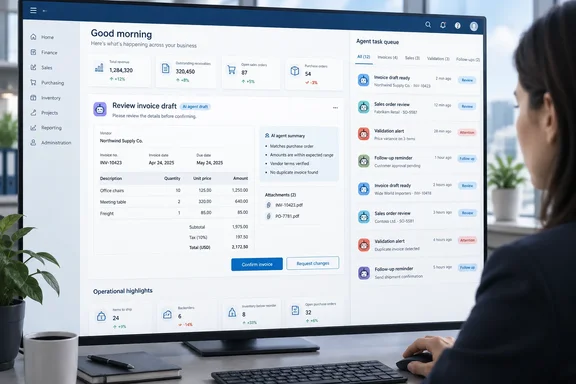
Microsoft says the feature adds a dedicated task pane that shows every task created by Business Central's agents. It's an extra panel you can open from anywhere in the product, so you don't have to go to a particular page or role center to find it. Microsoft gives these examples of tasks that land in the pane:
- Suggestions
- Validations
- Follow-ups
- Access to draft documents
- Other actions started by an agent
From the pane, users can read a task's details, jump straight to the record it affects, complete the task or dismiss it. Microsoft's stated goal is to replace a scattered set of notifications on different pages with one overview of agent tasks across finance, purchasing, sales and operations.
The roadmap metadata lists the product as Dynamics 365 Business Central, the platform as Web, the release ring as General Availability, and the cloud instance as Worldwide (Standard Multi-Tenant). Microsoft's release-plan page says the feature is enabled for "Users, automatically," so admins shouldn't need to switch anything on.
Section summary: This is a consolidation feature. It gives you one inbox for agent-generated work. Microsoft doesn't describe new agent abilities, a new automation engine, or any change to what agents are allowed to do.
Why the October date needs a caveat
The roadmap says the feature reaches general availability in October 2026. Microsoft's own release plan gives an earlier date. In the published list of new and planned features for Business Central 2026 release wave 1, "Manage tasks from all agents in dedicated task pane" is listed as enabled for users automatically, with general availability on Apr 1, 2026. The same Microsoft page says that wave covers features that are planned to release from April 2026 through September 2026.
Microsoft's own housekeeping probably explains the gap. A notice on the feature's Microsoft Learn release-plan page says Release Plans stop being published in September 2026, and new Dynamics 365, Power Platform and Dataverse capabilities move to the AI at Work roadmap from that month. A September 30 roadmap entry for a feature that shipped in April therefore looks like a migration artifact, not a new release. That's an inference. Microsoft hasn't explained the discrepancy directly.
Partner coverage also says the pane shipped with version 28. Dynamics Connect wrote that the dedicated task pane for AI agents is now live, giving users a central place to manage tasks across all active agents in one view. Tigunia's guide lists the feature with an April 1, 2026 GA date and describes it as one that gives administrators and reviewers a single place to monitor agent activity across all active agents. Tigunia also says Update 28.0 started rolling out on May 8, 2026, so when a particular tenant actually got it depends on its update schedule.
Microsoft's roadmap page also warns that its dates are estimates, that everything is subject to change, and that features may be removed once they become generally available. Admins should treat "October 2026" as roadmap metadata, not the day the pane first appeared.
Section summary: Microsoft's release plan dates GA to April 1, 2026, in release wave 1 (version 28). The October roadmap entry most likely reflects Microsoft moving Dynamics features onto the AI at Work roadmap.
How agent review already works
Business Central users could already review agent work before this pane. Microsoft's "Supervise agent activities" documentation, last updated in June 2026, describes two ways to do it.
1. The Tasks pane. The documentation says this pane shows all tasks from a selected agent, sorted by status, with tasks that need attention at the top. The documented steps:
- Select the agent's icon in the upper-right navigation menu (for example, Payables Agent or Sales Order Agent). A red badge with a number shows how many tasks need attention.
- Select a task under Needs Attention to open its timeline, which shows each step the agent completed and the step waiting for your input.
- Select Review for that step. The relevant content opens in the main display area.
- Make changes yourself or type instructions for the agent, then select Confirm so the agent can carry on.
2. Directly on document pages. When an agent creates or changes a document, a data review bar appears at the top of the page. It shows which agent made changes and gives you a Review (N) button for field-level suggestions. A white icon means standard confidence and an orange icon means low confidence. Done marks the review complete and records your name and the date. Dismiss hides the bar so you can come back later.
Microsoft lists two prerequisites: the agent has to be activated, and you need permission to use it. The data review bar still appears if you lack permission for the agent that made the changes, but in that case the links and buttons that open the agent's task aren't shown.
Section summary: Per-agent task review and on-page review were already documented. The new pane adds a cross-agent view on top of them. The current documentation doesn't spell out how the unified pane relates to the per-agent selection flow, so treat the steps above as the existing workflow, not as instructions for the new pane.
Who benefits, and what to check
Microsoft aims the feature at accountants, salespeople and managers who deal with several agents during the day. It says the pane reduces friction, cuts missed tasks and improves throughput. Those are Microsoft's claims about business value. Nobody has published measurements behind them.
Think of an accounts payable clerk handling vendor invoice drafts from the Payables Agent while a colleague confirms sales order drafts from the Sales Order Agent. Each badge can quietly fill up in its own corner of the screen. A shared queue makes it harder for a draft invoice to sit unreviewed until the supplier calls asking where the payment is.
Some practical caveats from partner reporting, which Microsoft's feature entry doesn't confirm:
- Online only. Tigunia says agent features are available only to Business Central online (SaaS) customers. On-premises deployments don't get them.
- Agent costs are separate. ERP Software Blog notes that the Payables Agent runs on consumption-based billing using Copilot Credits, so it is not included in your standard BC license. The task pane itself is listed as automatically enabled, but it can only show work from agents you've actually set up.
- Related controls arrived in the same wave. Dynamics Connect points to a new "Stop all active tasks" action for each agent, useful when an agent stalls after taking in too much at once. Microsoft's documentation warns that stopped tasks can't be restarted and may leave documents for you to finish by hand.
Not yet documented: whether custom agents built with Agent Designer appear in the unified pane, whether the pane can be customized, and exactly how the existing permission rules apply to the combined view. Admins shouldn't assume any of these until Microsoft says so.
The bottom line
This isn't a new launch so much as a roadmap entry catching up with a feature that Microsoft's release plan dates to April 2026. That doesn't make it any less useful. As more Business Central agents arrive, having one queue for their tasks becomes a basic part of keeping humans in charge of the work. The pane makes agent work easier to see, but it doesn't approve anything for you. Someone still has to open each draft and press Confirm or Done.
References
- Dynamics 365 Business Central: Copilot and agents - Manage tasks from all agents in dedicated task pane Microsoft 365 Roadmap · 2026-09-30T23:31:03.389585Z
- Manage tasks from all agents in dedicated task pane | Microsoft Learn learn.microsoft.com
- Guide to Business Central AI Agents (Wave 1 2026) tigunia.com