

What Microsoft is shipping
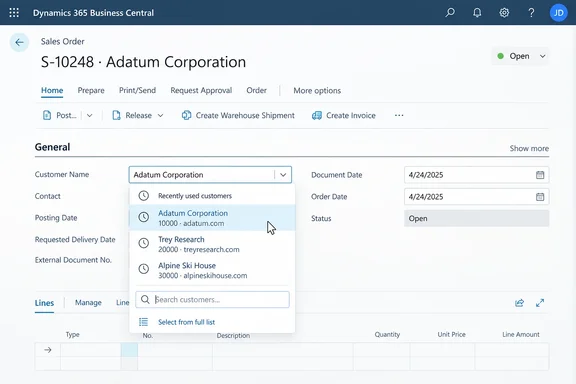
Here's how the roadmap listing describes it. When a user opens a lookup, Business Central shows records that person has recently accessed or worked with, so they can pick the right value without searching. The details:
- Personalized per user: Each person sees suggestions based on their own activity, not a company-wide popularity list.
- No new data collection: Microsoft says the feature uses usage signals the platform already collects.
- Shared engine: It reuses the server-side logic behind Autofill and other recent-record features, which Microsoft says keeps recommendations consistent across Business Central.
- Typical records: Microsoft names customers, vendors, items, projects and dimensions as values users pick again and again during the day.
The roadmap metadata lists the feature as Launched, at General Availability, on the Web platform, for Worldwide (Standard Multi-Tenant) cloud tenants, with a GA date of October 2026.
Section summary: Lookups now open with your own recent records at the top. The feature is web-only, multi-tenant, and lists October 2026 as its GA date.
Which release it belongs to
This feature belongs to the next major Business Central release. Business Central MVP Yun Zhu wrote about it in a post covering the 2026 release wave 2 (BC29) public preview, noting that the public preview for Dynamics 365 Business Central 2026 release wave 2 (BC29) is available. His post links to Microsoft's preview feature details page as the source of the description. Microsoft's own "What's new" page lists version 29.0 (preview) with a September 2026 availability, next to the 28.5 minor update for release wave 1.
The roadmap is now the official place to track this. Microsoft's Business Central "What's new" page says release plans will no longer be published starting in September 2026, and that new Business Central capabilities go to the AI at Work roadmap from that month. So features like this one now arrive as roadmap entries rather than release-plan chapters.
One caveat: the AI at Work roadmap says its dates are estimates and that all information is subject to change. Treat "October 2026" as the planned GA window, not a promise for a specific day in your tenant.
Section summary: This is a BC29 (2026 release wave 2) feature. It appeared in the September preview and is tracked on the new AI at Work roadmap, where dates are estimates.
What the screen should look like
A lookup is the drop-down attached to fields that reference another table. Developer and YouTuber Erik Hougaard describes it as the drop-down that appears when you click on a field, allowing you to select a value from a related table. In current versions, the keyboard shortcut to trigger a lookup is Alt + Arrow Down, and typing in the field works as a search.
The new feature doesn't replace that search. Microsoft's description, as quoted in Zhu's write-up, says users can still browse and search the full list of available records, but the most relevant and recently used entries are immediately available, helping reduce clicks and accelerate common workflows. The existing lookup options stay too. Since BC23, you can choose Select from full list to see every record, and Show details (Ctrl+Alt+Down arrow) opens the related record's card.
In practice:
- Open a document, such as a sales order, in the web client.
- Open the lookup on a reference field like the customer or item (click the field or press Alt+Down arrow).
- Records you've used recently should appear at the top.
- If the value you need isn't there, type to search or choose Select from full list.
That's the whole procedure. Microsoft hasn't documented any switch to turn this on, so don't go looking for a setting that may not exist.
Section summary: Recent records sit on top of the existing lookup. Search, the full list and Show details all still work.
The Autofill connection, and why "AI" doesn't mean an LLM here
The roadmap says this feature shares "server-side intelligence" with Autofill, and the news arrives on an AI-branded roadmap. That might make you expect a language model behind it. Microsoft's Autofill documentation points the other way. Among Autofill's suggestion methods, Microsoft lists a Most Recently Used method: for fields that reference another table, the value is the most recently used reference or the most recently viewed record. Microsoft says this value isn't computed with AI and comes directly from your Business Central data.
That documentation covers Autofill, not the new lookup experience, so it doesn't prove the two behave the same way. Still, it's the best public clue about what the "existing usage signals" are. The safe takeaway: this is personalization built from your own Business Central activity. Nothing in Microsoft's description says generative AI picks your vendors.
Section summary: The shared engine probably resembles Autofill's "Most Recently Used" method, which Microsoft says isn't AI-generated. But Microsoft hasn't confirmed the lookup feature works the same way.
A sibling feature: recent searches in Tell Me
BC29 adds a similar convenience elsewhere. Partner blogger Saurav Dhyani describes Version 29 as introducing two productivity-focused enhancements designed to help users work faster: Recently Searched in Tell Me and Recently Used Records in Lookups. In Tell Me (Alt+Q), the system remembers previous searches and surfaces them for quick access. Together, they suggest Microsoft is working through the small, repetitive steps in daily Business Central use.
What Microsoft hasn't said
The public description is short, and several practical questions are still open:
- How records are ranked, and how many appear.
- How long a record counts as "recent."
- Whether opening a record, selecting it in a field, or either one counts as "use."
- Whether users can clear their history or admins can turn the feature off.
- Whether every lookup supports it, including custom lookups built by extensions with their own lookup code.
- Whether on-premises deployments get it. The roadmap lists only Worldwide multi-tenant cloud.
Expect these answers when Microsoft's BC29 documentation is finalized. Until then, don't promise users details that haven't been published.
What admins and partners should do
From general industry experience, here's the sensible plan:
- Test in a BC29 preview sandbox before go-live, especially if your extensions add custom lookups. Verify behavior there rather than assuming it.
- Tell users suggestions are personal. Two colleagues can open the same lookup and see different lists. That's expected, not a bug, and it doesn't mean one record is "recommended."
- Don't change permissions in response. Microsoft hasn't said anything about the feature's security behavior. A recent-records shortcut shouldn't change what a user can access, but confirm it in testing instead of assuming.
- Watch the roadmap for date changes. Microsoft says roadmap dates can move.
Bottom line
"Show recently used in lookups" is a modest change with a large reach. Lookups are everywhere in Business Central, so shaving a search off each one adds up over a day of order entry. Microsoft's case is plausible but not measured: the company describes faster transactions and less repetitive searching without publishing any numbers. Data-entry staff will likely notice it most. Admins mainly need to test it in a preview sandbox and explain to users why everyone's list looks different.
References
- Dynamics 365 Business Central: User experiences - Show recently used in lookups Microsoft 365 Roadmap · 2026-09-30T23:31:03.389585Z
- Business Central 2026 release wave 2 (BC29): Show recently used in lookups yzhums.com
- Business Central Version 29: Recently Searched in Tell Me and Recently Used Lookups sauravdhyani.com