

The change is listed on Microsoft's AI at Work roadmap as ID 573306. It also appears in the Business Central 2026 release wave 2 (Update 29.0) preview feature list. It is still a planned change, though, and finance teams should keep their current processes until they have tested it.
What Microsoft has announced
The roadmap entry lists the feature as In development, with these dates and targets:
| Roadmap field | Listed value |
|---|---|
| Roadmap ID | 573306 |
| Status | In development |
| Preview availability | October 2026 |
| General availability | January 2027 |
| Release rings | Preview, General Availability |
| Cloud instance | Worldwide (Standard Multi-Tenant) |
| Platforms | Web, Android, iOS |
According to the roadmap description, the feature will:
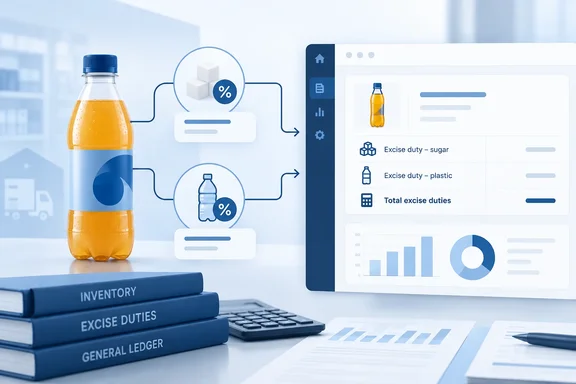
- Let you assign multiple excise duty configurations to the same inventory item. Microsoft's example is a product liable for both plastic tax and sugar tax.
- Calculate all applicable excise duties automatically during purchasing and vendor-related transactions.
- Handle products that are subject to more than one excise levy.
- Reduce the need for manual workarounds, customizations or separate item records created only to represent different tax obligations.
- Make tax figures more accurate and consistent across purchasing, inventory valuation and financial reporting.
Microsoft says the system will add up and apply every excise duty configured for an item, so the amounts are calculated the same way throughout the transaction.
The Update 29.0 preview notes are shorter. They describe the feature as support for multiple excise duties on a single item, to help businesses handle complex excise requirements more accurately. The broader claims about vendor transactions, inventory valuation and reporting come only from the roadmap description, and Microsoft has not yet documented them in detail.
Section summary: One item, several excise duties, calculated together. Preview is targeted for October 2026 and general availability for January 2027, both subject to change.
Why this matters: the current one-tax-per-item limit
Microsoft's current setup documentation states the limit plainly: "You can only assign one excise tax type to an item or fixed asset. You can't combine multiple excise taxes for the same item or fixed asset." Tecman, a Microsoft partner, lists the same restriction in its overview of the feature: "Only one Excise Tax Type can be assigned to an item or fixed asset."
Many real products don't fit that model. A sugary soft drink sold in a plastic bottle can owe one levy based on sugar content and another based on packaging weight. Under the current design, the usual answers were:
- duplicate item records, one per tax obligation
- calculations in spreadsheets outside Business Central
- custom extensions or third-party apps
Duplicate items are the worst of the three. They split inventory, complicate pricing and make reports harder to read. The new feature is meant to let one item record reflect the product's real tax position.
The excise framework this builds on
The multi-duty feature extends the excise tax framework Microsoft added in the 2026 release wave 1 cycle. According to Microsoft's release plan, that framework entered public preview on October 1, 2025 and became generally available on May 8, 2026. The release plan also says the first version did not include compliance or statutory reports. Instead, it provides a configurable calculation framework.
Here is how the framework works today, according to Microsoft Learn:
- Excise tax types. Excise tax types represent the goods or services that you want to register excise tax for. For each excise tax type, you can define a tax basis as weight, sugar content, active content, volume, pure alcohol (ABV), or quantity.
- Rates. You set up excise duty rates for each excise tax type to calculate the final tax amount based on the selected basis and the accumulated excise‑liable quantity.
- Entry permissions. In the Excise Entry Type field, specify the type of document to include in excise tax calculations. Microsoft's feature plan lists Purchase, Sale, Positive Adjustment, Negative Adjustment, Output and Assembly Output as the item ledger entry types that can count toward the excise-liable quantity.
- Effective dates. In the Effective From Date field, specify the date from which you want to calculate excise tax for the item or fixed asset.
- Item and fixed asset cards. On the Excise Tax FastTab of the Item Card or Fixed Asset Card pages, specify the relevant type of excise tax, the unit of measure, and the quantity.
- Journals. Microsoft requires a number series for excise tax journals and a separate journal batch for each excise tax type, such as one for alcohol, one for sugar and one for plastic.
Tecman describes the processing flow: duties can be calculated automatically through Excise Journals, with tax amounts generated directly from Item Ledger entries. The partner also says that CBAM and EPR are not your typical excise tax, but the same tax framework will be used to support the upcoming sustainability and environmental charges. Lifting the one-type limit could therefore help companies dealing with environmental levies as well as traditional excise duties.
Section summary: The engine already supports several tax bases, effective-dated rates and per-type journal batches. What's missing is the ability to attach more than one tax type to a single item.
What Microsoft hasn't explained yet
Several details are not covered in any Microsoft material published so far:
- Setup changes. Microsoft hasn't said how the Excise Tax FastTab on the Item Card will change to hold more than one type, or whether existing single-type setups will migrate automatically.
- Calculation order. It isn't clear whether duties are calculated independently, in sequence, or whether one duty can feed into another's base.
- Rounding and mismatched rate dates. There is no guidance on rounding, or on what happens when two duties on the same item have different Effective From dates.
- Transaction scope. The roadmap description mentions purchasing and vendor transactions. The current framework also counts sales, adjustments and production output. Whether the multi-duty calculation applies to all those entry types is not confirmed.
- Accounting and reporting. The roadmap mentions inventory valuation and financial reporting, but there is no documentation yet on what that means for ledgers or statutory filings.
Third-party apps for this area already exist. Abakion's Duty Reporting app, for example, says it automatically calculates duties when you trade items, and provides an overview of duties to report to the authorities. Companies that rely on such apps should not drop them until Microsoft's built-in version is documented and proven, especially since the first release of the built-in framework did not include statutory reports.
The preview timeline is confusing
Two schedules overlap here. According to Microsoft Learn, the Update 29.0 public preview applies only to Business Central online sandbox environments. It ran from the first week of September until 29.0 reaches general availability in the first week of October 2026. Microsoft deletes preview sandboxes 30 days after 29.0 general availability, which puts that in early November 2026, and a preview environment can't be moved to another version.
The feature's own roadmap dates are a preview in October 2026 and general availability in January 2027. Even if you find the feature in a 29.x sandbox, plan for general availability in early 2027, not October. Microsoft's roadmap notes that all dates are estimates.
There is also a process change. From September 2026, Microsoft no longer publishes Dynamics 365 release plans, and new Business Central features appear on the AI at Work roadmap instead. If you were looking for this feature in the usual release plan, that's why it isn't there.
What finance and IT teams can do now
These are sensible preparation steps based on general practice. Microsoft has not published a deployment procedure for this feature.
- Find the affected items. List products that owe more than one excise duty today and note how you handle them now: duplicate items, spreadsheets, extensions or a partner app.
- Record the tax details. For each affected item, note the basis (weight, sugar content, volume, ABV and so on), the rates, Effective From dates, units of measure and the transaction types that should count.
- Prepare a sandbox. Use a sandbox with realistic data, not production, to test purchasing, adjustments and output for those items.
- Calculate expected results yourself. Work out the duty amounts by hand for each jurisdiction and compare them with what Business Central calculates.
- Check your extensions. If you built a custom extension to work around the one-type limit, read Microsoft's documentation when it appears to see whether the two will conflict.
- Keep your legal and statutory reporting processes. Microsoft has not said this feature produces filings or ensures compliance. Do not assume it does.
The bottom line
This is a small but useful change to Business Central's excise engine. It removes a limit Microsoft itself documents and lets one item reflect a product's full excise position. Firms that handle sugar levies, plastic packaging taxes, alcohol duty or the coming environmental charges will benefit most.
The open questions are how combined duties are calculated, which transactions they apply to and how they affect accounting. Until Microsoft publishes full documentation, treat the feature as something to test in a sandbox, not as a replacement for your current compliance process.
References
- Dynamics 365 Business Central: Finance - Calculate multiple excise duties per item Microsoft 365 Roadmap · 2026-09-30T23:31:03.389585Z
- Business Central feature spotlight: Excise Tax - Tecman tecman.co.uk
- Duty Reporting: Manage Excise Duties and Consumer Taxes abakion.com