

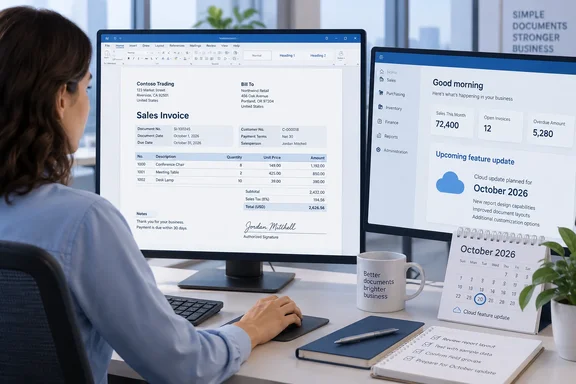
The practical focus is document layout—not new business calculations. For teams maintaining customer-facing reports, the intended benefit is a more guided way to assemble common sections rather than treating every template change as a miniature engineering project.
There is an availability caveat: the item’s exact details were not exposed in the retrieved public roadmap page. Its status and component list therefore remain attributable to the roadmap record, rather than independently confirmed deployment across every tenant. Microsoft also cautions that roadmap dates are estimates and can change. October 2026 is a release month, not proof of an October 1 rollout everywhere.
What the new design controls cover
The roadmap description names five document-report components:
- Addresses
- Field groups
- Amounts
- Signature lines
- Notes
That list establishes the update’s scope, but not each component’s behavior. It does not establish automatic international address formatting, new amount calculations, electronic-signature verification, or rules governing when notes appear.
Microsoft Learn explains that a Word report layout determines how a Business Central report looks when previewed and printed. Authors arrange fields from the report dataset and use Word formatting for fonts, margins, tables, and other presentation elements. The new controls should therefore be understood as layout-authoring tools, not a replacement for the report’s underlying data definition.
The useful distinction: making a field easier to place does not make additional business data available. Microsoft’s documentation describes content controls mapped to fields already supplied by the report dataset.
Related improvements are not the same release
Microsoft’s historical 2026 release wave 1 documentation describes a separate set of Word add-in improvements, with general availability listed for April 1, 2026. Those include better navigation of nested data, field search and filtering, contextual metadata, easier insertion within table cells, and dark-mode support. They provide context for the add-in’s evolution, but do not independently confirm the October design controls.
The same documentation describes a guided Insert Table experience as preview. That workflow lets authors select data sources and columns, configure headings, reorder fields, and include footer content. Its preview designation should not be swept away by the newer roadmap item’s launched status: related features can have different release states.
Prepare a layout without losing its metadata
For teams preparing to use the updated authoring experience, Microsoft Learn documents this existing workflow. The Add Data task pane applies to Business Central 2025 release wave 2 and later.
- In Business Central, open Report Layouts and select the Word layout.
- Choose Actions > Update and Export Layout to download the
.docx. - Open it in Word with the Business Central add-in installed.
- Select Business Central > Add Data, position the cursor, choose a dataset field, and select Add field.
- Save the document, import the modified layout into Business Central, and run the report to test it.
The export action matters. Microsoft warns that Update and Export Layout includes metadata required by the add-in. If Word reports missing layout metadata, re-export through that action rather than rebuilding the document by hand.
Successful editing is not merely a tidy Word file: the imported layout must render the intended report correctly. Microsoft documents importing modified layouts to replace an existing layout or create a new one; built-in report layouts cannot be modified directly.
The practical takeaway
This is a focused usability update for Business Central document-report designers. Its promise is straightforward: common document sections may become easier to construct and maintain.
The sensible approach is equally straightforward: confirm which controls are present in your environment, preserve the layout’s metadata, and validate the rendered output before replacing a production template. Treat signature lines as layout elements unless additional documentation establishes a signing workflow—and keep preview table-building features separate from the October roadmap item’s reported general availability.
References
- Dynamics 365 Business Central: Reporting and data analysis - Design document reports with the updated Word add-in Microsoft 365 Roadmap · 2026-09-30T23:31:03.389585Z
- Get easier editing of document report layouts with the enhanced Word add-in | Microsoft Learn learn.microsoft.com
- Work with Word Layouts - Business Central | Microsoft Learn learn.microsoft.com