

What changed, and what the version number means
Microsoft is aligning the extension's version with the current .NET release. The new version is 11.0, and the previous one was 3.3. That makes the jump a branding alignment as well as a major architectural change. It doesn't mean a .NET 11 SDK is now required. The Marketplace listing currently names the .NET 10 SDK as the requirement, and Microsoft's post doesn't say that changes.
The rework is only available in the pre-release channel for now. Microsoft says 11.0 is available in pre-release. To opt in, install C# Dev Kit, open its page in the VS Code Extensions view and choose Switch to Pre-Release Version. Microsoft says it is working toward a stable-channel release and invites bugs and suggestions on GitHub.
A side effect worth knowing about
A recent GitHub issue in the C# extension repository shows how tightly the pieces are now coupled. A user running C# extension 11.1.32 hit an activation failure. The error said C# Dev Kit version 11 or later was required and told them to switch to the pre-release version of the Dev Kit. If you see that message, the fix is the same pre-release switch described above. It suggests that stable-channel C# Dev Kit users may hit this combination of versions. That is my reading of one issue report. Microsoft hasn't said how common it is.
Faster loads: the numbers
Microsoft measured two open-source solutions and separated two moments in the load:
- Active file ready: completions, diagnostics, Go to Definition and quick fixes work in the file you're editing.
- Whole solution ready: every project has loaded. Language support works everywhere, tests are discovered across the solution, and Find All References spans all projects.
| Solution | Projects | Milestone | Dev Kit 3.3 | Dev Kit 11.0 | Reported gain |
|---|---|---|---|---|---|
| Orleans | 155 | Active file | up to 50.3 s | 0.53 s | up to 95× |
| Orleans | 155 | Whole solution | 50.3 s | 2.3 s | 22× |
| Aspire | 407 | Active file | up to 84.1 s | 0.47 s | up to 180× |
| Aspire | 407 | Whole solution | 84.1 s | 3.0 s | 28× |
The "up to" figures apply only to the active-file milestone. Full-solution readiness improved by 22× and 28×, which is still large. Microsoft doesn't publish the hardware, operating system, cache state or number of runs.
Why it's faster
Microsoft credits three changes.
- Project caches. A project's cache is built the first time it loads. Every later load is served from the cache. The old version rebuilt its understanding of every project each time you opened a workspace.
- Active file first. The extension now loads the active file first and finishes the rest in the background. The old version loaded projects in a fixed order, so wait time depended on where your file fell in that order.
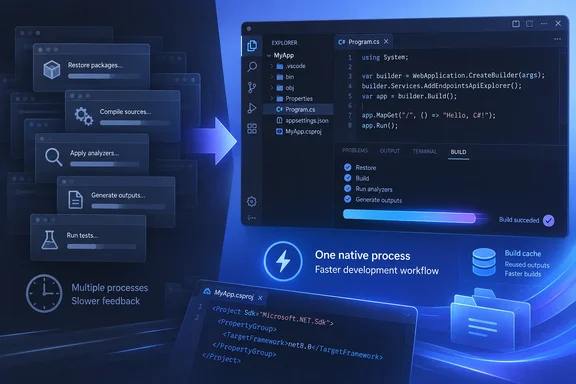
- One native process instead of six. Microsoft says you can commit cache files to version control. Fresh clones and new git worktrees then get fast tooling immediately. The post doesn't explain how cache invalidation works, how big the files are, or which files to commit. Check the project's documentation before changing your repository's contents.
On the process change, Microsoft says the old design launched six managed processes. Each had to pass antivirus checks, load images from disk, do JIT work (reduced by ReadyToRun) and connect to the others. All of that happened before they could answer a question about your code. The new consolidated CSDevKit process is a Native AOT executable with no runtime to load and no JIT on its startup path.
For background, Microsoft's Native AOT documentation says AOT-published apps are compiled to native code ahead of time. It says they don't use a JIT at runtime and generally have faster startup and smaller memory footprints. That supports the logic of the design. It doesn't validate Microsoft's measurements. The same documentation lists Native AOT limits, such as no dynamic loading and no runtime code generation. Microsoft hasn't said how those limits affect the extension.
On Windows, Microsoft's mention of antivirus checks on each process is a plausible factor. Fewer executables mean fewer scans. The post doesn't quantify that share of the gain, so treat it as an explanation and not a measured result.
Faster builds
C# Dev Kit 11.0 adds two features Visual Studio developers have had for some time: fast up-to-date checks and Build Acceleration. Microsoft built the whole 407-project Aspire solution each time.
| Change before build | Dev Kit 3.3 | Dev Kit 11.0 | Reported gain |
|---|---|---|---|
| Nothing | 34.4 s | 0.88 s | 39× |
| One C# file | 36.1 s | 2.1 s | 17× |
Microsoft says it cut the overhead of working out what changed and of copying output files. It cautions that results depend on solution structure and that not every build will improve this much. The best gains come when only a few things have changed, which is the usual case.
This also matters for tests and debugging. Running tests and launching an app both build first, so less build overhead means a faster start.
General MSBuild documentation explains why this works. Incremental builds compare input and output timestamps and skip targets that are already up to date. It's useful background but not a description of the Dev Kit's implementation.
Memory: smaller, with a catch
Microsoft compared memory allocated by the C# Dev Kit server process or processes:
| Solution | Projects | C# files | 3.3 | 11.0 | Reduction |
|---|---|---|---|---|---|
| Orleans | 155 | 4,010 | 1,307 MB | 208 MB | ~84% |
| Roslyn | 398 | 18,153 | 2,000 MB | 379 MB | ~81% |
| Aspire | 407 | 4,686 | 2,072 MB | 316 MB | ~85% |
Memory tracks code size more than project count. Roslyn has fewer projects than Aspire but about four times the C#, and its server uses more memory.
The caveat matters. These figures cover only the Dev Kit server. The Roslyn language-service process and VS Code itself are not counted, and Microsoft says both are largely unchanged. So the savings are real for that component, but your Task Manager total won't fall by 80%. The post also doesn't say whether the figures are peak or steady-state.
New editing tools and the C# Doctor
MSBuild file support
Version 11.0 adds language support for .csproj, .props and .targets files. It offers completions, diagnostics, Go to Definition, quick fixes and semantic highlighting. Specifically:
- Completions for package names and versions, plus properties, items and metadata keys.
- A CodeLens on packages that flags newer versions and versions with known vulnerabilities.
- Go to Definition that can reach into SDK source.
- Diagnostics as you type, with suggested fixes.
Microsoft doesn't say which vulnerability source feeds the CodeLens or how often it refreshes.
C# Doctor
C# Doctor gathers common environment checks in one place. Microsoft lists a missing SDK, a missing runtime, an unavailable target framework, a failed package restore and a package with a known vulnerability. It says the tool guides you to a fix instead of leaving you to piece the cause together from separate errors. The announcement gives no interface details or remediation steps, so I can't describe how it works in practice.
How to evaluate it on your own machine
Microsoft hasn't published its benchmark method, so a quick local test is the sensible check. This is my suggestion, not Microsoft's procedure.
- Pick a solution you know well and note your machine and VS Code version.
- Time the first load on 11.0, which builds the caches, separately from later loads.
- Record time to a working active file and time to the whole solution.
- Time a no-change build and a one-file-change build.
- Compare with 3.3 on the stable channel, using the same steps.
Watch for gaps between your results and Microsoft's. Small solutions may gain less, and caches and antivirus setups differ.
The bigger picture
Microsoft ties the work to agent-based workflows. It says developers need to get in and out of tools quickly and run several instances in parallel. That's a stated motivation and direction. The post doesn't announce a specific multi-instance or agent feature in 11.0. Still, fast cold starts and fast clones are useful whether you're a person or an automated tool.
The future posts will cover the simpler architecture, the Native AOT server, cached project loading and faster builds. Until then, the numbers are impressive but unverified by anyone outside Microsoft. If your solutions are large and slow to load, the pre-release is worth a try on a non-critical project.
References
- A faster, lighter C# Dev Kit .NET Blog · 2026-10-06T17:05:00+00:00
- C# Dev Kit version 11 or later is required. · Issue #9827 · dotnet/vscode-csharp github.com
- C# Dev Kit - Visual Studio Marketplace marketplace.visualstudio.com