

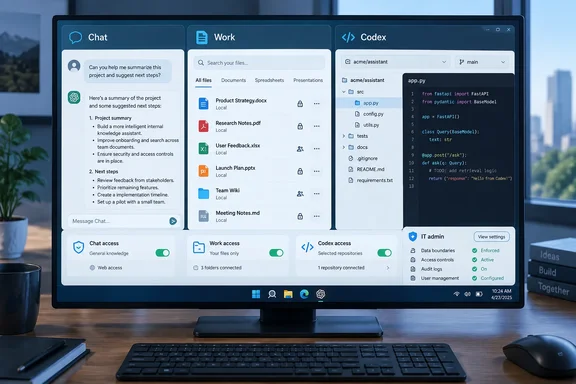
One desktop app, three modes
OpenAI's help documentation describes the split this way:
- Chat is for asking questions, searching, brainstorming, or getting quick conversational help.
- Work is for researching a topic, analyzing information, or creating a document, spreadsheet, presentation, report, or Site.
- Codex is for writing or debugging code, running tests and commands, reviewing changes, or working with a repository.
The packaging is the news for anyone who installs software on PCs. OpenAI says Chat, Work and Codex are available in the desktop app on every plan, including Free, and that the app can be downloaded globally on Windows and Mac. Existing Codex users get the new app through a normal update. After the update it becomes the new ChatGPT desktop app with Chat, Work and Codex, and existing Codex chats and projects should remain.
The older app doesn't vanish. If both stay installed, you'll see ChatGPT (the new app) and ChatGPT Classic (the previous one). Classic continues to receive model updates, bug fixes and security patches. Admins should expect to see both on machines and plan their inventory and patching accordingly.
How Work and Codex behave on a PC
This is where the explainer becomes a practical matter for Windows machines. OpenAI's documentation says:
- Work on web and mobile runs in the cloud. In the desktop app, you pick ChatGPT from the top-left menu and then use the Chat/Work toggle at the top of the page.
- When your plan and workspace allow it, Work in the desktop app can also use local files and desktop apps with your permission. The help page's guidance is to open a local folder or project and grant access only to the files the task needs.
- Local doesn't mean fully offline. OpenAI notes that messages and task context may be stored in the cloud even when work runs locally.
- Codex stays a separate view with its own history. It can work with local folders, repositories, terminals and developer tools.
- Codex Cloud runs coding tasks on OpenAI-managed computers, so tasks can continue while your PC is asleep.
OpenAI's Business release notes add Windows-specific detail for Codex. Computer Use on Windows lets Codex see, click and type in Windows applications. The release notes also describe per-app access controls for Computer Use on Windows. Codex Remote lets users start or continue work on a connected Mac or Windows host from the ChatGPT mobile app, review progress and approve actions from a phone.
That is useful, and it is also a reason to read your endpoint policy before users find it on their own.
Known rough edges on Windows
Early adopters have reported problems on GitHub. One report from a Plus user on Windows 11 Home 25H2 says the Chat/Work toggle is missing in the new ChatGPT Windows app and the app opens Work directly. The same report says that when the Codex/Work quota runs out, normal Chat still works on chatgpt.com but the desktop app becomes blocked. Another report says the Work option is missing from the new-chat screen in the Windows desktop app.
These are user-submitted issue reports, not confirmed OpenAI defects. They do suggest a few things to try if the toggle is missing:
- Update the app. OpenAI's help page says to use Menu > Check for Updates, even after an automatic update notice.
- Check that your plan and workspace actually include Work on desktop.
- Fall back to chatgpt.com for plain Chat if your Work/Codex allowance is exhausted.
Models: don't memorize the matrix
CNET lists a long roster of GPT-5.6 and GPT-6 models. Plan, workspace settings and rollout stage all change what you actually see, so treat any universal list with caution. A few points are verifiable in OpenAI's own material:
- GPT-6.1 Sol, GPT-6 Sol and GPT-6 Luna are models for ChatGPT Work and Codex, not regular ChatGPT conversations.
- OpenAI says GPT-6.1 Sol is available to Plus, Pro, Business, Enterprise and Edu users in Work and Codex, and is not yet available in Chat. Its API pricing is $2 per million input tokens, $0.10 per million cached input tokens and $10 per million output tokens. Those are developer API rates, not subscription prices.
- OpenAI's benchmark claims for GPT-6.1 Sol are the company's own evaluations. OpenAI itself says its factuality test uses deliberately hard prompts that don't represent typical use.
Pricing and the October 29 date
The one date-sensitive change worth flagging comes from OpenAI's Pro-tier help page. Pro 500 is a new $500-a-month plan that includes Astra Ultrafast, and Pro 200 is open to new subscribers again, with a lower usage allowance for new subscriptions. Eligible existing Pro 200 subscribers keep the old allowance through October 29, 2026 while their subscription stays active. Eligibility depends on having had an active Pro 200 subscription between September 22 and 10 a.m. Pacific on September 29, 2026. After that, the plan moves to the lower allowance at the same $200 price. Keeping the old allowance does not give you Pro 500 features.
OpenAI also warns that identical-looking tasks can burn allowance at different rates. Fast mode uses the included allowance at 2.5 times the rate, and Astra Ultrafast at 8 times.
I'm leaving out CNET's figures for the one-time credit grant and its dollar value. I couldn't confirm them in OpenAI's documentation, so treat them as unverified.
Connected apps: the real security boundary
For IT teams, connected apps matter more than model names. OpenAI's help page says apps can let ChatGPT find files, summarize documents, look up messages or take supported actions in another service. Availability depends on the app, plan, region, workspace, role, model and interface.
Several details deserve a place in any rollout checklist:
- Users connect apps under Settings > Plugins. Installing a plugin doesn't replace any account authorization or workspace approval an app needs.
- Permission options may include Always ask, Allow read actions, Allow low-risk actions and, for eligible apps or accounts, Allow all actions. The documentation warns that Allow all actions carries elevated risk because supported actions may run without another confirmation.
- Permissions change when ChatGPT asks before acting. They don't grant new access.
- OpenAI states that for Business, Enterprise and Edu customers, information accessed from connectors isn't used to train models by default. For Free, Plus, Go and Pro users, it may be used if "Improve the model for everyone" is on.
- Event-triggered Work tasks can fire on events such as new Gmail messages, Slack channel messages or GitHub pull request activity. In Enterprise and Edu, admins must enable the event-triggered task setting first.
Microsoft shops should note this item in the Business release notes. Updated scopes in Google and Microsoft apps now support write actions, such as drafting Outlook email. Write actions stay disabled until workspace admins turn them on. For Microsoft apps, some customers may also need Microsoft Entra admin approval for the updated scopes before new users can connect. In practice, that is a quick check against your Entra consent policies before enabling anything.
Privacy: Temporary Chat, step by step
CNET's privacy advice holds up against OpenAI's documentation, with one useful refinement. A temporary chat stays out of history and isn't used to improve OpenAI models while it remains temporary. OpenAI may keep a copy for up to 30 days for safety.
To start one:
- Open a new chat.
- Select Temporary.
- Choose Personalized or Unpersonalized before your first message. You can't change this later.
Personalized chats can draw on existing memories, custom instructions and plugins. Unpersonalized ones don't. Neither option creates or updates memories. If you save the chat, your account's normal personalization and model-improvement settings apply. For GPTs that use actions, OpenAI notes that data sent to a third party is governed by the recipient's privacy policy and may be kept longer than 30 days.
Health: a narrow, US-only feature
CNET mentions ChatGPT Health. OpenAI says it's available to eligible, logged-in Free, Go, Plus and Pro users in the US aged 18 or older, on web and iOS. Connecting Apple Health requires an iPhone, so it isn't a Windows desktop feature. OpenAI says connected medical-record and Apple Health data, and conversations that use it, aren't used to train foundation models or target ads. When you disconnect, synced data is deleted from OpenAI's systems within 30 days. Information already in chat history remains until you delete those chats. These are OpenAI's claims, not the result of an independent audit. OpenAI also says Health isn't intended for diagnosis or treatment.
What to verify before relying on it
CNET's own sourcing makes the caution case. Gartner's Afraz Jaffri says the biggest flaw is that the tools are unreliable, so he still checks answers. CNET also discloses that its parent company, Ziff Davis, is suing OpenAI, which readers should weigh when reading its coverage.
Several CNET claims weren't confirmed in the primary material available to me, so I'm not repeating them as fact. They include ad availability, the phone and WhatsApp access numbers, discontinued products, and the exact custom GPT retirement date. OpenAI's Business notes do confirm that it is planning to retire custom GPTs and migrate them to plugins, but they give no date in the passage I could see.
A short admin checklist
- Inventory both ChatGPT and ChatGPT Classic installs.
- Decide separately on Work Cloud, Work Local and Codex. They are different surfaces.
- Review connected-app permissions, and keep write actions off until you need them.
- Check Entra consent settings before enabling Microsoft app write actions.
- Tell users that citations and agent output still need human review.
The bottom line is that ChatGPT now behaves less like a website and more like a workplace application with its own permissions and update channel. Treat it like one.
References
- What Is ChatGPT? Everything You Need to Know About the AI Assistant - cnet.com cnet.com · 2026-10-06T12:45:12+00:00
- Work appears on the website but is missing from ChatGPT’s new-chat screen in the Windows desktop app. · Issue #46589 · openai/codex github.com
- Windows desktop app: Chat / Work toggle missing, app opens Work only · Issue #48700 · openai/codex github.com