

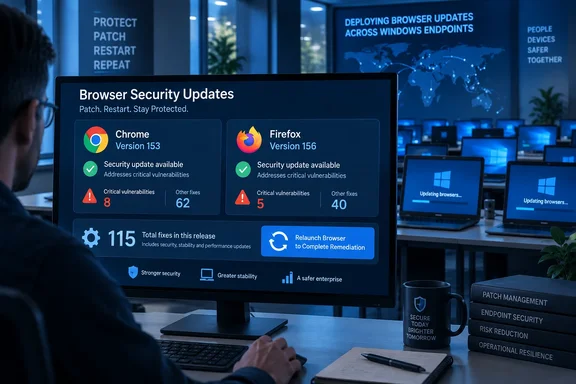
The immediate task is straightforward: make sure managed Windows endpoints are running Chrome 153.0.8010.47 or later and Firefox 156, Firefox ESR 153.3, Firefox ESR 140.16, or Firefox ESR 115.41, as appropriate. The important qualification is that a downloaded browser update is not necessarily an applied browser update: users must fully restart the browser so its updated executable and security components replace the running version.
NeoWin first reported the combined 115-issue figure. Google’s Chrome Stable release notice and Mozilla’s September 15 security advisories confirm the releases and version numbers, while Mozilla’s own documentation adds an important correction to the “patch fatigue” framing: Firefox’s unusually large visible count reflects a change in how Mozilla assigns and publishes CVEs, rather than a directly comparable jump in the number of flaws found from one release to the next.
Chrome 153 Includes Three Critical Fixes
Chrome 153.0.8010.47/.48 began rolling out to Windows and macOS on September 15, with Linux receiving 153.0.8010.47. Google’s release record lists 42 security fixes, three of them rated critical: CVE-2026-91726, an out-of-bounds read in WebGL; CVE-2026-91721; and CVE-2026-91749, a use-after-free issue in Workers.
Those labels are significant because WebGL and Workers are browser components reachable through ordinary web content. A malicious site does not need local access to a PC to exercise a rendering or worker-process bug; the practical defenses are Chrome’s sandboxing and site-isolation architecture, followed by the patch that removes the vulnerable code path. Security researchers generally treat critical browser memory-corruption defects as a high-priority deployment category because an attacker can combine them with another flaw to seek wider access beyond the renderer process.
Google has limited technical details for many entries, which is routine while users update. That restraint leaves administrators unable to independently reproduce the critical defects from the public advisory today, but it does not reduce the urgency of applying the fixed build. Google also did not flag any of these three Chrome vulnerabilities as actively exploited in the stable-channel announcement. That is materially different from a guarantee that exploitation has not occurred; it means the release notice does not carry Google’s usual explicit in-the-wild warning.
For Windows fleets, the version split matters. Windows builds are 153.0.8010.47/.48, while the Chrome-for-Testing stable channel lists 153.0.8010.47 for Windows, macOS, and Linux. Administrators should validate the installed browser version rather than keying compliance rules solely to the final build suffix, particularly where Chrome’s automatic updater and enterprise deployment tooling may surface adjacent build numbers.
Firefox’s 73 CVEs Are a New Reporting Baseline
Mozilla’s Firefox 156 advisory contains 73 vulnerabilities, 29 of which outside reporting by iThome and ComputerBase describes as high severity. The list includes use-after-free, privilege-escalation, sandbox-escape, information-disclosure, mitigation-bypass, and denial-of-service issues across components including Web Codecs, CanvasWebGL, Networking, Graphics, Enterprise Policies, and Windows-specific Widget code.
One Firefox entry should catch the attention of Windows administrators in particular: CVE-2026-92048 is described by Mozilla as a potential sandbox escape caused by incorrect boundary conditions in the Widget: Win32 component. Mozilla also lists several additional Win32 Widget issues in the same release, including use-after-free and sandbox-escape conditions. A browser sandbox is intended to contain damage when page-processing code fails; flaws in the boundary between a sandboxed process and the operating system deserve a faster patch window than cosmetic or feature updates.
But the raw number needs context. Mozilla states directly in its Firefox 156 advisory that it has stopped rolling internally identified memory-safety problems into one aggregate CVE and now issues an advisory for each individual bug. That makes Firefox 156’s count more precise, but it makes comparisons with earlier Mozilla releases misleading if readers treat CVE totals as a like-for-like measure of browser security.
In other words, 73 is a real count of disclosed entries for Firefox 156. It is not evidence, by itself, that Firefox suddenly became several times less secure or that its bug-finding process necessarily changed overnight. Mozilla has made the release more auditable for vulnerability-management teams, who can now track individual identifiers and component exposure, but the change also raises the apparent volume in dashboards and weekly patch reports.
That reporting change is the part of this release most likely to affect enterprise workflows. If a security operations team measures patch risk by counting new CVEs, Firefox 156 will look like an outlier. Teams should instead track whether the affected browser branch is installed, whether the issue reaches the organization’s platforms and enabled features, whether a public proof of concept or active exploitation has emerged, and whether the update has been restarted into service.
ESR Builds Prevent a Split Patch State
Mozilla released Firefox ESR 153.3, ESR 140.16, and ESR 115.41 alongside Firefox 156. The Canadian Centre for Cyber Security independently advised users and administrators to update Firefox versions earlier than 156 and the three affected ESR branches.
The multiple ESR updates are consequential because they show Mozilla still has users on three supported servicing tracks. An organization may deliberately retain an ESR build to control feature churn, preserve compatibility with line-of-business web applications, or accommodate older systems. That approach only works if the organization is equally disciplined about taking the security point releases: an ESR deployment that skips 153.3, 140.16, or 115.41 remains exposed to vulnerabilities Mozilla has now documented in public.
The scope also reaches Thunderbird. Mozilla issued Thunderbird 156 and Thunderbird 140.16 security advisories on the same day. Mozilla notes that many browser-engine flaws are generally harder to exploit through normal email reading because scripting is disabled in message display, but that is not a reason to leave the mail client behind: Thunderbird 156’s own advisory includes distinct mail-handling issues involving ambiguous headers and IMAP parsing, alongside shared browser-engine fixes.
For administrators, that means avoiding a common inventory mistake. “Firefox patched” does not prove Thunderbird is patched, and a report based only on the mainstream Firefox channel does not prove the relevant ESR branches have been updated. Browser, ESR browser, and mail-client versions need separate compliance checks even when their advisories share many CVE identifiers.
A Restart Is Part of the Remediation
Chrome and Firefox download updates with little user intervention, but both normally need a restart to complete the transition from vulnerable running processes to patched ones. A machine can therefore appear current in a software inventory while a user’s open browser session continues running code loaded before the update arrived.
For home users, checking Chrome’s About Google Chrome page triggers an update check and displays whether relaunch is required. Firefox’s About Firefox dialog similarly checks for and applies available updates. In either browser, reopening the application after all browser windows are closed is the practical endpoint; merely seeing an update notification is not.
Enterprise teams should treat these releases as a short-cycle browser patch operation rather than as a broad emergency response. Push or allow the approved installers, enforce a deadline for browser relaunch, measure the version actually running after restart, and give help-desk staff a clear exception path for users whose profiles, extensions, or critical web apps fail during the transition. Chrome’s release is rolling out over days or weeks, so organizations that rely solely on consumer auto-update timing may see uneven coverage.
The inconvenient restart is the price of swapping out a process that is actively parsing untrusted web content. With three critical Chrome defects, a Windows-oriented Firefox sandbox issue, and Mozilla’s expanded per-bug disclosure now public, postponing that restart leaves users on versions attackers can study rather than versions vendors have already fixed.