

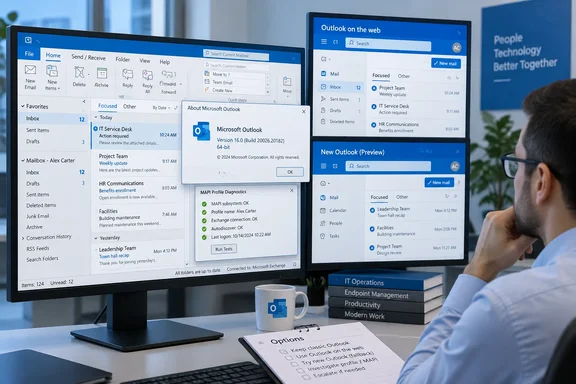
The practical implication is more specific than “Copilot disappeared.” A licensed user can still have Copilot listed under Add Apps, yet clicking Open does nothing; manually adding the command through ribbon customization can leave it unavailable or grayed out. The normal sign-in, licensing, and add-in troubleshooting path will therefore send administrators toward the wrong problem.
BleepingComputer reported the latest update to Microsoft’s advisory, and Microsoft’s own support page confirms the affected population includes both Copilot Chat (Basic) users and customers with paid Microsoft 365 Copilot accounts. Outlook on the web, the new Outlook for Windows, and the standalone Microsoft Copilot app or web experience remain available, so this is a classic Outlook client-side failure rather than a general Copilot service outage.
Build 20026.20182 is the useful dividing line
Microsoft identifies build 20026.20182 as the threshold: classic Outlook installations updated to that build or a later build can lose the Copilot controls. The build was released to Current Channel on June 16, 2026, according to Microsoft’s Microsoft 365 Apps release history and Update Catalog records.
That detail gives IT teams a clean first triage step. In classic Outlook, open File > Office Account > About Outlook and record the full version and build before resetting profiles, changing policies, or opening a support case. An affected machine should show Version 2605, Build 20026.20182, or a newer build lineage.
Microsoft’s wording matters here. It does not say every device on those builds will break, nor does it limit the issue to one Office update channel, one Windows release, or one Exchange configuration. It says the failure occurs in affected environments after the client updates to that level. That suggests a condition in the Outlook profile or local configuration is involved, even though the triggering population expanded as clients moved beyond the June build.
The June 16 update’s published release notes described routine functionality and performance fixes; they did not call out a Copilot regression. That leaves administrators without a documented reason to hold or roll back the update, and Microsoft’s current advisory does not recommend a rollback. Organizations should not treat an unofficial downgrade as the supported fix merely because the issue is associated with a particular build threshold.
Microsoft points to a missing MAPI profile property
Microsoft says its investigation centers on a MAPI property named PR_PROFILE_USER_SMTP_EMAIL_ADDRESS_W that Outlook cannot locate in the null profile section on affected systems. In Microsoft’s description, that prevents the Outlook Copilot component from persisting its Copilot-related settings and can stop the navigation-pane entry point from appearing.
For administrators, the important takeaway is that this is not presented as an entitlement failure. The visible symptoms can resemble an account that lacks a Copilot license: the button is gone, the app is present but cannot open, or the ribbon command is disabled. But Microsoft’s advisory explicitly applies to people who already hold the affected Copilot Chat or Microsoft 365 Copilot licenses.
The MAPI explanation also makes broad client cleanup a weak first response. Clearing cached data, reauthenticating Office, and restarting Windows may be reasonable basic diagnostics for a single user, but they do not address Microsoft’s stated inability to find a profile property. Earlier versions of the same Microsoft advisory, still visible in some localized support pages, said that creating a profile, clearing the Outlook cache and local configuration, signing in again, and restarting Outlook or Windows had been tried without consistently restoring the button.
The English-language advisory now lists a new Outlook profile as a workaround. That may be useful for an individual who can safely recreate their profile, but Microsoft has not published a success rate, described the profile condition that predicts success, or said that a new profile repairs the underlying defect. The change in wording should not be mistaken for proof that profile recreation is reliable across a managed fleet.
“Show Apps in Outlook” has an important trade-off
Microsoft now also tells affected users to enable Show Apps in Outlook under File > Options > Advanced > Outlook panes. This is worth trying, but it is not a general repair for the MAPI issue.
The setting controls whether classic Outlook uses the modern left-side app and navigation experience instead of the traditional navigation bar at the bottom of the window. Microsoft’s Outlook documentation confirms that choosing Show Apps in Outlook places navigation on the left. A Microsoft staff response in the company’s Q&A forum goes further: it says the setting and the Microsoft.Office.Outlook.Hub.HubBar registry control affect the same feature set, and that disabling the apps framework hides Copilot by design.
In other words, a missing Copilot icon can have two distinct causes that happen to look identical:
- The user or organization has disabled Show Apps in Outlook, or applied the HubBar configuration that moves navigation back to the bottom; in that case, Copilot is hidden because the Apps framework is off.
- The device has the MAPI-profile issue described in Microsoft’s September advisory; in that case, turning Show Apps on may expose the correct interface surface but does not guarantee that Outlook can persist the Copilot component’s settings.
This distinction should change help-desk guidance. Check whether Show Apps in Outlook is enabled before assuming the machine hit the documented regression. If it is disabled, enabling it is the appropriate configuration change—provided the organization accepts the move to the left-side navigation layout. If it is already enabled and Copilot remains unavailable on build 20026.20182 or later, record the Outlook version, user license type, profile type, and symptoms, then treat the case as part of Microsoft’s known issue.
There is no supported configuration documented by Microsoft that preserves the old bottom navigation arrangement while keeping the Copilot button available in classic Outlook. That will matter to organizations that deployed the HubBar setting specifically to retain the older layout. Restoring Copilot access through that control means accepting the interface change, not simply checking an innocuous feature flag.
New Outlook and Outlook on the web are the real fallback
Microsoft’s most dependable workaround remains avoiding the affected client surface: use Outlook on the web or the new Outlook for Windows. Windows Central independently reported the same limitation when Microsoft first published the known issue in August, including Microsoft’s warning that standard cleanup steps did not consistently restore the missing buttons.
That is workable for users who need Copilot Chat access more than classic Outlook-specific workflows. It is less straightforward for organizations that have retained classic Outlook because of COM add-ins, PST-dependent processes, specialized integrations, offline workflows, or user-interface requirements that have not yet been matched by new Outlook.
Microsoft has not supplied a fix date, affected-build list beyond “20026.20182 and higher,” rollout scope, or a known-good build to target. It also has not stated whether the problem is limited to Current Channel descendants of Version 2605 or can surface on other servicing channels once they carry equivalent code. Those omissions leave administrators with operational mitigations, not a patch-management resolution.
What admins should document now
For a small number of affected users, enabling Show Apps in Outlook and testing a new Outlook profile may be proportionate. For enterprise support teams, profile recreation should be controlled: it can disrupt signatures, local client settings, cached content, and add-in behavior, and Microsoft has not established it as a dependable remedy.
Capture the following before changing the affected machine:
- The complete Outlook version and build, including update channel and 32-bit or 64-bit architecture.
- Whether the account has Copilot Chat (Basic) or a paid Microsoft 365 Copilot license.
- Whether Show Apps in Outlook is enabled and whether an organization policy or registry setting forces bottom navigation.
- Whether Copilot is absent from the ribbon area, left app bar, More Apps, Add Apps, or all of those locations.
- Whether the same account can use Copilot through Outlook on the web or the Microsoft 365 Copilot app.
The immediate consequence is a support burden that looks deceptively like licensing or user misconfiguration. Microsoft’s latest update establishes that the defect remains open as of September 15, 2026; until the company publishes a corrected build, the safest response is to separate the navigation-setting case from the MAPI-profile case and direct users who need Copilot immediately to Outlook on the web or new Outlook.
References
- Microsoft says Copilot buttons still missing in classic Outlook BleepingComputer · 2026-09-16T08:16:32-04:00