

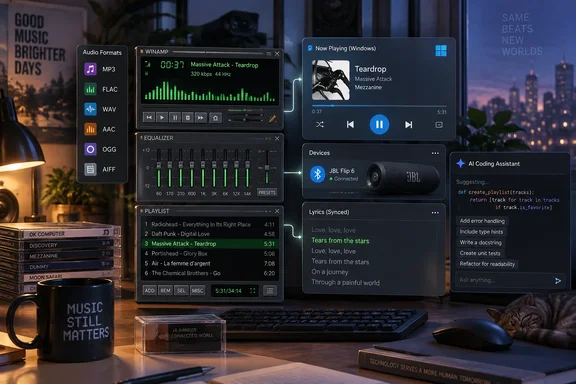
Before anyone starts looking for a download link, one caveat. This is one person's own build, based on code with a messy legal history. It isn't a product. It's still worth a look for Windows users, because it shows how an old desktop app can be updated around the edges, and how AI coding assistants are changing what one hobbyist can take on in a few evenings.
Where the code came from, and why that matters
Lewis says Winamp's source code was briefly posted on GitHub and then pulled because it contained proprietary code. He also says copies of that repository are still on GitHub, and those copies were his starting point.
The history backs him up. Winamp's owner announced that the Windows player's code would open to developers on September 24, 2024. CEO Alexandre Saboundjian said then that Winamp would remain the owner of the software and would decide which changes went into the official version.
The release didn't last. Current owner Llama Group removed the repository from GitHub about a month later. Hackster.io reported that the repository was found to have proprietary code owned by third parties including Dolby, Fraunhofer, and Microsoft, among others. The license was a problem as well. The code was published under a custom Winamp Collaborative License, which notably included a "No Forking" clause, prohibiting the creation, maintenance, or distribution of forked versions of the software. Before the takedown, the source code was forked over 2,600 times.
When How-To Geek covered the takedown in 2024, it predicted this kind of project. It said the code could still be used since the code is still readily available in mirrors, but only with unofficial projects that won't be officially-sanctioned. Lewis's build is one of those unofficial projects.
What this means for you: Lewis built this for himself. Nothing he has described is an official Winamp release. His article gives no public repository, binaries, licensing details or permission to redistribute. If you see a "modernized Winamp" download somewhere, be skeptical. When the forks first multiplied, one AlternativeTo commenter warned that the situation could lead to malware.
Fix one: media keys and Windows' media controls
The first thing Lewis fixed was the one that bothered him most. He pauses and skips songs with his keyboard's media keys, which almost every current player supports. His copy of Winamp didn't respond to them without extra work. So he and Claude wrote a plugin that connects Winamp to Windows' System Media Transport Controls (SMTC).
It helps to know why an old player needs this. Microsoft's developer documentation describes SMTC as the shared system controls that show media information such as artist and album, and that let you pause or skip from Windows' own interface. Starting with Windows 10 version 1607, apps built on Microsoft's modern MediaPlayer class get SMTC support automatically. Microsoft says apps that play audio through a different API have to add SMTC support themselves. Winamp's playback engine is far older than those APIs, so it gets nothing automatically. Something has to connect the two.
Lewis isn't the first person to build that connection. A community project on GitHub called gen_smtcinterop sends Winamp's track information to SMTC and lets you control Winamp from Windows' media controls. It lists these requirements:
- Windows 10 or newer
- Winamp 5.9.1
- The Visual C++ 2019 runtime, which should already be installed with Winamp 5.9.1
Installation is simple: copy gen_smtcinterop.dll into the Plugins folder of your Winamp installation. The project also credits an older plugin, gen_smtc, that does the same job but depends on the .NET Framework instead of the Visual C++ runtime.
To be clear, neither of those is Lewis's code. They show that SMTC support for Winamp is well-trodden ground, and if media keys are the only thing you want, an existing plugin may be enough without touching leaked source code.
Fix two: Bluetooth devices now show what's playing
Lewis says the SMTC work had a welcome side effect. Before it, Winamp couldn't send song information to Bluetooth devices such as car head units and some speakers. Once Winamp reported to SMTC, those devices got the information, and he says the player now works properly with his car receiver.
That fits how Windows works. Once a player reports to the system's media controls, Windows can pass the track details on to other devices. Lewis admits he may not use Winamp in the car much. Still, it's a good example of how one proper connection to the operating system can fix several problems at once.
Fix three: song identification without Gracenote
Winamp once used Gracenote, a commercial service, to tag songs automatically, fetch cover art and build playlists. Lewis notes that the source code can't include Gracenote, because it's proprietary and needs a license. The leaked code gets you the player, not the paid services behind it.
His replacement uses two open services:
- MusicBrainz, a free music database that supplies the song information
- AcoustID, which identifies untagged files by their audio
Lewis says that together they let his Winamp identify an unlabeled song, look up its details, tag it and download the cover art.
MusicBrainz's own documentation adds a limit worth knowing. AcoustID is an open-source acoustic fingerprint system. In MusicBrainz's Picard tagger, a scan calculates the file's fingerprint and checks it against AcoustID. The track matches only when that fingerprint is already linked to a MusicBrainz ID. If there's no match, you have to find the track some other way, such as a manual search. Once a file is matched, users can submit the fingerprint to help the next person. So identification depends on other listeners having fingerprinted the same recording first. Popular albums will usually match. Obscure bootlegs may not.
Fix four: Opus, xHE-AAC and anything Windows can play
Lewis says Winamp handles MP3s fine but fails completely on newer formats, including Opus, which is very common, and xHE-AAC. His fix was a decoder plugin built on Media Foundation, Windows' built-in media framework. It hands playback to Windows, so Winamp can play anything Windows itself can play.
This is arguably the smartest design choice in the project. Lewis says he built it to need as little upkeep as possible. When he installs a new Windows codec extension, he doesn't rebuild the plugin. He just adds the file extension to Winamp's list. Instead of maintaining its own decoders forever, the old player uses Windows' codecs as they're updated.
Lewis hasn't published which Windows build or which codec extensions he tested, so treat "anything Windows can play" as his description of the design, not a tested list of formats.
Fix five: similar-track playlists
Gracenote also powered Winamp's old automatic playlist feature. Lewis had Claude build a replacement that pulls information from three sources:
- MusicBrainz
- Last.fm
- ListenBrainz
He says the generator looks at the current song, including its genre and how real people listen to it, and compares that with what it knows about his local library. It then builds a playlist of similar songs. To use it, you right-click a track and choose "Play tracks similar to." His point is that a good playlist needs some sense of mood, so you don't get Debussy's "Clair de lune" right after a Pitbull track.
He hasn't described which fields the generator weighs or how it ranks songs.
Fix six: synced lyrics
The last plugin fetches lyrics for whatever is playing and shows them in a separate window. Lewis says that when the lyrics come with word-by-word timing, each word is highlighted as it's sung, karaoke style. Songs with no vocals just show "instrumental."
Open questions
This is the part a nostalgic write-up can skip. Three of the six features rely on outside web services: identification, playlist generation and lyrics. Lewis's article doesn't say:
- Which APIs and endpoints the plugins call, or whether any need accounts or API keys
- What data leaves the PC, and whether listening history is uploaded
- Which Winamp and Windows versions he tested
- Whether any of the code will be published, and under what terms
These questions matter because this isn't a store app with a privacy label. It's a personal build, and once you start adding outside services to a player, you're also deciding what data it sends.
Is AI-assisted modernization the real story?
Lewis's conclusion is that reviving old software by hand used to be a huge job, even for an experienced developer. He argues that AI can now write the shims, patches and plugins that bring an old program up to date in a few evenings, without changing what made you love it.
He has a point about the architecture. None of his six fixes touches the parts people are nostalgic for, like the skins, the tiny window or the whole feel of the thing. Each one adds something at the edge: a connection to Windows' media controls, a decoder that uses Media Foundation, or a link to an open data service.
Some skepticism is fair, too. Lewis says he used Python and C++ as a freelance programmer before joining How-To Geek. Someone who can read the code, spot wrong answers and debug a plugin DLL gets far more out of Claude than a beginner would. "A few evenings" is his experience, not a benchmark. The legal problem also hasn't gone away. AI can write the plugins, but it can't clean up the licensing of the leaked code underneath them.
Summary
- What happened: Lewis used Claude to help build Winamp plugins for SMTC media keys, Bluetooth track info, identification through MusicBrainz and AcoustID, playback through Media Foundation, similar-track playlists and synced lyrics.
- What's verified: Microsoft's documentation explains why an old player needs its own SMTC support, community SMTC plugins for Winamp already exist, and MusicBrainz documents the limits of fingerprint matching.
- What isn't: Lewis's code, test results and data handling. There's no public release.
- What to do: If you only want media keys, look at existing SMTC plugins such as gen_smtcinterop, which lists Winamp 5.9.1 and Windows 10 or newer as requirements. Don't trust unofficial "modern Winamp" builds from unknown sources.
References
- I built a smarter music player by modernizing Winamp with Claude's help - How-To Geek How-To Geek · 2026-09-28T11:00:13+00:00
- GitHub - laszlolukacs/gen_smtcinterop: Windows System Media Transport Controls Interoperability Plug-in for Winamp · GitHub github.com
- Press - Winamp has announced that it is opening up its source code to enable collaborative development of its legendary player for Windows. winamp.com