

Clonezilla Live 3.3.3-37 changes more than the kernel
Maintainer Steven Shiau announced the stable release on the Clonezilla release mailing list on September 20. The project’s release notes identify 3.3.3-15 as the comparison baseline and specify a Debian Sid package snapshot dated September 13, 2026. 9to5Linux also reported the release on September 20, describing the move from Linux 7.0 to Linux 7.1.
The exact kernel package version is 7.1.13-1, according to Clonezilla’s release notes. Linuxiac’s separate coverage also reports that version, the September 13 package baseline, and the accompanying update to Partclone 0.3.50. These details distinguish the announced stable image from a generic reference to the Linux 7.1 series.
Clonezilla Live is the operating environment from which the imaging tools run. Updating its Linux kernel therefore changes that environment; it does not upgrade or replace the operating system contained in a Windows image. The practical reason to consider newer boot media is compatibility and corrected behavior while performing imaging work.
The available reporting describes better hardware support as a benefit of the kernel update, but it does not establish a list of newly supported PCs or provide comparative imaging benchmarks. Administrators should consequently judge this release against a specific need—such as booting a particular machine or using HTTPBoot—rather than assume that every clone will finish faster.
Partclone 0.3.50 brings a more narrowly documented improvement: a fix for a Btrfs issue. Btrfs is a Linux filesystem, so that fix is particularly relevant to mixed Windows/Linux environments. It is not evidence of a corresponding change to NTFS imaging performance.
Clonezilla Lite Server expands network boot without discarding PXE
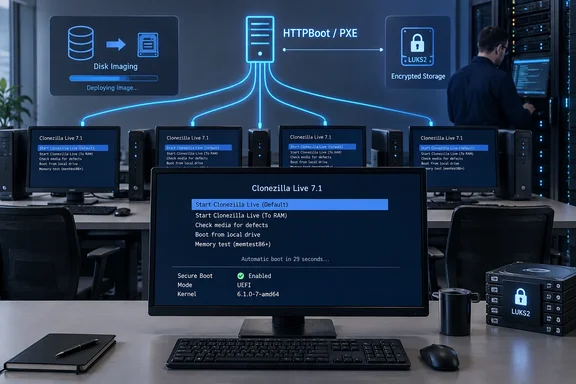
The most consequential deployment addition is in Clonezilla Lite Server. The project says it now supports both PXEBoot and HTTPBoot network boot clients, with Secure Boot support for the HTTPBoot mechanism. This gives administrators another supported route for starting the imaging environment over a network while retaining PXE support.
The distinction between network booting and cloning is important. These changes concern how a client reaches and starts Clonezilla; they do not, by themselves, establish a new disk-image format or a faster restore engine. For a team already relying on PXE, the release provides an additional boot path rather than documenting a mandatory migration.
Secure Boot support makes HTTPBoot worth evaluating where keeping Secure Boot enabled is a deployment requirement. However, the release notes do not contain a complete server configuration procedure or a firmware compatibility matrix. They support the feature announcement, not a claim that any existing network can serve compatible clients without configuration changes.
There is also a concrete architecture boundary. Clonezilla’s official download guidance says machines with UEFI Secure Boot enabled must use the AMD64/X86-64 edition, whether Debian-based or Ubuntu-based. That is the relevant download rule for Secure Boot PCs; the tool’s broader history of supporting different architectures should not obscure it.
A separate Secure Boot fix affects ocs-live-boot-menu. The utility now conditionally runs efitextmode under Secure Boot lockdown to prevent “prohibited by secure boot policy” messages. This is a targeted boot-menu correction, distinct from the new HTTPBoot capability, and gives affected technicians a reason to evaluate the updated media without treating every Secure Boot error as the same problem.
LUKS2 repository support has a narrower meaning than Windows encryption support
Clonezilla Live 3.3.3-37 adds LUKS2 repository support. Here, the important word is repository: the change concerns storage used for Clonezilla images. It should not be interpreted as an announcement about BitLocker-protected Windows volumes.
LUKS2 and BitLocker are different encryption technologies, and the release notes make no claim that this feature decrypts BitLocker volumes or bypasses Windows protections. For a Windows administrator who keeps Clonezilla images on LUKS2-protected storage, the repository addition may be directly useful. For someone whose only question is how Clonezilla handles an encrypted Windows source disk, this announcement does not supply a new answer.
The release also introduces a way to bypass partition-image conversion when restoring to identical base disks or partitions. The eligibility condition belongs beside the feature: the documented case is an identical base disk or partition, not an arbitrary destination with a different layout.
That could remove a conversion step from a matching restore workflow, but the project does not provide a quantified time saving. Nor do the release notes specify the exact menu selection or command-line switch for invoking the behavior. It would be premature to turn that brief announcement into a universal restore recipe.
Several fixes address the less glamorous parts of imaging work. Clonezilla reports correcting an empty-partition-device error and a case where a filesystem placed directly on a bare disk had no detected size or filesystem. These are specific detection fixes; they do not establish support for every unusual disk arrangement.
Direct device-to-device cloning also receives interface improvements. The release restores the text interface for choosing power-off, reboot, or command actions after cloning finishes, and enables Partclone’s ncurses text interface during direct cloning. These changes affect the operator’s view of the task and its completion, rather than promising different image contents.
Clonezilla’s networking and display changes deserve a workflow check
The networking update is more than a package refresh. Clonezilla replaces deprecated net-tools commands with iproute2 alternatives and removes dhclient-related code in favor of dhcpcd. It also configures dhcpcd to use a client identifier for stable IP reservations.
For administrators with custom scripts or deployment-network assumptions, those named changes provide a useful review target. Automation that refers to the old commands or DHCP client deserves inspection before the new environment becomes standard. That is a compatibility precaution arising from the documented substitutions, not a report that existing scripts have failed.
The client-identifier setting is similarly specific. Clonezilla describes it as supporting stable IP reservations, but it does not promise that a machine will receive an unchanged address on every network. Where an imaging workflow depends on a reserved address, confirming the reservation behavior is more useful than assuming the client-side change settles the entire network configuration.
On the local console, GRUB now prefers resolutions of 1920x1080,1024x768,auto, with 1024x768 as the fallback. The project says these choices address microscopic boot menus and text distortion on 4K and other high-DPI screens. They change the visibility of the boot environment, not the display settings of the Windows installation being cloned.
Related changes improve Chinese, Japanese, and Korean font scaling in fbterm through --font-size, optimize ocs-console-font-size startup, and fix font-size autodetection on non-KMS/FHD configurations. The live system also gains netpbm and fonts-unifont. No measured startup-time reduction accompanies these announcements, so the supported takeaway is improved console handling rather than a general performance claim.
Time handling receives its own targeted adjustment. The ocs-live-time-sync utility can detect boot parameters such as utc=no when handling hardware clocks set to local time and can prompt interactively while offline. This addresses clock interpretation within the live environment; it should not be presented as a replacement for Windows or domain time synchronization.
Clonezilla’s conversion fixes matter to specific workflows
The cnvt-ocsiso-qcow2 utility has been refactored with two packaging modes, --use-vhd-mode and --use-iso-mode, plus flexible naming through --prefix. Clonezilla also reports fixing VHD boot kernel panics. These are useful, concrete changes for administrators already using that conversion utility.
The appearance of VHD in the release notes does not establish blanket Hyper-V compatibility. The announcement does not identify supported hypervisors, VHD variants, or Windows boot configurations. Readers should keep the claim at its documented scope: revised packaging options and a VHD boot-panic fix.
Another targeted correction addresses an LVM system.devices locking issue affecting RHEL 10 and AlmaLinux 10+. Its stated scope is those Linux environments, not Windows disk management. Including it in a mixed-fleet assessment makes sense; presenting it as a general Windows cloning fix would not.
Together, these changes make the release more compelling for teams that recognize one of the named failure cases. A technician encountering a VHD boot panic or the missing post-clone menu has a clearer upgrade rationale than someone merely comparing kernel version numbers.
Choose Clonezilla Live 3.3.3-37 for the changes your imaging work needs
Prioritize evaluating this release if you need Secure Boot-aware HTTPBoot, LUKS2 repositories, or one of the documented cloning fixes. If your current workflow is reliable and none of those changes applies, the announcement supplies no measured speed improvement that demands an immediate switch.
The official download page lists 3.3.3-37 as the Debian-based stable release and provides ISO and ZIP downloads alongside checksum resources. Its verification guidance makes an important distinction: the DRBL project signs the checksum files, not the ISO or ZIP files themselves. The listed signing-key fingerprint is 54C0 821A 4871 5DAF D61B FCAF 6678 57D0 4559 9AFD.
That distinction defines what verification needs to establish: the authenticity of the checksum file and the agreement between the downloaded image and its recorded checksum. The release announcement does not document a complete media-writing or restore procedure, so it does not justify inventing a single sequence that applies to every technician’s setup.
For an upgrade assessment, the concrete takeaways are:
- Use the AMD64/X86-64 Clonezilla Live edition when the target machine has UEFI Secure Boot enabled.
- Treat HTTPBoot as an additional Lite Server boot capability, and evaluate it separately from the correctness of the subsequent imaging operation.
- Review custom networking automation for dependencies on
net-toolsordhclient, and confirm reservation behavior where a predictable client address is required. - Keep LUKS2 repository support separate from any decision about imaging BitLocker-protected Windows volumes.
- Apply the partition-conversion bypass only within its documented identical-base-disk-or-partition scope, without assuming it relaxes other restore constraints.
- Verify the downloaded image using the project’s signed checksum resources before making it part of an imaging workflow.
Clonezilla Live 3.3.3-37 offers its strongest value at identifiable operational friction points: network booting with Secure Boot, access to encrypted repositories, readable boot menus, and corrected cloning behavior. For Windows technicians and mixed-fleet administrators, the sensible next step is to match those changes to the machines and jobs they support, then qualify the new boot environment for that work.
References
- Clonezilla - Release Notes clonezilla.org