

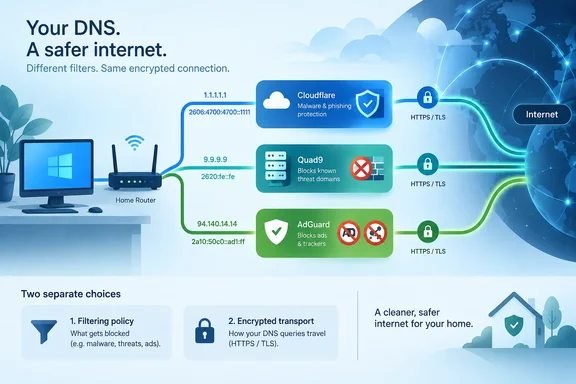
MakeUseOf highlighted the three services in its September 20 comparison. Their providers’ documentation supports a more precise buying-free decision: choose the protection you need, select the corresponding addresses, and treat encrypted DNS as a separate configuration requirement. There is also an address error in the comparison’s Quad9 table worth correcting before copying it.
Choose the filtering policy before the provider
DNS translates domain names into addresses that devices can use to connect. A filtering resolver intervenes in that lookup process when a requested domain matches its blocking policy.
Cloudflare documents a concrete example: when its Families service classifies a queried domain as malicious, it returns 0.0.0.0 instead of the real address, preventing the connection through that lookup. The useful protection comes from the resolver’s classification and response; it is not a scan of a downloaded file or a guarantee that every dangerous site will be identified.
The providers document these IPv4 options:
| Service | IPv4 resolver pair | Documented filtering |
|---|---|---|
| Cloudflare standard | 1.1.1.1 and 1.0.0.1 | Standard resolution without the Families filters. |
| Cloudflare malware blocking | 1.1.1.2 and 1.0.0.2 | Blocks domains associated with malware and phishing. |
| Cloudflare malware and adult-content blocking | 1.1.1.3 and 1.0.0.3 | Adds adult-content blocking. |
| Quad9 Secure | 9.9.9.9 and 149.112.112.112 | Provides threat blocking. |
| Quad9 No Threat Blocking | 9.9.9.10 and 149.112.112.10 | Omits threat blocking, but retains DNSSEC validation under Quad9’s announced policy. |
| AdGuard DNS Default | 94.140.14.14 and 94.140.15.15 | Blocks ads, tracking, and phishing. |
| AdGuard DNS Family Protection | 94.140.14.15 and 94.140.15.16 | Adds adult-website blocking and safe search to the Default features. |
Cloudflare’s setup documentation confirms its Families addresses and behavior. Quad9’s service directory documents its threat-blocking and non-blocking options, while AdGuard’s knowledge base lists its own filtering policies and corroborates Cloudflare’s resolver addresses.
The word “default” therefore means different things across these services. Choosing Cloudflare’s familiar 1.1.1.1 address does not select its malware filter. Quad9’s 9.9.9.9 does select threat blocking, while AdGuard’s default addresses select a broader policy that includes advertising and tracking.
Cloudflare: select the security option explicitly
Cloudflare separates ordinary resolution from its two Families policies. That makes it possible to choose malware and phishing blocking without also selecting adult-content filtering.
Cloudflare says Families uses the same privacy commitments as its standard resolver. It also publishes encrypted connection options for both filtering policies, so filtering and encrypted transport can be used together.
The practical decision is straightforward: if malware blocking is your reason for switching, choose the 1.1.1.2 service rather than assuming 1.1.1.1 includes it. If adult-content restrictions are also wanted, choose the 1.1.1.3 service.
Cloudflare’s documentation includes dedicated Families test pages for checking malware and adult-content blocking after configuration. Those checks are more informative than simply seeing whether ordinary websites still load: successful browsing establishes connectivity, but does not establish that the intended filter is active.
Quad9: threat blocking and DNSSEC are separate controls
Quad9 describes 9.9.9.9 as its most popular, threat-blocking service. Its 9.9.9.10 option serves users who want the resolver without threat blocking.
The submitted comparison lists the wrong second IPv6 address for Quad9’s non-blocking service. Quad9’s own directory specifies 2620:fe::10 and 2620:fe::fe:10. The comparison instead pairs the first address with 2620:fe::9, which belongs to the Secure service. Copying that pair would mix two different filtering policies.
There is also a documented change relevant to troubleshooting. In an April 9 announcement, Quad9 specified June 15, 2026 as the date strict DNSSEC validation would become active across every service endpoint, including previously non-validating options.
DNSSEC checks the origin and integrity of DNS data for zones whose operators have signed them. It serves a different purpose from a malicious-domain blocklist: a domain can be correctly signed without being trustworthy, while a legitimate domain can fail validation because of a configuration error.
Quad9 says its formerly non-validating endpoints now return SERVFAIL for DNSSEC failures, whether caused by misconfiguration or a tampered response. Consequently, 9.9.9.10 remains an option for removing threat filtering from a comparison, but it is no longer a non-validating reference resolver. Administrators following an older diagnostic guide should account for that change.
AdGuard DNS: broader filtering for ads and trackers
AdGuard’s knowledge base documents advertising, tracker, and phishing blocking on its Default public servers. Family Protection adds adult-website blocking and safe search.
This makes AdGuard the clearest match among the three when reducing advertising-related DNS lookups is the main objective. Cloudflare’s documented Families policies focus on malicious and optionally adult domains; Quad9’s main service focuses on threats. Neither of those documented policies is an equivalent advertising filter.
The scope of the protection still matters. DNS filtering acts on domain lookups, so the feature description should not be read as a promise to remove every advertisement within a page or application. MakeUseOf itself acknowledges that AdGuard DNS will not block the full spectrum of ads.
AdGuard also publishes a non-filtering option. That establishes a useful distinction within its own service: choosing an AdGuard resolver does not automatically mean advertising blocking is enabled. The address or encrypted endpoint determines the policy.
Changing the resolver does not, by itself, establish encryption
Filtering and encrypted transport are separate choices. An IP address identifies a resolver; it does not establish which transport your device is using to reach it.
Cloudflare explains that DNS over HTTPS, or DoH, carries DNS queries as encrypted HTTPS requests. DNS over TLS, or DoT, encrypts the queries using TLS on a dedicated port. Both protect the DNS exchange between the client and resolver from ordinary observation along that path.
Quad9’s service directory publishes DoH and DoT options for its service variants. AdGuard documents those protocols as well as DNS over QUIC. Where a compatible client or router requests an encrypted-DNS configuration, the chosen endpoint must correspond to the filtering policy you want.
The consequence for a Windows user is to avoid treating “I entered different DNS addresses” as proof of encrypted DNS. Provider selection, filtering policy, and encrypted transport are three separate properties to check. DNS encryption also describes protection for the DNS exchange, not encryption of every connection an application makes.
IPv6 addresses must match the same policy
For configurations that require IPv6 resolver addresses, the documented pairs are below. These preserve the same service choices as the IPv4 table rather than combining filtered and unfiltered endpoints.
| Service | IPv6 resolver pair |
|---|---|
| Cloudflare standard | 2606:4700:4700::1111 and 2606:4700:4700::1001 |
| Cloudflare malware blocking | 2606:4700:4700::1112 and 2606:4700:4700::1002 |
| Cloudflare malware and adult-content blocking | 2606:4700:4700::1113 and 2606:4700:4700::1003 |
| Quad9 Secure | 2620:fe::fe and 2620:fe::9 |
| Quad9 No Threat Blocking | 2620:fe::10 and 2620:fe::fe:10 |
| AdGuard DNS Default | 2a10:50c0::ad1:ff and 2a10:50c0::ad2:ff |
| AdGuard DNS Family Protection | 2a10:50c0::bad1:ff and 2a10:50c0::bad2:ff |
Cloudflare’s Families documentation, Quad9’s service directory, and AdGuard’s provider directory establish these service mappings; AdGuard’s directory also lists Cloudflare’s standard IPv6 pair.
Decide on features, not an unsupported speed ranking
MakeUseOf reports that Cloudflare was the fastest provider in its author’s previous testing, but its comparison does not establish enough test conditions to predict the winner on a particular reader’s connection. The provider documentation establishes available features and addresses, not an independent performance ranking.
There is also no basis here for promising a specific battery-life improvement from AdGuard’s filtering. Its documented advertising and tracking controls are sufficient reasons to consider it without attaching an unmeasured performance benefit.
For a personal Windows PC or home network, choose Cloudflare’s Families endpoints when its specific filtering categories fit, Quad9 Secure when threat blocking is the priority, or AdGuard Default when advertising and tracker blocking are part of the goal. Then use the matching configuration documentation for your device or router; the address comparison alone is not a universal Windows setup procedure.
References
- Services - Quad9 Documentation docs.quad9.net
- Known DNS Providers | AdGuard DNS Knowledge Base adguard-dns.io
- Set up Cloudflare 1.1.1.1 resolver · Cloudflare 1.1.1.1 docs developers.cloudflare.com