

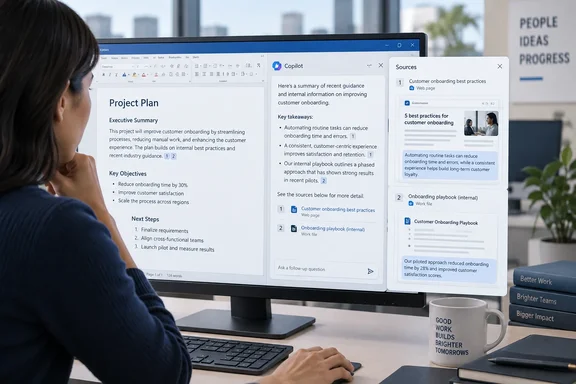
The reason is simple. If you can't check an AI answer, you can't safely use it in a contract, policy memo or board report. Citations don't make Copilot right. They do make it much quicker to find out when it's wrong.
What Microsoft actually shipped
Microsoft's official "What's New in Microsoft Copilot" post for September 2026 groups the change under the heading "Citations and image modifications for Copilot in Word." According to the post, citations in Copilot responses in Word let users see the sources behind Copilot's answers. Users can view citations to relevant web and work content directly in the response. This provides greater transparency and helps users understand where Copilot's information comes from. This feature rolled out in September.
The same section covers a second Word change: users can now arrange and modify images and shapes directly within their Word documents. Microsoft says that one also rolled out in September.
Here's where Word sits in the wider release:
| Area | September 2026 change |
|---|---|
| Copilot Chat | New design and functionality |
| Copilot App | Plugins, connectors, Work IQ enhancements |
| Teams Phone | Teams Phone agent |
| Word | Citations and image modifications |
| PowerPoint | Skills and connectors |
| SharePoint | General availability |
| OneDrive | General availability |
Microsoft's roundup lists all of these as headline items, and Copilot-powered editing in Word, PowerPoint and Excel, which rolled out earlier this year on iOS, rolled out on Android in September.
Section summary: Citations to web and work content in Word responses are rolling out now. Microsoft gives no specific build number or platform-by-platform schedule.
This isn't Word's first citation feature
The feature is new, but citations in Word aren't. Microsoft's existing support page, "Chat with Copilot about your Word document," covers Word for Microsoft 365 on Windows, Mac and iPad. It already says that after Copilot answers a question about the open document, you can view references with citations showing where in that document it found the information.
The September change goes further than the open document. The new citations can point to web and work content, which matters more because those are the sources you can't see on screen. If Copilot summarises your own document, you can scroll and check. If it pulls something from a SharePoint file you've never opened, or from a web page, you couldn't easily check it until now.
Why citations matter
Windows Central's reporter said Copilot has sometimes given them "the exact opposite of the truth." That's a useful reminder that made-up facts aren't the only risk. An AI can also misread a real source and turn a caveat into a conclusion.
Citations help with both problems, though not equally:
- Made-up claims: if the answer cites nothing, or the cited page doesn't say what Copilot claims, you find out quickly.
- Misread sources: a citation only gets you to the right page. You still have to read the passage and check that Copilot kept the context, the dates and the scope.
- Coverage gaps: nothing in Microsoft's documentation says every sentence in a response will get a citation, or that the cited sources cover the whole topic.
Microsoft itself doesn't claim citations prove anything. Its "Draft and add content with Copilot in Word" page tells users to review and verify details, "especially facts, numbers, citations, names, policy statements, and other sensitive information," and says you're responsible for deciding what to keep before sharing. Citations make checking easier. They don't replace it.
Don't confuse this with web search query citations
Admins should note a distinction here. Microsoft Learn has a separate feature called web search query citations, which shows the exact search terms Copilot sent to Bing. According to the Learn page on web search data and privacy, that feature is available only in Microsoft Copilot Chat. It isn't in the Copilot pane inside Microsoft 365 apps such as Word or PowerPoint, and the queries only stay visible in the chat thread for 24 hours.
So the new Word feature shows you the sources, not the Bing queries behind them. If your compliance team needs to see what Copilot searched for, those details are in Copilot Chat. Admins can also find them through audit logs, eDiscovery, and the activity explorer in Microsoft Purview DSPM for AI.
The same Learn page explains what admins control. Web grounding is governed by the "Allow web search in Copilot" policy in Cloud Policy service for Microsoft 365. If an admin turns web search off, users can't turn it back on with the Web content toggle. In practice, a tenant with web search disabled should see citations to work content in Word, not web pages. That's a reasonable conclusion from Microsoft's documentation rather than something Microsoft spells out for the Word feature.
How to get useful citations in Word
These steps come from Microsoft's current Word and connector support pages. Your menus may differ depending on licence, app version and platform.
- Check you have Copilot at all. Microsoft says that if Copilot doesn't appear in Word, your subscription may not include it or your organisation may not allow it. You need an eligible Microsoft 365 subscription and/or a Microsoft 365 Copilot licence.
- Ask for sources directly. The drafting guide lists "Add citations" as something you can request: ask Copilot to generate content with citations to the sources it used.
- Name the source. When drafting, type / in the Copilot prompt and pick the file you want it to work from, if that option is available. A narrower source makes a citation easier to check, though it still doesn't guarantee accuracy.
- Be specific about work systems. For content brought in through Copilot connectors (knowledge bases, ticketing systems, wikis, CRM tools), Microsoft suggests naming the system, adding a time range such as "in the last month," and asking it to "include sources so I can open the items."
- Open the citations. Check each specific claim against the source passage: numbers, dates, who said it, and any caveats Copilot might have dropped.
When a citation doesn't show up
- Expected work content is missing: Microsoft's connector troubleshooting advice is to check you can open the item in its source system, try a narrower query, ask your admin whether the connector is enabled for your group, and allow for indexing delays on synced connectors.
- No web sources: your tenant may have web search turned off by policy, or you may have switched off the Web content toggle.
- The feature isn't there yet: Microsoft's Word drafting guide says some Copilot experiences roll out gradually and depend on licence, organisation settings, app version, and whether you're using Word for Windows, Mac, web or iPad.
Are citations enough?
Some skepticism is fair. A cited answer can look more trustworthy than it is, and a neat source link can tempt busy people to skip reading it. Windows Central's own take admits that a hard-line reader could argue Copilot shouldn't be used for serious work at all.
The middle ground is the realistic one. Copilot finds and drafts, and a person checks the result before anyone relies on it. Citations make that checking quicker, which is why they matter more than another flashy agent.
This also fits a wider pattern. Microsoft's June 2026 roundup included "Expanded citations and reasoning for Copilot app and Chat", so Word is catching up with a trend across Copilot rather than starting one. Independent blog A Guide to Cloud has also tracked a roadmap item for "deep citations" that jump to the relevant part of a Word or PowerPoint source first, with meetings, web and PDF references following. Treat that as roadmap reporting until Microsoft confirms it has shipped.
Bottom line
- Copilot in Word can now cite web and work sources, not just the open document. Microsoft says it rolled out in September 2026.
- Availability depends on licence, tenant policy, app version and platform, so it may not have reached every user yet.
- Word shows sources, not the exact Bing queries. Those are only in Copilot Chat, and admins can reach them through audit and Purview tools.
- Ask for citations, name your sources, and open every link before you rely on a claim.
Citations won't stop AI mistakes. They do make the mistakes much easier to catch.
References
- Forget the flashy AI features, this is the Copilot update that matters Windows Central · 2026-10-05T14:24:46+00:00
- Data, privacy, and security for web search in Microsoft Copilot and Microsoft Copilot Chat | Microsoft Learn learn.microsoft.com
- Draft and add content with Copilot in Word | Microsoft Support support.microsoft.com