

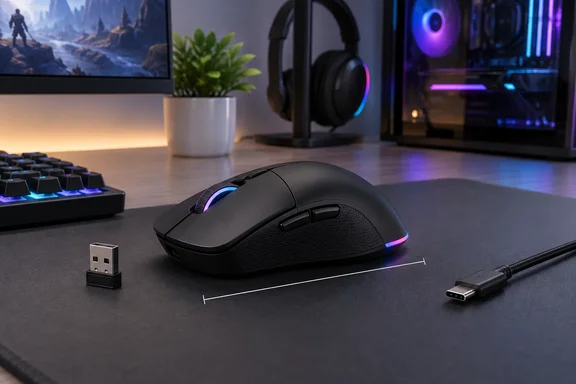
TechRadar called it a well-constructed mouse with a comfortable design and great battery life, but it's too small for large-handed PC gamers to use comfortably. Below, that verdict is set against Corsair's own spec sheet, with some practical notes for Windows PC owners.
A sequel seven years in the making
The Harpoon V2 Wireless is the second iteration of Corsair's Harpoon RGB Wireless, sporting a redesigned casing and improved internal components. Corsair says that in January 2019, CORSAIR released the HARPOON RGB WIRELESS, a compact wireless mouse that became one of the most popular entry points into CORSAIR's mouse lineup. Seven years later, the HARPOON v2 WIRELESS arrives as its successor.
The original set a high bar. Back when we reviewed the Harpoon RGB Wireless in 2019, we gave it a well-deserved four and a half stars, citing its excellent value for money, solid ergonomics, and good battery life, TechRadar recalled.
The market has changed since then. TechRadar's reviewer, Computing Editor Christian Guyton, pointed to cheaper wireless competitors such as the MSI Versa 300 Wireless 8K, Cooler Master MM311 and Logitech G305 Lightspeed Wireless. The review names those mice as market context only. It didn't test them against the Harpoon.
Section summary: This is a direct successor to a well-liked budget wireless mouse, but it now has far more competition than in 2019.
The spec sheet, verified
Corsair's product page and FAQ fill in details that the review doesn't give:
| Specification | Corsair's official figure |
|---|---|
| SKU | CH-9311110-WW |
| US price (Corsair store) | $69.99 |
| Sensor | MARKSMAN optical, up to 26,000 DPI |
| Tracking / acceleration | up to 650 IPS tracking speed and 50G acceleration |
| Polling rate | up to 1,000Hz in both wired and wireless modes |
| Weight | 80 g (±1 g) |
| Dimensions (L × W × H) | 115.5 × 68.3 × 40.4 mm (±0.5 mm) |
| Switches | mechanical switches rated for up to 100 million clicks |
| Onboard memory | 1 saved profile |
| Warranty | 2 years |
Three points matter for buyers:
- "Tri-mode" means two wireless options plus a cable. Corsair says the mouse supports three connection modes: 2.4GHz wireless, Bluetooth, and detachable wired USB-C cable.
- Polling tops out at 1,000Hz. The TechRadar review mentions the MSI Versa 300 Wireless 8K, whose name points to a much higher polling rate. The Harpoon targets everyday gamers, not people chasing polling-rate numbers.
- "Six programmable buttons" counts every button. Corsair lists them as left click, right click, the middle click/scroll wheel, forward, back and the DPI button. That's six buttons in total, not six extra ones. TechRadar also noted the wheel has no tilt inputs.
Section summary: The specs are strong for the price, but the 1,000Hz polling rate and the modest button count show where Corsair saved money.
Fit: 115.5 mm is the number to check
Guyton says he's six foot four, and he was open about the fit problem. As a palm gripper, I found that my fingers rested too far forward in the most comfortable position, prompting me to adopt more of a claw-type grip, which proved a bit uncomfortable in longer sessions. The mouse is almost a centimeter shorter than the Logitech G Pro X2 Superstrike and NZXT Lift Elite he uses at home. Over a week of testing, the claw grip left him with minor hand cramps in longer sessions.
He also didn't like where the side buttons sit. The thumb buttons are also a bit further forward than I would expect; most mice with two thumb buttons will keep the split between them lined up with the back edge of the main mouse button, but they're closer to the front here, which made pressing the back one feel a bit less intuitive than I'd like.
Corsair's description of the shape partly agrees. The company says the mouse is best suited for palm and claw grip styles. The old Harpoon had a similar reputation: Corsair itself describes the original as popular with claw-grip players who wanted a smaller footprint.
There's a simple way to check before buying. Measure the mouse you use now and compare its length with the Harpoon's 115.5 mm. If yours is noticeably longer and you palm-grip, you may run into the same problem Guyton did. It's also right-handed only. Corsair says it is designed for right-handed users.
Section summary: The mouse is comfortable if your hands are average-sized or smaller. Larger-handed palm grippers should compare lengths first.
Build, sensor and battery
Size aside, the review is positive. Guyton liked the firm main clicks and a scroll wheel that spins smoothly but still has noticeable steps. He found the thumb buttons a little spongy but not worryingly so. He described the sensor as responsive and accurate in Marathon, Warframe, Marvel Rivals and Valorant. Those are hands-on impressions, not lab measurements of latency or tracking.
Battery life comes with conditions. Corsair rates the mouse for up to 140 hours of battery life via 2.4GHz wireless with RGB off, and up to 210 hours via Bluetooth with RGB off. Both figures assume the lighting is off. The lower-latency 2.4GHz mode also gives less battery life than Bluetooth. Guyton didn't charge the mouse once during his week of testing. That shows it lasts well in normal use, but it isn't a timed battery test.
Corsair says the new battery ratings are a big step up from the original: Where the original topped out at up to 60 hours of battery life in Bluetooth mode, the HARPOON v2 WIRELESS is rated for up to 140 hours over 2.4GHz and up to 210 hours over Bluetooth.
The dongle storage bothered Guyton. The receiver sits under one of the PTFE feet, and he said the removable foot kept picking up dust and his dog's hair around its edges. According to Corsair's FAQ, you press the feet to tilt them open and get to the dongle. His problem may be specific to a pet-heavy home, but it's worth knowing about.
Section summary: The mouse feels solid and the battery ratings are generous, but they assume RGB is off, and the dongle compartment can collect fluff.
Setup on Windows: Web Hub, pairing and firmware
The most useful feature for Windows users may be the software. Corsair's Web Hub lets you fine tune your logo lighting, button assignments, DPI, and more in your browser. Fast, lightweight, zero installation required. Guyton praised it and noted that rival browser tools from Keychron and Royal Kludge only work with keyboards.
There's one discrepancy. TechRadar says the buttons can also be remapped in the iCUE app. Corsair's FAQ says the mouse uses CORSAIR Web Hub for all mouse configurations. Treat Web Hub as the supported tool. If you manage your other Corsair gear through iCUE, check that the Harpoon shows up there before you plan around it.
A basic setup, based on Corsair's quick-start guide and FAQ:
- Update the firmware first. Corsair recommends doing this before first use. Connect the mouse to your PC with the USB-C cable, open Corsair Web Hub in your browser, allow it access, and select the mouse. If the "Update Firmware" button lights up, press it and choose "Proceed." Don't unplug the mouse or close the browser while the update runs.
- Use 2.4GHz for gaming. Plug in the receiver and make sure the power switch is set to 2.4GHz (RF).
- Pair Bluetooth for a second device. Press and hold DPI BUTTON (G) and switch POWER / WIRELESS MODE SWITCH (I) to Bluetooth, then release DPI BUTTON (G). The lights blink blue while the mouse is in pairing mode.
- Set your DPI stages. The defaults are 400 (red), 800 (orange), 1200 (yellow), 1600 (green), and 3200 (blue). Change them in Web Hub if you like.
Bluetooth has a limit: HARPOON v2 WIRELESS can only be paired to one device. If you need to pair with another device, please enter re-pairing mode to initialize the pairing process. If you want to move between a gaming PC and a work laptop, the realistic setup is the dongle for one machine and Bluetooth for the other. Multi-device switching mice make that easier. And because the mouse stores only one onboard profile, you can't keep separate saved setups for different games on the mouse itself.
Section summary: Browser-based setup is convenient, but Bluetooth pairs with only one device and there's one onboard profile.
Price and verdict
TechRadar lists the mouse at $69.99 / £64.99 / around AU$100. It's sold directly by Corsair in the US and UK, while Australian buyers will need retailers such as Amazon. The review scored it 4.5/5 for value, 4/5 for design and 4.5/5 for performance, for an overall 4.333/5. Its alternatives are the more expensive Razer DeathAdder V4 Pro and the larger, button-heavy Logitech G502 X Plus.
Buy it if:
- Your hands are average-sized or smaller, or you already use a claw grip.
- You want an 80 g wireless mouse with long battery life for about $70.
- You'd prefer a browser tool to another background app.
Skip it if:
- You palm-grip and your current mouse is well over 115 mm long.
- You're left-handed.
- You want extra side buttons, tilt-wheel inputs, polling above 1,000Hz or Bluetooth switching between several devices.
In short, the Harpoon V2 Wireless keeps what made the original popular and updates the sensor, switches and battery. Its weak points are size, a basic feature set and a dongle compartment that collects pet hair.
References
- Corsair Harpoon V2 Wireless review TechRadar · 2026-09-30T10:26:23+00:00
- HARPOON v2 WIRELESS Gaming Mouse corsair.com
- Harpoon v2 Wireless vs Harpoon RGB Wireless: What's the Difference | CORSAIR corsair.com