

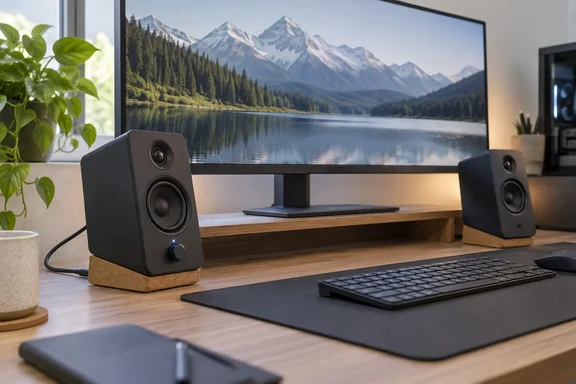
Here's what the review found, what Creative's specification sheet confirms, and how the XF1 fits a Windows PC setup.
What the XF1 actually is
Creative calls the XF1 a 2.0 desktop speaker system, sold in black or white. Each cabinet measures 155 × 99.7 × 191 mm (6.10 × 3.93 × 7.52 inches), according to Creative's product page and launch press release. The left speaker weighs 1.29 kg and the right 1.36 kg.
Digital Foundry describes a roughly 10 × 19 cm footprint. That covers width and height, but not the full picture. German outlet Stereo Guide measured each cabinet at just under 10 centimeters wide, 19.1 centimeters tall, and 15.5 centimeters deep. So measure your desk for depth as well as width. That's especially true once the included cork stands tilt the speakers back.
Creative's published specifications:
| Spec | Creative's figure |
|---|---|
| Drivers | 2 × 3-inch woofers, 2 × ¾-inch tweeters |
| Amplification | Bi-amplified: 2 × 26W RMS (woofers) + 2 × 10W RMS (tweeters) |
| Total output | 72W RMS |
| Frequency range | 55 Hz – 40 kHz |
| SNR / THD+N | ≥85 dB / <1% |
| Inputs | USB-C audio (up to 24-bit/96 kHz), 3.5 mm AUX, Bluetooth 6.0 |
| Bluetooth codecs | SBC, AAC, LDAC |
| Output | Subwoofer out |
| Enclosure | MDF (per US product page) |
| Warranty | 1-year limited hardware |
These are the manufacturer's numbers, not independent measurements. Creative also says it used Finite Element Analysis to design the woofers. Ecoustics reported the claim that this was done to model the woofers and optimize their behavior for higher output and lower distortion within the XF1's small enclosure.
Section summary: a compact, bi-amped 2.0 set with USB-C, AUX and Bluetooth 6.0 inputs, a sub output, and a 15.5 cm depth that the "10 × 19 cm" shorthand leaves out.
Design and controls
Judd liked the look before he switched them on: a boxy shape with softened corners, a subtle ring around each three-inch woofer, and cork stands that angle the sound about 15 degrees up towards your ears. Creative says the stands also reduce vibration and desk resonance. PC Gamer's review notes that you can leave them in the box if you prefer your speakers flat.
The front panel is kept deliberately plain. You get one multifunction dial with a coloured LED:
- Press to switch input source
- Turn to change volume
- Flip the speaker around to reach everything else
Around the back are a Bluetooth pairing button, the ports (AUX in, sub out, USB-C, the link to the left speaker, and power in) and an energy-saving switch. According to Judd, that switch turns off the auto-sleep behaviour that's otherwise mandatory on European units. That regional detail comes from the reviewer; we haven't confirmed it separately against a regulation.
The trade-off compared with busier desktop monitors, such as the Edifier MR5 Judd has recommended elsewhere, is that there's no front 3.5 mm headphone jack. There's also no HDMI or eARC, so the XF1 suits a PC better than a TV.
How to set up the XF1 on a Windows PC
Judd ran the speakers over USB-C for 99 percent of his testing, and that's the sensible default for a PC. Setup is simple:
- Link the two speakers with the included 2 m four-pin interconnect cable and connect the power adapter.
- Plug the included 1.5 m USB-A-to-USB-C cable into your PC. Creative lists only an available USB port as the requirement for USB audio.
- Pick the XF1 as your output device. In Windows 11 that's Settings > System > Sound, or the speaker icon in Quick Settings. Windows sometimes leaves the old device as the default, so check this if you hear nothing. This step is general Windows guidance, not something from Creative's documentation.
- Use the front dial to switch sources if you also connect a phone over Bluetooth or a turntable preamp or other device over AUX.
- Optionally, install Creative Nexus to adjust EQ and install firmware updates (see below).
PC Gamer's review makes the point that despite all the connection options, you only really need to plug in the power cable and connecting cable between the speakers to get it up and running.
Getting the best out of it:
- High-res audio: USB-C supports up to 24-bit/96 kHz. Bluetooth high-res needs a source device that supports LDAC, and most Windows PCs don't support it natively, so on a PC USB-C is the better route. Judd points out that high-res playback matters mostly for services like Tidal and rarely for PC gaming.
- Bluetooth range: Creative specifies up to 10 m in open space. Walls cut that down.
- Need more bass? Use the sub out. Creative's press release says the subwoofer output switches modes automatically, which gives you an upgrade path to a 2.1 system.
How they sound
Judd's listening impressions, which are subjective rather than lab results:
- Volume: loud enough to fill a typical home office or bedroom without audible distortion, despite the small cabinets and 72W rating.
- Treble: the ¾-inch tweeters come across well, with some warmth.
- Mids: detailed but not pushed forward. He says the tuning isn't skewed towards gaming at the expense of critical listening.
- Bass: controlled and present but not bombastic. If you want music and cinematic moments in games or films to hit hard, he says the sub out is the way to go.
Other outlets largely agree. Stereo Guide praised the neutral sound but found that the subdued bass makes you wish for a subwoofer when using them in spaces larger than small rooms. Can Buy or Not came to a similar conclusion: like most 2.0 desktop speakers, the Creative XF1 can't produce the low frequencies alone. CNET, quoted on Creative's own product page, said the sound quality exceeded my expectations for the price.
Keep in mind that Creative's "deep, impactful bass" marketing sounds more generous than every independent review we found. Three-inch woofers have physical limits, and more than one reviewer came away planning to add a subwoofer.
Section summary: a clear, balanced, surprisingly loud sound for its size, with bass that's disciplined rather than room-shaking. The sub out is there for good reason.
Creative Nexus app: basic but useful
Creative Nexus provides a 10-band parametric EQ and more than 120 presets. Creative's launch release says the presets cover over 20 music genres and close to 100 games, although the US product page rounds that down to "100+". The app also adds a "Desktop Mode" tuned for close-range listening, and it handles firmware updates. Judd found the Windows app very barebones, but said it does what it promises.
Music Photo Life's review points out a practical advantage: the EQ saves the curve into the hardware so you get your personalised sound across all input sources. In other words, a tuning you set on your Windows PC also applies when your phone connects over Bluetooth.
On platform support, Creative's US product page lists Nexus for Windows 10 or later (64-bit), iOS 17 or later, and Android 10 or later. Judd says there's also a macOS version, but Creative's app requirements on that page don't mention macOS (the Mac appears only as a supported playback device), so Mac owners should check before counting on it.
Price, timing and alternatives
Creative announced the XF1 on June 24, 2026, with Japan first in its global rollout. Singapore availability followed on July 16 at SGD$249. Creative's US store lists it at $179.99, and Stereo Guide reported a European price of €159.99. Prices vary by region and change over time, so treat these as launch-era figures.
Judd's comparisons, using his quoted prices:
| Alternative | Quoted price | Reviewer's take |
|---|---|---|
| Creative Pebble Nova | ~£200/$240 | Better overall speaker, more bass, bolder design |
| Edifier M60 | ~£160/$200 | Similar-priced option |
| Edifier MR4.5 | ~£200/$250 | "Slightly nicer" |
| Creative T100 | ~£100/$180 | Older and taller, lacks the newer wireless/hi-res features |
Not everyone agrees on the Pebble Nova, though. Music Photo Life concluded the XF1 is more affordable than the Pebble Nova, looks more conventional, and delivers a better overall sound after applying EQ. The difference may come down to whether you judge the speakers with their default tuning or after adjusting them in Nexus.
The bottom line
The XF1 isn't trying to replace a 2.1 system or a pair of studio monitors. It's for Windows users who want a proper step up from laptop speakers or a cheap USB soundbar without adding a separate amp or DAC, and without giving up the desk space that an ultrawide monitor, mic arm or stack of hardware needs.
Buy it if you want compact, self-powered desktop audio with USB-C, Bluetooth and AUX, a proper parametric EQ, and a subwoofer upgrade path.
Skip it if you need a front headphone jack, HDMI/eARC for a TV, or deep bass without buying a subwoofer.
One caveat: every review so far, Digital Foundry's included, is an early hands-on look at a product launched in the summer of 2026. None of them says anything yet about long-term reliability or how Creative will support Nexus in the future.
Anyone rebuilding a desk setup this year may also find our forum discussions on Windows 11 audio output switching, USB DAC troubleshooting and ultrawide monitor desk layouts useful.
References
- Creative XF1 Review: Classy PC Speakers That Hit Harder Than You'd Expect - Digital Foundry Digital Foundry · 2026-09-27T12:00:00+00:00
- Creative Worldwide Support - Creative XF1 support.creative.com
- Creative XF1 Review: Hi-Res Desktop Speakers with USB Audio and Subwoofer Output stereoguide.com