

DRUMFLX Brings KXVI's Drum Library to Windows as a Free VST3
SoniX Audio's homepage now lists DRUMFLX as "OUT NOW" and pitches it as a way to get KXVI's signature drum sound free. It names three headline features: a classic drum machine mode, a loop mode, and analog-modeled built-in effects. KXVI is the producer behind the plug-in. Bedroom Producers Blog credits him with work for Future, SZA, 21 Savage and Lil Tjay. SoniX already sells a range of KXVI-branded drum, vocal and MIDI kits, so DRUMFLX works partly as a free introduction to that paid catalog.
According to Bedroom Producers Blog, the plug-in is mainly aimed at hip-hop, trap, R&B, drill and related styles. It also has enough built-in processing to push the kits toward other electronic genres. It's a sample-based instrument: it plays back recorded drum hits and adds its own processing, with no synthesis of drum sounds from scratch.
On Windows there is one format. The plug-in ships as VST3 for 64-bit Windows 10 or newer, and nobody has reported a standalone Windows application or a VST2 build. The Mac version needs macOS 14 Sonoma or later and comes in VST3 and AU formats for both Intel and Apple Silicon. SoniX hasn't published minimum CPU, RAM, storage or host-version requirements, and there's no Windows 11-specific note. Windows 10 is simply the stated floor.
Classic One Shot and Drum Loop Modes Split Playing From Programming
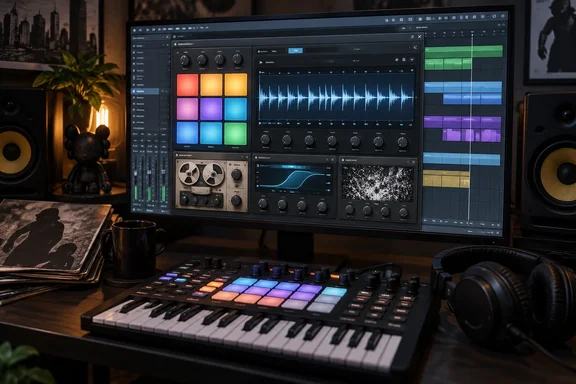
DRUMFLX works in two ways. Classic One Shot mode gives you a grid of pads that you play from a MIDI keyboard or controller, the familiar drum-machine layout used for finger drumming and programming patterns hit by hit. Drum Loop mode takes the same kits and presents them as finished drum and percussion loops.
So DRUMFLX is both an instrument and a source of grooves. If you already program beats in a piano roll, One Shot mode acts like any pad sampler. If you're sketching an idea and don't want to build a beat from nothing, Drum Loop mode hands you a starting groove to write over.
A user in the KVR Audio forums raised one limitation after trying it. They found no way to assign custom MIDI mapping to the pads, unless they were missing it. Nobody else has reported this and SoniX hasn't documented it either way, but it matters to anyone with a pad controller whose layout doesn't match the plug-in's defaults. If you depend on a particular controller map, check this before building a workflow around the plug-in.
Modern, Vintage and Texture Modes Swap the Effects Rack
The sound library comes in three sets: Modern, Vintage and Texture. Each has its own processing chain. Bedroom Producers Blog lists the controls for each:
| Mode | Character | Controls |
|---|---|---|
| Modern | Clean, contemporary drums | Boost, Punch, Analog EQ, Grit, Shine, Tighten, Noise |
| Vintage | Warmer drums with tape, sampler and record-style character | Drive (in place of Boost), plus the mode's coloration controls |
| Texture | Experimental processing | Resample, Instability, Delay, gated reverb, Drive, Shine, Noise |
The controls on screen change with the selected mode. You see only the effects relevant to that mode, so there's no single crowded panel with every effect. Tomislav Zlatic, who wrote the Bedroom Producers Blog piece, singled this out as a highlight. He said it keeps the interface simple while putting the right tools in front of you. SoniX's own page describes the effects only as analog-modeled. The mode names and control lists above come from that hands-on write-up, not from a SoniX spec sheet.
You don't have to be locked into the bundled sounds. You can import your own samples. The KVR user who flagged the MIDI mapping issue also confirmed that you can import your own samples and the samples it ships with can be used in other plugins. They said they'd already pulled a snare from DRUMFLX into a different instrument. That makes the free download more useful even if you never make DRUMFLX your main drum tool. The bundled one-shots can go straight into whatever sampler you already use.
SoniX has also said it plans to release more kits. It hasn't given dates, a count or prices, and it hasn't said whether they'll be free, so treat the extra kits as a stated plan, not something you can count on.
The Price of DRUMFLX Is an Email Address and a Marketing Opt-In
According to Bedroom Producers Blog, you get DRUMFLX by entering your first name and email address and waiting for a download link. There's no checkout, no user account, no license code and no plug-in activation. That last point is useful in practice. You won't be tied to a sign-in or an authorization limit when you move to a new PC or reinstall Windows.
The catch is the consent checkbox. Bedroom Producers Blog says the form uses a single required checkbox that covers both the download and SoniX's promotional emails, even though SoniX's FAQ calls marketing optional. The checkbox text, as quoted in the KVR thread, confirms the bundling. Next to the request to have the download link emailed, the box says that by checking it you also agree to receive SoniX Audio news, drops, and deals, and that you can unsubscribe at any time.
In practice, you can't get the link without accepting marketing email, and unsubscribing afterward is your only way out. SoniX already runs a weekly "Free Loop Friday" mailing and daily deal promotions on its site, so the list is likely to be active. Several people in the KVR thread said they use a separate throwaway inbox for exactly this kind of free download. That's an easy precaution if you'd rather keep SoniX out of your main inbox.
Installing DRUMFLX Safely on a Windows DAW PC
Because the plug-in is free and delivered by email link, it's reasonable to be careful about the installer. One KVR forum user reported that they ran the installer through VirusTotal and it got a perfect score. That was one person scanning one copy, not an audit. A clean multi-engine scan is a sensible baseline check, and you can easily repeat it on the file you download yourself.
Before installing, confirm you meet the basics:
- You're running 64-bit Windows 10 or newer. You can check the architecture under Settings > System > About, next to "System type".
- Your DAW can load 64-bit VST3 instruments. If your host only supports VST2 or AU, DRUMFLX won't load in it on Windows, because VST3 is the only Windows format reported.
- You're comfortable with the email opt-in described above, or you have a secondary address ready.
After installing, rescan your plug-ins in the DAW and load DRUMFLX on an instrument or MIDI track. If it shows up and the pads respond to incoming MIDI notes, it's working. SoniX hasn't published the installer's default paths or uninstall steps. On Windows, VST3 plug-ins conventionally go in the shared Common Files\VST3 folder, but that's a general convention and hasn't been confirmed for this installer. If DRUMFLX doesn't appear after a rescan, check where your DAW looks for VST3 plug-ins and compare that with where the installer put the files.
The release has reached Windows-heavy music communities. A thread linking to the download was posted in the deals section of the official Cakewalk by BandLab forum. That doesn't confirm compatibility with any particular host. It does show that the Windows DAW community is picking it up.
What this means for you
The decision is simple. If you make hip-hop, trap, R&B or drill on a Windows 10 or newer PC with a VST3-capable DAW, DRUMFLX is worth trying, and the only real cost is the marketing email. If you already have plenty of drum plug-ins, the bundled samples may still be worth grabbing on their own. If you rely on a custom pad-controller layout, hold off on building it into your workflow until you've checked the MIDI mapping yourself.
You can also try it before handing over your details. According to Bedroom Producers Blog, the DRUMFLX product page has a playable 12-pad version in the browser, plus audio examples for each sound category. That lets you hear the Modern, Vintage and Texture modes before downloading.
- DRUMFLX runs on Windows only as a 64-bit VST3 plug-in and requires Windows 10 or newer, with no reported standalone app.
- The download needs only a first name and email address, with no account, license code or activation, so reinstalling on a new PC shouldn't hit any authorization limit.
- The single required checkbox signs you up for SoniX marketing email, so use a secondary inbox if that bothers you, or plan to unsubscribe.
- Classic One Shot mode covers pad playing and programming, and Drum Loop mode provides ready-made grooves from the same kits.
- You can import your own samples, and early users report the bundled samples work in other plug-ins.
- One early user found no custom MIDI pad mapping, so test your controller before relying on it.
DRUMFLX is a good free instrument, and the email signup is the one real trade-off. The Windows version is narrowly scoped, with one format and one OS floor, and there's no activation to cause trouble later. The main thing to watch next is SoniX's promised extra kits: when they arrive, how many there are, and whether they stay free.
References
- SoniX Audio releases DRUMFLX, a FREE drum machine plugin - Bedroom Producers Blog Bedroom Producers Blog · 2026-09-23T12:51:05+00:00
- DrumFLX Free - Instruments Forum - KVR Audio kvraudio.com