

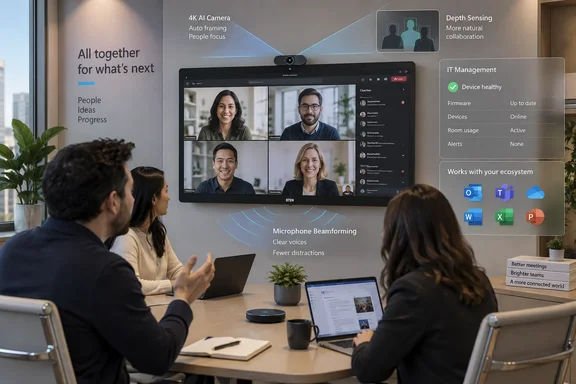
The launch was announced by DTEN in a press release carried by AOL through PR Newswire. Microsoft’s own certified-hardware documentation independently confirms the precise model, the D7X AI Board 55-inch, in its Windows touchboard list, alongside its Intel Core Ultra 7 155H processor, 16GB of memory, and 256GB of storage. That confirmation makes this more than a vendor promise: the 55-inch model has cleared Microsoft’s Teams Rooms certification program.
For organizations already standardized on Microsoft 365, the news is less about another 4K meeting display than about deployment and lifecycle management. DTEN is packaging display, camera, microphones, speakers, Windows compute, and touch controls into a single unit; the certification means administrators can treat it as a supported Teams Rooms endpoint. But buyers should separate what Microsoft has certified from DTEN’s broader claims about what its on-device AI will accomplish in live meetings.
What Microsoft has actually certified
Microsoft’s certified-hardware catalog classifies the D7X AI Board 55-inch as a Windows touchboard device under the Teams Rooms on Windows certification program. Microsoft says that program tests for hardware design and performance requirements. In other words, the listing carries real weight for procurement teams that need a supported Teams Rooms device rather than an improvised PC-and-display combination.
The certification is specific to the 55-inch D7X AI Board, not the whole D7X family and not a future 75-inch AI Board. DTEN says certification for the 75-inch model is expected later, but it has not supplied a date. That distinction matters for facilities teams planning room refreshes around screen size: the certified product available today is the 55-inch Windows touchboard.
The form factor also comes with a limitation that can get lost in a product announcement. Microsoft’s Teams Rooms guidance says touchboards are certified for standalone use and cannot be extended to drive additional front-of-room displays; dual-display mode is not supported for touchboards. A D7X AI Board may simplify a single-display huddle room or conventional small conference room, but it is not a drop-in answer for boardrooms designed around separate content and gallery displays.
DTEN positions the board for rooms with two to 10 people. That is broadly compatible with the 55-inch format, though the company has not published a recommended room-depth range, formal microphone pickup measurement, or a public price. Buyers comparing it with modular Teams Rooms kits will need those details, plus local reseller quotes, before they can assess whether the all-in-one design really reduces total installed cost.
The on-device AI claim needs a sharper reading
DTEN says the D7X AI Board uses a 48-megapixel center camera, dual depth sensors, and dedicated AI processing to map the room in 3D, identify actual people, avoid framing photos or reflections, and create individual participant views. It also claims a 15-element beamforming microphone array can isolate and carry voices more clearly.
Those specifications describe a plausible approach to the familiar hybrid-meeting problem: a room camera aimed down a table often makes in-room participants look distant while a shared microphone feed obscures who is speaking. Individual framing and beamforming are designed to correct that. Yet there is no independent testing in DTEN’s announcement showing framing accuracy in backlit rooms, performance with people moving through the space, microphone pickup at the far end of a table, or behavior when multiple participants speak at once.
The important division is between in-room processing and Microsoft’s cloud experiences. DTEN’s board may use local processing to decide what its camera should capture. But Teams features such as Cloud IntelliFrame, participant recognition, meeting transcription, and Copilot-generated output have their own Microsoft-side requirements, settings, policies, and licensing.
Microsoft’s documentation says Cloud IntelliFrame on Teams Rooms for Windows produces a smart video feed by zooming in on people in the room and removing distractions. It is available for Teams Rooms on Windows systems with a Teams Rooms Pro license and an enabled camera configuration. It works when there are nine or fewer people in the room, and Teams can switch back to a standard room view as activity changes.
That means the AI board does not remove the need to validate the Teams configuration. Organizations should test the D7X AI Board with the exact Teams Rooms Pro licensing, camera configuration, meeting policies, and client versions they intend to support. A well-framed video feed can help remote participants see people more clearly, but a device certification is not a blanket guarantee of every premium Teams AI feature.
Copilot and speaker attribution remain an administration project
DTEN’s press release makes a stronger marketing connection: clearer video and audio will give Microsoft 365 Copilot and the Facilitator agent better signals for notes, follow-ups, summaries, transcription, and speaker attribution. The premise is reasonable, but the claimed outcome is conditional.
Microsoft says in-room participant identification through Cloud IntelliFrame requires a scheduled Teams meeting, an invited participant, organization-wide enablement of voice and face recognition, and an enrolled recognition profile for the individual. An ad-hoc “Meet Now” meeting does not qualify. A person who enters the room without being on the invitation also will not be identified, even if that person has enrolled a recognition profile and was recognized in another meeting.
This matters particularly for organizations expecting an AI board to solve attribution automatically. The hardware can improve the camera and microphone input, but it cannot bypass identity enrollment, tenant policy, meeting scheduling, or licensing conditions. If those prerequisites are absent, the room may still have clearer video and audio, while the transcript continues to refer generically to an in-room speaker.
Privacy and compliance work also remain with the customer. Microsoft directs organizations enabling Cloud IntelliFrame to provide appropriate notice outside meeting rooms and states that customers are responsible for meeting applicable local-law obligations regarding notice, consent, and data retention. Microsoft further says Cloud IntelliFrame is not intended for use in Illinois because of uncertainty around the definition of biometrics in state law.
That is a significant omission from the sales pitch around “recognizing participants.” A deployment team should involve privacy, legal, and workplace-experience stakeholders before turning on facial or voice recognition features, especially in multinational environments. The technical decision is not simply whether the D7X AI Board can recognize people; it is whether the organization has chosen and documented a lawful policy for doing so.
Windows management is the enterprise advantage — with some setup required
The D7X AI Board’s Windows base is the strongest operational argument for Microsoft-heavy organizations. DTEN says the device can be managed through Microsoft Intune, Windows Autopilot, and its own DTEN Orbit service. Microsoft’s Teams Rooms guidance confirms that Windows Autopilot and Autologin can provision, reset, redeploy, and recover Teams Rooms on Windows without someone needing to interact with the device during initial setup.
However, “ready in minutes” should be read as physical readiness, not a complete enterprise rollout. Microsoft’s Autopilot process requires registered device hardware identities, an Intune configuration, a dedicated Teams Rooms device group, a Teams Rooms Pro license, Microsoft Entra setup, resource accounts, and the correct deployment permissions. Microsoft also recommends excluding Teams Rooms devices from general Windows configuration and compliance policies that could interfere with room operation.
DTEN’s reference to “Microsoft Pro Portal for Rooms” appears to be informal naming. Microsoft calls the service the Teams Rooms Pro Management portal. It is the portal used to monitor room health, manage settings, and increasingly centralize Teams device management. The naming difference is minor, but administrators shopping from the release should search for the official product name when checking licensing, roles, and rollout documentation.
Microsoft’s security guidance offers another reason not to manage this board like an employee laptop. Teams Rooms on Windows devices are intended to operate as appliances, and Microsoft does not support adding arbitrary software. Certified compute hardware is expected to use TPM 2.0 and physical protections for the compute and I/O interfaces. The D7X AI Board may run Windows, but the operational model should be a tightly controlled room endpoint with narrowly scoped policies, update rings, and recovery procedures.
A credible option, but not a self-contained Copilot upgrade
The D7X AI Board 55-inch has the certification many IT buyers require, and its all-in-one design can reduce cabling, component matching, and support handoffs in rooms where one 55-inch touch display is the right layout. Microsoft’s official catalog validates the core claim that it is a certified Teams Rooms on Windows device.
What remains unproven is the part of DTEN’s pitch most likely to influence an expensive room-standardization decision: whether its depth sensing, participant framing, and microphone processing outperform established Teams Rooms alternatives in the organization’s actual rooms. DTEN has not published pricing, independent performance data, or a certification timeline for the 75-inch model.
For now, the sensible procurement move is to treat the 55-inch D7X AI Board as a supported Windows Teams Rooms touchboard, then run a pilot that measures camera framing, far-end audio, Cloud IntelliFrame behavior, policy compliance, and recovery through the Teams Rooms Pro Management portal. The certification clears the compatibility hurdle; the pilot determines whether the AI claims justify replacing a room’s existing hardware.
References
- DTEN D7X AI Board Achieves Microsoft Teams Certification, Bringing Room-Aware AI to Hybrid Meetings - AOL.com AOL.com · 2026-09-17T08:07:00+00:00