

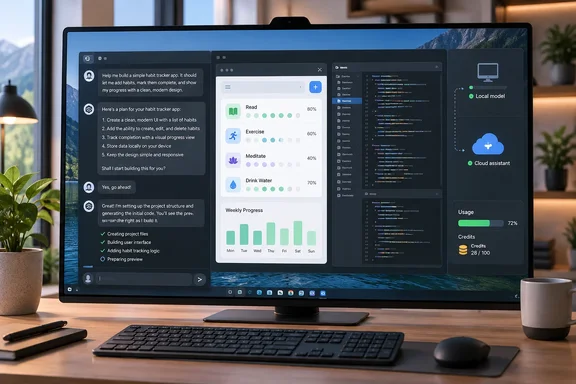
The pitch is good. Still, "free" does a lot of work in that sentence, so this piece looks at what Dyad actually costs, where the limits are, and what Windows users should watch for.
What Dyad is, and why it lives on your PC
Dyad works much like Lovable or Bolt. You describe an app in a chat window and a working preview appears next to the conversation. The big difference is location. Dyad runs on your own machine, and according to XDA's review every file it generates is saved to your disk as ordinary code that you can open in VS Code or push to GitHub.
Dyad's pricing page says the free app can be downloaded for macOS and Windows with no sign-up. The project describes itself as a "local, open-source AI app builder for power users" and as an alternative to v0, Lovable, Replit and Bolt.
For Windows users that has real consequences:
- No lock-in for your code. If you stop using Dyad, your project is still a normal folder on your drive.
- No account needed to start. You can try it without handing over an email address.
- Your hardware and your problems. Local software means local troubleshooting, which comes up again below.
Section summary: Dyad is a desktop builder, not a cloud service. The code stays on your PC, and you choose where the AI comes from.
Three ways to pay for the AI (including "not at all")
Dyad doesn't include its own AI. You connect one, and each route costs you something different.
| AI route | What you supply | Where the cost lands |
|---|---|---|
| Local models (Ollama, LM Studio) | Your own GPU/CPU and RAM | Electricity and hardware; no per-request cloud bill |
| API keys (OpenAI, Anthropic, Google, OpenRouter, OpenAI-compatible custom providers) | Your provider credentials | The provider's pay-per-token billing |
| ChatGPT subscription (v1.16.0+) | An existing ChatGPT plan | Your ChatGPT usage allowance, plus a Dyad fee in some modes |
Local models
Dyad's local-models guide lists LM Studio and Ollama. It also warns that running local LLMs can take a lot of resources, and that smaller models may struggle to follow Dyad's instructions and give less useful answers. XDA's advice follows from that: how much VRAM you have largely decides how good the local experience is.
Some practical details from Dyad's documentation:
- Start LM Studio or Ollama before you open Dyad's model picker.
- In Dyad, open the model picker and choose Local Models.
- For LM Studio, Dyad expects the server at
[url]http://localhost:1234[/url], with a model already loaded. If you use a different port, add it as a custom AI provider. - For Ollama, Dyad connects to whatever
OLLAMA_HOSTpoints to, or to[url]http://localhost:11434[/url]if that variable isn't set.
If no models appear, the most common cause according to the docs is simple: the local server isn't running, or no model is loaded in LM Studio.
The ChatGPT subscription route
This is the new part. The pull request that added it states plainly that free users can connect a ChatGPT subscription without a Dyad Pro key. For free users, subscription inference skips Dyad credit checks and Engine usage reporting when Pro is off; Basic Agent quota and free-tier limits still apply.
There are two limits worth knowing:
- According to the same PR, the model picker unlocks only subscription-catalog OpenAI models for free users; others still need API keys or Pro. Connecting ChatGPT doesn't open up every model.
- Dyad's v1.16.0 release notes add an optional Fast mode for connected ChatGPT subscriptions. It's off by default, answers faster, and uses twice as much of your ChatGPT allowance.
The PR also says a successful connection can auto-pick a catalog model by plan tier (non–Plus/Pro prefers gpt-5.6-luna), add Recents, set Agent as default mode. That last detail matters for the fees covered next.
XDA's reviewer thought the usage probably comes out of the Codex allowance included with ChatGPT plans, but said so with an "as far as I can tell." Dyad's own documentation just calls it your ChatGPT usage allowance. Treat the Codex link as the reviewer's reasonable guess, not a confirmed fact.
Section summary: You can pay with hardware, with API tokens, or with a ChatGPT plan you already have. Only the local route avoids a cloud bill entirely.
The fine print: "free" isn't the same in every mode
XDA calls this a "brilliant" payment model, and for experimenting it mostly is. But Dyad's v1.16.0 release notes add a condition the review mostly skips over.
- Build, Ask and Plan with a connected ChatGPT subscription don't use any Dyad credits. Dyad's GitHub changelog lists this as a separate change: "Make Build, Ask, and Plan ChatGPT usage free of Dyad credits".
- Agent mode with a ChatGPT subscription carries a Dyad orchestration fee, based on combined input and output tokens. It's up to 1.5 credits per million tokens, or 0.3 credits per million for smaller models such as GPT 5.6 Luna. Dyad's pricing page repeats the 1.5-credit figure.
- The claim of "up to 5x" usage from a ChatGPT subscription, compared with Dyad Pro credits alone, comes from Dyad. Nobody has independently measured it.
The release notes also recommend ChatGPT Plus at $20/month or Pro at $100/month for access to OpenAI's top models. That's a recommendation, not a requirement. Free Dyad users can connect whatever subscription they have, within the model limits above.
Dyad's own plans, according to the current pricing page:
- Free: free forever, with Basic Agent limited to 20 messages per day.
- Pro: $20/month, 200 AI credits per month, plus Pro modes for large codebases.
- Max: $79/month, 900 AI credits per month, with credit reloads at the same price.
One discrepancy: an older Dyad blog post explaining Agent mode gives the free allowance as 5 messages per day. The pricing page, which is the current plan comparison, says 20. Pricing pages change, so treat all of these numbers as a snapshot.
Section summary: Planning and building with ChatGPT really are free of Dyad credits for free users. Agent mode still has a daily cap and, in some setups, a fee.
The workflow: plan, build, version, ship
XDA's walkthrough describes a sensible sequence. It's based on one reviewer building one test project, so read it as an example rather than a benchmark.
- Plan mode. Start with a vague idea. The reviewer asked for a screen-time dashboard using fake phone data, and Dyad asked a short multiple-choice questionnaire before writing any code. You can then keep building in the same session or open a new one with the plan attached.
- Build or Basic Agent. According to XDA, Build now runs in a loop and checks its own changes over several steps, with no usage cap. Basic Agent can find and fix bugs on its own, within the free tier's daily message limit. Dyad's pricing page says the free agent can check for build errors, run tests and debug using logs.
- Automatic versioning. The reviewer says every edit saves a new version, and restoring an older version keeps the rest of the history.
- Preview and code panel. The live preview and the full codebase sit on the right side of the window. XDA says visual editing is a Pro feature (Dyad introduced its visual editor for Pro users back in v0.30.0), but free users can still select parts of the preview and attach them to the chat.
- Publish. Dyad's publishing guide explains the steps: open the app's details card, click Connect to GitHub, authorize Dyad, then click Sync to GitHub to push your local code. On Vercel, sign in with GitHub, import the repository, and deploy. Vercel usually detects frameworks such as Vite automatically. After that, each sync normally triggers a new build.
Two notes from that guide are worth keeping in mind. Apps that use services like Supabase or OpenAI may need environment variables set on Vercel. And once deployed, your app is public, so the guide warns against putting sensitive content in it without proper authentication and security. A weekend prototype that builds successfully is not ready for production.
Section summary: The Plan → Build → Sync path works well. The most important step is still the one where you decide whether to deploy at all.
Windows-specific notes: v1.17.0, antivirus, and credentials
Now for what the review didn't cover. First, v1.16.0 is no longer the latest release. Dyad's GitHub release page shows stable v1.17.0 published September 28, 2026. The page lists experimental Claude Code integration and Cloudflare Workers publishing, and the release includes a Windows Setup.exe installer. If you're downloading now, you'll get v1.17.0. The ChatGPT subscription feature arrived in v1.16.0 and carries forward.
Second, there's a real bug report from a Windows user. In GitHub issue #4680, filed on Dyad 1.16.0 running on win32 x64, the user wrote that they had to reinstall the app because my antivirus put it in quarantine, and that afterward the app won't connect back to my chatgpt subscription despite the app saying it was successful in linking it. That's one report and doesn't show a widespread problem. Still, if your security software flags Dyad, check the installer against the SHA-256 hashes published on the GitHub release page before you allow it.
Third, a code reviewer on the ChatGPT-subscription PR raised a credential edge case. If the encrypted credential file cannot be opened (locked or migrated OS keyring), credentialError is true and every OpenAI turn throws a DyadError even when the user has a valid OpenAI API key of their own. The reviewer added that recovery requires finding and using Disconnect in the model picker. The evidence available here doesn't show whether that behavior shipped unchanged. Still, if your own OpenAI key suddenly stops working after you've connected a subscription, disconnecting the subscription in the model picker is the first thing to try.
Section summary: Install v1.17.0, verify the installer if your antivirus complains, and if subscription login breaks, look first at the model picker's Disconnect option.
The verdict: a good home for bad ideas, with conditions
XDA's main point holds up. Most vibe-coding tools charge you for every attempt, and that stops people from trying small, silly ideas that might turn into something. Dyad keeps your code local, lets you pick your AI source, and doesn't charge Dyad credits for planning and building with ChatGPT. That makes it one of the cheaper ways to experiment on a Windows PC.
The counterpoints:
- Someone still pays. It might be your GPU, an API provider, or OpenAI through a subscription. "Free" really means "free from Dyad."
- Agent mode has limits. Free users get a daily cap, and there's a per-token fee when Agent runs through a ChatGPT subscription.
- The 5x figure is Dyad's own claim. Nobody has tested it independently yet.
- Local models only go as far as your hardware. Small models may not follow Dyad's instructions reliably, and Dyad says so itself.
If you're a WindowsForum reader with an idea you never bothered to build, Dyad is a low-risk place to try it. Set it up with Ollama or LM Studio if you want to keep everything offline, or connect a ChatGPT plan you're already paying for. Just know which mode you're in before you let the Agent run off with your credits.