

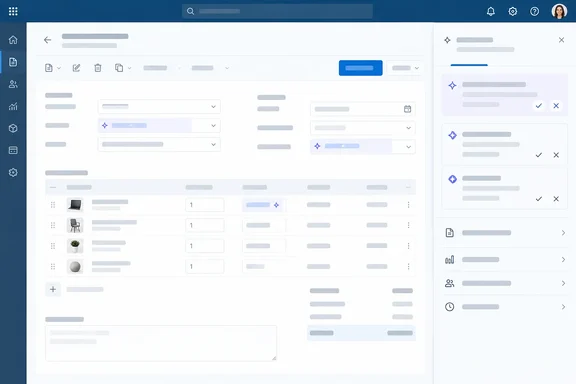
The feature appears on Microsoft's AI at Work roadmap as item 573366, titled "Dynamics 365 Business Central: Copilot and agents - Review content generated by agents directly on pages." The roadmap lists it as Launched, on the Web platform, in the General Availability release ring, for Worldwide (Standard Multi-Tenant) cloud tenants, with a general availability month of October 2026.
What changes on the page
Microsoft's Learn release-plan page says the update lets Business Central users review and approve content generated by agents directly on the pages where they work. Microsoft also describes what it removes from the workflow: "You no longer need to navigate to separate task pane to understand that a given document was created by an agent."
Instead, agent‑generated suggestions—such as descriptions, text proposals, or field‑specific updates—appear inline where they can be evaluated and modified before being applied.
Microsoft makes two design points:
- Context: By keeping the review process within the page context, users maintain flow, reduce clicks, and ensure content quality with minimal disruption.
- Familiar interface: The feature builds on existing Business Central autofill user interface patterns ensuring admins and users can adopt it as part of existing agent‑powered daily workflows.
The key phrase is "before being applied." A human still reviews the content before it's committed. The agent drafts and the person decides.
Section summary: Agent suggestions now appear inline on the working page, and you can edit them before they're applied. The goal is to keep review in context, not to give agents more freedom.
Two ways to review agent work
The biggest practical detail comes from a separate Microsoft Learn article on supervising agent activities. It shows that on-page review sits alongside the Tasks pane rather than replacing it. Microsoft explains that Business Central agents, such as the Payables Agent and Sales Order Agent, work autonomously to process requests like quotes and invoices, and that sometimes, they need your input to verify information, approve drafts, or resolve issues they can't handle on their own.
According to that article, you can review and approve agent work in two ways: from the Tasks pane on the side of the role center or directly on document pages. Microsoft's guidance on which to use comes down to this:
| Approach | Best suited for (per Microsoft Learn) |
|---|---|
| Tasks pane | Seeing the full task timeline, each step the agent took, and giving instructions when the agent is blocked |
| Directly on pages | Quickly checking field-level suggestions on a document you already have open, without switching context |
Microsoft notes that both approaches let you approve agent work and continue the task.
In practice, an accounts payable clerk with a draft purchase invoice already open can check the agent's field suggestions right there. If the agent got stuck and needs instructions, or you want to see why it did what it did, the Tasks pane is still the better place. To reach the pane, Microsoft says you select the agent's icon in the upper-right of the navigation menu, where a red circle with a number indicates how many tasks need your attention.
Section summary: On-page review is the quick option for field-level checks. The Tasks pane is still the place to dig deeper and unblock agents.
The autofill connection, and where it ends
Microsoft says the feature builds on "existing autofill user interface patterns," so it helps to know what that pattern looks like. Microsoft's documentation for Copilot autofill (still marked preview) describes suggested values shown in italics with a Show details icon. When you select a field, Accept the suggestion and Discard the suggestion buttons appear, and there's a Keep all option for the whole page. Business Central also asks you to accept or discard pending suggestions before you leave the page, and suggestions aren't saved until you accept them.
That gives a fair idea of the design approach. Still, autofill and agent review are separate features. Microsoft hasn't published click-by-click steps, screenshots, page-type limits or a complete list of controls for reviewing agent content on pages. Don't assume autofill's documented limits apply here. Those limits include support only on card and document pages, English-only validation and no support for multiline text fields. The safe takeaway is that Microsoft designed the agent review to look familiar. Don't read it as an exact copy.
The documentation also leaves several questions open:
- Can every kind of agent suggestion be rejected outright, or only edited?
- What happens to content nobody reviews?
- Is review required in every workflow where agents run?
- Is each review decision logged?
Admins who need answers for compliance should test in a sandbox before they rely on any assumption.
The date discrepancy
The dates don't line up. Microsoft's release-plan documentation for 2026 release wave 1 lists this feature as enabled for users, automatically, with general availability on Apr 1, 2026. The roadmap record, published September 30, 2026, says October 2026.
One likely reason is Microsoft's change in how it publishes roadmaps. The Learn page now says release plans will no longer be published starting in September 2026, and that new Dynamics 365, Power Platform and Dataverse capabilities will go to the AI at Work roadmap instead. A feature moving into the new roadmap could pick up a new date along the way. Microsoft hasn't explained the mismatch, though, so treat that as an educated guess. The AI at Work roadmap also says its dates are estimates and that items may be removed once they become generally available.
So what should admins do? Don't rely on either date to tell you whether the feature is live in your tenant. Check your own environment. Microsoft Learn also says geography and language availability are covered in separate Feature Geography and Feature Language reports, not on the feature page. The "Worldwide" tag on the roadmap shouldn't be read as a promise about every country or language.
Section summary: Learn says April 1, 2026, and the roadmap says October 2026. Microsoft documents the feature as enabled automatically, but your tenant is the only reliable answer.
Why it matters
Business Central has been adding agents quickly. Microsoft describes the product as including Copilot, built-in autonomous agents, and the flexibility to add custom AI. More agents mean more drafts that someone has to check. That review work grows with every agent you turn on.
Consultancy Travsx makes the same point in its readiness guide: automation fails when people cannot see what the system is doing. Consultants at Tigunia list on-page review as one of the wave's governance features, calling it a supervisor review workflow integrated into the BC pages where the affected records live.
There's a counterpoint. Easier review can also mean careless review. If accepting a suggestion becomes a habit, people may approve content without really checking it. Microsoft's own autofill documentation warns that Copilot uses AI and its suggestions might not be correct. Microsoft hasn't published accuracy figures, time-savings measurements or customer results for this feature. The fewer-clicks claim is Microsoft's reasoning, not a measured result.
What admins and users should do
- Check whether it's there. Open a document that an agent such as the Payables Agent or Sales Order Agent created, and see whether its suggestions appear inline. Microsoft lists the feature as enabled for users automatically.
- Tell users about both review paths. Use the page for quick field checks and the Tasks pane for the full task history and blocked tasks.
- Reset review expectations. Remind staff that a suggestion is a draft that still needs checking, especially descriptions or text that customers will see.
- Check language and geography coverage in Microsoft's availability reports before rolling out across regions.
- Test the open questions in a sandbox, including rejection, unreviewed content and logging, before you build compliance processes around them.
Bottom line
Business Central now shows agent-generated content where people already work, and the Tasks pane is still there for deeper supervision. The feature doesn't make the AI any more accurate. It does make agent output easier to find and check before it's applied. Microsoft hasn't yet documented the full review controls, and its two published dates disagree, so test it in your own tenant first.
References
- Dynamics 365 Business Central: Copilot and agents - Review content generated by agents directly on pages Microsoft 365 Roadmap · 2026-09-30T23:31:03.389585Z
- Review content generated by agents directly on pages | Microsoft Learn learn.microsoft.com
- Business Central Agents: Features and Readiness Guide travsx.com