

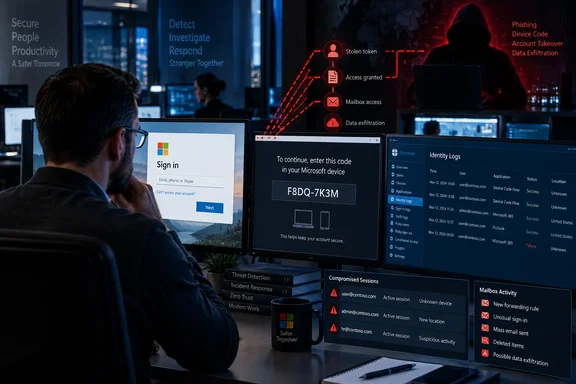
For Microsoft 365 administrators, the most important detail is where the deception happens. EvilTokens can send a victim to Microsoft’s real authentication service, where the person may complete legitimate multifactor authentication. The attacker benefits because the victim approves a sign-in request that originated on the attacker’s device.
Microsoft’s earlier technical investigation, published April 6, documented this separation between the person authenticating and the session receiving access. That research also provides a practical response: block device-code authentication wherever possible, investigate suspicious approvals, and explicitly revoke compromised sessions while accounting for access tokens that may remain usable during containment.
EvilTokens loses infrastructure, but compromised accounts still need attention
BleepingComputer reports that Microsoft coordinated the disruption with Health-ISAC, law enforcement, and identity-threat intelligence company SpyCloud. The partners obtained legal authority to seize active infrastructure associated with EvilTokens. Microsoft tracks the operation behind the service as Storm-2992.
The investigation also led to arrests in London. According to BleepingComputer’s reporting, the Metropolitan Police received information about the suspects in August and executed warrants at addresses in Canary Wharf and Nine Elms on the Friday preceding the announcement. Two men, aged 32 and 38, suspected of administering the EvilTokens website were arrested and subsequently released on bail pending further investigation. Those arrests are investigative developments, not findings of guilt.
The reported victim figures describe two different views of the operation:
| Reporting organization | Reported exposure | What the figure describes |
|---|---|---|
| Microsoft, as reported by BleepingComputer | More than 12,000 compromised accounts across over 10,000 organizations worldwide. | Microsoft’s reported assessment of the operation’s reach. |
| SpyCloud, as reported by BleepingComputer | More than 8,708 compromised accounts across 6,585 corporate email domains in 79 countries. | Accounts visible in SpyCloud’s recaptured phishing data. |
These figures should remain separate. An email domain is not the same unit as an organization, and the two collections may overlap. Adding the account counts would produce an unsupported total. SpyCloud reported that approximately 97.5% of accounts in its collection belonged to enterprise domains, reinforcing the operation’s business focus.
Microsoft identified affected organizations in wholesale distribution, construction, financial services, real estate, higher education, and healthcare. SpyCloud’s geographic breakdown placed the United States first, followed by Canada, Australia, the United Kingdom, and Saudi Arabia. Neither breakdown limits who should investigate: the distinguishing exposure is an account’s authentication activity, not its industry or country.
BleepingComputer explicitly describes the action as a disruption rather than the elimination of EvilTokens. The threat remains active, and affiliates have produced alternatives, including a reported clone called APToken. A reduction in attack volume is an expected benefit, not a measured post-disruption result available in this reporting. Infrastructure seizure is not account remediation: defenders still have to establish what an attacker obtained and whether that access remains usable.
Microsoft device-code phishing makes a real login part of the trap
The OAuth 2.0 device-authorization flow solves a legitimate usability problem. A device with limited input capabilities, such as a television or printer, can display a short code and ask the user to complete authentication in a browser on another device. Microsoft’s April investigation explains that the resulting authorization goes back to the session that requested the code.
EvilTokens exploits that separation. Instead of asking a victim to type a password into a counterfeit Microsoft login, the attacker starts a genuine device-authorization request and persuades the victim to complete it. The legitimate identity service then delivers access to the requesting session.
The documented sequence works like this:
- The attacker initiates a device-code authentication request.
- A phishing page displays the resulting code under a business pretext, such as opening a shared document or reviewing an invoice.
- The page directs the victim to Microsoft’s genuine device sign-in interface.
- The victim enters the code and completes the required authentication or confirmation.
- The attacker’s requesting session receives tokens that allow access within the authorization granted.
That final step explains why familiar advice about checking the destination website is insufficient on its own. A Microsoft-owned authentication page can be genuine while the request it is approving belongs to someone else. The user needs to recognize the application and understand why they are authorizing it, including whether they initiated the device-sign-in process.
MFA remains valuable, but successful MFA does not establish that the user intended to authorize this particular requesting session. Microsoft observed victims who were prompted for a password and MFA when they lacked an active session. Already signed-in victims could instead confirm the code using their existing session. In both cases, the attacker’s objective was to get the authorization completed.
This also puts recommendations for passkeys and FIDO2 security keys in context. Microsoft recommends phishing-resistant authentication as part of broader identity protection, alongside restricting device-code flow. Administrators should preserve both parts of that advice: stronger authentication belongs in the defensive baseline, while control over device-code authorization addresses the flow being abused here. A real authentication page is precisely why this attack requires attention to the request’s purpose, not just its appearance.
EvilTokens automation starts the code’s clock when the victim arrives
Microsoft’s April research identified a practical improvement over older, static device-code lures. A pre-generated code placed in an email could expire before the recipient opened the message. In the documented campaign, codes had a 15-minute validity window, leaving a static attack dependent on the victim acting quickly.
The newer workflow generated a live code when the victim interacted with the phishing page. That gave the attacker a fresh authorization window at the point when someone was already engaged. Some pages also copied the code to the clipboard to make the next step easier.
The security implication is specific: dynamic generation avoids wasting the code’s lifetime while an email sits unread. It does not mean that an expired code becomes valid again or that Microsoft’s expiry check disappears. It moves the beginning of the countdown closer to the victim’s action.
Microsoft also documented automated backend polling, which checked whether the victim had finished authentication. Once authorization succeeded, the infrastructure could validate access and move into post-compromise activity. The human interaction was brief; the surrounding machinery was built to operate at scale.
EvilTokens sells the route from account access to payment fraud
EvilTokens was marketed as phishing-as-a-service: operators paid for a ready-made platform instead of building the delivery, authentication, and management components themselves. BleepingComputer reports that it was promoted through Telegram for $500 per month or a $1,500 one-time payment. The service offered 44 customizable phishing kits, with additional sending and redirection tools sold separately.
The business themes were central to the attack. Reported lures impersonated document-signing platforms, Microsoft services, file-sharing providers, invoicing systems, voicemail, and eFax services. Subjects included construction bids, partnership agreements, compensation notices, requests for proposals, shared files, invoices, and password-expiration warnings.
Those themes put the authentication request inside work that employees already expect to perform. An invoice or document-signing message supplies a plausible reason to continue; a Microsoft sign-in supplies a familiar next step. The useful training message is therefore more specific than “watch for suspicious email”: a document request that suddenly asks someone to authorize a device or unexpected application deserves to be stopped and verified.
The reported AI capabilities operated on both sides of account compromise. EvilTokens could help customize lures before access and analyze mailbox contents afterward. BleepingComputer reports that the platform used Microsoft Graph—the interface through which software can access authorized Microsoft cloud data—to map organizational relationships and locate potentially valuable correspondence.
Microsoft’s separate April research documented a compatible pattern: automated reconnaissance, selection of financial or executive targets, searches for wire-transfer details and pending invoices, and malicious inbox rules used to conceal or redirect communications. That investigation establishes the mechanics of the broader campaign without implying that every affected account experienced every follow-on action.
The resulting threat is business email compromise, or BEC: fraud that uses trusted business identities and correspondence to induce a payment or disclosure. Access to an existing mailbox can give an operator the participants, language, and timing of an active transaction. AI-assisted review and message generation can reduce the manual work involved in finding and exploiting that opportunity; the available reporting does not quantify how much faster EvilTokens made it.
Evasion supported the same commercial model. Reported delivery chains used PDFs, HTML attachments, multiple redirects, and fake CAPTCHA pages, with traffic passing through compromised websites and legitimate cloud platforms. Microsoft’s April investigation specifically observed Vercel, Cloudflare Workers, and AWS Lambda in the redirect infrastructure. For defenders, that makes the full sequence—from message to authorization to resource access—more informative than judging the final login page alone.
Microsoft’s containment guidance goes beyond a password reset
A suspected device-code approval should be handled as a possible token-based account compromise. The attacker may never have learned the user’s password, yet may possess an access token and a refresh token. An access token authorizes resource access; a refresh token can obtain replacement access tokens while it remains valid.
SpyCloud’s May analysis emphasizes explicit token revocation in responding to this technique. Microsoft’s April guidance likewise instructs defenders to revoke the user’s refresh tokens through the revokeSignInSessions action and consider policies that force reauthentication. A password change may form part of an incident response, but it is not a substitute for investigating and containing the authorization already granted.
There is an important timing caveat. Microsoft reported that standard session revocation in recent campaigns could leave existing access tokens active for up to an hour. Its guidance therefore recommends temporarily disabling a compromised account for immediate containment, acknowledging the associated business disruption. Administrators should account for that interruption before taking the action and avoid treating a successful revocation request as proof that all access has already ended.
These recommendations concern managed organizational identities in Microsoft Entra and Microsoft 365. They are not a universal recovery procedure for personal Microsoft accounts. They also require the appropriate administrative authority and the organization’s available logging and security controls.
Entra investigation should follow authorization into resource access
A useful investigation begins with the suspicious sign-in and follows what the resulting session did. SpyCloud’s technical guidance identifies Entra sign-in records with authenticationProtocol = "deviceCode" as a hunting starting point. Legitimate device-code activity can also appear there, so the field is a way to locate the relevant flow, not a verdict that the event was malicious.
The next question is whether the activity matches an expected application, device-sign-in task, and user context. Microsoft recommends monitoring risky sign-ins and documents detections that combine suspicious device-code authentication with other signals. Its research also describes how Defender for Office 365 Safe Links and Entra ID Protection can contribute to high-confidence device-code phishing alerts where those capabilities are deployed.
For a suspected compromise, the evidence supports the following investigation sequence. This is a synthesis of the documented attack behavior and Microsoft’s containment recommendations, not a claim that every tenant has identical controls:
- Establish which organizational account approved the suspicious code and when. Preserve the relevant message, sign-in details, and alerts so the authorization can be connected to subsequent activity.
- Contain the identity using the organization’s incident-response process. Microsoft recommends refresh-token revocation and temporary account disablement to address the access-token window; disabling the account will interrupt legitimate work.
- Examine mailbox rules and forwarding behavior for changes that redirect or hide messages. Microsoft observed malicious rules as part of follow-on activity.
- Review available evidence of Microsoft Graph access, mailbox access, device registration, and data extraction around the compromise. Microsoft observed different follow-on paths, including newly registered devices and email exfiltration.
- Determine whether the identity sent further phishing or fraudulent business correspondence. Where payment-related threads were accessed or altered, include the relevant business owners in the investigation.
The distinction between containment and impact assessment is useful here. Revoking access addresses the attacker’s ability to continue. Examining messages, rules, devices, and resource access establishes what may already have happened. Neither task can replace the other.
Success should therefore be evaluated against both objectives: the suspicious access has been contained, and the organization has investigated the affected account’s activity sufficiently to address persistence and follow-on fraud. The available reporting does not establish a universal restoration timetable or a single automated check that proves an account is clean.
Microsoft 365 administrators should restrict unnecessary device-code access now
Organizations should determine where device-code authentication is genuinely needed and restrict it elsewhere. Microsoft’s April recommendation is direct: block device-code flow wherever possible and use Entra Conditional Access to control necessary use. The operational trade-off is that legitimate workflows depending on the same flow can also be interrupted.
That makes understanding actual use a prerequisite to a broad policy change. The evidence establishes the policy direction, but it does not supply a complete, current tenant-specific deployment procedure or licensing matrix. It would be unsafe to turn that into a universal series of portal clicks, exclusions, or rollback instructions.
For employees, the decision is simpler. If an email about a document, invoice, or voicemail unexpectedly asks them to enter a device code, they should pause and verify the request’s purpose and the application being authorized. A Microsoft login page and a familiar MFA prompt do not explain who initiated that device request. Someone who already approved an unexpected code should report that approval promptly, even if they never entered a password on an unfamiliar site.
The immediate priorities are concrete:
- Identify legitimate device-code dependencies, then block or restrict the flow for organizational accounts that do not need it.
- Review suspicious device-code sign-ins alongside the associated email and subsequent cloud-resource activity, rather than treating the authentication record in isolation.
- Revoke compromised sessions and refresh tokens, and account for Microsoft’s warning about existing access tokens when choosing containment actions.
- Inspect mailbox rules, device registrations, and business correspondence for evidence of persistence, concealment, or payment fraud.
- Continue deploying phishing-resistant authentication while teaching users to verify the application and purpose of a device-code request.
The EvilTokens disruption gives defenders an opportunity to reduce exposure while a major provider’s infrastructure is under pressure. The durable improvement comes from using that opportunity to control unnecessary device-code authorization and investigate tokens already issued. For Microsoft 365 organizations, the decisive boundary is whether a sign-in authorizes a session the user actually intended to trust.
Update: Additional details (September 22, 2026)
Microsoft’s new technical analysis says EvilTokens emerged in February 2026 and confirms that its phishing pages poll the attacker infrastructure every three to five seconds during the 15-minute device-code validity period. Microsoft also observed some operators registering new devices within 10 minutes of a successful compromise to obtain a Primary Refresh Token for longer-term persistence.
For organizations that require device-code authentication for Teams devices, Microsoft now specifies a narrower Conditional Access approach: scope any exception to the relevant Teams device resource accounts and exclude the Device Registration Service resource from that policy.
Update: Additional details (September 23, 2026)
Windows Report reports that the disruption seized 50 websites associated with EvilTokens and disabled more than 150 additional domains. It also names Cloudflare, Coinbase, OpenAI, Railway, Shadowserver, and TRM Labs among the technology and security partners that worked with Microsoft and Health-ISAC.
The outlet says Microsoft characterized the action as its first disruption of an end-to-end AI-enabled cybercrime service. It further reports that EvilTokens used AI to identify trusted contacts, payment responsibilities, and active financial conversations in compromised inboxes, then recommend fraud approaches and generate impersonation messages. For incident responders, this reinforces the need to validate payment-detail changes, transfer requests, and other unusual financial instructions through a separate trusted communication channel.
References
- EvilTokens PhaaS disrupted after compromising 12,000 Microsoft accounts BleepingComputer · 2026-09-22T11:00:00-04:00
- Unmasking EvilTokens: Getting to the root of device code phishing Microsoft Security Blog · 2026-09-22T15:00:00+00:00
- New EvilTokens service fuels Microsoft device code phishing attacks bleepingcomputer.com