

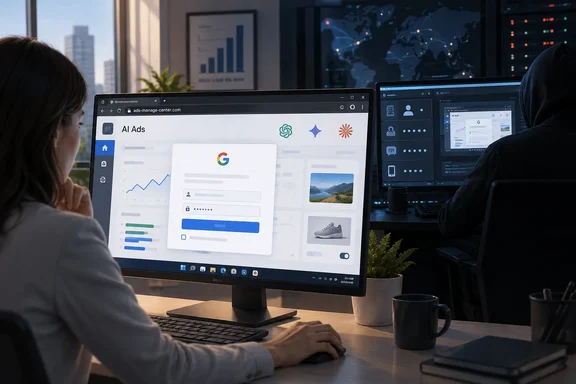
This is not an operating-system or browser vulnerability. Nothing needs patching. The attack works by convincing a person that a picture of a sign-in window is a real one. That makes it a user-awareness and identity-hardening problem for IT teams, and a Windows PC is just as exposed as a Mac or phone.
What Island found
Island says operators added a fake Muse Ads product eight days after Meta launched Muse, on a human-operated phishing platform already impersonating Gemini, Claude, ChatGPT, and Perplexity. Meta introduced Muse as a personal AI agent on September 8, 2026. Meta's announcement does not describe Muse as an advertising-account product. The fake "Muse Ads" is the attackers' invention, and Meta itself is not shown connecting Muse to ad accounts.
Island's report says each fake product has its own pitch:
- ChatGPT-branded pages promise a Monday Google Ads brief.
- Gemini pages talk about manager accounts (MCC) and linked clients.
- Claude gets its own advertising portal.
- Perplexity pages offer campaign planning and spend audits.
- Manus pages offer a private Meta integration.
The copy uses advertiser shorthand such as MCC and ROAS. That makes a request to "connect your account" look like routine tooling rather than a credential prompt.
How the Connect button steals logins
The "connect" button opens a fake Google window inside the page, complete with an address bar showing accounts.google.com. Island says the real browser stays on the phishing domain the whole time. BleepingComputer notes that BitB was devised by researcher mr. dox in March 2022.
The fake window adapts to its environment. Island reports that it copies Windows, macOS, iOS and Android styling, and newer builds copy details such as Safari's URL pill, Chrome custom tabs and dark mode.
A person is running the show
The platform is not a simple form that mails passwords to an attacker. Island describes a state machine with an operator watching live:
- On Connect, the page creates a victim record and fingerprints the device, including IP, location, screen size and WebGL.
- It retains up to three separate password attempts, so an operator can reject one and ask again.
- Operator commands include requesting another password, an SMS code or an authenticator code. They also include showing a Google approval prompt, a QR code, a tap-number prompt, or an Okta push or authenticator request.
- Operators can reject a code, hold the victim on a waiting screen, finish the flow, or suppress the page.
The workflows covered are Google, Meta, TikTok and Okta, driven over Socket.IO events. Island contrasts this with a transparent reverse-proxy kit. The platform rebuilds the provider interface locally and collects credentials and MFA state through its own APIs. The traffic therefore looks like an AI product talking to an unrelated backend, not a session passing through an identity-provider proxy.
The practical lesson is that a one-time code typed into a fake page can be used immediately by the person on the other end. Ordinary MFA codes and push approvals do not stop this kind of live relay.
One platform, many lures
Island ties the ad pages to refund and fake recruitment pages. All share a Next.js and Socket.IO stack and common endpoints. Many use Vercel frontends with Railway or Render backends. One Railway backend appeared in 73 archived scans across 25 page domains between May 27 and June 20. Those are archived sightings, not proof of when each site began operating.
The operators also exposed older source code in misconfigured public GitHub repositories. That code let researchers link the ad lures to recruiter-themed pages that use the same routes, the same three-password retry pattern and a Telegram control channel. BleepingComputer says this allowed tracing the activity back to March. Island's own retained backend-scan example covers a narrower window, so the two dates describe different things.
Scale caveat
Island saw hundreds of victim submissions in the Telegram channel. It does not say this equals hundreds of compromised accounts. No total of affected organizations or financial losses has been published. Island is also a vendor that sells enterprise browsers, so its recommendations should be read with that in mind. The technical details are specific and checkable, but the findings are not independently confirmed incident counts.
Why ad-account managers are the target
An advertising account has a stored payment method and an approved budget. A manager account can reach several client accounts, each with its own billing profile and users. Island cites Mimecast research on ad-account theft. It describes attackers either spending the budget on their own campaigns or selling the account. Island says aged, clean accounts sell on Telegram for two to four times the price of new ones. It also says recovery can take weeks or months, because attackers often add their own administrators and downgrade the real owner. Those market figures come from Mimecast's research, not from measurements of this campaign.
What to do about it
Spotting a fake window
BleepingComputer and Island both point to a simple test. A fake window is page content, so it cannot behave like a real window:
- Try dragging the sign-in window outside the main browser window. A real popup can move there. An iframe imitation cannot.
- Try resizing it as you would a normal window.
- Look at the browser's own outermost address bar and tab, not a URL drawn inside the page.
These are clues, not guarantees. A careful visitor can still be fooled, which is why the controls below matter more.
Controls for IT and security teams
- Treat any "connect your ad account" request from an AI tool as an access grant. Verify beta programs and connectors through the vendor's official site, reached independently.
- Use phishing-resistant authentication. Island recommends origin-bound passkeys or hardware-backed authentication, since these remove the reusable passwords and one-time codes the platform collects.
- Hunt for client patterns. Island lists combinations such as repeated password fields, calls to IP-lookup services, the /api/create/user and /api/send/ip endpoints, and Socket.IO connections to unrelated Railway or Render hosts.
- Search for the control vocabulary, including operator-command and telegram-command events and the Google and Okta state names.
- Use the full indicator list from Island's report rather than a few examples. Domains seen include museads.ai, advertising-chatgpt.com, advertising-gemini.com, claude-ads.com and perplexity-advertising.com. Validate each in context, because they are reported indicators and may no longer be active.
If someone entered credentials or codes
Island's triage advice is to review every ad account the identity could reach. Look for new managers or partners, changed recovery details, and campaigns or spend nobody approved. Involve your identity and advertising-account administrators. This is a first step, not a full incident-response plan, and Island gives no vendor-specific recovery procedures.
Why this matters beyond advertising
The ad-account angle is specific, but the pattern is general. A fake product launch gives the page a reason to ask for a sign-in. A live operator beats a static code prompt. Work Google or Okta identities can open far more than an ad account. Island notes that job-lure victims may sign in with an employer's identity, so one stolen login could reach their current employer's email, files and SaaS apps.
AI brand names are now reliable bait because staff expect new AI integrations to appear constantly. Island argues that tools make polished, branded phishing pages cheap to produce, and that a new product launch is when a fake looks most convincing. That is the researchers' view, not a measured rate.
The takeaway for Windows admins is to look at the sign-in itself. A page can draw an address bar, a padlock and a "security check" dialog. It cannot change the real origin of the browser tab. Passkeys and hardware keys enforce that origin check automatically, and a distracted human does not.
References
- Fake ChatGPT, Gemini Sites steal advertising accounts, MFA codes BleepingComputer · 2026-10-06T11:16:44-04:00
- Behind the Connect Button: The Fake AI Ads Campaign island.io