

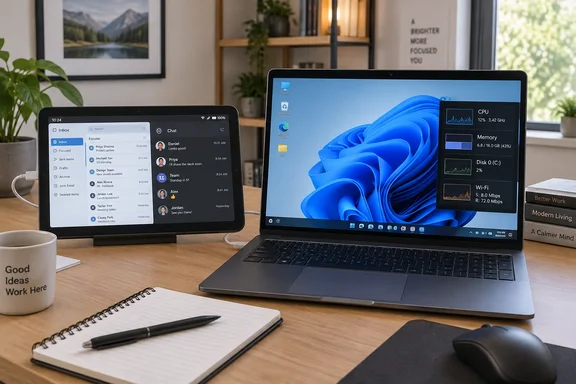
The core result is sound. Spacedesk installs a virtual WDDM display adapter on a Windows 10 or Windows 11 PC, compresses the extra desktop, and sends it across a local network to an Android viewer. That lets a Fire tablet become an extended desktop rather than a simple screen-mirroring target. For a machine used near a router, it is a sensible reuse project for email, chat, music controls, monitoring dashboards, documentation, or a video window.
But readers should identify the Fire tablet they actually own before investing time in resets and configuration. Amazon’s device documentation lists the Fire HD 10 generations distinctly: the 2017 model is seventh generation; the 2019 model is ninth generation; the 2021 model is 11th generation; and the 13th-generation Fire HD 10 arrived in 2023. As of September 18, 2026, Amazon lists the 2023 Fire HD 10 for security updates through December 31, 2029. The seven-year-old description and the 13th-generation label cannot both be true.
The Windows PC Creates a Virtual Monitor
Spacedesk’s model is more involved than attaching a display cable. The Windows PC is the primary machine: it runs the spacedesk Driver, which adds a virtual graphics adapter visible in Windows display settings. The Fire tablet is the secondary machine: it runs the viewer app and receives the extended or duplicated desktop over TCP/IP.
That distinction explains why Windows sees the tablet as another monitor after it connects. In Settings, users can choose Extend these displays, arrange the virtual display’s position, select its resolution, and adjust scaling. The article’s recommendation to use landscape orientation and increase scaling is practical. A 10.1-inch Fire HD 10 panel runs at 1920×1200, but full-resolution Windows applications can leave text and controls too small for comfortable touch use.
For this kind of secondary screen, the highest value comes from putting passive or glanceable work there. An Outlook inbox, Teams or Slack window, a PowerShell session whose output needs watching, performance counters, a password-manager prompt, or a reference document all fit the medium better than a dense spreadsheet or a primary coding workspace. The Fire’s touchscreen can also pass touch input back to Windows, though touch interaction does not turn a desktop application into a tablet-native one.
The Age and Model Matter More Than the Headline Suggests
Amazon’s records show why the device generation is more than a pedantic correction. The 2017 Fire HD 10, which really is roughly nine years old in September 2026, carries older hardware and software than the Fire HD 10 models released in 2019, 2021, and 2023. The 2019 ninth-generation version, for example, has a 1920×1200 display, 2GB of RAM, dual-band 802.11ac Wi-Fi, and Fire OS 7 based on Android 9.
That hardware should still meet spacedesk’s Android requirement, which is Android 5.0 or later, provided the Fire tablet can install and run the viewer. But expectations should be set around its role. An old Fire tablet can be a competent auxiliary display; it is unlikely to match a wired USB-C monitor for latency, color accuracy, brightness, sustained responsiveness, or the ability to show small text comfortably.
The 2023 13th-generation Fire HD 10 is a materially newer device with 3GB of RAM and the same 1920×1200, 10.1-inch display size. It is also still in Amazon’s listed security-support window. Calling that model “a seven-year-old Kindle Fire” obscures the question that matters to someone repurposing a dusty device: whether they have a genuinely old Fire HD 10, or a newer tablet that merely has not been used.
Before factory-resetting anything, check the model and generation in Fire OS under Device Options or About Fire Tablet. That step prevents a reader from following advice meant for a 2017 tablet while assuming their 2023 model has the same ports, operating system behavior, performance limits, and remaining support life.
Wi-Fi Is Convenient, but It Is the Weak Link
XDA Developers reports that the Fire tablet discovered the Windows PCs running spacedesk quickly on the same network and had little visible lag. That is plausible for light use, particularly when both devices are close to a capable dual-band access point. It should not be read as a general performance guarantee.
Spacedesk’s own documentation ranks a direct Ethernet connection as its best-performing option, Ethernet through networking equipment as good, direct Wi-Fi as intermediate, and Wi-Fi through a router or access point as its weakest listed arrangement. The reason is straightforward: every redraw must be encoded on the PC, traversed across the network, decoded by the tablet, and displayed. Congested Wi-Fi, roaming between access points, power-saving behavior, and a heavily loaded laptop can all show up as delayed cursor movement, choppy video, or a sluggish desktop.
For the stated workloads—VLC playback, an email inbox, and general overflow workspace—Wi-Fi may be entirely adequate. It is a poor fit for competitive gaming, precision photo or video work, fast scrolling through complex data, or any task where a delayed pointer is disruptive. If the virtual screen feels slow, first lower its resolution, keep scaling readable, reduce motion-heavy content, and make sure both endpoints are using the same local network rather than a guest SSID or VPN-routed path.
The tablet’s display should also be configured with a specific job in mind. A lower resolution can reduce the amount of image data sent across the network, while 125% or 150% Windows scaling can make the result more usable. The best setting is not automatically the Fire panel’s native 1920×1200; it is the setting that leaves text readable without making the Windows desktop feel cramped.
A USB Cable Does Not Mean USB Debugging
The article says a physical connection is a reason to enable Developer Options and USB debugging on the Fire tablet. Spacedesk’s official Android USB-cable instructions say otherwise. The documented process is to enable the USB Cable Android option in spacedesk Driver Console under Communication Interfaces, then connect the Android client directly by USB. The viewer should then connect as a spacedesk display.
Developer options and USB debugging are Android development and diagnostic features. They may be relevant when troubleshooting a particular device, using ADB, or dealing with an unusual driver problem, but they are not presented by spacedesk as a standard prerequisite for its direct Android USB connection. Turning them on as a default expands access to debugging functions with no stated benefit to a routine display setup.
There is another tradeoff the article leaves understated: when spacedesk’s Android USB function is active, its documentation says other USB-cable uses, including file transfer, are disabled. A cable may improve consistency over an overloaded Wi-Fi network, but it is not the same as a conventional DisplayPort or HDMI monitor connection. Users should toggle the spacedesk USB mode off when they need ordinary file-transfer behavior again.
The safest practical sequence is uncomplicated:
- Install spacedesk Driver only from the developer’s official distribution on the Windows PC, then allow its network access only on a trusted private network.
- Install the spacedesk viewer from the Amazon Appstore when it is available for the Fire tablet, rather than enabling sideloading solely for this project.
- Start with Wi-Fi on the same trusted LAN, use Windows’ Extend setting, and reserve the tablet for low-interaction work.
- Use the direct USB option only when Wi-Fi responsiveness is unacceptable, and enable USB debugging only if a documented troubleshooting step specifically calls for it.
A Useful Second Life, With Real Limits
The underlying project earns its appeal because it extracts value from hardware many people already own. A Fire HD 10 lacks native HDMI input, so an HDMI-to-USB cable by itself will not turn it into a monitor. Software such as spacedesk bridges that gap by making the tablet a network display client, with the Windows PC carrying the real rendering and desktop workload.
That also defines the boundary. This is a virtual, network-delivered monitor, not a replacement for a purpose-built external panel. It works best as a small supplementary screen placed beside a laptop, powered continuously or charged regularly, and assigned a narrow task. A stable stand, landscape lock, appropriate Windows scaling, and a clear separation between primary work and secondary information will do more for the experience than chasing maximum resolution.
For owners of a 2017 or 2019 Fire HD 10 that has genuinely been sitting unused, that is still a credible way to keep an aging tablet out of a drawer. For someone with the 2023 13th-generation model described in the article, the more accurate conclusion is simpler: it is a supported, relatively recent tablet being repurposed as a secondary Windows display—and it should be configured with the same care as any other network-connected endpoint.
References
- I turned my 7-year-old Kindle Fire into a second monitor, and it’s useful again XDA · 2026-09-18T17:00:18+00:00