

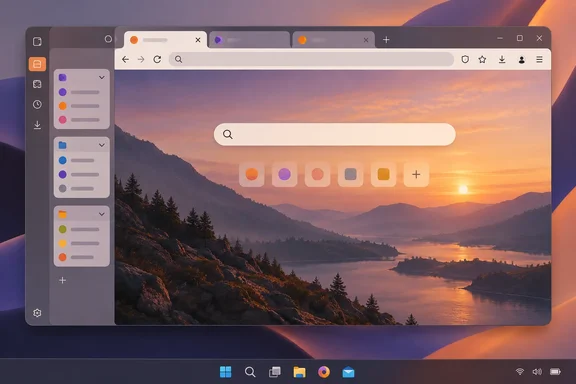
Firefox 157 Makes Nova the Default on September 29
Mozilla teased the launch on social media on September 23, and Neowin reported it. Mozilla's own records back up the date. The Firefox 157 developer release notes on MDN say the version is in Beta and ships September 29, 2026. Mozilla's support blog says Project Nova "is expected to roll out more broadly" with Firefox 157. That is the wording of a plan, and until release day it should be treated as one. OMG! Ubuntu reports that Nova will be enabled for all users in Firefox 157, due the end of September – barring any last minute hiccups. Winaero also reports that Firefox 157 will use the new user interface developed by the Nova project by default.
The stable release is the end of a long public process. Mozilla first described Project Nova on May 21, 2026, in a post from the Firefox UX team. The name reflects the idea of "a renewal, not a replacement," and Mozilla said that once the design ships, "you can just call it Firefox." On July 27, the Nightly team invited testers to try the combined design, saying pieces of it had been showing up in Nightly for months. Mozilla's public roadmap lists "Design system refresh (Nova)" for Android, iOS and desktop. The roadmap gives no per-platform schedule, though, and the September 29 date is tied to the desktop release.
Nova joins a short list of major Firefox redesigns. As OMG! Ubuntu notes, 'Australis' came in 2014, followed by the 'Photon' redesign in 2017 and the 'Proton' revamp in 2021. Proton was the last redesign many long-time users disliked, largely because of its extra padding. That history helps explain Nova's most important feature for power users, covered below.
Firefox 157 also ships alongside the extended support branches. According to 9to5Linux, Mozilla plans to release Firefox 153.4, Firefox 140.17, and Firefox 115.42.0 ESR (Extended Support Release) releases on the same day. All the available reporting ties Nova to the 157 mainline release. Organisations on ESR should not expect their browsers to change on September 29. That is our inference from how ESR branches work, not something Mozilla has stated.
Nova Rounds Off Firefox Without Moving the Furniture
Mozilla's main promise is that Nova changes how Firefox looks, not how it works. Extensions, keyboard shortcuts and menus stay in familiar places, so existing users shouldn't have to relearn the browser. Mozilla describes the aim as a more cohesive foundation that feels "cleaner, warmer, faster and more adaptable."
The visual changes, as Mozilla lists them, are:
- Tabs have a softer shape, and a subtle gradient gives the active tab more presence.
- Panels, menus, settings and browser controls are more rounded and consistent, so they look like parts of one system.
- Icons have been redrawn to look cleaner and more balanced in both light and dark themes.
- Spacing has been rebalanced across the interface to make better use of screen space.
- A new "fire"-inspired colour palette adds a glow around the active tab, deep smoky purples and lighter, warmer tones.
Winaero's description of the build adds some layout detail. It says the tab bar, navigation bar and sidebar are placed in a separate, highlighted area, and that the toolbar contains separate buttons for switching to private browsing mode and using the built-in VPN. This matches Mozilla's May post, which says the design "pulls privacy features forward" so tools such as the built-in VPN and private browsing are easier to find.
On productivity, Mozilla is careful about what it claims. Tab groups, split view and vertical tabs are not new in Nova. The claim is that the redesign makes them easier to reach, putting them "at your fingertips, but not in your face." For a Windows user who has never found vertical tabs in Firefox, the practical change is discoverability.
Some of the work is invisible. Mozilla says Nova is built on reusable design tokens, components and patterns, so future features "feel integrated instead of bolted on." Web Designer Depot argues that this is arguably more important than whether the tabs are 8px or 14px round. Once the shared system is in place, Mozilla can change the interface more often and more consistently, which fits the faster release schedule described below.
On personalisation, Mozilla is adding new themes and wallpapers. It is also "exploring" further controls, such as choosing the shape of tabs and other interface parts. That second item is a possibility, not a feature confirmed for the September 29 release. The same applies to the Settings redesign Mozilla described in May, which includes plainer language, clearer data choices, a way to turn off AI features entirely, and Enhanced Tracking Protection tuning. Mozilla discussed these as part of the wider design effort but hasn't said all of them arrive with Firefox 157.
Compact Mode Returns as Mozilla Tones Down Early Nova Designs
The version of Nova shipping in 157 is noticeably tamer than the first mock-ups. OMG! Ubuntu describes the original pitch as rounded UI elements, floating toolbars, framed web content no longer flush with the edges of the browser window and, more strikingly, a lot of pastel gradients. Web Designer Depot reports that as testing went on, the gaps largely disappeared, the rounding became less aggressive, and Compact Mode returned after users complained about wasted space. Two independent outlets describing the same retreat is good evidence that the Nightly feedback process changed the design.
Compact Mode is the biggest practical change for anyone working on a small laptop screen or at high display scaling. Mozilla says it is back because "people told us that they missed it, and we listened." It gives the densest possible layout of browser controls. 9to5Linux reports that Compact Mode sits alongside a Standard mode providing balanced spacing for most screens and a Touch mode optimized for touch screens with larger window elements and click targets. On a touchscreen Windows 2-in-1, that means a choice between the most screen space for pages and larger controls that are easier to tap.
Mozilla also lists accessibility goals for the design: contrast, readability, focus states, keyboard behaviour, target sizes, respect for system settings, visual comfort, and consistent behaviour across themes and windows. These are design goals, not measured results. The Nightly team asked testers to check keyboard navigation, screen readers, display scaling, different window sizes, and different languages and layouts. Real-world accessibility will become clear once the design reaches the stable channel's much larger and more varied audience.
Firefox 157 Is the First Big Test of the Two-Week Release Schedule
Nova also arrives at an awkward point in Firefox's release process. Firefox moved to a two-week release cycle this month, starting with Firefox 155 on September 1, two weeks earlier than originally planned. Firefox 156 followed, and MSN's coverage says it is available today from Mozilla's direct download page and rolling out as an automatic update to existing users on Windows, macOS, and Linux. Firefox 157 is the third release on the new schedule.
Mozilla's support blog, written by Rizki Kelimutu, gives the reasons. Several recent versions needed a string of follow-up "dot releases," up to six for Firefox 152. The two-week rhythm is meant to get bug fixes and finished features to users sooner and make releases more predictable. Mozilla says this doesn't mean twice as many features, and dot releases can still happen when needed.
The same post shows how Mozilla expects users to react. The support team says a typical release brings about a 30% rise in support questions over the first 10 days. The most common categories are interface changes ("Where did this go?"), lost data after updating, and crashes. The team calls Firefox 157 the "first major test" of the new schedule because of Nova, and says it is preparing standard responses for questions about interface changes. Mozilla is planning for an increase in "where did my button go" questions, even though it says the layout hasn't moved.
For IT staff, the shorter cycle helps if Nova causes problems. A fix doesn't have to wait four weeks for the next scheduled release. The next regular version should be about two weeks after 157, going by the new schedule.
uBlock Origin and Manifest V2 Remain Firefox's Other Selling Point
Mozilla's pitch pairs the redesign with extension support, but the two are separate. Nova does nothing to uBlock Origin. uBlock Origin support comes from Mozilla's extension platform policy, which Mozilla set out on February 25, 2025.
In that policy, Mozilla says Firefox will keep supporting both Manifest V2 and Manifest V3. Manifest V2 and V3 are the two generations of the rules that define what browser extensions are allowed to do. Firefox keeps both the older blockingWebRequest API and the newer declarativeNetRequest API. Mozilla explains that the full uBlock Origin depends on blockingWebRequest, which lets an extension inspect and block network requests as they happen. Chrome has moved away from Manifest V2 in favour of declarativeNetRequest, which works from lists of rules declared in advance. Mozilla argues this limits some content-filtering features. That comparison is Mozilla's own. It doesn't mean ad blocking has disappeared from every Chromium-based browser. It means the full, Manifest V2 version of uBlock Origin is one of the things Firefox still runs and Chrome does not.
Mozilla has good reason to lead with this. Its February 2025 post said nearly half of Firefox users had installed at least one extension. A redesign that kept extensions working but hid them would undercut that advantage, which is why Mozilla stresses that extensions and menus stay where they are.
What Nova Means for Windows Users and Admins
Most home users on the standard release channel don't need to do anything. Firefox 157 will arrive through the normal automatic update and switch the interface over. The people who should act before September 29 are those with a heavily customised setup, users of small or touch screens who want to choose a density mode, and admins who support non-technical users.
People who want to see it early can turn Nova on in the current stable version. Winaero gives the steps:
- Make sure you are running Firefox 155 or above.
- Type about:config in the address bar and press Enter. Accept the risk warning if prompted.
- In the search box, enter browser.nova.enabled. It will show as false.
- Change the value to true by double-clicking the entry or using the toggle icon. Restart Firefox to apply the changes.
Winaero says that to disable the new interface, you can set the "browser.nova.enabled" preference to false. That applies to current builds, where Nova is optional. None of the reporting confirms the switch will still work once Nova is the default in 157, so don't rely on it as a long-term way back. OMG! Ubuntu also warns that the preview will have some differences to the version coming in v157 (try a nightly build for a more accurate idea). Screenshots from the flag won't exactly match what users see on release day.
- Firefox 157 is scheduled for September 29, 2026, and is expected to make Nova the default desktop interface.
- Mozilla says extensions, shortcuts and menus keep their places, so most workflows should carry over, even though the look changes a lot.
- Compact Mode returns in Nova, and 9to5Linux reports Standard and Touch density options alongside it for different screen types.
- The
browser.nova.enabledflag inabout:configlets Firefox 155 and 156 users preview Nova now, but it doesn't match the final 157 design and isn't a confirmed opt-out after release. - Nova doesn't change uBlock Origin. Firefox's continued Manifest V2 and
blockingWebRequestsupport is a separate, longer-standing policy. - Organisations should prepare help-desk answers for "where did this go?" questions, since Mozilla's own support team is expecting them.
Nova is a careful redesign. Mozilla toned down its boldest ideas after Nightly feedback, brought back the dense layout power users asked for, and kept extensions and menus where people expect them. Paired with its continued support for the full uBlock Origin, the pitch to Chrome users is a browser that looks newer without taking away what made them consider switching. Stable users will see the result on September 29, and under the two-week schedule the first follow-up release should arrive about two weeks later.
Update: Firefox 157 Adds AV1 Calling Support and Removes Amazon Search (September 28, 2026)
Neowin reports that Firefox 157 includes several changes beyond the Nova interface rollout. The release reportedly enables hardware-accelerated AV1 decoding for WebRTC calls, which could reduce CPU use during compatible video meetings, and fixes a Windows issue where the taskbar could remain visible over fullscreen video. Mozilla has also addressed washed-out grey tones in 8-bit HDR video on PCs.
The report says Amazon is being removed from Firefox’s built-in search-engine list, although users can add it back through Settings. Firefox Suggest is also expanding to 16 European countries, including Austria, Belgium, Ireland, the Netherlands, Spain, Sweden and Switzerland.
Neowin further reports that Firefox’s redesigned sidebar—containing vertical tabs, history, synced-bookmark shortcuts and AI chatbot access—is now enabled by default. The sidebar.revamp preference can reportedly still disable it for now, but Mozilla plans to remove that choice by the end of 2027.
Contrary to expectations set last month, JPEG XL will not ship enabled in Firefox 157 because of technical issues. Neowin says Mozilla now plans to enable the image format by default in Firefox 158, scheduled for October 13.
Update: Firefox Redesign Reportedly Available Now (September 29, 2026)
Firefox’s planned release-day change has reportedly arrived. According to How-To Geek, the redesigned browser is now available to download on Windows, macOS and Linux. That moves the desktop rollout from a September 29 plan to a reported release, though existing users may receive the update through Firefox’s normal update process rather than immediately.
How-To Geek also says the updated browser is available on Android and iOS, with a more consistent look across platforms. That does not establish that the full Nova desktop interface has launched on mobile. The outlet says the changes are most noticeable on desktop, and Mozilla’s previously published roadmap did not give a date for the mobile design refresh. Mobile users should therefore not expect their apps to match the new desktop interface feature for feature.
For Windows users, the immediate practical point is that Nova is no longer just an optional preview if the reported rollout has reached their installation. Admins supporting Firefox users can begin checking the released build and its interface before updating deployment guidance; the report does not confirm whether the earlier browser.nova.enabled preview preference remains a way to switch back.
Update: Firefox 157 Reportedly Changes Keyboard Navigation and Sidebar Settings (September 30, 2026)
The Register’s September 30 report identifies additional workflow changes in Firefox 157: pressing Tab in a new tab or window reportedly now moves focus directly to the search box rather than the search-engine selector. According to the outlet, Shift+Tab still provides access to that selector. For Windows users who navigate primarily with a keyboard, this changes the sequence needed to begin a search or choose its provider.
The Register also reports that Firefox 157 delays searching a newly opened page for text when users start typing before it has finished loading. That is a separate keyboard-behaviour change worth checking in workflows that rely on typing immediately after navigation.
For sidebar users, The Register reports that the show-or-hide option has been removed from Settings. The outlet also says disabling the redesigned sidebar hides vertical tabs, so that workaround has a functional consequence beyond changing its appearance. For support teams, these reported changes mean keyboard-navigation instructions and sidebar guidance may need revision; disabling the sidebar redesign should not be presented as a purely cosmetic rollback.
Update: Firefox 157 Reportedly Fixes 76 Security Vulnerabilities (September 30, 2026)
According to PCWorld’s September 30 report, Firefox 157 fixes 76 security vulnerabilities, including 38 classified as high risk, 29 as medium risk and nine as low risk. The outlet says 30 of the flaws were reported by external security researchers. These security fixes add a practical reason to install the release beyond its interface changes.
PCWorld reports that the fixes include 32 use-after-free vulnerabilities, some potentially allowing code injection and execution, and 15 vulnerabilities potentially allowing an attacker to escape the browser sandbox. Those descriptions concern possible exploitation; the report does not establish that attackers are actively exploiting these flaws. For Windows users, the security implications mean the update should not be treated as merely an optional visual refresh.
The outlet also reports that Firefox ESR 153.4.0, 140.17.0 and 115.42.0 are now available with security fixes. Administrators maintaining ESR deployments should therefore check their applicable branch for updates rather than assume that staying outside the Nova rollout removes the need to patch.
References
- Firefox’s biggest redesign in years just landed with Nova PCWorld · 2026-09-30T17:55:43+00:00
- Besides uBlock Origin support, Firefox hopes to win you with 2026 redesign launching soon Neowin · 2026-09-23T19:42:01+00:00
- Firefox's biggest update in years launches tomorrow. Here's how to get it early Neowin · 2026-09-28T16:57:21+00:00