

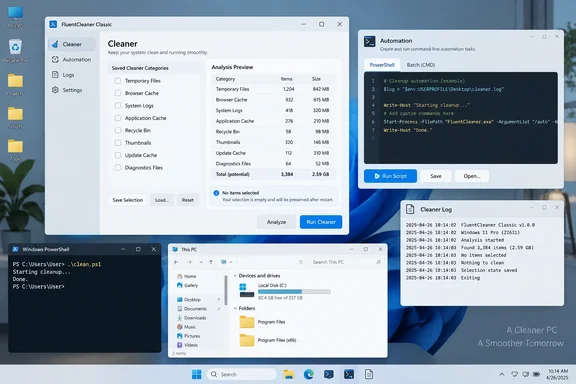
FluentCleaner Classic 1.18.250 makes cleanup scriptable
Neowin covered the two-edition update on September 19, while NTCompatible reported Classic’s new automation capabilities on September 18. The addition supports batch files, PowerShell, and third-party tools, according to the developer’s release notes. These are announced capabilities, rather than independently measured reliability or performance improvements.
Classic can now silently analyze or clean its saved selection and optionally restrict the operation to an individual cleaner category. Analysis and cleaning are separate choices: users can inspect the proposed work before committing to deletion. Optional shutdown is also available after cleanup, so an unattended workflow can have consequences beyond removing files.
The new interface is documented inside Classic under Options > Handoff / CLI, with ready-to-copy examples. Command-line runs return exit codes intended for automation and write detailed results to %AppData%\FluentCleaner\auto.log. The release notes do not enumerate the numeric exit-code meanings, so this announcement alone is insufficient to write a script that reliably interprets every outcome.
That gives administrators two useful integration points: an exit status for the calling process and a detailed record for reviewing what happened. Before enabling silent deletion, a sensible evaluation sequence is to configure the selection visibly, use the documented analysis operation, and inspect its results. Leave the optional shutdown behavior out of that initial evaluation.
The edition boundary matters. FluentCleaner 26.09.01 is the modern WinUI 3 and Windows App SDK application; Classic 1.18.250 uses WinForms and.NET Framework 4.8. The developer describes them as independently versioned editions using the same cleaning engine. The newly expanded command-line automation is specifically labeled Classic, even though some accompanying fixes apply to both editions.
FluentCleaner’s empty-selection fix makes “nothing” stay nothing
Both editions now preserve an intentionally empty cleaner selection. Previously, clearing every item could be interpreted as a fresh installation, causing default entries to return after restarting. The update also fixes silent cleaning and command-line operations falling back to database defaults when the saved selection was empty.
This is a small configuration bug with a meaningful automation implication. A saved selection expresses the operator’s chosen scope. When an empty selection becomes a default selection, the program can propose or perform work the operator did not retain in that configuration. The fix makes “nothing selected” a persistent state rather than an invitation to repopulate the list.
For users already running FluentCleaner unattended, this is a stronger reason to evaluate the update than the cosmetic changes. It is also a useful acceptance check: deliberately clear the selection, restart the application, and confirm that it remains empty. That check follows directly from the documented fault; it is not a claim that WindowsForum reproduced it.
The shared DetectFile fix addresses a different boundary: deciding which applications are installed. Cleaner entries using %ProgramFiles% now detect installations in both Program Files and Program Files (x86), including rules with wildcards. The developer identifies this as improved handling of 32-bit applications.
FluentCleaner uses a parser for Winapp2 cleaning rules, which describe application-specific cleanup targets. Better installation detection can therefore change which entries are recognized as applicable. After updating, reviewing the detected entries and saved selection is more useful than assuming that the visible cleanup list will be identical to the previous version. Detection becoming more accurate does not, by itself, mean every newly detected category should be enabled.
Classic’s Cookie Manager becomes easier to use without losing your place
Classic’s Cookie Manager receives two practical changes. Deleting a cookie now preserves the working position and selects the nearest remaining entry instead of returning the user to the beginning of the list. The underlying browser databases are still refreshed, according to the release notes.
Both Cookie Manager lists also gain a context-menu Select all command that respects the active search filter. With a filter applied, it selects only the currently visible cookies. For someone working through a particular subset, that makes the command’s scope easier to predict; changing or clearing the filter changes the visible set to which selection applies.
These are workflow improvements, not a new privacy guarantee. They make it easier to inspect and manage browser data, but the release does not establish a broader protection against tracking or a secure-erasure capability.
Classic’s analysis view also gives the Entry column the available space while keeping the file, registry, and size columns compact. Azerbaijani joins the available interface languages, while Brazilian Portuguese and French receive updated strings. The developer also adds localized Select all text and tidies the English and German localization structure.
Meanwhile, development of the built-in Mini mode is paused. The maintainer says the experiment was pulled to keep Classic small and maintainable; a separate add-on or plugin remains a possibility, not an announced deliverable. Anyone choosing this release should evaluate the application that ships rather than count on Mini mode returning.
Choose FluentCleaner by the workflow you need
Existing users should prioritize the selection fixes; prospective automation users should evaluate Classic specifically. The project’s repository describes Classic as a portable, framework-dependent application, so “portable” should not be read as “has no runtime dependency.” Its stated framework is.NET Framework 4.8.
The repository also says that the Builtbybel.FluentCleaner WinGet package installs the modern edition, while Classic remains a portable download. Installing that package is therefore not a substitute for obtaining Classic when its new automation is the requirement.
Before putting this release into regular use:
- Choose Classic 1.18.250 if you need the newly announced analysis, category-targeting, and automation controls.
- In either edition, verify that your saved selection survives a restart, particularly if you deliberately leave every cleaner item unchecked.
- Review detected cleaner entries after the update, because the shared
DetectFilefix can recognize 32-bit installations that earlier detection missed. - Use Classic’s Options > Handoff / CLI examples, start with analysis, and review
%AppData%\FluentCleaner\auto.logbefore enabling unattended cleaning. - Obtain the application from the developer’s official
builtbybel/FluentCleanerGitHub releases; the project explicitly warns that third-party sites presenting themselves as official are unaffiliated.
FluentCleaner’s useful advance here is more predictable control over cleanup: Classic gains a scriptable workflow, while both editions stop treating an intentionally empty selection as missing configuration. The practical next step is a narrowly scoped evaluation of the saved selection, analysis results, and automation output—not a broader cleaning policy simply because the tool can now run silently.