

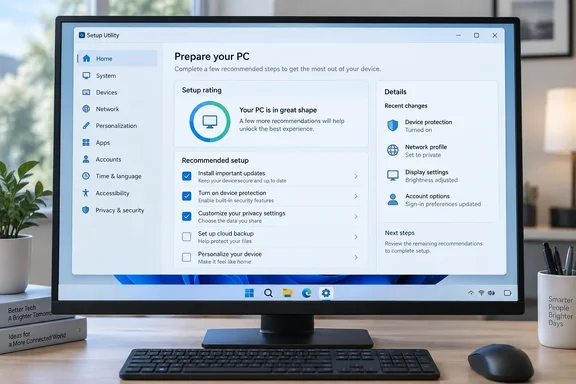
That's a small change of direction. The tool began as Flyby11, the small utility that got older PCs past Windows 11's hardware checks. It has since grown into a general setup companion.
What Flyoobe is now
Neowin's listing still describes the app with the old Flyby11 feature list: getting past TPM, Secure Boot, CPU and RAM checks, allowing a local account instead of a Microsoft account sign-in, and getting past region and network checks during OOBE. That list is a bit dated.
The 3.03 release notes describe a broader product. Flyoobe is a setup tool for Windows 11 that deliberately looks and behaves like the classic Control Panel: no animations, no account, nothing leaves your PC. It handles the things people still fight with installing on unsupported hardware through the Flyby11 path, creating a local account instead of a Microsoft one, and turning off Start menu ads and suggestions in one click instead of twelve registry keys.
The 3.x line started as a rebuild. According to the 3.0 notes, Version 3.0 turns the old page-heavy setup assistant into a native, signature-driven Windows checklist. Recommendations live in editable data files. Recipes let you repeat a setup on another PC. Bloatware detection and a winget-based app installer sit alongside those features.
The project README lists which pieces are still maintained:
| Component | Status (per project README) |
|---|---|
| Flyoobe 3 releases | Active |
| Refactored Flyoobe 3 source | Being prepared; coming soon |
| Flyoobe 2.4 | Still downloadable, not actively developed |
| Flyby11 Classic | Legacy Windows 10 → 11 in-place upgrader, no longer maintained |
| Flyoobe Extensions | Retired, replaced by Setup Actions |
Summary: Flyoobe 3 is a setup and configuration tool that includes an unsupported-hardware upgrade path. It is no longer just a patcher.
The new setup rating
The main addition is the setup rating. The changelog calls it a base score for how far this PC follows Flyoobe's recommendations, in the shape of the old Windows Experience Index. You open it from the first row under "Your choices" on the Overview page, and that row also shows the score.
The Windows Experience Index look is nostalgic, but the score measures something different. The old Microsoft index rated hardware. This one only shows how closely your configuration matches Flyoobe's own recommendation files. It isn't:
- a performance benchmark
- a security certification
- a Microsoft compatibility check
- a sign that your PC is "healthy"
The release notes don't explain the scale, the formula or any thresholds, so don't read much into a particular number. The 3.0 release notes also say recommendations, app catalogs, bloatware signatures and upgrade limits live in separate editable data files. If you edit those files, you're effectively changing what the score measures.
Interface and translation changes
The rest of the changelog is about clarity:
- Details pane: lists the settings that actually differ instead of only counting them. This is the most useful change for anyone reviewing a machine.
- Clearer counts: the summary counts settings and group headers count areas, and the labels now say so.
- Preinstalled apps: the summary line names them again, and it now shares its text with the matching tree row so the two can't disagree.
- Device row: says what it configures instead of showing the machine name.
- "More options": now has its own heading, so the link under it is clearly a link.
- Setup tree: uses the Explorer theme, with arrows instead of +/- boxes, softer selection and a hover highlight.
- Search: the field names the page you're on ("Search Control Panel", or "Search Flyoobe" on the Overview). An (x) clear button appears only when there's text to clear.
- Fixed: the Settings page scrolls all the way to the bottom again.
- Small wording changes: the "?" is gone from the Settings header, the AI section no longer suggests explanations exist only on the tweaks page, and the status bar shows the version without a "v".
- New languages: French and Portuguese (Brazil).
This builds on 3.02, released five days earlier, which added an Explorer-style search field and an optional change log. With that log turned on, every single thing Flyoobe changes on your machine can now be written to a plain text file. Taken together, 3.02's change log and 3.03's list of differing settings make it much easier to see what the tool has changed.
Summary: 3.03 doesn't add new ways to modify Windows. It makes it easier to see what the tool thinks is different and what it has already changed.
How to install Setup Actions (optional)
Setup Actions are PowerShell-based post-install jobs that ship separately from the main download. Nothing about them changed in 3.03, but the install steps come with every release:
- Download the Actions asset from the official release page.
- Extract the included
Actionsfolder into Flyoobe'sDatafolder. The README says the result should look likeData\Actions\<action-id>\action.ini. - Open Flyoobe and go to Settings > Advanced.
- Turn on Setup Actions.
- Close Settings so the new actions load.
If the actions don't appear: check the folder depth first. If you end up with Data\Actions\Actions\... or the action folders sit loose in Data, the path won't match what the README describes. Also make sure you closed Settings after enabling the feature.
The README says Setup Actions are disabled by default. It also warns that they are PowerShell, so read an action before you run it, especially one that asks for administrator rights or downloads code. The project says Flyoobe won't run an action just because the package is there.
Warnings before you download
Fake download sites. The project README carries a security alert: flyoobe.com and the GitHub account github.com/flyoobe are not affiliated with this project. Official releases are published only through github.com/builtbybel/Flyoobe. A tool that edits the registry and runs PowerShell is exactly what a malware author would like to imitate, so check where your copy came from.
"Open source" needs a caveat. Download sites list Flyoobe as open source, but the README admits that the refactored 3.x source is still being prepared for publication, so the source currently visible in this repository represents the previous generation. For now, you can't read the 3.03 binary's source code. That doesn't make it unsafe, but security-minded admins should know about the gap.
Unsupported hardware stays unsupported. The README says hardware-check workarounds don't make unsupported hardware supported. Microsoft can change setup behavior or update eligibility, and newer Windows releases may add requirements that no software can get around. The project recommends keeping backups. Neowin's reference to "version 24H2" is a leftover from the Flyby11 days. Don't take it as a promise that the bypass works on current Windows 11 builds.
Who should update?
- Current 3.x users: yes. The list of differing settings and the Settings scrolling fix are worth having.
- Enthusiasts reviving older PCs: the Flyby11 path still exists, but this release doesn't change it.
- IT admins: Flyoobe is a hands-on tool for individual machines. Recipes are handy for a handful of PCs, but don't use it in place of Intune, Autopilot or proper image management for a managed fleet.
Flyoobe 3.03 is a small, careful update, and that's a good sign for a tool that touches this much of Windows.
References
- Flyoobe 3.03.100 - Neowin Neowin · 2026-09-28T16:45:26+00:00
- README.md github.com
- Flyoobe 3.03 Release: Open-Source Windows 11 Setup Tool Gets Retro Score Bar ntcompatible.com