

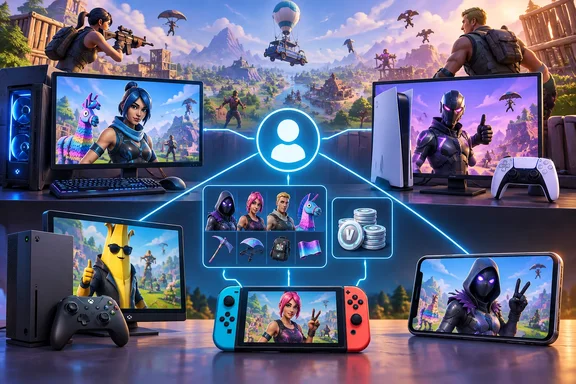
FRVR's new explainer covers crossplay, friends and cross-progression in one place. We checked its claims against Epic's own support documentation and Xbox's privacy settings. The FRVR piece holds up well, and Epic's pages confirm a few details it only hedged on.
Which platforms play together
Epic's current compatibility list covers:
- PC (Windows)
- PlayStation 4 (including Pro and Slim), PlayStation 5 and PS5 Pro
- Xbox One (One S, One S All-Digital Edition, One X) and Xbox Series X|S
- Nintendo Switch, Switch Lite and Switch 2
- Android, iPhone and iPad
FRVR says all of these share one player base. A PS5 player, an Xbox Series X player, a Switch player and someone on an Android phone can all be in the same Battle Royale squad, as long as everyone signs in with an Epic account. Older and newer consoles in the same family also play together, so PS4 players can join PS5 friends and Switch players can join Switch 2 friends.
Mac is the exception. Epic says Fortnite isn't available natively on macOS, but Mac users can play through Xbox Cloud Gaming, GeForce NOW or Amazon Luna. Cloud players use the same Epic account and join the same matches. FRVR links the Mac situation to Apple removing Epic's developer account in 2020, when the two companies went to war over App Store payments.
Mobile changed in 2026. Epic announced Fortnite's worldwide return to Google Play on March 19, 2026, and its return to the App Store on May 19, 2026. The May announcement said the game was not back on the Australian App Store at that point. We haven't confirmed whether that has changed since. FRVR adds that Australian players can still stream the game, and that the Epic Games Store offers it on Android and on iPhone in the EU, Japan and Brazil. We couldn't confirm those store details independently.
Summary: If it runs Fortnite, it plays with everything else that runs Fortnite. Mac only gets in through the cloud.
The Epic account ties it all together
The words get mixed up a lot, so here are the definitions:
| Term | What it actually means |
|---|---|
| Cross-platform | The game ships on more than one platform |
| Crossplay | Players on different platforms share parties and matches |
| Cross-generation | Old and new consoles from the same family play together |
| Cross-progression | Unlocks and progress follow you between devices |
| Account linking | Connecting your PSN, Xbox or Nintendo account to one Epic account |
Epic's support page is clear: if your Xbox, PlayStation, PC, Switch or mobile accounts are linked to the same Epic Games account, everything you've bought and all your progress is available on every platform. V-Bucks are the one exception, covered below.
The problem usually starts with a shortcut. If you launched Fortnite on a new console and skipped the Epic sign-in, Epic created an account for you automatically, tied to that console. Epic's account help describes these as accounts missing an email, password, display name and real name. It strongly advises against unlinking a console from one of these automatic accounts, because you lose access to that game data when you play on that platform.
Epic also says plainly:
- Fortnite progress can't be merged between two Epic accounts, and Epic Support can't do it for you.
- When you link a console to an Epic account, the console shows that Epic account's progress. The console's old progress doesn't come with it.
- Unlinking and relinking to a different account doesn't move progress either. Progress stays on the Epic account where it was earned.
- If you want to keep two separate histories, you have to keep two separate Epic accounts.
A safe order for linking
- Sign in to each Epic account you have and check which one holds your main Fortnite progress before changing anything. Epic recommends exactly this.
- To find out which Epic account a console is already linked to, sign out on the Epic website. Then choose that console's sign-in option and log in with your console credentials. That takes you to the linked Epic account. The email may not match the one on your console account.
- Only then link a new console to your main Epic account, ideally before you play on it.
- Launch Fortnite on the console and check that your Locker and level match your main account.
FRVR says each Epic account can link one PlayStation, one Xbox and one Nintendo account.
Summary: Link first, play second. Epic can't merge accounts later, so a mistake here is permanent.
Adding friends across platforms
Your PSN and Xbox friends may show up in Fortnite, but FRVR notes that only Epic friends work across every platform. Epic's instructions:
- In the Fortnite lobby, open your profile/social panel.
- Select Add Friends.
- Enter your friend's Epic display name exactly.
- Send the request. They appear in your list once they accept.
PC players can also do this from the Epic Games Launcher, and mobile players from the Epic Games mobile app. The friends list is capped at 1,000.
The most common mistake is searching for someone's console name. Epic says changing your Epic display name doesn't change your PSN Online ID or Xbox Gamertag, and display names can only be changed once every two weeks. Ask friends for their exact Epic display name.
If a friend request won't go through, check these (the last four come from FRVR's troubleshooting list, not Epic's documentation):
- Wrong name, or a single character typed wrong
- Friend list full (1,000 limit)
- A console-only player who hasn't set up an Epic display name yet
- A Cabined Account. Epic uses these for players under 13 or under their country's age of digital consent, whichever is higher. FRVR says these accounts get an auto-generated display name until a parent finishes setup.
- A parental-controls PIN required for friend requests
- A block on either side
Turning crossplay on or off
Crossplay is on by default. Epic's crossplay page sets out who can turn it off:
- PlayStation: In the Fortnite lobby, open the menu, go to Settings, then the Account and Privacy tab. Scroll to Gameplay Privacy and set Allow Cross Platform Play to Yes or No.
- Xbox: Epic has no Fortnite toggle here. It sends players to Xbox's own cross-network play settings.
- Nintendo Switch, PC and mobile: Epic says crossplay currently can't be turned off.
On Xbox, the path is: Profile & system, then Settings, then Account, then Privacy & online safety, then Xbox privacy. Select View details & customize. Open Communication & multiplayer. Find You can join cross-network play and set it to Allow. Choose Block to turn it off. That same guide advises restarting the game afterward, because some titles read the permission only at launch.
This setting belongs to your Xbox profile, not to Fortnite. MakeUseOf notes that with cross-network play blocked, crossplay will be universally disabled on your Xbox, in every game, not just Fortnite. For households with Windows PCs, Activision's support documentation describes managing this setting from the Xbox PC app: Select your Gamertag at the top of the Xbox PC app. Select Settings. On the Account tab, scroll down to Privacy settings and select Manage. Then use the Online Safety tab for Xbox Series X|S, Xbox One and Windows 10 devices. To be clear, this changes an Xbox profile. It does not give Fortnite on PC an off switch, and Epic says there isn't one.
Is turning it off worth it? Epic's crossplay page says crossplay "significantly lowers queue times," and warns that "if crossplay is disabled, some game modes may only work in Solo mode." So this isn't just FRVR's opinion: Epic's own documentation confirms it. You'll also lose games with friends on other platforms. For most people, it's a bad deal.
Cross-progression: V-Bucks are the catch
Skins, emotes, pass progress and account level follow your Epic account everywhere. FRVR notes this includes console-exclusive skins. V-Bucks don't all follow you. Epic's Shared Wallet explainer says:
- V-Bucks bought on Nintendo Switch stay on Switch and can't be used in the Fortnite Web Shop.
- V-Bucks bought on other platforms can't be used on Switch.
- In Korea, V-Bucks bought on PC aren't shared with other platforms either.
- V-Bucks earned from Fortnite Passes, Quest Packs or Save the World are shared everywhere.
- Items you've bought with V-Bucks are available on all platforms.
Epic gives three examples:
| Scenario | Xbox / PlayStation / PC / Android | Switch |
|---|---|---|
| 1,000 bought on PC | 1,000 | 0 |
| 1,000 bought on Switch | 0 | 1,000 |
| 1,000 bought on PlayStation + 500 earned from Battle Pass | 1,500 | 500 |
To check your balance, sign in to your Epic account on the website and open In-game currency, then the Fortnite tab. Epic splits the balance into "Redeemable only on specified platform" and "Redeemable on any platform." The first is broken down by Switch and Shared Wallet platforms, and into Purchased and Bonus V-Bucks. The second shows Earned/Granted V-Bucks. Note that Bonus V-Bucks from packs and promotions are platform-locked too, which is stricter than a simple "bought vs. earned" rule.
Practical advice: If you play on both Switch and anything else, buy your V-Bucks on the non-Nintendo side, and only use Switch purchases for things you'll spend on Switch.
Voice chat across platforms
Epic has two voice channels. Party Channel is for your Epic party. Game Channel is for teammates who aren't in your party. If cross-platform voice chat stays silent:
- Leave any PlayStation or Xbox console party. Epic says an active console party can stop Fortnite voice chat from working.
- Check Fortnite's voice chat permissions and mute settings.
- On Xbox, check the privacy setting for voice and text communication outside Xbox. The Communication & multiplayer menu also has a setting that controls cross-platform voice chat in supported games.
- Remember that Cabined Accounts can't use voice or free-text chat until a parent consents.
The bottom line
Fortnite's crossplay is about as smooth as cross-platform gaming gets. Most problems come from accounts, not networking: a console linked to the wrong Epic account, a friend searched for by the wrong name, an Xbox profile with cross-network play blocked, or V-Bucks bought on a Switch. Epic won't merge accounts later, so linking your consoles properly the first time matters most.
References
- Is Fortnite cross-platform? Crossplay, friends, and cross-progression explained - frvr.com frvr.com · 2026-09-29T13:24:51+00:00
- How to Turn Off Crossplay on Xbox One and Xbox Series X|S makeuseof.com
- How do I turn Fortnite crossplay On or Off from my console? - Fortnite Battle Royale Support epicgames.com