

That is a valid niche, especially for reception desks, compact workstations, signage controllers and home offices where the PC will remain on for long periods. But Geekom’s “2027 Edition” label should not obscure the platform’s age. AMD introduced the Ryzen 7 7730U in January 2023 as a Zen 3, 15-watt mobile processor with eight cores, 16 threads and boost speeds up to 4.5GHz. It remains useful silicon, but it is not a new architecture, does not bring an NPU, and is paired here with DDR4, PCIe 3.0 storage and 10Gbps USB rather than USB4.
A quiet refresh rather than a faster A5
The change in Geekom’s priorities is real. The original A5 configuration with a Ryzen 7 5800H was designed around a much larger power budget, while the Ryzen 7 7730U in the new model is an efficiency-oriented part. Fewer watts generally mean lower sustained clock speeds, less heat to exhaust and a smaller power supply; Geekom ships a 65W adapter with this version rather than the 120W unit associated with the higher-power A5.
TechRadar’s test system, equipped with the Ryzen 7 7730U, 16GB of dual-channel DDR4 and a 512GB SSD, produced a Geekbench 6 multicore score of 7,712 and a Cinebench 2024 multicore score of 479. Those results are entirely reasonable for eight Zen 3 cores running in a constrained power envelope. They also put the machine in a different class from newer mini PCs built around Zen 4, Zen 4c or current Intel mobile platforms, particularly where integrated graphics, modern media engines, AI acceleration or very fast external storage matter.
The review’s comparison with the older Ryzen 7 5800H A5 needs one qualification. TechRadar says its older records indicate the 5800H machine was faster, but it no longer has that hardware to re-run using the same suite. That makes the broad conclusion credible—the 45W chip has considerably more thermal and electrical headroom—but it is not a clean, like-for-like benchmark shootout. Buyers should treat this A5 as a low-power replacement for office mini PCs, not as an upgrade for an existing high-power 5800H A5.
For day-to-day Windows workloads, the compromise will often be invisible. Word, Excel, Outlook, Teams meetings, browser-heavy multitasking and remote administration rarely need the kind of sustained CPU throughput that distinguishes these machines. It becomes visible in code compilation, long exports, virtual machines, large photo batches, CPU rendering, gaming and workloads that keep all cores busy for minutes rather than seconds.
IceBlast 3.0 claims still need independent thermal testing
Geekom’s pitch rests heavily on its IceBlast 3.0 cooling design. The company says it combines a larger fan, copper cooling hardware and a reinforced internal metal frame, claiming a 42 percent cooling-efficiency improvement and up to 35 percent more airflow over the prior generation. It also claims temperatures below 72 degrees Celsius after an hour at high load in ambient temperatures above 30 degrees Celsius.
Those are vendor laboratory claims, not independent measurements. Geekom itself notes that the advertised 28dB idle and roughly 32dB heavy-load noise figures were collected in its controlled acoustic laboratory. TechRadar reports that the A5 2027 Edition is quiet in use, which is useful confirmation of the broad goal, but it does not provide its own sound-pressure readings, sustained thermal charts or power-draw results to validate Geekom’s specific numbers.
That missing data matters most for the “24/7” framing. A mini PC can be quiet and still reduce clocks under a long all-core load; it can also operate reliably for days without being the right system for a continuously busy business application. Geekom says the system has passed 72-hour full-load aging tests and is intended for commercial terminals, customer-service sites, logistics and digital signage. Those claims support that the vendor has designed and marketed it for long-running scenarios. They do not establish how a particular Windows workload, SSD configuration, room temperature or deployment image will behave after months in service.
Administrators considering a fleet should therefore validate one unit with their actual workload before committing. Monitor package power, temperatures, fan behavior, Windows Update reboots, network stability and SSD health under the same mounting arrangement and room conditions the deployed machines will face. The A5’s compact chassis is an advantage behind a display, but a VESA-mounted PC trapped against a hot panel is not the same as a unit tested freely on a desk.
The practical strength is its unusually flexible storage layout
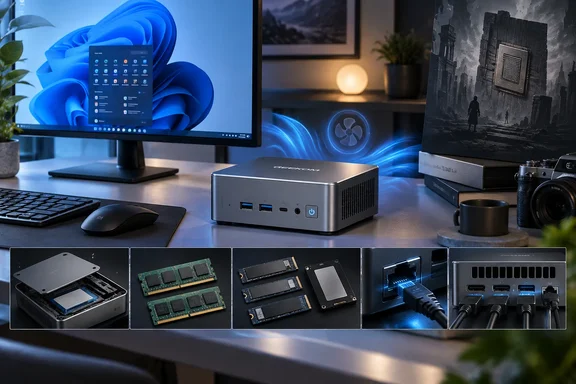
Where the A5 2027 Edition has a more concrete advantage is expandability. Geekom specifies a full-length M.2 2280 PCIe 3.0 x4 NVMe/SATA slot, an M.2 2242 SATA slot and a 2.5-inch, 7mm SATA bay. That is three internal storage positions in a 117mm-by-112mm chassis, and TechRadar confirms that the bottom panel is held by retained screws rather than adhesive-covered feet.
For a small office system, that can be more useful than chasing peak benchmark results. A buyer can run Windows 11 Pro and applications from the NVMe drive, then add a 2.5-inch SATA SSD for locally retained documents, media or an offline backup target. The M.2 2242 SATA slot is more awkward because that shorter format is less common than M.2 2280, but it can still hold a second solid-state drive without consuming the 2.5-inch bay.
The official specification says the three slots support up to 7TB in total: a 4TB M.2 2280 drive, a 1TB M.2 2242 SATA drive and a 2TB 2.5-inch SATA drive. Do not read that as a guarantee of every retail drive combination. Capacity support, thermals and firmware compatibility can vary, particularly with inexpensive high-capacity SATA hardware. For business deployment, standardizing on tested drives is safer than assuming the theoretical maximum will behave identically across every unit.
The memory arrangement also deserves attention. The A5 uses two DDR4 SODIMM slots and supports up to 64GB, which is considerably more repairable and upgrade-friendly than mini PCs with soldered LPDDR5X. But memory must remain balanced to preserve dual-channel operation. TechRadar’s own comparison illustrates the penalty: it cites a single-memory-module BOSGAME P4 Ultra with the same Ryzen 7 7730U scoring 4,961 in 3DMark WildLife, versus 7,346 for the dual-channel A5 review system.
The lesson applies beyond gaming. The Ryzen 7 7730U’s integrated Radeon graphics shares system memory, so a single SODIMM can materially reduce graphics performance and affect some display, creative and GPU-accelerated workloads. If 16GB is not enough, replace the installed pair with a matched 32GB or 64GB kit rather than adding one larger module beside one of the existing 8GB sticks.
Connectivity is adequate, not forward-looking
The port selection is broad: three USB 3.2 Gen 2 Type-A ports, two USB 3.2 Gen 2 Type-C ports, a USB 2.0 port, dual HDMI 2.0 outputs, 2.5GbE, Wi-Fi 6, Bluetooth 5.4 and an SD 4.0 card reader. Geekom also says the two Type-C ports support DisplayPort 1.4 Alt Mode, allowing the A5 to drive up to four displays when paired with the two HDMI ports.
That makes the A5 flexible for a desk with multiple 4K panels, a point-of-sale back office, a monitoring station or an information display. The device also ships with Windows 11 Pro and supports Wake-on-LAN, scheduled startup and Group Policy, all practical features for organizations that need unattended startup and ordinary Windows domain policy management.
The omission is equally important: there is no USB4 or Thunderbolt. Every fast USB port tops out at 10Gbps. That rules out the easiest path to high-bandwidth external NVMe storage, Thunderbolt docks and some high-end display or expansion workflows. It also means the A5 is a poor fit for buyers hoping to extend its useful life with an external GPU or a high-performance single-cable dock.
Geekom’s own product pages introduce a small but telling configuration wrinkle. The A5 2027 Edition selector includes Ryzen 7 7730U and Ryzen 5 7430U options, as expected, but also lists a Ryzen 7 5825U configuration in some markets. Regional inventory may explain it, yet it reinforces why buyers should verify the exact processor, RAM layout, SSD capacity, wireless specification and Windows license on the checkout page rather than relying on the “2027 Edition” branding alone.
Buy it for deployment simplicity, not the calendar year
TechRadar is right that the A5 2027 Edition is well-built and sensible for buyers who are not demanding. Its metal chassis, tool-light access, socketed RAM, triple-drive capability, 2.5GbE and Windows 11 Pro installation make it more practical than many sealed mini PCs. Its Ryzen 7 7730U configuration is also substantially more capable than the Ryzen 5 7430U option, especially in multicore CPU work and integrated graphics.
The name, however, promises more novelty than the hardware delivers. This is a refreshed Zen 3 mini PC sold in 2026 under a 2027 badge, built around a platform AMD introduced in 2023. Geekom has made a coherent product decision—lower power, lower fan noise and easy servicing—but not a generational leap.
For an always-on Windows endpoint where silence, repairability and three internal drives outweigh raw performance, the A5 2027 Edition is a credible option. For heavy virtual machines, modern AI workloads, USB4 peripherals, faster integrated graphics or the longest possible performance runway, spend the extra money on a newer platform rather than paying for a future-facing name.
References
- Geekom A5 mini PC 2027 Edition review: Good value, well-made, and a decent user experience for those who aren’t excessively ambitious TechRadar · 2026-09-19T06:15:00+00:00