

Gemini Connected Apps add 14 partners in three categories
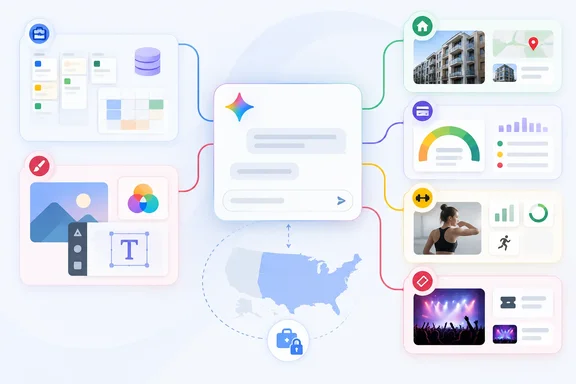
The announcement comes from Mai Lowe, Group Product Manager for the Gemini App, on Google's News from Google blog. Google sorts the partners into three groups. Productivity: Manage projects, organize databases, dictate notes and more with Airtable, Linear, monday.com, PandaDoc, Wispr AI and Zoho. Creativity: Bring ideas to life, design visual assets, and build websites with Adobe, Picsart, Squarespace and Webflow. Lifestyle: Search for your next apartment with apartments.com, monitor your credit with Experian, plan workouts with Peloton and find event tickets on SeatGeek.
That short list is all the feature detail the post gives. Adobe is named as a company, not a product, so the announcement doesn't say whether the connection goes through Express, Photoshop, Acrobat or something else. Superpower Daily noted that Google hasn't detailed exactly what each connection can do.
This is the second named batch in six weeks. On August 12, 2026, Lowe announced 13 partners rolling out "over the next few weeks": Granola, Otter.ai, Wix, Fever, GetYourGuide, Localiza, OpenTable (UK), Ticketmaster, iHeartRadio, Pandora, Angi, Thumbtack and Zocdoc. No company appears in both lists, so Google has now named 27 partners in 42 days. That counts announcements, not apps every Gemini user can actually open.
The launch was picked up by PPC Land, Unite.AI, Digital Trends and others. Unite.AI dated it to September 23, 2026, according to an announcement on The Keyword. The reports don't agree on reach: HyperAI described the update as launching globally today. Google's post says only that the apps are "beginning to roll out today", and its availability documentation, covered below, points the other way.
Google's availability table narrows the launch to US personal accounts
PPC Land's early coverage said Google's post does not name markets, languages, account types or subscription tiers, the conditions that have decided who could use earlier additions. The post itself doesn't. Google's separate help table, "Check the availability & requirements of Connected Apps in Gemini Apps", does have entries for nine of the 14 new partners. The copy of the table we retrieved was cut off partway through, so we could not confirm entries for PandaDoc, Wispr AI, Zoho, Adobe or SeatGeek.
Here is what the table lists for the other nine:
| Connected app | Account type | Age | Location | Language | Gemini apps | Modes |
|---|---|---|---|---|---|---|
| Airtable | Personal only | 18+ | US only | English only | Web, mobile | Chat, Spark |
| Linear | Personal only | 18+ | US only | English only | Web, mobile | Chat, Spark |
| monday.com | Personal, work or school | 18+ | Wherever Gemini and monday.com are supported | English only | Web, mobile | Chat, Spark |
| Picsart | Personal only | 18+ | US only | English only | Web only | Chat, Spark |
| Squarespace | Personal only | 18+ | US only | English only | Web, mobile | Chat, Spark |
| Webflow | Personal only | 18+ | US only | English only | Web, mobile | Chat, Spark |
| Experian | Personal only | 18+ | US only | English only | Web, mobile | Chat, Spark |
| Peloton | Personal only | 18+ | US only | English only | Web, mobile | Chat, Spark |
| apartments.com | Personal only | 18+ | US only | English only | Web, mobile | Chat, Spark |
None of those nine entries lists a required Google AI subscription for the app itself. Every one supports Gemini Spark, Google's agent mode that keeps working on a task in the background. That is the real change: these apps aren't just lookups inside a chat, they can be handed to the agent. Spark carries its own eligibility rules. PPC Land reports that Spark's support pages have required users to be 18 or over, signed in with a personal account, subscribed to Google AI Pro ($19.99 a month) or Ultra ($99.99), and running with Keep Activity on. So an app that needs no subscription in chat may still sit behind a paid plan once Spark gets involved.
The table's descriptions also say more than the announcement. Experian's entry reads "Monitor your FICO credit score and inspect credit report factors, like payment history and credit utilization." Webflow's covers editing visual design, responsive layouts, CSS properties and CMS content. Picsart's covers image, video and audio editing, background removal, upscaling and raster-to-SVG conversion.
The apartments.com entry doesn't match Google's announcement. The blog post pitches it as a way to "search for your next apartment." The table describes searching commercial real estate by submarket, building class, square footage and vacancy, plus analysing lease and sales comparables. AlphaSignal's example prompt is a residential one: Search for two-bedroom rentals in Miami below $3,500. Until Google reconciles the two, the in-app details page for apartments.com is the thing to check.
Europe is left out entirely. With the one exception of monday.com's "wherever supported" wording, none of the confirmed entries covers a user in the EEA, the UK or anywhere else outside the US. Rollout reports that call the launch global are wrong for eight of the nine partners Google has documented.
How connecting a Gemini app works, and the Keep Activity condition
Google gives users three ways in: choose a service in Gemini settings, mention it with @ in chat, or ask Gemini to use it directly. Google's help page for the web app explains what happens after that. You type your prompt at gemini.google.com, type @ and pick an app. If the app isn't connected yet, Gemini either connects it or asks your permission first.
To see what's actually available to you on the web:
- Sign in at gemini.google.com. Connected Apps don't work signed out.
- Open Settings, then Connected Apps. If you can't find Connected Apps, open Personal Intelligence first and look under it.
- Browse the list. It shows only the apps available to your account type in the Gemini app you're using.
- Click Learn more under an app to open its details page. That page lists supported and unsupported actions and gives example prompts.
- Turn an app's switch on to connect it, or off to disconnect it, and follow any on-screen prompts.
The biggest prerequisite is a privacy setting. Google's help documentation says that when Keep Activity is off, Connected Apps won't be available on gemini.google.com, on iOS devices or on smart watches. On Android, only Device assistance, Phone, Messages and WhatsApp keep working with the setting off. Keep Activity controls whether Gemini saves your activity and whether that data can be used to improve Google AI. So using Airtable, Experian or Webflow on the web or an iPhone means leaving activity saving on. Google says its default auto-delete period is 18 months, and you can change it to 3 months, 36 months or indefinite.
Availability also differs by surface. Google notes that apps available only in the Gemini mobile app on Android do not appear on iOS devices or in the Gemini web app. Picsart runs the other way: it's listed for the web app only. The table names the web app and the mobile app. It doesn't list the Gemini app for Windows, which Google launched earlier this month, as a separate surface. Windows users shouldn't assume a web-listed app also appears in the desktop client until they see it in that client's settings.
On how the connections are built, AlphaSignal reports that the integrations use Model Context Protocol, the same open standard powering Claude and ChatGPT connectors. Google's announcement doesn't say this for any partner. Google's help page does confirm MCP as a separate route: users can link a personal or third-party MCP server to add a custom app to their Connected Apps list. Google's privacy notice treats custom apps very differently from the vetted partners. It states that Google does not monitor or secure data from custom third-party Connected Apps, and warns that connecting one may expose data, passwords, devices and accounts to unauthorised access.
Where monday.com, Airtable and Linear create a Workspace problem
For administrators, the productivity group is the part that matters. Airtable, Linear, monday.com, PandaDoc and Zoho are mostly sold to organisations, yet the confirmed Airtable and Linear entries accept personal Google Accounts only. The Workspace admin can't control a Gemini connection that doesn't run through Workspace.
The access that comes with these connections is broad. The table says Airtable can search and query workspaces and bases and manage tables, records, pages and automations. Linear can create, manage and track issues and project cycles. monday.com covers projects, sales pipelines and leads. AlphaSignal's sample prompts include monday.com: Create a board item and set its status and PandaDoc: Draft a services agreement with a specified contract value. These are write actions against company systems, not read-only lookups.
Two different data regimes apply, depending on the account. Google's privacy hub says that with a work or school Google Account, Gemini use "may be subject to different data handling terms," which are covered in the Generative AI in Google Workspace Privacy Hub. Personal-account use falls under the consumer Gemini Apps Privacy Notice. That notice says human reviewers read some chats, and that reviewed chats are kept for up to three years even after you delete your activity. An employee who links a work Linear or Airtable account to a personal Gemini login moves that project data from one regime to the other.
PPC Land cites research from LayerX, a browser security firm, showing the pattern already exists: 47.11 percent of enterprise AI conversations ran through personal identities. The same outlet reports that Google's work-account documentation leaves enabling or disabling apps for managed accounts to the Workspace administrator. That makes monday.com the one new partner where an admin decision actually applies, since it's the only confirmed entry that accepts work and school accounts.
Experian puts FICO data inside a Gemini chat
Experian's connection handles the most sensitive data of the 14. The table describes FICO score monitoring and inspection of credit report factors, limited to US adults with personal accounts. AlphaSignal's example task is to check a credit rating and identify factors that changed during the month.
Google's privacy terms set out the handling in general. Gemini saves and uses information from Connected Apps under the Gemini Apps Privacy Notice. Third-party services process your data under their own privacy policies. Deletion doesn't carry across either way: disconnecting an app or deleting data inside it doesn't remove the matching record from Gemini Apps Activity, and deleting your Gemini activity doesn't delete anything the partner already holds. For a credit bureau, that means two separate cleanups if you later change your mind.
Google hasn't said what Experian passes back into the conversation, whether sign-in happens inside Gemini or on Experian's own site, or whether score figures enter the model's context. The general guidance applies. Google's notice warns that task features "can make mistakes, like making purchases or sharing your data with third parties unexpectedly," and that Gemini output shouldn't be relied on for financial advice.
What this means for you
Whether to act depends on your location, your account type and whether you manage other people's accounts. For most readers outside the US, nothing changes yet. For US users on personal accounts, the question is whether an app's usefulness is worth keeping Keep Activity on and adding a second party to your data. For Workspace administrators, the job is to find out which work tools employees can already link through personal logins, and to set a policy for monday.com, which is the one confirmed work-account entry.
- Check Settings > Connected Apps in each Gemini app you use. The list reflects your account, device and app, and a staged rollout means an app may not appear yet.
- Open an app's Learn more page before connecting it, and read the supported and unsupported actions. For apartments.com, check whether it's the residential search Google announced or the commercial-property tool the table describes.
- Expect most of the new partners to be unavailable in the EEA, UK and other non-US markets. Eight of the nine apps Google has documented are US-only.
- Keep Activity must stay on for Connected Apps to work on gemini.google.com and iOS. Set its auto-delete period deliberately rather than leaving the 18-month default.
- Workspace admins should review monday.com access for managed accounts and remind staff that Airtable and Linear connections run through personal Google Accounts only, outside Workspace data terms.
- Treat custom MCP connections as unvetted. Google says it doesn't monitor or secure data flowing through them.
Google has shipped a partner batch roughly every six weeks since May, and each one arrives with the same pattern: the announcement names the partners and the help table sets the terms. The terms for this batch are already mostly published. They describe a US-only, English-only rollout for personal accounts, with background agent support through Spark built in. For IT teams, what matters next is the missing entries for PandaDoc, Zoho, Wispr AI, Adobe and SeatGeek, and whether they follow monday.com in accepting work accounts or stay with the personal-account default.
Update: Adobe Connected App reportedly launches worldwide across Gemini plans (September 24, 2026)
According to The AI Economy, Adobe’s Gemini connection is now rolling out worldwide and is available on all Gemini plans, rather than following the US-only, personal-account limits documented for most of this partner batch.
The integration reportedly brings tools from Photoshop, Lightroom, Express and Firefly into Gemini. Users can connect an Adobe ID under Personal Intelligence, then ask Gemini to enhance images, create marketing assets, restyle product photography, adjust lighting and color, crop images, or adapt existing designs for different formats.
That fills in the feature gap left by Google’s September 23 announcement, which named Adobe without identifying the underlying products or supported actions. It also means Adobe appears to be an exception to the earlier conclusion that the new connections were largely US-only; Google’s availability table had not yet exposed Adobe’s entry.
Update: Google’s table fills in Zoho and Wispr AI availability (September 25, 2026)
Notebookcheck reports that Google’s availability table now accounts for the previously missing apps: Zoho is limited to India, while Wispr AI is available wherever both Gemini and Wispr AI are supported. Like Adobe and monday.com, Wispr AI is an exception to the otherwise US-only rollout.
The report puts the final geographic tally at 10 US-only apps, with Adobe, monday.com and Wispr AI available internationally where their services operate, and Zoho restricted to India. All 14 new Connected Apps are listed as English-only and for users aged 18 or older.
For account policy, Wispr AI follows Adobe in requiring a personal Google Account. monday.com remains the only confirmed app in this batch that supports personal, work and school accounts. That leaves Zoho’s Google-account eligibility as the remaining practical detail IT teams should verify in Gemini’s own Connected Apps settings before deployment or policy decisions.
References
- Google Gemini adds 14 connected apps, and 10 of them are US only Notebookcheck · 2026-09-25T06:48:00+00:00
- Check the availability & requirements of Connected Apps in Gemini Apps - Gemini Apps Help support.google.com
- Use & manage Connected Apps in Gemini - Computer - Gemini Apps Help support.google.com