

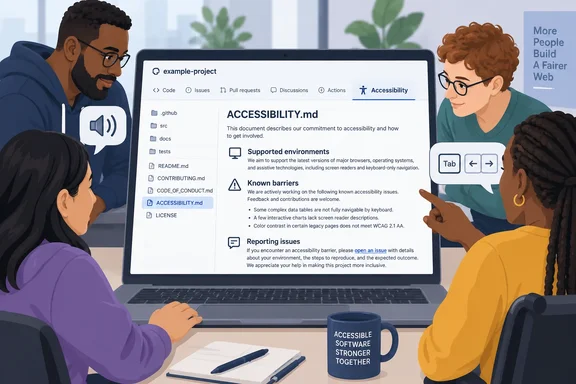
ACCESSIBILITY.md file is now shown on the repository overview. GitHub looks for it in three places: the repository root, the .github/ directory, or the docs/ directory. Public repositories also get a template-based way to add or propose an accessibility statement from the Community Standards page.It's a small change. But security policies, contributing guides and codes of conduct already have well-known file names, and accessibility information has usually ended up buried in a README or a wiki page. Now it has a standard place to live.
What changed
The details in GitHub's changelog and its Docs page, "Adding an accessibility page to your repository," are short:
- Display: If a repository has an
ACCESSIBILITY.mdfile, GitHub shows an Accessibility tab on the repository overview. It also links to the page from the repository's About section. - Recognized locations: The repository root,
.github/, anddocs/. - Search order: The Docs say GitHub checks
.github/first, then the root, thendocs/. If you have more than one copy, the one in.github/is the one GitHub uses. - Organization fallback: If a repository has no accessibility page, it can inherit one from a repository named
.githubowned by the organization. The changelog doesn't mention this. - Availability: It works on all GitHub plans on github.com. GitHub says it will be available in GitHub Enterprise Server 3.24. The announcement does not give a release date for that version or say it has shipped.
- Community Standards entry point: GitHub describes the "Add or Propose" template option for public repositories.
In short: The file is now shown on the repository page, and the GitHub Docs page above explains how the lookup works.
Why a dedicated file matters
The idea follows the SECURITY.md model. The open-source ACCESSIBILITY.md project, maintained by Mike Gifford on GitHub, makes the same comparison: "Just as SECURITY.md defines how to handle vulnerabilities, ACCESSIBILITY.md defines the inclusive state of a project." That project calls itself a "README for accessibility": a predictable place for humans and AI coding agents to find your a11y standards. It also says README files cover general onboarding, while ACCESSIBILITY.md adds a dedicated layer for accessibility status, known gaps, and enforcement workflows.
GitHub's announcement doesn't say whether its feature is based on that community format. Treat the two as related ideas, not a confirmed partnership. Still, community projects promoting the file name existed before this change. GitHub has now given the name official status in its interface, much as it did earlier for other community health files.
GitHub has also been building other accessibility tools. Microsoft's developer site describes the AI-powered Accessibility Scanner (a11y scanner), a GitHub Action that detects accessibility barriers across your digital products, creates trackable issues, and leverages GitHub Copilot for AI-powered fixes. An ACCESSIBILITY.md file is not part of that scanner. It's a written statement from the project, not an automated test.
What should go in the file
GitHub Docs lists the topics an accessibility page can cover:
- Accessibility priorities
- Supported environments
- Known barriers
- Expectations for contributors
- How to report accessibility problems
- Who owns and maintains the page
The reporting section is probably the most useful one. A user who runs into a barrier — say, a screen reader that can't get through your CLI's output, or a settings dialog that only works with a mouse — needs to know where to report it and what will happen next. "We care about accessibility" with no contact route doesn't help them.
How to add an accessibility page
Option 1: From Community Standards (public repositories)
According to GitHub Docs:
- Open the repository's main page on GitHub.
- Under the repository name, click Insights.
- In the left sidebar, click Community Standards.
- Under "Additional community file," find Accessibility and click Add or Propose.
- Replace the template instructions with your project's own information. The instructions are stored in comments and don't show up when GitHub renders the file.
- Click Commit changes... and write a short, meaningful commit message.
- Choose whether to commit to the current branch or a new one. If you're on the default branch, GitHub recommends creating a new branch and opening a pull request.
- Click Commit changes or Propose changes.
Option 2: Create the file manually
- On the repository's main page, open the Add file dropdown above the file list and click Create new file.
- Name the file
ACCESSIBILITY.md. To put it in another recognized location, use.github/ACCESSIBILITY.mdordocs/ACCESSIBILITY.md. - Add your accessibility information on the Edit new file tab.
- Click Commit changes..., write a commit message and, if you have more than one verified email address, pick the author email.
- If you're on the default branch, create a new branch and open a pull request. Then click Commit changes or Propose changes.
Did it work?
After the commit reaches the repository, you should see an Accessibility tab on the overview and a link in the About section. If you don't, check three things:
- File name and location. The file must be named
ACCESSIBILITY.mdand sit in the root,.github/ordocs/. Other folders aren't on GitHub's list. - Duplicates. If there's an older copy in
.github/, GitHub uses it before the one in the root. - Unmerged pull requests. If you proposed the file through a pull request, it won't appear until the pull request is merged.
- Enterprise Server. If you're on GitHub Enterprise Server, you'll need to wait for version 3.24.
The Docs don't say whether the Community Standards template option appears for private repositories. Creating the file manually is the documented route that doesn't depend on that page.
In short: Use the template if your repository is public. Otherwise create the file by hand, and check the location if the tab doesn't appear.
What the file can't do
This is not a certification. Adding an ACCESSIBILITY.md file doesn't test, fix or verify anything. GitHub describes it as a way to share your priorities, supported environments, known barriers and reporting process.
The community ACCESSIBILITY.md project says the same thing directly: "Do not expect that simply adding an ACCESSIBILITY.md file will make your digital tool accessible." What the file can do, it says, is signal to developers that accessibility matters, and make explicit what your development processes are and how they affect accessibility. That project also calls itself "still experimental". That's a fair reminder that nobody has yet agreed on what a good statement contains.
There's also a downside to the new visibility. A tab that looks official can make a project seem more mature than it is. A copied template that claims full support for screen readers is worse than having no file, because it raises expectations the project doesn't meet. Honest "known barriers" lists will be more useful to users than polished promises.
What this means for Windows developers and IT teams
- Open-source maintainers: This is a cheap way to give users a clear route for reporting barriers. It helps most for desktop apps, PowerToys-style utilities and developer tools, where people using Narrator, NVDA or high-contrast themes are often the ones who find problems.
- Organizations: Add one shared
ACCESSIBILITY.mdto your organization's.githubrepository to cover every repository that doesn't have its own. Projects with specific environments or known issues should still keep their own file. - Enterprise Server admins: Plan around GHES 3.24, not today. GitHub has given no date for that release.
- Procurement and compliance teams: Teams that check accessibility before adopting open-source software now have a standard place to look. They should still treat the file as a starting point for questions, not as evidence of conformance.
In short: The feature makes accessibility statements easier to find. Whether they're useful depends on how specific and honest each project's statement is.
References
- Accessibility statements highlighted on repository overview GitHub Changelog · 2026-10-01T19:04:32+00:00
- Adding an accessibility page to your repository - GitHub Docs docs.github.com
- GitHub - mgifford/ACCESSIBILITY.md: ACCESSIBILITY.md — a simple, open format (aligned with AGENTS.md) for guiding coding agents to be more accessible github.com