

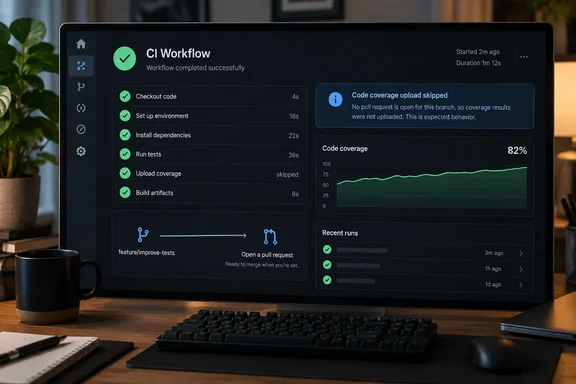
upload-code-coverage action skips the upload in that case and explains why. It no longer turns the check red.This matters to anyone who pushes a branch first and opens a PR later. That's a lot of developers, including many working on Windows with Visual Studio, VS Code or the command line.
What changed
The old failure came from how the coverage API worked. Any push to a branch other than the default branch needed a pull request number. A branch has no PR number until someone opens a pull request, so the first push of a new feature branch produced a failed upload step even though the workflow wasn't broken.
The new behavior, according to GitHub's changelog:
- The first push to a branch with no open pull request now skips the coverage upload instead of failing.
- Later pushes to that branch also skip the upload, until a pull request is opened.
- The reason for the skip appears in an Actions notice and in the step summary.
- Pushes to the default branch and supported pull request events work exactly as before. You don't need to change any existing workflow configuration.
Summary: Pushes to a branch with no PR now get a clear "skipped" message instead of a failed check. Nothing else about the upload has changed.
Why the action needs a PR number
The action's own documentation explains the background. The upload action handles everything else automatically: gzip/base64 encoding, resolving the correct commit SHA and ref, detecting PR number (from both pull_request and push events), and calling the upload API. On push events there is no pull request in the event data, so the action has to look one up. The README notes that for push-only workflows where the action looks up PR numbers via gh pr list, also add pull-requests: read.
The README also explains why this kind of problem was so visible. By default, the action fails the workflow step (exits with code 1) when the upload is unsuccessful. This ensures you notice when coverage data is not being stored. Failing loudly is the right default for real problems. It was the wrong response to a branch that simply had no PR yet. The action also has a fail-on-error input, which defaults to true and controls whether to fail the workflow step if the upload fails.
This is my own read, not something GitHub has said: some teams may have set fail-on-error: false to stop the false alarms on new branches. That setting also hides real failures. Now that the no-PR case is handled properly, those teams should consider turning failure reporting back on.
The trigger detail to check
There is one catch. A workflow that runs only on push doesn't run again when you open a pull request. So if your coverage upload is tied only to push events:
- You push a new branch, and the upload is skipped with a notice.
- You open a pull request. Nothing runs, so no coverage is uploaded yet.
- You push again. Coverage now uploads normally.
If you want coverage to upload as soon as a pull request opens, add a pull_request trigger to the workflow.
GitHub's setup documentation already recommends this. Its example workflow runs on pushes to the default branch to set the baseline and on pull requests to compare against it. It says Code Quality compares PR branch coverage to the default branch, so both triggers are needed. The documented setup looks like this:
on:
  push:
    branches: [main]
  pull_request:
    branches: [main]

permissions:
  contents: read
  code-quality: write
The same example checks out the PR head commit, not the merge commit, using ref: ${{ github.event.pull_request.head.sha || github.sha }}. That keeps coverage line numbers aligned with the diff. The upload step also has a condition that skips pull requests from forks: if: github.event_name != 'pull_request' || github.event.pull_request.head.repo.full_name == github.repository.
Summary: Push-only workflows now skip quietly until a PR exists, then wait for your next push. Add a pull_request trigger if you want coverage the moment a PR opens.
What this fix does not cover
The fix only handles one case: a non-default branch with no open pull request. Other causes of a failed upload still fail the step:
- Missing or misnamed report files. One public repository's PR shows the upload step then failed with 'Coverage file not found'.
- Code Quality not enabled. Another project's CI notes say the upload steps call GitHub Code Quality, which is billed and has to be enabled per repository. In that case, uploads were returning a 403 error.
- Missing permissions. The workflow or job must grant code-quality: write. The action cannot declare this itself.
- Processing timeouts. By default, the action also waits for GitHub to finish processing a successful upload. If processing reports failed, or if it never reaches a terminal status before the timeout, the step fails the same way as an upload error.
The changelog doesn't say which action version contains the change. It also doesn't list exactly which "supported pull request events" are covered, and there's no setting to turn the behavior on or off. It is simply "available now."
Availability
The change is live on GitHub Enterprise Cloud and GitHub Team, including GitHub Enterprise Cloud with data residency. It isn't available on GitHub Enterprise Server. That matches the feature as a whole. When pull request coverage entered public preview, GitHub said GitHub Code Quality is available today for GitHub Enterprise Cloud and Team, but isn't yet available on GitHub Enterprise Server. That preview started on May 26, 2026, so this fix arrives about four months into the feature's public life.
What the uploads measure
When uploads do run, it helps to know what they're measuring. According to GitHub's coverage reference:
| Aspect | Behavior |
|---|---|
| Report format | Cobertura XML |
| Metric shown on PRs | Line coverage only |
| Function, branch and statement coverage | Ignored, even if your report includes them |
| Storage | Latest upload kept for each branch, including the default branch |
| Comparison | PR branch line coverage vs. default branch line coverage |
GitHub's example: if the default branch has 44% line coverage and the PR branch has 65%, the PR gained 21 percentage points. Because the default branch is the baseline, keep uploading coverage on default-branch pushes. Without that baseline, the PR comparison has nothing to compare against.
Checklist for maintainers
- Look at your triggers. Push-only workflows will now show skip notices on new branches. Add
pull_requestif you want coverage when a PR opens. - Check permissions. Make sure the workflow grants
code-quality: write. Push-only setups should also grantpull-requests: readso the action can look up PR numbers. - Undo old workarounds. If you set
fail-on-error: falsebecause of false failures on new branches, consider turning it back on so real failures show up again. - Read the step summary. A skip on a branch with no PR is now expected. A failure points to a real problem, such as a missing file, permissions or processing.
- GitHub Enterprise Server users: none of this applies to you yet.
Analysis
This is a small fix, but a useful one. Many developers push a branch to get it backed up or run CI before deciding whether it's ready for a PR. Treating that normal habit as an error made people stop trusting CI. A check that fails when nothing is wrong teaches developers to ignore failures, and that makes the real ones easy to miss.
The new behavior still tells you what happened through the notice and step summary. It just doesn't fail the build over it. The one real decision left for teams is when coverage should run, and that comes down to whether the workflow includes a pull_request trigger.
References
- Code coverage uploads no longer fail CI for new branches GitHub Changelog · 2026-10-01T16:49:05+00:00
- Setting up code coverage for your repository - GitHub Docs docs.github.com
- Code coverage reference - GitHub Enterprise Cloud Docs docs.github.com